
sg-admin-template
v1.0.0
Published
后台管理系统
Downloads
17


Readme
web-admin-template

Latest stable version: v0.0.1
vue2 + vuex + vue-router + webpack + ES6 + axios + sass + Element UI + iconfont + ESlint
Features
- 权限
- mock
- 支持多页
Requirement
nodeJS >= v10.8.0 npm =>6.2.0
- IE6~10 ×
- IE11 √
- chrome √
Installation
git clone http://git.mr.com/frontend/web-admin-template.git
Quick start
# Install dependencies
npm install

# 建议不要用cnpm  安装有各种诡异的bug 可以通过如下操作解决npm速度慢的问题
npm install --registry=https://registry.npm.taobao.org

# 启动mock服务器 localhost:9800
npm run dev:mock

# Serve with hot reload at localhost:9528
npm run dev

# Build for production with minification
npm run build

# Build for production and view the bundle analyzer report
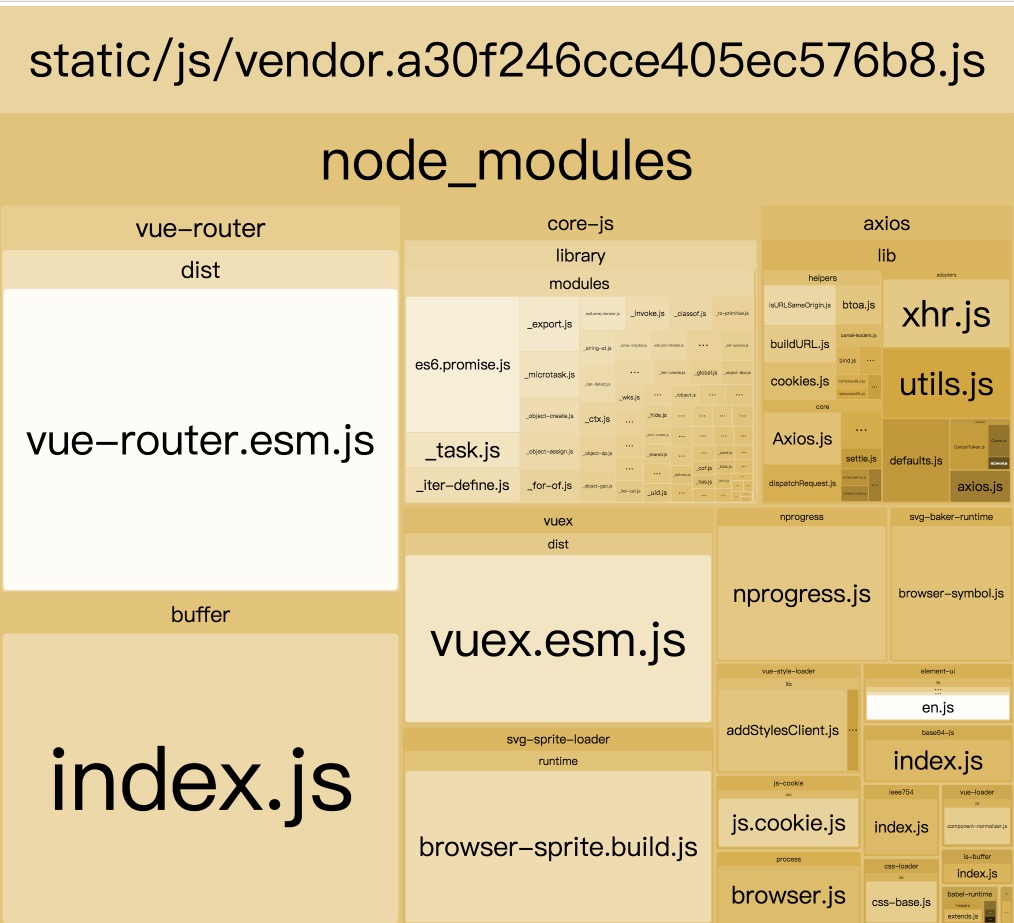
npm run build --report
最终你可以使用 npm run build --report 查看效果
如图:
Cli options / Configs
根目录下创建.env.local, 配置代理环境
# 接口前缀
VUE_APP_BASE_API='/api'
# 联调环境
VUE_APP_BASE_TARGET='http://192.168.32.138:8080/bi'
VUE_APP_BASE_TARGET 注释后默认为本地mock
Release
nginx相关改动
http {
    include       mime.types;
    default_type  application/octet-stream;

    sendfile        on;

    keepalive_timeout  65;


    server {
        listen       80;
        # 访问域名
        server_name admin.sharegoodsmall.com;
        location /gateway {
            proxy_redirect     off;
            proxy_set_header   Host    $host;
            proxy_set_header   X-Real-IP   $remote_addr;
            proxy_set_header   X-Forwarded-For $proxy_add_x_forwarded_for;
            proxy_pass_header Set-Cookie;
            proxy_set_header Cookie $http_cookie;
            # 反向代理接口
    		proxy_pass   http://api.sharegoodsmall.com/gateway;
        }
        # vue history 模式需要配置 否则404错误
        location / {
            # todo
            root  /Users/damon/Documents/webapp/crm/web-admin-template/dist;
            index  index.html index.htm;
            try_files $uri $uri/ /index.html;

            # 首页禁止缓存
            if ($request_filename ~ .*\.(htm|html)$) {
                add_header Cache-Control "no-cache,no-store";
            }
            # 静态资源默认缓存14天
            if ($request_filename ~ .*\.(js|css|png|jpg)$) {
                expires 336h;
            }
            # proxy_pass http://127.0.0.1:9001;
        }
     }

}
Route
分为固定路由以及权限路由
固定路由包括/login、/404(src/layout/router/constant-router.js)
Pages
页面统一放在src/views
API Reference
e.g
import HttpMiddleware from '@/igrow/http/http-middleware';
const HTTP_CONFIG = {
    // 所有接口前缀
    baseURL: '/api',
    // 所有接口超时时间
    timeout: 30000,
    // 全局接口请求前的钩子
    transformRequest({ label, data }) {
        $console.log(`[HTTP请求:${label} start]`, data);
    },
    // 全局接口请求后的钩子
    transformResponse({ response, label }) {
        $console.log(`[HTTP请求:${label} end]`, data);
        return response;
    },
    // 全局接口请求数据成功条件
    getResponseSuccess(response) {
        if (response.code === 0 || response.code === 10000) {
            return true;
        }
        return false;
    },
    // 全局接口请求错误的钩子
    handleError({ response, meta }) {
        if(meta.isShowError) {
            $console.log(`[HTTP请求失败] : ${response.url}`, response);
        }

    },
    // 全局接口请求成功的钩子
    handleSuccess({ response, meta }) {
    }
};

const { API } = new HttpMiddleware(
    [
        {
            // name 必填
            name: 'userLevelListAll',
            // label 可选
            label: '用户等级',
            // path 必填
            path: '/data/userlevel',
            // method 可选 默认post
            method: 'get',
            // config 可选 接口自定义请求头以及配置
            config:{
                timeout:10000,
                headers:{test:1}
            },
            // processData 可选 接口请求前处理参数
            processData(data) {
                if (data.category && !data.grade) {
                    data.grade = 1;
                }
                return data;
            },
            // success 可选 接口成功后处理数据
            success(res) {
                const list = res.data || [];
                list.forEach(item => {
                    item._uuid = item.level;
                    item._label = item.remark;
                });
                return res;
            }
        }
    ], HTTP_CONFIG);

// 可选 接口额外参参数(自定义)与全局配置handleSuccess、handleError配合使用
let meta = {isShowError:true};
// 请求参数
let data = {account:'damon',password:'123456'};
API.userLevelListAll(data,meta).then(res => {
    console.log('成功信息', res);
}).catch(err => {
    console.log('错误信息', err.message);
});
Mock
在mock下建立数据和路径的关联,路径既是API中配置的path,文件名既API中配置的name(放在mock文件夹下)
Account Reference
github账号
[email protected] Hzmrnet20180808!@#
Components
todo
Licence
踩坑记
[email protected]的顶级路由不被选中问题(没有出现router-link-active)