
sg-json-table
v0.0.6
Published
sg-json-table Component


Readme

Sg-Table Component
This package is used to load table from api returning the JSON Array.
You just need to provide the data-url which returns JSON Array, It will load and display table with pagination, search, print options. You can also customize the options and themes based on your needs.
Getting Started
Use the below command to add your package in your application
npm i sg-json-tableyou can consume it in your application as shown below:
<sg-table data-url='https://microsoftedge.github.io/Demos/json-dummy-data/128KB.json' ></sg-table>
Options
| Property | Attribute | Type | Description |
| ------------- | ---------------- | --------- | :-----------------------------------------------------------------: |
| dataUrl | data-url | string | (Required) API url to load the data as an JSON Array |
| info | info| boolean | (Optional) It gives the end user information about what is being shown in the table, Default: false |
| ordering | ordering | boolean | (Optional) Enable or disable ordering of columns, Default: false |
| paging | paging | boolean | (Optional) Enable and disable the pagination button and total entries dropdown. Total number of records shown in the page is 10 as default, Default: false |
| print | print | boolean | (Optional) Enable and disable the print options. It will provide options to print the current page. Default: false |
| searching | searching | boolean | (Optional) Enable or disable the search filter textbox. Default: false |
| theme | theme | string | (Optional) Used to change the background of the table header. You can use 3 themes . "red , green and blue". Default: White
Example:
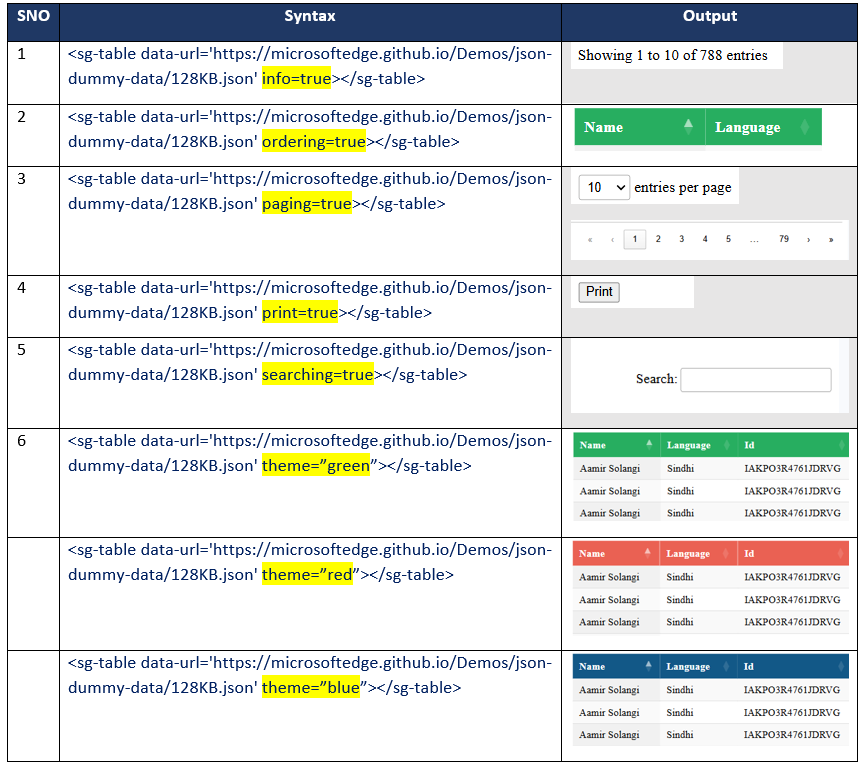
Usage
Now we will see how to integrate this libiary in your applications.
Angular
Step 1: Add an import to main.js
import { defineCustomElements} from '../node_modules/sg-json-table/loader';And somewhere near the bottom we'll call this function.
defineCustomElements();Step 2: Next, in app.module.ts add the CUSTOM_ELEMENTS_SCHEMA.
import {CUSTOM_ELEMENTS_SCHEMA} from `@angular/core`;and then
schemas: [
    CUSTOM_ELEMENTS_SCHEMA
]
Your app.module.ts should look like this:
import { NgModule, CUSTOM_ELEMENTS_SCHEMA } from '@angular/core';

@NgModule({
  declarations: [],
  imports: [],
  schemas: [ CUSTOM_ELEMENTS_SCHEMA],
  providers: [],
  bootstrap: [AppComponent]
})

export class AppModule { }
Please Note: schemas: [ CUSTOM_ELEMENTS_SCHEMA ] need to be added to each component where you are using custom HTML tags.
Step 3: Now, in app.component.html you utilize your new custom element.
<sg-table data-url='API_JSON_URL'></sg-table>React
Step 1:
Now we'll add an import to index.js
import { defineCustomElements} from '../node_modules/sg-json-table/loader';And somewhere near the bottom we'll call this function.
defineCustomElements();Step 2:
Next, in app.js you utilize your new custom element
function App() {
  return (
    <div className="App">
      <header className="App-header">
        <img src={logo} className="App-logo" alt="logo" />

        <sg-table data-url='https://microsoftedge.github.io/Demos/json-dummy-data/128KB.json' info='true' paging="true"></sg-table>

      </header>
    </div>
  );
}
Vue
Add defineCustomElements to one of our main files. Specifically main.js for Vue.
import { defineCustomElements} from '../node_modules/sg-json-table/loader';And somewhere near the bottom we'll call this function.
defineCustomElements();Next, in App.Vue you consume the custom element.
<template>
  <div id="app">
    <img alt="Vue logo" src="./assets/logo.png">

      <sg-table data-url='https://microsoftedge.github.io/Demos/json-dummy-data/128KB.json' info='true' paging=true></sg-table>

  </div>
</template>

<script>
export default {
  name: 'App',
}
</script>
Please Note: If you are using multiple component then you can define the defineCustomElements as shown below:
import { defineCustomElements as defineCustomElements1} from '../node_modules/sg-copyright/loader';
import { defineCustomElements as defineCustomElements2} from '../node_modules/sg-avatar/loader';
import { defineCustomElements as defineCustomElements3} from '../node_modules/sg-json-table/loader';
.
.
.
defineCustomElements1();
defineCustomElements2();
defineCustomElements3();
Click Here for live demo.