
sgf-to-image
v0.2.2
Published
Convert SGF (Smart Game Format) files to high-quality PNG/JPEG diagrams

Maintainers
 ragnarb
Readme
SGF to Image
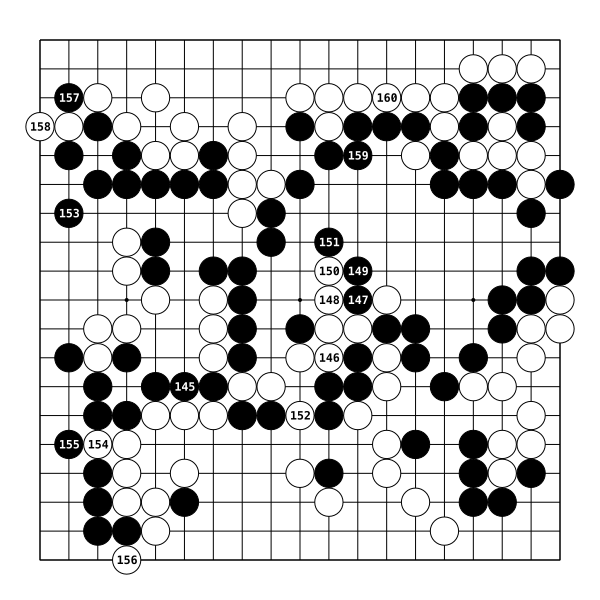
Convert SGF (Smart Game Format) files to high-quality PNG/JPEG diagrams for Go/Baduk/Weiqi games.


Features
Multiple Input Formats: SGF strings, file paths, or File/Blob objects
Flexible Board Sizes: Support for 9×9, 13×13, 19×19, and custom sizes
High-Quality Rendering: Anti-aliased graphics with professional appearance
Size Presets: Small (480×480), Medium (1080×1080), Large (2160×2160)
Smart Move Labels: Automatic numbering with overwrite detection
Optional Coordinates: Toggle A-T and 1-19 board coordinates
Performance Optimized: < 100ms rendering for 19×19 medium diagrams
Universal Compatibility: ESM and CommonJS with full TypeScript support
Advanced Options: Move ranges, custom sizes, quality control
Installation
npm install sgf-to-imageQuick Start
Basic Usage
import { convertSgfToImage } from 'sgf-to-image'

// From SGF string
const sgfContent = '(;FF[4]GM[1]SZ[19];B[pd];W[dp];B[pp];W[dd])'
const result = await convertSgfToImage({
  sgf: sgfContent,
  size: 'medium',
  format: 'png',
})

// Save the image
import { writeFileSync } from 'fs'
writeFileSync('diagram.png', result.imageBuffer)
From File
import { convertSgfToImage } from 'sgf-to-image'

const result = await convertSgfToImage({
  sgf: './game.sgf',
  size: 'large',
  format: 'jpeg',
  showCoordinates: true,
})
Advanced Options
const result = await convertSgfToImage({
  sgf: sgfContent,
  size: 'medium',
  format: 'png',
  moveRange: [1, 50], // Show moves 1-50
  showCoordinates: true,
  lastMoveLabel: true, // Mark last move with triangle
  labelType: 'letters', // Use A, B, C... instead of 1, 2, 3...
  quality: 0.9, // JPEG quality (0.0-1.0)
})

console.log(result.overwrittenLabels) // ['4 at 10', '18 at 20'] - moves that were overwritten
API Reference
Main Function
convertSgfToImage(options: ConvertOptions): Promise<ImageResult>
The primary function for converting SGF files to images.
import { convertSgfToImage } from 'sgf-to-image'

const result = await convertSgfToImage({
  sgf: '(;FF[4]GM[1]SZ[19];B[pd];W[dd])',
  size: 'medium',
  format: 'png',
})
Types
ConvertOptions
| Property | Type | Required | Description |
| ----------------- | -------------------------- | -------- | ------------------------------------------------------- |
| sgf | string \| File \| Blob | ✅ | SGF content, file path, or binary data |
| size | SizePreset \| CustomSize | ✅ | Output dimensions |
| format | 'png' \| 'jpeg' | ✅ | Image format |
| moveRange | [number, number] | ❌ | Range of moves to display (e.g., [1, 50]) |
| move | number | ❌ | Show board state up to move N (0-based) |
| lastMoveLabel | boolean | ❌ | Mark last move with triangle (default: false) |
| showCoordinates | boolean | ❌ | Show A-T/1-19 coordinates (default: false) |
| labelType | LabelType | ❌ | Label style: numeric, letters, circle, square, triangle |
| labelText | string | ❌ | Custom text for all labels (overrides numbering) |
| quality | number | ❌ | JPEG quality 0.0-1.0 (default: 0.9) |
Size Options
Presets:
'small': 480×480px (ideal for web thumbnails)'medium': 1080×1080px (high quality for most uses)'large': 2160×2160px (ultra-high resolution for printing)
Custom Size:
{ width: 800, height: 800 } // Custom dimensions (100-4000px)ImageResult
| Property | Type | Description |
| ------------------- | ---------- | ------------------------------------------------------------------- |
| imageBuffer | Buffer | Generated image data ready for saving or serving |
| overwrittenLabels | string[] | Labels overwritten by captures/ko (e.g., ["4 at 10", "18 at 20"]) |
| boardSize | number | Detected board size (9, 13, 19, etc.) |
| totalMoves | number | Number of moves rendered in the diagram |
Advanced Features
Move Range Selection
Display only specific moves from a game:
// Show moves 10-30
const result = await convertSgfToImage({
  sgf: gameContent,
  size: 'medium',
  format: 'png',
  moveRange: [10, 30],
})
Board State at Specific Move
Show the board position after a specific number of moves:
// Show board after first 25 moves (0-based indexing)
const result = await convertSgfToImage({
  sgf: gameContent,
  size: 'medium',
  format: 'png',
  move: 24, // Shows moves 0-24 (first 25 moves)
  lastMoveLabel: true, // Mark the last move with a triangle
})
Custom Label Styles
Change how move numbers are displayed:
// Use letters instead of numbers (A, B, C...)
const result = await convertSgfToImage({
  sgf: gameContent,
  size: 'medium',
  format: 'png',
  labelType: 'letters',
  moveRange: [1, 26], // A through Z
})

// Use shapes with numbers inside
const result = await convertSgfToImage({
  sgf: gameContent,
  size: 'medium',
  format: 'png',
  labelType: 'circle', // or 'square', 'triangle'
})

// Use custom text for all labels
const result = await convertSgfToImage({
  sgf: gameContent,
  size: 'medium',
  format: 'png',
  labelText: '★', // All moves labeled with star symbol
})
Custom Dimensions
// Custom square canvas
const result = await convertSgfToImage({
  sgf: gameContent,
  size: { width: 1200, height: 1200 },
  format: 'png',
})
File Input Handling
// From file path (Node.js)
const result = await convertSgfToImage({
  sgf: './games/professional-game.sgf',
  size: 'large',
  format: 'jpeg',
})

// From File object (browser)
const fileInput = document.querySelector('input[type="file"]')
const file = fileInput.files[0]
const result = await convertSgfToImage({
  sgf: file,
  size: 'medium',
  format: 'png',
})
Error Handling
The library provides specific error types for different failure scenarios:
import {
  convertSgfToImage,
  InvalidSgfError,
  RenderError,
  LabelType,
} from 'sgf-to-image'

try {
  const result = await convertSgfToImage({
    sgf: gameContent,
    size: 'medium',
    format: 'png',
    labelType: LabelType.Letters,
  })
} catch (error) {
  if (error instanceof InvalidSgfError) {
    console.error('SGF parsing failed:', error.message)
  } else if (error instanceof RenderError) {
    console.error('Rendering failed:', error.message)
  } else {
    console.error('Unexpected error:', error)
  }
}
Performance
Typical rendering times on modern hardware:
| Board Size | Canvas Size | Moves | Time | | ---------- | --------------- | ----- | ---- | | 9×9 | Small (480px) | 20 | ~1ms | | 13×13 | Medium (1080px) | 35 | ~2ms | | 19×19 | Medium (1080px) | 50 | ~2ms | | 19×19 | Large (2160px) | 100 | ~5ms |
Bundle size: ~8KB gzipped (well under 150KB limit)
Development
# Install dependencies
npm install

# Run tests
npm test

# Build the library
npm run build

# Lint code
npm run lint

# Format code
npm run format
Changelog
Version 0.2.0 (Latest)
Major New Features
- Advanced Label Types: Support for circles, squares, triangles, and letters instead of just numbers
- Custom Label Text: Override automatic numbering with custom text for all labels
- Move Range Selection: Display only specific moves from a game using
moveRangeoption - Board Snapshots: Show board state at a specific move using
moveoption - Last Move Highlighting: Mark the final move with a special triangle indicator
- CLI Tool: Full command-line interface with
npx sgf-to-image - JPEG Quality Control: Adjustable compression quality for JPEG output
Label Rendering Options
LabelType.Numeric- Traditional 1, 2, 3... numbering (default)LabelType.Letters- A, B, C... lettering systemLabelType.Circle- Numbers/text inside circlesLabelType.Square- Numbers/text inside squaresLabelType.Triangle- Numbers/text inside triangleslabelText- Custom text override for all labels
Enhanced API
- Comprehensive input validation with descriptive error messages
- Better TypeScript support with complete type exports
- Improved performance (19×19 renders in <150ms)
- Full backward compatibility maintained
CLI Features
- Cross-platform executable:
npx sgf-to-image input.sgf output.png - Format auto-detection from file extensions
- All library options available as command-line flags
- Comprehensive help and error messages
Performance & Quality
- Updated performance benchmark to 150ms for 19×19 medium boards
- Extensive test coverage for all new features
- Visual regression test framework
- Memory usage optimizations
Version 0.1.0
- Initial release with basic SGF to image conversion
- PNG format support
- Fixed size presets (small, medium, large)
- Basic move numbering
- Core board rendering functionality
License
MIT. See LICENSE for details