
shares-cli
v1.0.2
Published
a tool init project


Readme
构建属于自己的CLI工具
前言
CLI,全称是command-line interface,也就是命令行交互接口。无论是在前端还是后端,都可以用于在构建时通过命令快速生成项目或模板等。例如前端的vue-cli(Vue前端开发脚手架),后端的dva-cli(Ant Design后端开发脚手架)等
需求
那么如何构建属于自己的CLI工具呢,在项目开发时可以快速生成自己需要的代码模板,去除重复工作,并且还可以为其他的开发者提供快速入门的使用呢?我们的具体需求如下:
1,通过执行命令,自动生成项目代码模板
2,项目代码模板可以自定义编辑
3,CLI可以通过软件包形式分发,其他开发者可以简单使用
整体架构
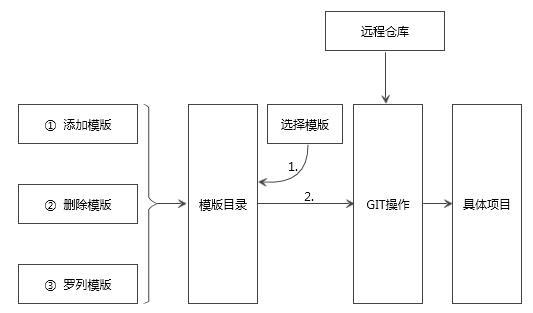
这里模版的概念是指一个项目的样板,包含项目的完整结构和信息。模版的信息都存放在一个叫做templates.json的文件当中。用户可以通过命令行对templates.json进行添加、删除、罗列的操作。通过选择不同的模版,会自动从远程仓库把相应的模板拉取到本地,完成项目的搭建。
需要的依赖模块
| package name | desc | link |
| :--- | :---------- | :----- |
| commander | 用于处理命令行相关工具 | https://github.com/tj/commander.js |
| download-git-repo | 用于下载git仓库 | https://github.com/flipxfx/download-git-repo |
| chalk | 处理终端信息显示的颜色 | https://github.com/chalk/chalk |
| inquirer | 交互终端,用于处理用户输入 | https://github.com/SBoudrias/Inquirer.js |
| ora | 终端loading解决方案 | https://github.com/sindresorhus/ora |
| shelljs | shell 命令执行, 支持回调 | https://github.com/shelljs/shelljs |
| read-metadata | 用于读取json或者yaml元数据文件并返回一个对象 | https://www.npmjs.com/package/read-metadata |
| minimatch | 字符匹配工具 | https://github.com/isaacs/minimatch |
| semver | 版本号处理工具 | https://github.com/npm/node-semver |
| user-home | 用于获取用户的根目录 | https://github.com/sindresorhus/user-home |
| tildify | Convert an absolute path to a tilde path: /Users/sindresorhus/dev→~/dev| https://github.com/sindresorhus/tildify |
|rimraf|A deep deletion module for node (like rm -rf)| https://github.com/isaacs/rimraf |
|axios|跨平台的ajax处理工具| https://github.com/axios/axios |
|handlebars|易于构建的模板引擎| https://github.com/wycats/handlebars.js |
|metalsmith|An extremely simple, pluggable static site generator.| https://github.com/segmentio/metalsmith |
|multimatch|对 minimatch 的多字符串处理的扩展| https://github.com/sindresorhus/multimatch |
|consolidate|支持多种模板引擎的渲染| https://github.com/tj/consolidate.js |
|async|用于异步代码的高阶函数和通用模型| https://github.com/caolan/async |
|validate-npm-package-name|用于验证npm包| https://github.com/npm/validate-npm-package-name |
|figlet|A FIG Driver written in JavaScript which aims to fully implement the FIGfont spec.` | https://github.com/patorjk/figlet.js |
Quickstart
npm install -g shares-cli
# or
yarn global add shares-cli

// list available templete
shares list
// output usage information
shares list -h
// params: Template view under the specified warehouse
shares list -u aurorafe -p vue
// output usage information
shares init -h
// generate project
shares init shares-gis/maptalks-plugin-tpl-base project
// Defaults associated repository `aurorafe`, so, you can use
shares init vue-template-webpack project
// Use cached template
shares init --offline vue-template-webpack project
cd project
npm i
npm run dev
example
shares list vue // list vue project templete
shares list react // list react project templete
shares list library // list javascript library templete
shares list react-component // list react component templete
shares list vue-component // list vue component templete

// init
shares init vue-template-webpack project // repo
shares init aurorafe/vue-template-webpack project // user/repo
shares init --offline vue-template-webpack project // Use cached template
shares init -c direct:https://github.com/aurorafe/vue-template-webpack.git project // Use git clone ~ direct is important
Resource
vue & vue-component
// list
shares list vue // or
shares list -u vuejs-templates // list vue project templete
shares list vue-component // list vue component templete

// init
shares init vue-template-webpack project // repo
shares init aurorafe/vue-template-webpack project // user/repo
// or
shares init vuejs-templates/webpack project // or other template

// components template
shares init vue-component-template-webpack project // build your own component
react & react-component
shares list react // list react project template
shares list react-component // list react component templete

// init
shares init react-template-webpack project // repo
shares init aurorafe/react-template-webpack project // user/repo or other template

// components template
shares init react-component-template-ts project // build your own component
library (javascript library)
shares list library // list library template

// init build your own javascript library
shares init library-template-rollup project
Development
git clone https://github.com/liutaochange/shares-cli.git
cd shares-cli
npm link
shares -h