
sheetcheater
v0.1.3
Published
A markdown-to-A4-cheatsheet generator. Write structured markdown, get a clean, printable 3-column HTML cheatsheet with auto-colored tag pills.
Downloads
67


Readme
SheetCheater
A markdown-to-A4-cheatsheet generator. Write structured markdown, get a clean, printable 3-column HTML cheatsheet with auto-colored tag pills.
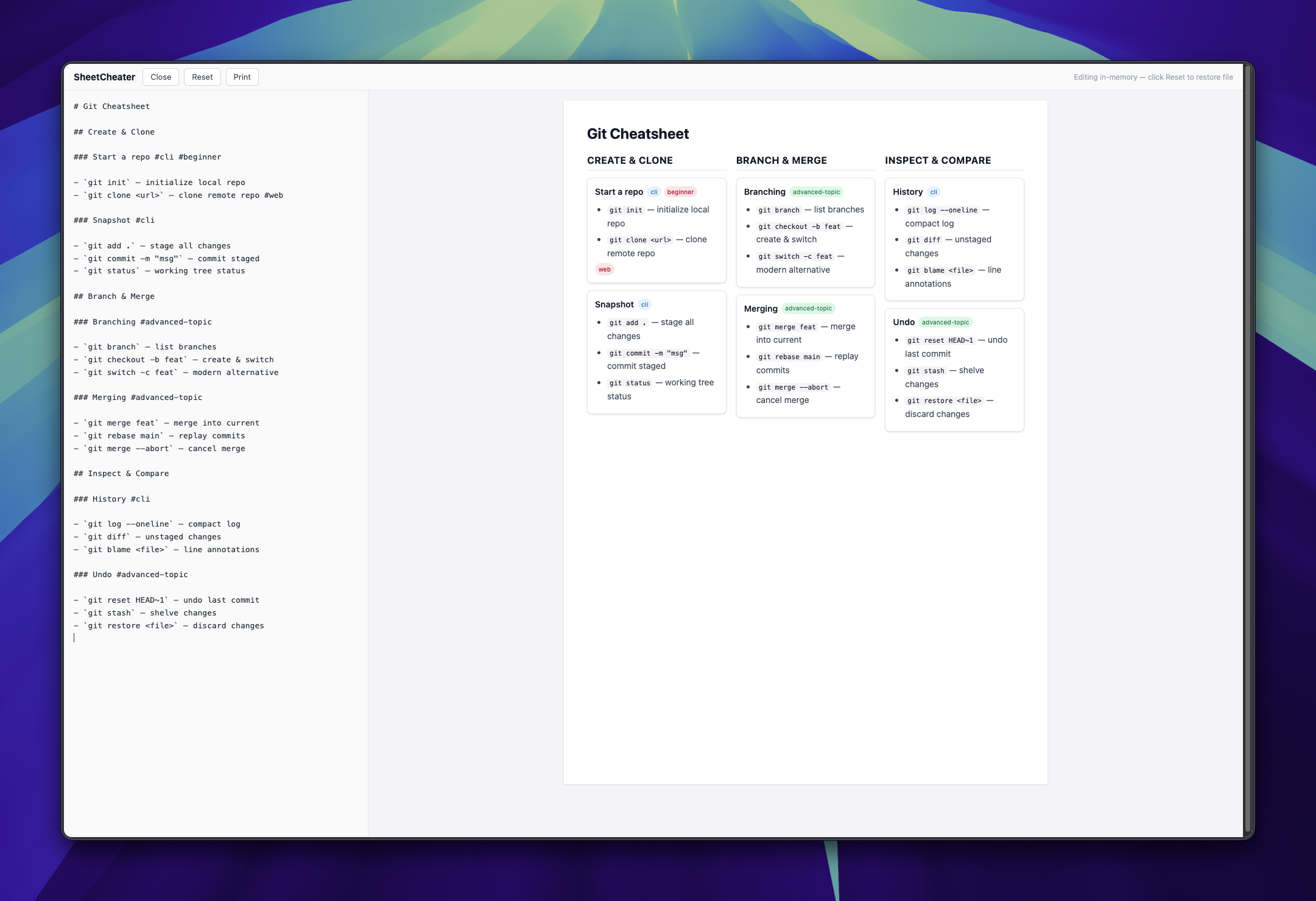
Features
- Rigid markdown convention —
#title,##columns,###cards - Visual tag pills — inline
#tagswith auto-assigned pastel colors - Live preview — edit markdown in the browser, see changes instantly
- Drag-and-drop — drop any
.mdfile to load it - A4 optimized — print to PDF with clean
@pagestyles - In-memory editing — edits persist across refreshes via
localStorage - Overflow warning — warns when content exceeds one A4 page
Quick Start
1. Web App (No Install)
Open sheetcheater.narze.live, paste your markdown, and print to PDF.
2. CLI
npx sheetcheater input.md output.htmlThe output is a self-contained HTML file with Tailwind CDN.
Markdown Convention
SheetCheater expects a rigid hierarchy:
| Element | Markdown | Role |
| ---------- | ----------------- | --------------------------- |
| Page Title | # Title | Cheatsheet heading |
| Column | ## Section Name | Vertical column (max 3) |
| Card | ### Card Title | Bordered card inside column |
| Tag | #tag-name | Inline pill badge |
Example
# Git Cheatsheet

## Create & Clone

### Start a repo #cli #beginner

- `git init` — initialize local repo
- `git clone <url>` — clone remote repo #web

### Snapshot #cli

- `git add .` — stage all changes
- `git commit -m "msg"` — commit staged

## Branch & Merge

### Branching #advanced-topic

- `git branch` — list branches
- `git checkout -b feat` — create & switch

### Merging #advanced-topic

- `git merge feat` — merge into current
- `git rebase main` — replay commits

## Inspect & Compare

### History #cli

- `git log --oneline` — compact log
- `git diff` — unstaged changes

### Undo #advanced-topic

- `git reset HEAD~1` — undo last commit
- `git stash` — shelve changes
Tag Rules
- Tags are visual only — no filtering or search
- Write them inline:
#lowercase-kebab - Allowed on card titles and list items
- Colors are auto-assigned by hash (consistent per tag)
In-Browser Editor
| Action | Behavior |
| ----------------- | -------------------------------------------- |
| Click Edit | Open split-pane editor |
| Type in textarea | 100ms debounced live preview |
| Click Close | Hide editor, keep changes |
| Click Reset | Confirm dialog → revert to original file |
| Click Print | Open browser print dialog |
| Drag & drop .md | Load file into editor |
| Refresh page | Restores in-memory draft (not original file) |
Print to PDF
- Click Print (or
Cmd+P/Ctrl+P) - Destination: Save as PDF
- Paper size: A4
- Margins: Default
- Save
The output hides the toolbar and editor automatically.
Development
Stack
- Runtime: Bun (native TypeScript)
- Toolchain: Vite+ (wraps Vite, Oxlint, Oxfmt)
- Styling: Tailwind CSS v4
- Markdown:
markdown-it
Commands
# Install dependencies
bun install

# Start dev server
bun run dev

# Type-check and build for production
bun run build

# Preview production build
bun run preview

# Format, lint, and type-check
vp check
Project Structure
sheetcheater/
├── src/
│   ├── parser.ts          # Markdown → JSON structure
│   ├── renderer.ts        # JSON → HTML (Tailwind classes)
│   ├── main.ts            # Dev server entry (editor + preview)
│   ├── cli.ts             # CLI entry (static HTML output)
│   ├── types.ts           # Shared TypeScript interfaces
│   └── style.css          # Tailwind + A4 print styles
├── public/
│   └── git.md             # Default cheatsheet (dev server)
├── example/
│   ├── git.md             # Example cheatsheets
│   ├── docker.md
│   ├── sql.md
│   ├── vim.md
│   ├── css-flexbox.md
│   └── bun.md
├── docs/
│   └── MARKDOWN_RULES.md  # Full markdown spec
├── .agents/skills/
│   └── sheetcheater-markdown/SKILL.md  # LLM skill
├── cheatsheet.md          # Example input
├── index.html             # Dev server shell
├── vite.config.ts         # Vite+ config
└── package.json
License
MIT