
ship-create
v2.0.4
Published
Scaffold a new project the SHIP Method way — Structure, Human Flow, Instruction, Publish. No git clone, no API key, just one command.

Maintainers
 altonut
Readme
🚢 ship-create




Scaffold a new product the SHIP Method way — idea → prototype in minutes. No API key, no config, no git clone. One command.
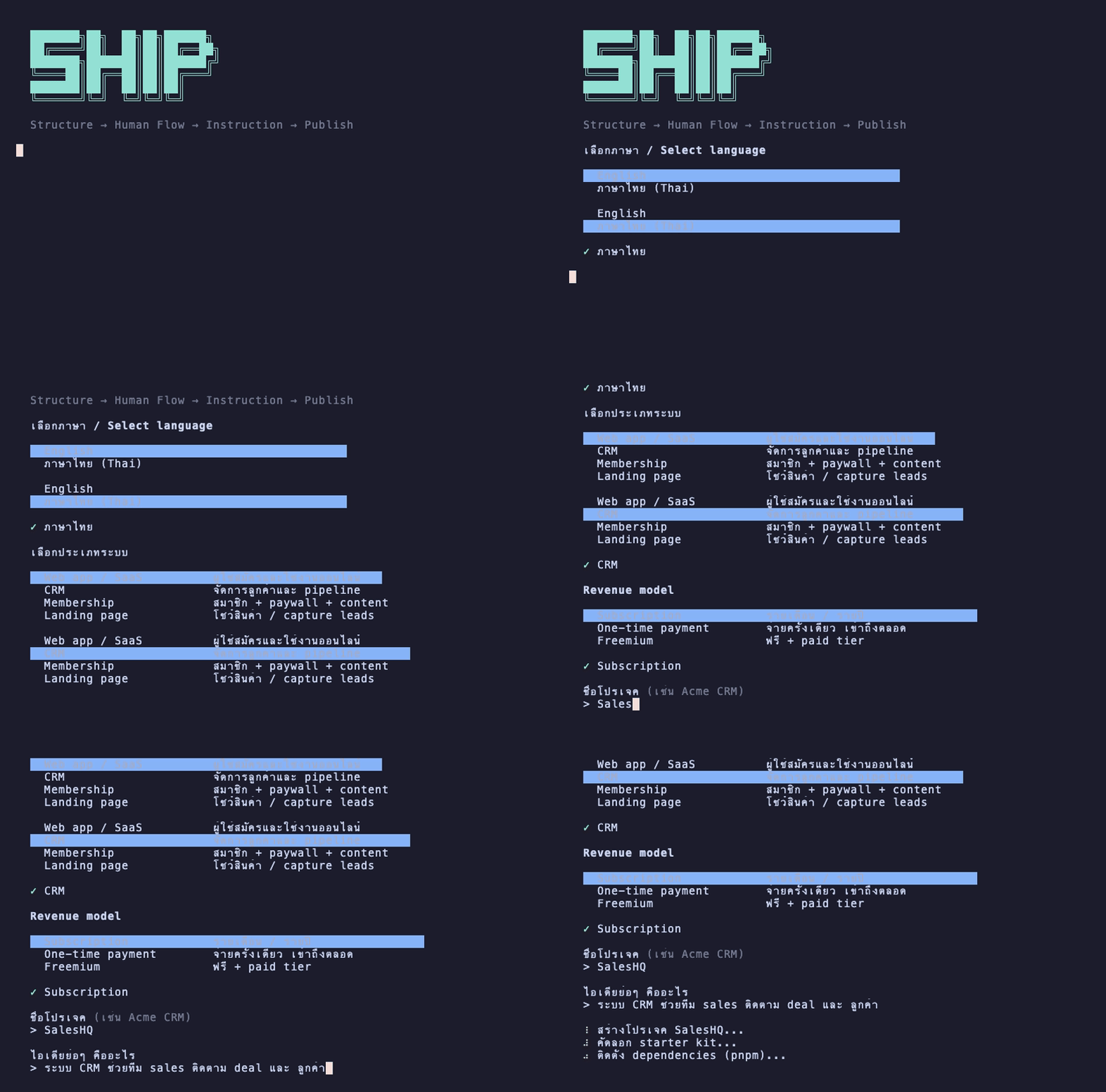
⚡ Run It
From anywhere — an empty folder, your Desktop, wherever you want the project to land:
npx ship-createThat's it. You need Node.js 18+ installed. If node -v works in your terminal, you're ready.
Prefer a permanent global command?
npm install -g ship-create, then just typeship-create.
🎯 What It Asks
The CLI walks you through 5 quick picks — all arrow-key, no typing required:
| Step | Question | |------|----------| | 1 | Language — English or ภาษาไทย | | 2 | Product type — SaaS, CRM, Membership, Landing page, Directory, Dashboard, Internal tool, or Marketplace | | 3 | Revenue model — Subscription, One-time, Freemium, Marketplace fee, or Free | | 4 | Project name — e.g. "Acme CRM" | | 5 | Idea — one sentence describing what it does |
Then it scaffolds everything and Claude builds your prototype automatically.
📦 What It Creates
A new folder <your-project-slug>/ containing:
- Full starter-kit — Next.js 16 app with sale page, member area, and backoffice (working code, Tailwind CSS v4 + shadcn/ui)
- Agent rules —
CLAUDE.md,AGENTS.md,.cursorrules,.windsurfrulesso Claude Code / Cursor / Windsurf all pick up the SHIP order automatically docs/PROJECT.md— pre-filled with your product type, language, revenue model, and ideadocs/HUMAN_FLOW.md— screen-by-screen user journey templatedocs/PROMPTS.md— the full SHIP prompt chain for reference.claude/commands/— slash commands for every phase of the build journey
🛠️ Slash commands included
Once you open the project in Claude Code, these commands guide you from prototype to launch:
| Command | What it does |
|---------|-------------|
| /build | Build prototype automatically from your idea (runs on first open) |
| /foundation | Wire auth (Clerk), database (Supabase), payments (Stripe) |
| /features | Build features one at a time from the spec |
| /polish | Responsive, empty states, SEO, performance |
| /uat | Full user acceptance testing — happy path, edge cases, mobile |
| /pentest | Security audit — OWASP Top 10, auth, data exposure, headers |
| /quality | Code quality — TypeScript, lint, duplication, dead code |
| /launch | Deploy to Vercel, domain, analytics, go live 🚀 |
🤔 Why No API Key?
If you already pay for Claude Pro, ChatGPT Plus, or Gemini Advanced, requiring a separate API key adds friction for no reason. Instead, the CLI sets up your project so Claude Code (or whichever AI tool you use) takes over the moment you open the folder — no extra signup, no extra billing.
🔁 Re-running
The CLI refuses to overwrite an existing <slug>/ folder — pick a different project name, or delete the old folder first if you want to start over.
🏗️ Tech Stack
Projects created with ship-create use this stack by default:
| Layer | Tool |
|-------|------|
| Framework | Next.js 16 (App Router + Turbopack) |
| Package manager | Bun → pnpm → npm (auto-detected) |
| Language | TypeScript 5 |
| Styling | Tailwind CSS v4 + shadcn/ui |
| Auth | Clerk (wired by /foundation) |
| Database | Supabase + Drizzle ORM |
| Payments | Stripe |
| Deploy | Vercel |
🏠 ship-membership — White-label Membership Backend
The SHIP Method OS also includes ship-membership/ — a ready-to-deploy membership backend you can white-label for your own product. Think WordPress admin, but for your SaaS.
| What | Details |
|------|---------|
| Admin panel | /admin — MRR, member list, content manager, settings |
| Member portal | /dashboard, /content, /billing |
| Public site | Landing page + pricing, reads from config.ts |
| Payments | Stripe subscriptions with webhook handler |
| Auth | Clerk |
| Config | One file (config.ts) to white-label everything |
AI-guided setup via slash commands:
/setup— Clerk → Supabase → Stripe → local test, step by step/go-live— Vercel deploy → env vars → Stripe webhook → smoke test/add-content— add gated content interactively/add-plan— add a new Stripe plan end-to-end
🔧 Maintaining This Package
This folder lives inside the the-ship-method-os repo but publishes as a separate public package. If the source templates change, re-sync and publish:
# from the repo root
cp -R starter-kit ship-cli/templates/starter-kit
rm -rf ship-cli/templates/starter-kit/{node_modules,.next,package-lock.json,next-env.d.ts,tsconfig.tsbuildinfo}
cp 01-STRUCTURE/PROJECT.md 02-HUMAN-FLOW/HUMAN_FLOW.md 03-INSTRUCTION/PROMPTS.md ship-cli/templates/docs/
cp 06-TEMPLATES/*.md ship-cli/templates/docs/product-types/
cp AGENTS.md CLAUDE.md .cursorrules .windsurfrules ship-cli/templates/

cd ship-cli
npm version patch   # or minor/major
npm publish --access public
Built with ❤️ by The SHIP Method