
shipkit-cld
v2.4.0
Published
Documentation & lifecycle system for Claude Code — Plan, Dev, Test workflow with 55 slash commands, 24 skills, and 9 agents for code review, security, debugging, refactoring, copywriting, diagrams, and git workflow
Downloads
399

Maintainers
 moniav
Readme
SK — Documentation & Lifecycle System for Claude Code
Why This Exists
Claude Code (and any AI coding agent) works dramatically better when it has structured context about your project's conventions, architecture, and procedures. Without it, you get inconsistent code style, forgotten edge cases, and repeated mistakes across sessions.
SK solves two problems:
- Procedural context -- Conventions, file structure, testing patterns, and step-by-step workflows so the agent follows your project's rules instead of inventing its own.
- Behavioral guardrails -- Principles that govern how the agent thinks: surface assumptions before coding, do exactly what was asked, keep solutions simple, verify goals with evidence, and track deliberate shortcuts (see
docs/conventions/coding-behavior.md).
Beyond engineering. SK extends the same discipline to the whole software-company doc surface — dedicated homes and tooling for end-user guides, business / GTM (positioning, competitors, pricing), legal & compliance, and operations (runbooks, incidents, postmortems) — plus two domain experts (/sk:legal-scan, /sk:ops), document lifecycle tracking, a read-only coherence audit (/sk:docs-audit), and one-command PDF export.
What Gets Installed
your-project/
├── CLAUDE.md                    ← Agent reads this first (slim, ~100 lines)
├── .claude/
│   ├── commands/sk/             ← 55 slash commands
│   ├── agents/                  ← 9 agents (implementer, reviewers, debugger, dependency-analyzer)
│   └── skills/                  ← 24 skills (TDD, legal, ops, PDF, copywriting, diagrams, ...)
└── docs/                        ← Documentation hub (multi-audience)
    ├── START-HERE.md            Human front door (role-based router)
    ├── README.md                Agent index
    ├── architecture/ system/    Engineering: design + current state
    ├── conventions/ sop/        How to work: standards + procedures
    ├── features/                Per-feature / subsystem docs
    ├── user-guides/             Customer-facing guides
    ├── business/                Positioning, competitors, pricing
    ├── legal/                   Agreements, policies, compliance scans
    ├── operations/              Runbooks, incidents, postmortems
    ├── tasks/ decisions/ flows/ reviews/ research/ reference/  + _archive/
    ├── templates/               26 starter templates
    └── commands-reference.md    Full command table (loaded on demand)
With the plugin, the .claude/ folder is not created: the commands, agents and skills load from the plugin, and the project holds only CLAUDE.md and docs/.
How It Works
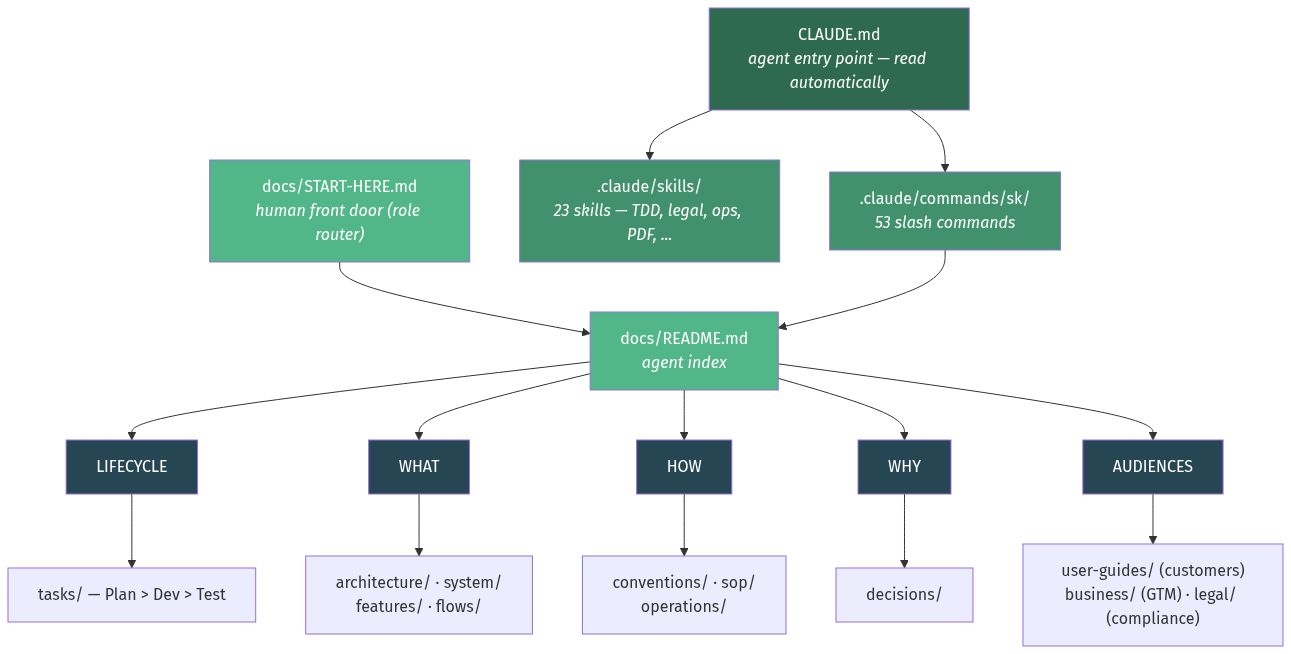
LIFECYCLE = How work flows from idea to done (plan > dev > test, task hierarchy) WHAT = What the system looks like (architecture, current state, features, diagrams) HOW = How to work in and run it (coding rules, procedures, ops runbooks) WHY = Why things are the way they are (decision records) AUDIENCES = Who else the docs serve — customers, business/GTM, legal/compliance
Task Lifecycle
Every piece of work flows through three phases with explicit exit gates:
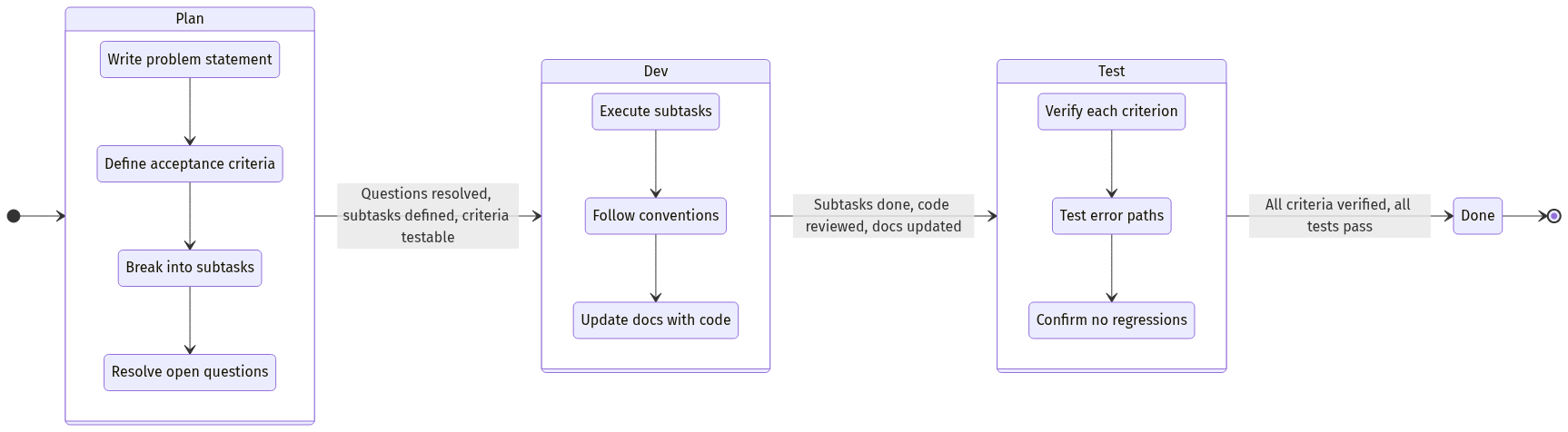
Quick Path (XS/S complexity): Most work doesn't need task files. Just describe what you want — Claude Code follows Plan > Dev > Test mentally and commits when done.
Formal lifecycle (M+ complexity): Create a task file, go through each phase with exit gates.
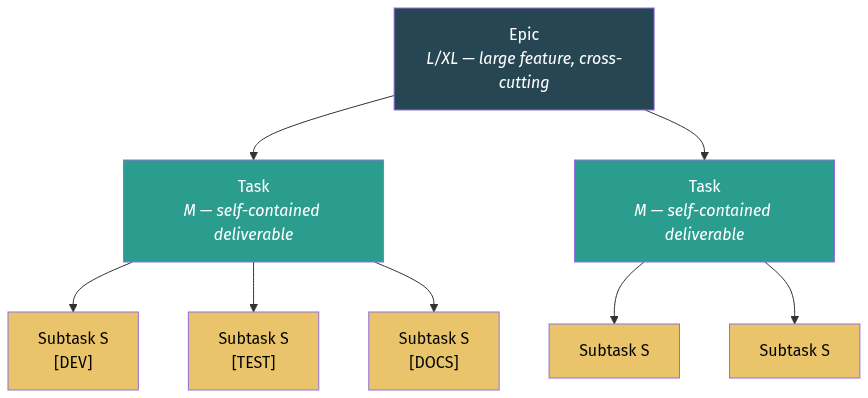
Task Hierarchy
Installation
There are two ways to install SK. Pick one: with both, every command appears twice.
Recommended: the Claude Code plugin
The plugin holds the commands, skills and agents. They live outside your project and update without touching it.
# Once per machine:
claude plugin marketplace add moniav/sk
claude plugin install sk@shipkit
Then, once per project, in Claude Code:
/sk:scaffold              # creates docs/ and CLAUDE.md
/sk:scaffold --minimal    # core doc homes only; the rest are created on demand
The scaffold only fills gaps: it never replaces a file you already have.
It runs the script that ships inside the plugin, so the docs always match the plugin's version. It needs Node.js 18 or later.
Outside Claude Code, npx shipkit-cld init does the same.
To get new releases, run claude plugin update sk@shipkit, or turn on auto-update for the shipkit marketplace under /plugin → Marketplaces. Auto-update is off by default.
To share SK with everyone working in a repository, run claude plugin marketplace add moniav/sk --scope project there once and commit the .claude/settings.json it writes.
Full walkthrough: plugin install guide.
Alternative: copy the files into the project
Use this when a project must pin its own SK version, because a plugin is one version per user.
npx shipkit-cld                       # from your project root
npx shipkit-cld /path/to/my-project   # or a specific directory
npx shipkit-cld --minimal             # core doc homes only
This copies the commands, skills and agents into the project's .claude/ directory, next to the docs/ scaffold.
To move a project from copied files to the plugin: npx shipkit-cld remove . (keeps docs/), install the plugin, then /sk:scaffold.
Updating
With the plugin, claude plugin update sk@shipkit updates commands, skills and agents.
Then /sk:scaffold update in a project refreshes the shipped templates, SOPs and reference docs there (outside Claude Code: npx shipkit-cld@latest update .).
With copied files, there are three ways to update after SK has been changed:
# 1. From npm (latest published version):
npx shipkit-cld@latest update .

# 2. From a local SK checkout (explicit):
npx shipkit-cld update . --from /path/to/sk

# 3. Automatic (if installed from local checkout, source path is remembered):
npx shipkit-cld update .
Updates refresh SK system files (commands, agents, skills, templates, SOPs) one file at a time and never overwrite your work:
- Project content is not touched: tasks, conventions, system docs, architecture, decisions, flows.
- A managed file you edited is kept. SK's new version is written beside it as
<name>.sk-new. Merge what you want and delete the sidecar, or rename the sidecar over the file to take SK's version. - Your own files are left alone, including an agent or skill that happens to share a name with one SK ships.
CLAUDE.mdis yours. If you already have one when you install, SK drops its template alongside asCLAUDE.sk.mdfor you to merge. If SK created it, updates refresh it only until you edit it.
npx shipkit-cld@latest update . --dry-run   # show what would change, write nothing
npx shipkit-cld@latest update . --yes       # no prompt, for scripts and CI
npx shipkit-cld@latest update . --force     # take SK's version of every managed file (discards local edits)
To customise SK without creating update work, put project-specific rules in files SK never manages (docs/conventions/, docs/business/brand-voice.md, and your own skills and agents under their own names) rather than editing shipped files.
The source path is saved to .claude/.sk-source during install, so subsequent updates find it automatically.
# Remove SK (keeps your docs/):
npx shipkit-cld remove .
Models and cost
Commands and skills run in your session, on whatever model you chose. SK never switches it.
Subagents are set by role:
| Role | Agents | Model |
|------|--------|-------|
| Judgement-heavy | debugger, architecture-reviewer, plan-reviewer | your session's model |
| Bounded | implementer, quality-reviewer, security-reviewer, perf-reviewer | sonnet |
| Mechanical | spec-reviewer, dependency-analyzer | haiku |
A subtask that fails review twice is retried one tier up, and the subtasks of a small task may start on haiku.
To change this:
- One model for every SK agent: set
CLAUDE_CODE_SUBAGENT_MODEL=sonnetandCLAUDE_CODE_SUBAGENT_MODEL_FORCE=1. Without the second variable, an agent's own setting wins. - A cheaper session with a stronger model on call: use Claude Code's advisor setting.
The names are aliases. On Amazon Bedrock, Google Cloud and Microsoft Foundry they resolve to older models than on the Anthropic API unless you pin them.
Getting Started
SK works with both new projects and existing codebases. The setup path differs.
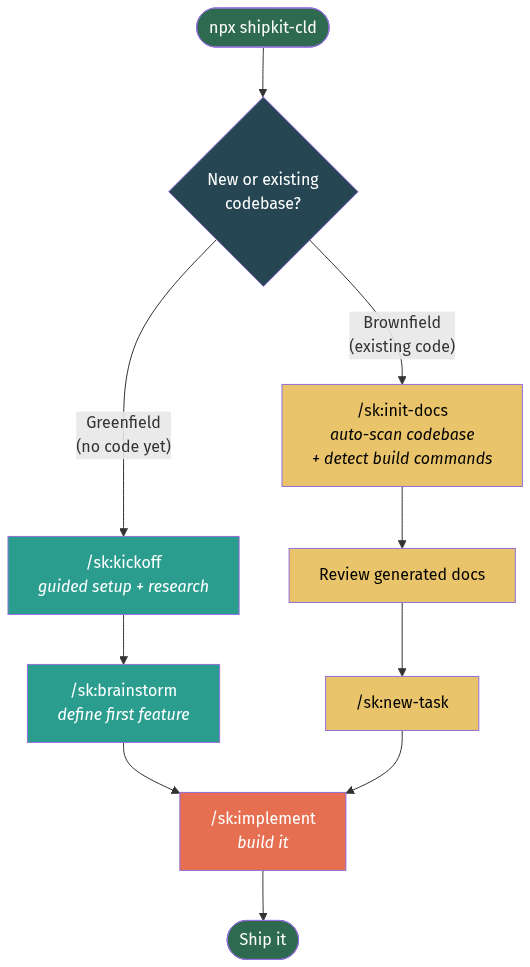
Greenfield Project (starting from scratch)
1. Install SK (see Installation above)
2. /sk:kickoff                              # Answer questions, docs auto-generated (creates the docs/ scaffold if it is missing)
3. /sk:brainstorm                           # Describe your first feature, get epic + tasks
4. /sk:implement                            # Build it
/sk:kickoff is a guided conversation that asks what you're building, what stack you want, and what the core features are. It then researches current best practices for your chosen stack (latest versions, recommended project structure, naming conventions, common pitfalls) and generates all foundation docs automatically:
docs/system/tech-stack.md— with current stable versions from researchdocs/system/project-context.md— dense project summarydocs/conventions/code-style.md— conventions for your chosen language/frameworkdocs/conventions/file-structure.md— recommended project layoutdocs/conventions/testing.md— test patterns for your stackCLAUDE.mdBuild Commands — filled in for your stack- ADRs for your major stack choices
/sk:brainstorm then takes your first feature idea, explores it through conversation, optionally researches domain patterns ("what do similar apps typically include?"), and produces a structured epic with tasks — ready for /sk:implement.
No manual file editing required. Both commands generate everything through conversation.
Brownfield Project (existing codebase)
1. Install SK (see Installation above)
2. /sk:init-docs                            # Auto-scan codebase, detect build commands, populate docs
3. Review generated docs                    # Verify accuracy, fix anything wrong
4. /sk:new-task                             # Define your first piece of work
5. /sk:implement                            # Build it
/sk:init-docs scans your codebase and generates:
docs/system/tech-stack.md— frompackage.json,pyproject.toml, etc.docs/system/project-context.md— dense project summarydocs/system/database-schema.md— from schema/model filesdocs/system/api-reference.md— from route definitionsdocs/conventions/code-style.md— from observed naming and formatting patternsdocs/conventions/file-structure.md— from actual project layoutdocs/architecture/README.md— component map from directory structure- ADRs for 2-3 major tech choices it discovers
Build commands are auto-detected from package.json scripts, Makefile targets, pyproject.toml tools, Cargo.toml, go.mod, and CI workflows. You only need to fill in commands marked [NOT DETECTED].
Tip: Run /sk:update-docs periodically to keep docs in sync as your codebase evolves.
Autonomous & Multi-Agent Operation
SK works unattended and at fleet scale, governed by files you control:
docs/conventions/delegation-policy.md— a decision-rights matrix defining what agents may do alone (commit, push, PR) vs ask (merge) vs never (deploy, publish, spend). Agents cannot widen their own authority./sk:routines— schedule maintenance (doc audits, dependency sweeps, retros, security reviews) that runs headless: no questions, dated reports, escalation via the task board. See the autonomous routines guide.- Task claiming + goals — multiple agents pull from one board without collision
(
claimed_byfrontmatter), prioritized against stated goals (docs/business/goals.md), with every autonomous decision journaled indocs/decisions/decision-log.md. See the multi-agent guide.
Session Continuity
SK tracks your active work across sessions:
docs/tasks/.current— automatically updated by lifecycle commands with your active task, phase, and subtask progress/sk:resume— start a new session with a briefing: what you were working on, what's next, any uncommitted changes- Claude Code memory — user preferences and workflow patterns persist across sessions automatically
Command Map
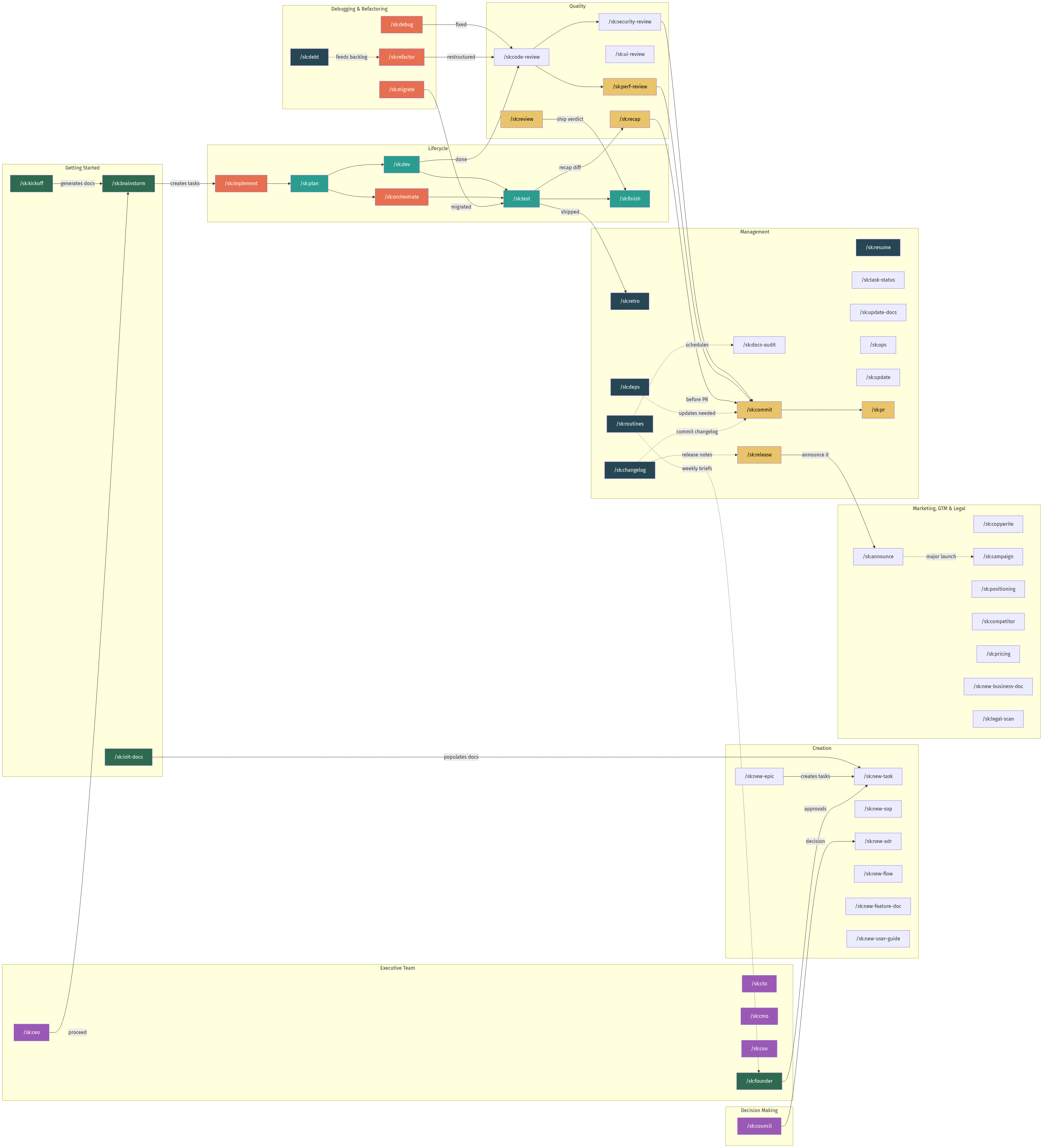
Command Reference
Not sure which command you need? Run /sk:help, or /sk:help <what you want to do>.
Claude starts only six commands by itself: /sk:debug, /sk:resume, /sk:task-status, /sk:new-task, /sk:plan and /sk:review. Every other command runs when you type it, so nothing commits, pushes or publishes unless you ask.
Getting Started
| Command | Purpose | When to Use |
|---------|---------|-------------|
| /sk:help | Find the right command for a situation | Not sure where to start, or what comes next |
| /sk:scaffold | Create docs/ and CLAUDE.md, or refresh the shipped docs | Once per project when SK is installed as a plugin |
| /sk:kickoff | Guided project setup + best-practice research | Starting a new (greenfield) project |
| /sk:brainstorm | Explore idea, produce epic + tasks | Have an idea, need to break it down |
| /sk:init-docs | Auto-scan codebase, populate docs | Brownfield project or full rebuild |
Lifecycle (Plan > Dev > Test)
| Command | Purpose | When to Use |
|---------|---------|-------------|
| /sk:implement | Full lifecycle: Plan > Dev > Test | Build a feature end-to-end |
| /sk:plan | Complete PLAN phase | Break down and prepare a task |
| /sk:dev | Execute DEV phase | Implement subtasks for a task |
| /sk:test | Execute TEST phase | Verify acceptance criteria |
| /sk:finish | Review + commit + push + PR + task update | After work is done, ready to ship |
| /sk:orchestrate | Parallel agent team — dependency-aware | 3+ independent subtasks, want parallelism |
Decision Making
| Command | Purpose | When to Use |
|---------|---------|-------------|
| /sk:council | Multi-persona advisory council (3-5 personas, structured debate) | Architecture decisions, strategy, trade-offs |
Document Creation
| Command | Purpose | Output |
|---------|---------|--------|
| /sk:new-task | Create a new task file | docs/tasks/TASK-{N}-*.md |
| /sk:new-epic | Create a new epic + child tasks | docs/tasks/EPIC-{N}-*.md |
| /sk:new-sop | Create a standard operating procedure | docs/sop/*.md |
| /sk:new-adr | Record an architecture decision | docs/decisions/*.md |
| /sk:new-flow | Create a flow diagram (SVG or Mermaid) | docs/flows/*.svg or *.md |
| /sk:new-feature-doc | Document a feature/subsystem, verified against code | docs/features/*.md |
| /sk:new-user-guide | Write a customer-facing, task-oriented guide | docs/user-guides/*.md |
Quality & Review
| Command | Purpose | Output |
|---------|---------|--------|
| /sk:review | Parallel multi-dimension review — security, perf, quality subagents | Merged report with ship/no-ship verdict |
| /sk:code-review | Analyze code for bugs, conventions, quality | Report (conversation) |
| /sk:security-review | OWASP Top 10, secrets, dependency audit | Report (conversation) |
| /sk:ui-review | Accessibility, responsive design, UX | Report (conversation) |
| /sk:perf-review | Queries, memory, rendering, caching | Report (conversation) |
| /sk:recap | Reviewer-facing recap of a diff — what changed and why | Report (conversation, optional save) |
Debugging & Refactoring
| Command | Purpose | Output |
|---------|---------|--------|
| /sk:debug | Reproduce, isolate, fix, verify with regression test | Code fix + test + task file (M+) |
| /sk:refactor | Restructure code, verify behavior unchanged | Code changes + task file (M+) |
| /sk:migrate | Handle breaking changes, dependency upgrades, DB migrations | Safe migration with rollback plan |
| /sk:debt | Harvest sk-debt markers into a ranked ledger | Tech-debt ledger (optional save) |
Git & Release
| Command | Purpose | Output |
|---------|---------|--------|
| /sk:commit | Smart git commit + push + PR | Git commit |
| /sk:pr | Create a pull request from the current branch | PR URL |
| /sk:changelog | Generate changelog from git history | CHANGELOG.md |
| /sk:release | Version bump + changelog + tag + GitHub release | Tagged release |
Session & Management
| Command | Purpose | When to Use |
|---------|---------|-------------|
| /sk:resume | Session briefing + context restore | Starting a new session with active work |
| /sk:task-status | Show task board overview | Check progress across all tasks |
| /sk:update-docs | Sync docs with codebase | After changes, or periodic audit |
| /sk:docs-audit | Audit doc coherence — orphans, staleness, broken links, lifecycle | Periodic doc health check, before release |
| /sk:ops | Operations/SRE expert — incidents, runbooks, postmortems, SLOs, readiness | Running prod, on-call, reliability work |
| /sk:deps | Dependency health check | Periodic audit or before release |
| /sk:retro | Run a retrospective on completed work | Capture lessons, patterns, improvements |
| /sk:routines | Scheduled maintenance routines — headless, policy-governed | Automating audits, retros, dependency sweeps |
| /sk:update | Update SK commands & templates | Get latest version (npm or local) |
Marketing, GTM & Legal
| Command | Purpose | When to Use |
|---------|---------|-------------|
| /sk:copywrite | Write marketing copy — landing pages, emails, ads, CTAs, blog posts | Any SaaS/tech marketing copy task |
| /sk:campaign | Plan, track, and close marketing campaigns — goal-linked, honest results | Coordinated marketing work |
| /sk:announce | Turn a release into an announcement pack (post, email, social) | After /sk:release |
| /sk:positioning | Define positioning & messaging (ICP, category, value prop) | Establishing GTM foundation |
| /sk:competitor | Analyze competitors — profiles, positioning map, comparison | Competitive intelligence |
| /sk:pricing | Design or evaluate pricing — value metric, model, tiers | Pricing decisions |
| /sk:new-business-doc | Create a business doc (plan, model, cap table, update, memo) | Capturing a business artifact |
| /sk:legal-scan | Legal & compliance expert — requirements, framework deep-dives, document drafting, contract review | Starting a project, adding payments, fundraising |
Full marketing walkthrough (brand voice → copy → campaigns → announcements → routines): Run your marketing with SK.
Executive Team
Run the company with an executive team — persistent 1:1 partners with portfolios,
memory (each seat keeps a STATE.md + meeting notes in its office), a dissent duty,
and authority that widens only on cited evidence. The founder is never gated:
every command keeps working directly, and executives observe your work rather than
approving it.
| Command | Purpose | When to Use |
|---------|---------|-------------|
| /sk:ceo | Strategy, goals, roadmap — plus grill (stress-test with memory) and product (proceed/park/kill verdicts) | Strategy sessions, feature decisions |
| /sk:cto | Architecture, quality, velocity, debt — feasibility lens | Technical direction, tech health |
| /sk:cmo | Positioning, brand, campaigns, launches — marketability lens | Marketing direction |
| /sk:coo | Routines, incidents, reliability — "runs the same when nobody watches" | Operational health |
| /sk:founder | The Monday packet: briefs merged into an approval console, decisions ranked one-way-doors-first | Weekly founder review |
Weekly headless briefs via /sk:routines; per-seat decision rights live in your
docs/conventions/delegation-policy.md. Custom seats via the executive-charter
template. Full walkthrough: Meet your executive team.
Package Structure
SK separates the product (what gets installed) from project files (for developing SK itself):
sk/                              ← SK source repository
├── CLAUDE.md                    ← SK development instructions (NOT shipped)
├── cli.mjs                      ← npm entry point: imports pkg/cli.mjs
├── .claude-plugin/              ← marketplace.json: installs the plugin from ./pkg
├── scripts/                     ← Dev tooling (check, sync, baselines, evals), not shipped
├── package.json                 ← npm package config
├── pkg/                         ← Everything shipped to target projects; also the plugin root
│   ├── cli.mjs                  ← CLI: install / update / remove / init; /sk:scaffold runs it under the plugin
│   ├── .claude-plugin/          ← plugin.json
│   ├── CLAUDE.md                ← Template CLAUDE.md installed into projects
│   ├── docs/                    ← Template documentation tree
│   └── .claude/                 ← Commands, agents, skills
│       ├── commands/sk/         ← 55 slash commands
│       ├── agents/              ← 9 agents: implementer, six reviewers, dependency-analyzer, debugger
│       └── skills/              ← TDD, diagrams, escalation, legal, subagent-dev, verification, worktrees, copywriting, technical-writing, error-recovery, context-priming, plow-ahead, stay-within-limits, competitor-analysis, pricing-strategy, product-marketing-context, operations-advisor, create-pdf
└── .claude/                     ← Development copy (dogfooding, not shipped)
Key Design Decisions
Plan > Dev > Test lifecycle — Forces thinking before coding. Each phase has an explicit exit gate so nothing gets skipped. The 3-phase cycle is simple enough to actually follow.
Quick Path as default — Most work is XS/S complexity. The formal lifecycle exists for M+ work but the default is "just do it" with mental guardrails.
Lazy-loaded context — Commands only read the docs they need for the current phase, not everything upfront. This keeps context windows lean and response times fast.
Session continuity — .current file + /sk:resume command + memory integration means you never lose context between sessions.
Task hierarchy (Epic > Task > Subtask) — Epics break into tasks, tasks break into subtasks. Each level has a clear scope and complexity ceiling. Subtasks capped at S complexity (single concern) prevent scope creep and make progress visible.
Self-contained tasks — Every task is independently buildable, testable, and shippable. Claude Code can execute a task without needing context from other in-flight work.
Source path persistence — .claude/.sk-source remembers where SK was installed from, so local development changes flow to target projects with a simple update command.
Worked examples over abstract docs — The examples/ folder shows exactly what a completed task looks like. Worth more than pages of explanation.
Templates over empty files — Every doc type has a template. Copy, fill in, done. No blank page anxiety.
SVG + Mermaid for diagrams — SVG diagrams (via the technical-diagrams skill) for polished architecture and flow visuals with a consistent design system. Mermaid for quick sequences, ER diagrams, and state charts that render natively in GitHub. Both live in git alongside code.
ADRs for decisions — "Why did we choose X?" is the most expensive question in a codebase. ADRs answer it once.
SOPs for procedures — AI agents follow explicit steps better than vague guidelines. SOPs eliminate improvisation on critical tasks.
Parallel orchestration — /sk:orchestrate analyzes subtask dependencies, builds a file-conflict graph, groups independent subtasks into waves, and dispatches parallel subagents with worktree isolation. Two-stage review (spec + quality) runs per agent. Merges wave results sequentially with conflict detection. Caps at 4 parallel agents (research-backed sweet spot).
Advisory council — /sk:council convenes 3-5 AI personas with genuinely incompatible value systems (pragmatist vs architect vs adversary) to debate strategic questions. Structured rounds: independent positions (zero cross-visibility), challenge, optional rebuttal, synthesis. Produces a decision report with recommendation, confidence, dissent, and conditions for reversal. A plan-arbiter mode resolves competing plans via a ranked tiebreaker instead of blending them. Research shows multi-agent debate reduces hallucinations by 30%+ and improves factual accuracy.
Behavioral guardrails — LLMs over-engineer, make hidden assumptions, and drift from scope. Five principles (surface assumptions, do exactly what's asked, keep it simple, verify with evidence, track deliberate shortcuts via sk-debt markers) are embedded in every lifecycle command to counteract this. See docs/conventions/coding-behavior.md.
Proof over claims. Every phase gate ends on something that can be shown: a command that was run with its output, a file that exists, a count that matches. Each acceptance criterion is reported as passed, failed or untested, never left out. Reviewer findings say how far they were proven.
Updates never destroy your work. The updater works one file at a time. A file you edited is kept, with SK's new version written beside it; a file of yours that shares a name with one of SK's is never touched.
Context is a budget. A command or skill that Claude can start by itself puts its description in every turn. Only six commands and eleven skills do; the rest run when you type them. Three behaviour rules that used to depend on a skill firing (evidence before "done", stop after three failed attempts, what "just do it" permits) are always on through CLAUDE.md.
Anti-Patterns to Avoid
| Don't | Do Instead | |-------|-----------| | Write 20-page architecture docs | Keep each doc focused, link between them | | Document implementation details | Document decisions and interfaces | | Let docs go stale | Update in the same PR as the code change | | Duplicate content across docs | Link to the single source of truth | | Write docs nobody reads | Write docs Claude Code reads every session | | Add features "while you're in the file" | Stick to the task scope, note improvements as follow-ups | | Build for hypothetical future needs | Implement the simplest thing that satisfies the acceptance criteria | | Mark criteria as "works" or "done" | Verify with specific evidence ("returns 201 with {id, email}") |