
sidekick-agent-hub
v0.27.6
Published
Terminal dashboard for monitoring AI coding agent sessions

Maintainers
 cesarandreslopez
Readme
Sidekick CLI
Full-screen terminal dashboard for monitoring AI agent sessions — standalone, no VS Code required.
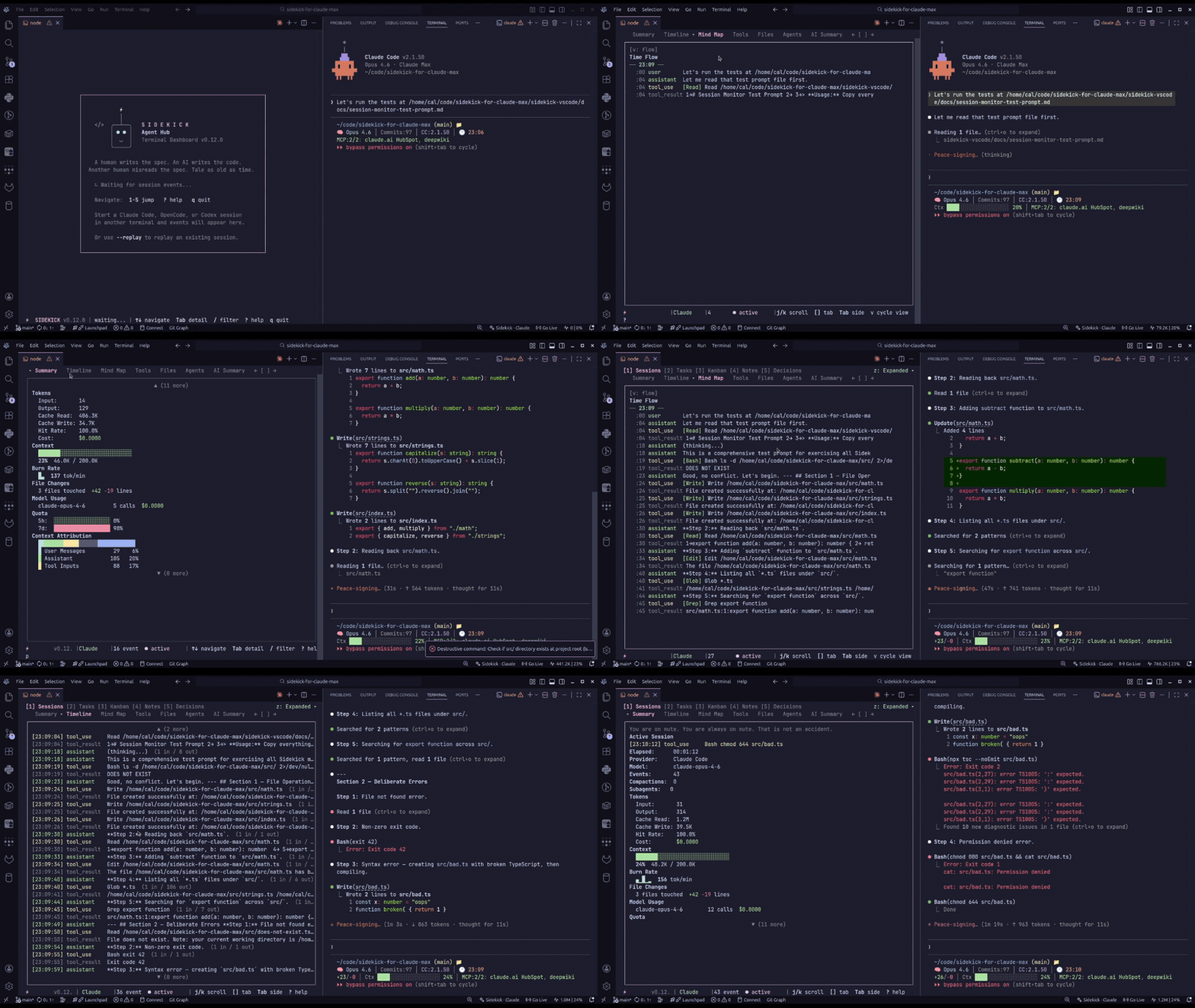
Sidekick CLI reads from ~/.config/sidekick/ (%APPDATA%\sidekick\ on Windows) — the same data files the VS Code extension writes. Browse sessions, tasks, decisions, knowledge notes, mind maps, and more in an interactive terminal UI.
What's New
- 0.27.6: one usable copy of every login — Sidekick no longer causes Claude Code's "Not logged in · Please run /login": Keychain writes over about 4 KB are no longer truncated, the live login keeps no second copy,
accounts switchsaves the outgoing login first and is journaled so an interrupted switch finishes or rolls back, and keep-alive never refreshes a live copy. Codex switches are refused while Codex sessions run (even with--force), and keep-alive refreshes throughcodex app-server.sidekick accounts doctoris read-only and reports Claude and Codex credential stores;--fixrepairs them after asking (--yesskips,--jsonlists the repairs). - 0.27.5: prompts grouped by session —
sidekick dump --promptsprints every prompt you typed in Claude Code and Codex sessions, grouped by session: the most recent session with prompts by default, one session with--session <id-or-prefix>, or every session of the project and its git worktrees with--all(narrowed by--sinceand--limit).--repliesadds the agent's final reply to each prompt,--signalsadds interrupts, rejected and failed tool calls, compactions, API errors, and rollbacks, and--formatwrites text, markdown, JSON, or JSONL (one session per line). OpenCode is not supported. - 0.27.3: accurate token totals and subagent totals — Claude Code split lines and repeated Codex
token_countevents are no longer double-counted, which fixesdump,report, the dashboard,daily/weekly/monthly/sessions, andblocks(the usage cache rebuilds itself).sidekick dumpandsidekick reportshow the session's subagents and "Session total (incl. subagents)", anddump --format jsonadds atokenSummaryblock. The dashboard's Tokens section leads with "Total (incl. cache)", lists all four buckets, then subagent and session totals, and its cache-hit rate counts cache writes. Claude subagent transcripts count toward the usage reports under their parent session, andstate.jsongainscontext.totalTokens. - 0.27.0: Opus 5.5 pricing and GPT-6 summaries — cost estimates for Claude Opus 5.5 (
claude-opus-5-5) sessions use its own rates ($4 / $20 per 1M tokens, $0.20 cache reads) instead of Opus 5's, GPT-6 Sol and Luna sessions are priced, and OpenAI API dashboard summaries usegpt-6-luna. - 0.26.6:
sidekick accounts— an interactive picker pluslist,add,switch,login,remove,shell,env,undo,doctor, andconfigsubcommands. Logins you already use are registered automatically, every switch is verified against the live credential store and undoable, expired credentials are refused with a sign-in hint, running apps that keep the previous login are named, andenv/shellrun a second account side by side on bash, zsh, fish, PowerShell, and cmd. The dashboard gains an accounts overlay (A) and a health-coloured status bar account.sidekick account --…flags remain as a deprecated alias. - 0.26.5: cheaper dashboard watching — newer-session detection reconciles each watched-file event with one stat, and catch-up polls cost one stat per unchanged directory instead of walking every session file.
- 0.26.4: sharper authentication and policy guidance — AI summary failures recognize expired-login and re-authentication messages with guidance matched to the credential kind, distinguish a rejected refresh token from an expired conversation, and treat
Permission denied by policy(including HTTP 403) as an execution-policy denial. - 0.26.3: provider failure diagnosis and status evidence — AI summary failures distinguish authentication, provider sessions, service, connection, timeout, rate-limit, execution-policy, runtime, and context-limit problems with provider-specific guidance, without signing in, switching providers, or replaying.
sidekick status, the dashboard, anddoctorshow unavailable or partial public status instead of implying normal operation, andstatus --jsonaddsserviceStatuswith anavailabilitydiscriminator. - 0.26.2: reliable dashboard replay — complete-line checkpoints preserve Unicode and parser context. Live-only runs leave complete-history caches intact; OpenCode replays history when requested.
- Project search and Doctor — project-scoped searches include Codex and database-only OpenCode sessions;
doctor --providerfocuses diagnostics on the selected session provider. - Usage reports from session logs —
sidekick daily,weekly,monthly, andsessionscompute tokens and cost for every provider straight from session logs (local calendar days,--breakdown,--by-project,--csv,--json), so CLI-only users no longer need the extension's history store;sidekick importbackfills that store when you wantstatsandtodayto see older sessions. sidekick blocks— five-hour billing blocks with cache-inclusive totals, cost provenance, burn rate, and end-of-block projections, with the official status-line sample beside the local estimate.- Official quota through the status line —
sidekick statuslinereads the JSON Claude Code pipes on stdin, appends context %, session cost, and cache hit rate, and persists the official limits;quota,quota --all, andmcp get_quota_statusshare one resolution order and print aSourcerow naming where the numbers came from. state.json— a public, versioned snapshot (account, quota with freshness, context includingcontext.totalTokens, session cost, active billing block) written bystatuslineand the dashboard for tmux status bars and scripts.- Scripting flags — global
--offlineand--output-file,--csvonstats,dump --list, andquota history,quota history --window 5h|7d|max, and--jsonon the quick-capture commands andreport; every token total is cache-inclusive and every cost carries its provenance. sidekick history— list your most recent Codex prompts across every workspace, newest first;--path <id-or-prefix>resolves a session to its transcript file forless/jq, and--jsonemits full ids and timestamps.sidekick dump --listand the session picker now read a cheap preview index with a--limitbound (default 50), so huge session histories list quickly.sidekick statusline,today&doctor— a cache-only one-line account/quota/burn footer, a cache-only daily brief, and cross-provider health diagnostics.- Quick capture —
sidekick tasks add,tasks done,note add, anddecision addwrite straight to the shared project stores with atomic merges. sidekick mcp— a read-only stdio MCP facts server so Claude Code or Codex can inspect quota, burn rate, context pressure, and project stores mid-session.- External handoff —
sidekick handoff open --url-templateopens a configured deep link with{sessionId},{provider}, and{projectPath}placeholders. - Codex reset credits — when Codex quota is refreshed from the API,
sidekick quotanow lists available rate-limit reset credits (Reset Credits: N available) and their expirations. sidekick quota --provider zai— authoritative z.ai Coding Plan quota (5-Hour / Weekly) from z.ai's quota API, using OpenCode's stored z.ai token when available.sidekick extract— pull URLs, file paths, commands, and plans out of recent Claude Code and Codex chats, with--jsonand an interactive picker.
See the full changelog for everything.
Replay and Recovery
Selecting a session in the picker loads its history. When starting with --session <id>, add --replay to include earlier events; without it, the dashboard follows new activity only. Claude Code and Codex can reuse compatible complete-history checkpoints. Live-only runs never replace those checkpoints, and OpenCode replays from the start when history is requested. Doctor honors --provider and treats unused integrations as informational.
Installation
Note: The npm package is
sidekick-agent-hub, but the binary it installs is calledsidekick.
npm install -g sidekick-agent-hubRequires Node.js 20+.
Quick Start
cdinto your project directory- Run
sidekick dashboard - The dashboard auto-detects your project and session provider
- Press
?to see all keybindings
OpenCode note: OpenCode session monitoring reads
opencode.dband currently expects an executablesqlite3runtime in the host environment.
OpenCode session data lives in OpenCode's platform-specific data directory:
- Linux:
~/.local/share/opencode/ - macOS:
~/Library/Application Support/opencode/ - Windows:
%LOCALAPPDATA%\opencode\(falls back to%APPDATA%)
If sqlite3 is missing or not executable in the current shell environment, Sidekick prints an actionable OpenCode-specific notice instead of silently failing session detection.
Usage
sidekick dashboard [options]
sidekick tasks|decisions|notes|stats|import|blocks|daily|weekly|monthly|sessions|quota|status|accounts|handoff|search|context|extract [options]
sidekick dump|history|report|peak|today|doctor|statusline|mcp [options]
sidekick tasks add|tasks done|note add|decision add [args]
Most commands run one-shot queries and print to stdout; dashboard opens the full-screen TUI, accounts and extract -i open interactive pickers, and mcp serves stdio until closed. Every command except statusline accepts the global flags below.
| Flag | Description |
| ---------------------- | ---------------------------------------------------------------------------------- |
| --json | Machine-readable JSON output (commands that support it) |
| --project <path> | Override project path (default: current working directory) |
| --provider <id> | Session provider: claude-code, opencode, codex, or auto (default) |
| --no-color | Disable colored output (also honors NO_COLOR) |
| --offline | Price from the cached catalog only (also SIDEKICK_OFFLINE=1) |
| --output-file <path> | Write a command's stdout to a file, without colour codes |
| --session <id> | Follow a specific session by ID (dashboard, dump, report, handoff open) |
| --replay | Replay existing events from the beginning before streaming live (dashboard only) |
Daily Brief & Statusline
sidekick today
sidekick statusline
sidekick today prints a cache-only daily brief: yesterday's sessions/tokens/cost, open tasks, the newest decision, the latest handoff, a quota summary, and the scheduled peak-hours window. sidekick statusline renders the same account/quota/burn summary as a single line with no account bootstrap, pricing hydration, or quota network access, so it is fast enough to run on every agent prompt (the VS Code extension can wire it into Claude Code's statusLine setting). When Claude Code runs it as the status line it pipes a JSON document on stdin: Sidekick appends context usage, session cost, and prompt-cache hit rate, and persists the official five-hour and seven-day limits so every other command sees authoritative quota without a network call. Cached quota older than five minutes shows its age. Global flags --project, --provider, and --json apply to today; statusline takes no flags (SIDEKICK_STATUSLINE_STDIN=0 ignores stdin).
Doctor
sidekick doctorDiagnose project identity, sessions, accounts, providers, and dependencies in one typed health report — the same diagnostics behind the VS Code Sidekick: Run Doctor command. Global flags --project, --provider, and --json also apply.
Billing Blocks
sidekick blocks [--active | --recent | --since <time>] [--csv] [--no-cache]Five-hour billing blocks computed from session logs (ccusage-style: a block opens at the first usage event, aligned to the UTC hour, lasts five hours, and a longer gap opens a new one). Each block shows its cache-inclusive token total, cost with provenance, burn rate, and — for the open block — projected end-of-block tokens and cost plus the time remaining. Sessions are read once and cached by size and mtime under the Sidekick config directory. When the status line has persisted an official Claude Code rate-limit sample, it is shown beneath the local estimate for comparison. --since accepts an ISO date, YYYY-MM-DD, or a relative window such as 7d; --json prints the full report and --csv one row per block.
Import History
sidekick import [--since <time>]Fold finished sessions from every provider into the history store that sidekick stats, sidekick today, and the VS Code History tab read — the same importer and store mutation the extension runs on first activation, so both hosts credit sessions identically. Idempotent: already-imported files, sessions the live monitor persisted, and files modified in the last minute are skipped. --since limits the scan; --json prints the result. Sessions stored before 0.27.3 keep their older, inflated token totals in stats and today; the log-based reports (daily, blocks, …) are recomputed.
Usage Reports
sidekick daily|weekly|monthly|sessions [--since <time>] [--until <time>] [--breakdown] [--by-project] [--utc] [--csv] [--no-cache]Usage computed straight from session logs — no VS Code extension or history store required — for every provider with session data side by side (--provider narrows to one). Rows are bucketed by the time of each usage event on the local calendar (--utc for UTC), so a session that crosses midnight is split across both days; Claude Code subagent transcripts count toward their parent session; weeks start on Monday. --breakdown adds per-model sub-rows, --by-project groups by project, sessions prints one row per session, and --json / --csv feed scripts. Defaults: 30 days, 12 weeks, 12 calendar months, 30 days.
Quick Capture
sidekick tasks add "Wire retry backoff into the sync job" --tags backend
sidekick tasks done a1b2
sidekick note add "SQL substitution is index-based" --type gotcha --file src/db.ts
sidekick decision add "Store history as JSONL" --rationale "Append-only, crash-safe"
Capture tasks, knowledge notes, and decisions from the terminal without opening the dashboard. Writes use the shared atomic merge writers, so concurrent captures from VS Code or other terminals are never lost (the extension's Kanban board picks them up live).
| Command | Flags |
| ---------------------------- | -------------------------------------------------------------------------------------------------------------------------------------------------------------------------------------------------------------------------------- |
| tasks add <subject> | --description <text>, --tags <csv> |
| tasks done <id> | Accepts a task ID or unique prefix |
| note add <content> | --file <path>, --title <title>, --type <type> (gotcha/pattern/guideline/tip, default tip), --importance <level> (critical/high/medium/low, default medium), --tags <csv>; --file defaults to . |
| decision add <description> | --rationale <text>, --chosen <text>, --alternatives <csv>, --tags <csv> |
The global flag --project also applies.
MCP Facts Server
sidekick mcpServe read-only Sidekick facts over stdio MCP so your coding agent can inspect them mid-session. Register once from the project where you want it:
claude mcp add sidekick -- sidekick mcp     # Claude Code
codex mcp add sidekick -- sidekick mcp      # Codex
Seven tools: get_quota_status, get_burn_rate, get_context_pressure, get_tasks, get_decisions, get_notes, and get_project_context. Every tool is annotated read-only, non-destructive, and idempotent — the server exposes no capture or store-mutation tools. Pass the global --project and --provider flags before mcp to target a specific project or provider.
Session Dump
sidekick dump [options]Export session data as text, markdown, or JSON. Token lines use "Total (incl. cache)" with all four buckets (input, cache read, cache write, output). When the session spawned subagents, text and markdown add "Subagents (n)" and "Session total (incl. subagents)", and markdown adds a Subagent Tokens table. --format json adds a tokenSummary block with mainThread, subagents (one entry per subagent), subagentTotal, and combined (main thread plus subagents).
| Flag | Description |
| ---------------- | -------------------------------------------------------------------------------------------------------- |
| --format <fmt> | Output format: text (default), json, or markdown; also jsonl with --prompts |
| --width <cols> | Terminal width for text output (default: auto-detect) |
| --expand | Show all events including noise |
| --session <id> | Target a specific session (default: most recent) |
| --list | List available sessions and exit |
| --limit <n> | Maximum sessions listed with --list (default: 50), or dumped with --prompts |
| --csv | With --list, print the session table as CSV |
| --prompts | Dump human prompts grouped by session (see below) |
| --all | With --prompts, every session of the project and its git worktrees |
| --since <time> | With --prompts, sessions active since an ISO date, YYYY-MM-DD, or 7d/24h (returned whole) |
| --signals | With --prompts, add interrupts, rejected and failed tool calls, compactions, API errors, and rollbacks |
| --replies | With --prompts, add the agent's final reply to each prompt |
Global flags --project, --provider, and --json (the same as --format json) also apply.
Prompts by session
sidekick dump --prompts prints every prompt typed in Claude Code and Codex sessions, grouped by session, for reading or classifying a whole session. The default is the most recent session with prompts, and --limit <n> takes the n most recent instead. --session <id-or-prefix> picks one session, and --all takes every session of the project and its git worktrees (it cannot be combined with --session), optionally narrowed by --since 7d (sessions active since then, returned whole) and --limit <n>. --signals adds interrupts, rejected and failed tool calls, compactions, API errors, and rollbacks, and --replies adds the agent's final reply to each prompt. --format accepts text, markdown, json (full result with bounds and stats), or jsonl (one session per line). Both providers are read unless --provider names one; --provider opencode exits with an error.
sidekick dump --prompts --all --since 7d --signals --replies --format jsonl > sessions.jsonlPrompt History
sidekick history [options]Show recent user prompts across Codex sessions, newest first — across every workspace. Use --path <sessionId> to resolve a session ID (or unique prefix) to its rollout transcript file, e.g. less "$(sidekick history --path 0198a3c2)". The global --json flag emits full session IDs and ISO timestamps.
| Flag | Description |
| -------------------- | ------------------------------------------------------------ |
| --limit <n> | Maximum prompts to show (default: 20) |
| --path <sessionId> | Print the rollout transcript path for a session ID or prefix |
Codex-only for now (reads the global ~/.codex/history.jsonl); Claude Code and OpenCode are not yet supported (for Claude Code and Codex prompts grouped by session, use sidekick dump --prompts). Not to be confused with sidekick quota history, the quota utilization heatmap.
HTML Report
sidekick report [options]Generate a self-contained HTML session report and open it in the default browser. Includes full transcript, token/cost stats, model breakdown, and tool-use summary. Token cards show "Total (incl. cache)" with all four buckets and a "Cache hit" rate; when the session spawned subagents, "Subagents (n)" and "Session total (incl. subagents)" appear beside the main thread. Per-message token counts include cache.
| Flag | Description |
| ----------------- | ------------------------------------------------ |
| --session <id> | Target a specific session (default: most recent) |
| --output <path> | Write to a specific file (default: temp file) |
| --theme <theme> | Color theme: dark (default) or light |
| --no-open | Write the file without opening the browser |
| --no-thinking | Omit thinking blocks from the transcript |
Global flags --project, --provider, and --json (prints the report path as {"path": …}) also apply.
You can also press r in the TUI dashboard to generate a report for the current session.
Extract Session Assets
sidekick extract [options]Pull actionable assets from recent Claude Code and Codex sessions for exactly the current project directory: URLs, validated file paths, commands the agent suggested for you to run, and plan-mode plans. Text output is grouped by type and labels each item with its source agent; --json returns the same grouped shape plus inChat and per-item provenance for scripts; -i opens an interactive picker where Enter opens URLs and copies other assets.
This feature was contributed by @B33pBeeps (Juan Fourie) and adapted from his MIT-licensed trawl project.
| Flag | Description |
| --------------------- | ---------------------------------------------------------------------------------------- |
| --type <types> | Comma list: url, path, command, plan (aliases: urls, files, cmds, plans) |
| --limit <n> | Positive integer maximum items per type |
| -i, --interactive | Interactive picker with copy/open actions |
Global flags --project, --provider, and --json also apply. --provider claude-code scopes to Claude Code, --provider codex scopes to Codex, and auto reads both. Invalid --type or --limit values fail fast with a clear error. OpenCode extraction is not supported yet.
# Grouped text output
sidekick extract

# URLs and file paths only
sidekick extract --type url,path

# JSON for scripts
sidekick extract --limit 10 --json

# Interactive picker
sidekick extract -i
API Status
sidekick statusCheck public service status for both Claude (status.claude.com) and OpenAI (status.openai.com). Shows indicators with color coding (green/yellow/red), component associations, every unresolved incident the feed supplies, and separate check and provider-update timestamps. A failed check displays Status unavailable instead of implying normal operation; a feed that omits incidents displays Incident information unavailable. Public incidents do not establish why a particular request failed. In the dashboard, provider-status surfaces are scoped to the monitored provider: Claude for Claude Code sessions, OpenAI for Codex sessions, and hidden for OpenCode. Dashboard details and Doctor use the same evidence semantics.
sidekick status --json retains claude, openai, and peak for compatibility and adds serviceStatus: { claude, openai }. New integrations should use each result's availability discriminator; the legacy indicator: none fallback cannot distinguish operational status from failed fetching. Doctor similarly adds serviceStatus alongside its legacy providerStatus field.
When the active provider is claude-code, the output also includes a Claude Peak Hours block (see below).
Peak Hours
sidekick peakShow whether Claude is currently in peak hours (weekdays 13:00–19:00 UTC — when session limits drain faster on Free/Pro/Max/Team subscriptions). Data comes from the public promoclock.co/api/status endpoint (third-party, unaffiliated with Anthropic). Use --json for machine-readable output. The peak-hours summary also appears under the bars in sidekick quota for Claude subscriptions.
Quota & Rate Limits
sidekick quotaProvider-aware quota and rate-limit display. The command auto-detects the active provider:
- Claude Code: Shows Claude Max subscription quota — 5-hour and 7-day windows with color-coded progress bars, projections, and reset countdowns. Includes a peak-hours summary line.
- Codex: Fetches the Codex usage API on every command — primary and secondary windows with progress bars, projected end-of-window utilization, and reset countdowns. The output also lists available reset credits and each credit's expiration. Session logs and cached samples are fallbacks if the API fails.
- OpenCode / z.ai: OpenCode has no native rate-limit data, but when z.ai Coding Plan credentials are available,
sidekick quota --provider opencodecan auto-route to authoritative z.ai quota (5-Hour / Weekly, with projected end-of-window utilization). Use--provider zaito request it explicitly. z.ai quota is read from z.ai's quota API using OpenCode's stored token, with fallback support forANTHROPIC_BASE_URLandANTHROPIC_AUTH_TOKEN.
Every provider renders in the same aligned table — a now column (current utilization), a projected column (estimated end-of-window utilization, or — when it can't be computed), and a resets countdown:
Subscription Quota                          now projected resets
────────────────────────────────────────────────────────────────
  5-Hour    ████████████░░░░░░░░░░░░░░░░░░  40%      100% 2h 15m
  7-Day     ██████████████████████░░░░░░░░  72%       88% 4d 6h
  Peak      ● Peak Hours — Limits Drain Faster (off-peak in 2h 45m)
When quota data is unavailable, sidekick quota shows structured auth, rate-limit, network, server, or unexpected-failure messaging instead of a generic raw error. The dashboard Sessions panel also keeps a compact inline quota/rate-limit state visible instead of hiding the section entirely.
Codex quota commands and sidekick mcp's get_quota_status always ask the API first, even when a fresh local sample exists. If the API fails, the newer session or cached sample is shown; equal capture times favor the cache. The Source row identifies the sample and its age, and a Refresh row explains a failed Codex API attempt. Claude and z.ai may reuse a persisted sample younger than five minutes; add --refresh to ask their APIs first too. Dashboard refresh schedules are unchanged.
Use --json for machine-readable output; it includes resolution, source, capturedSource, freshness, and ageMs, plus failureKind, httpStatus, and retryAfterMs on unavailable responses. The failure descriptor explains an API failure even when fallback data is available. Claude Code requires active credentials (read from the system Keychain on macOS, or ~/.claude/.credentials.json on Linux/Windows).
sidekick quota shows the currently logged-in account email above the quota bars — resolved live from the provider's auth, so it stays correct even after a native claude login / codex login.
Use sidekick quota --all to show Claude and Codex quota together in a single run, plus z.ai when API quota is available or z.ai traffic is active. Each provider degrades independently — if one provider's quota can't be fetched, its error is shown inline and the others still render (the command never aborts on a single provider's failure). The combined view uses the same policy as the single-provider view; live values can change between calls. --all --json emits a provider-keyed payload for dashboards and automation.
Quota History
sidekick quota historyRenders a 13-week, GitHub-contributions-style heatmap of quota utilization for the current workspace. Each cell is one day; brightness encodes the peak utilization observed (· ░ ▒ ▓ █ → ≤0% / <25% / <50% / <75% / ≥75%). Days that hit available: false render as a red ×.
Claude  ·  13 weeks  ·  41 day(s) with samples
Sun ·░▒▒▓█░░░ ·░░·· ·▒▒
Mon ··▒▒▓█▒░· ·░░·· ·▒▓
…
Peak 92%  ·  Avg 38%  ·  Samples 612
Flags: --weeks <n> (1-26, default 13), --provider claude|codex|zai (claude-code and z.ai are accepted aliases; default all available, stacked), --workspace <path> (default cwd), --window 5h|7d|max (default 5h), --csv. --json emits a { workspaceId, weeks, window, providers, generatedAt } payload — the same shape consumed by the VS Code dashboard's Quota History panel. Cells are local calendar days.
History is stored at ~/.config/sidekick/quota-history/<workspaceId>/<provider>.jsonl (mode 0600, 60-second debounce, 91-day retention). The workspace id is sha256(realpath)[0..16], so the same folder yields the same store whether sampled from the CLI or VS Code.
Account Management
sidekick accounts [command]Keep several Claude Code and Codex logins on one machine and switch between them without /logout cycles. Sidekick registers the login you are already using automatically (labelled with its email), verifies every switch by reading the live credential store back, warns about running Claude apps that still hold the previous login, refuses a Codex switch while Codex sessions run, keeps exactly one usable copy of every login (the rest are private backups neither CLI reads), and flags expiring credentials before they fail. Account data is stored in ~/.config/sidekick/accounts/ with strict file permissions and atomic writes with rollback on failure. See the Account Switcher guide for the per-app reachability table and platform notes.
| Command | Description |
| ------------------------------------------------ | ------------------------------------------------------------------------------------------------------------------------------------------------------------------------------------------------------------------------------------------------------------------------------------------------------------------------ |
| sidekick accounts | Interactive picker (arrow keys, Enter switch, a add, l sign in again, r remove, s shell, u undo, ? help, q quit). Prints the list when piped |
| accounts list | Saved accounts with health and expiry |
| accounts add [--label <name>] [--current] [-y] | Sign in to a new account in an isolated profile; --current registers or relabels the live login |
| accounts switch <name> \| --next [--force] | Make an account active (label, email, id, or unique prefix); --force ignores an expired health verdict but never skips saving the outgoing login or the Codex running-session check |
| accounts login <name> | Sign in again to an existing (expired) account, keeping its id and label |
| accounts remove <name> [-y] | Delete a saved account and its credentials (prompts unless --yes/--force; required for --json/non-TTY) |
| accounts shell <name> [-- <cmd…>] | Subshell, or one command, where claude/codex use the account |
| accounts env <name> [--shell <kind>] | Print the environment for eval (bash, zsh, fish, powershell, cmd; default detected) |
| accounts undo | Revert the last switch |
| accounts doctor [--fix [-y]] | Read-only check of credential expiry, stored Claude and Codex credentials (unused, second live, unreadable, interrupted switches), running apps, the Codex credential store, and keep-alive; --fix repairs what Sidekick owns after asking (-y skips; required for --json/non-TTY), and --json lists the repairs |
| accounts config auto-switch <pct\|off> | Persist the auto-switch quota threshold (continuous auto-switching runs in a long-running host such as VS Code) |
| accounts config keep-alive <on\|off\|run> | Refresh inactive accounts through the official CLIs (the dashboard runs it hourly); run executes one pass now |
sidekick accounts and accounts list accept --provider claude-code|codex|all; the per-account subcommands accept claude-code|codex; config takes no provider. The global --json applies everywhere. A switch prints ✓ verified once the live store reads back the new credential, one ! line per running app that still holds the previous login, and the undo command. A switch to an expired or missing account is refused with a sign-in hint unless you pass --force. A Codex switch is refused while Codex CLI, app, or IDE sessions run or keep-alive is refreshing the target account; --force overrides neither. For the live account, shell and env use the normal Claude or Codex home instead of a profile.
sidekick accounts                          # interactive picker
sidekick accounts list --json              # { accounts, activeByProvider, registeredNow }
sidekick accounts add --label Work         # sign in to a second account; current login untouched
sidekick accounts switch work              # switch by label, email, or id
eval "$(sidekick accounts env work)"       # this shell only: claude/codex use Work
sidekick accounts shell work -- claude     # one claude session as Work
sidekick accounts doctor                   # what would break a switch right now (read-only)
sidekick accounts doctor --fix             # repair stored credentials Sidekick owns (asks first)
remove prints the resolved account and asks for an interactive y/N answer (default No). Pass -y/--yes to skip the prompt; --json and non-TTY contexts require the flag and exit 1 without it — unattended automation that removes accounts must add --yes.
The legacy sidekick account --add | --login | --switch | --switch-to <id> | --remove <id> | --launcher <name> | --auto-switch <pct|off> flags still work and print the equivalent sidekick accounts … command on stderr. --launcher writes a POSIX script to ~/.local/bin that runs sidekick accounts shell each time, so it follows the account whether or not it is the live login; accounts shell and accounts env are the cross-platform replacements.
Dashboard Panels
The dashboard is a two-pane terminal UI. The left side shows a navigable list, the right side shows details for the selected item.
| # | Panel | Description | | --- | ------------- | ------------------------------------------------------------------------------------------------------ | | 1 | Sessions | Browse recent sessions with detail tabs: Summary, Timeline, Mind Map, Tools, Files, Agents, AI Summary | | 2 | Tasks | View persisted tasks filtered by status | | 3 | Kanban | Task board with status columns | | 4 | Notes | Knowledge notes attached to files | | 5 | Decisions | Architectural decisions from sessions | | 6 | Plans | Agent plans persisted in the project store from Claude Code, OpenCode, and Codex sessions | | 7 | Events | Live event stream with type badges, timestamps, and keyword-highlighted summaries | | 8 | Charts | Tool frequency bars, event distribution, activity heatmap, and pattern analysis |
Layout Modes
Press z to cycle through layout modes:
| Mode | Description | | ------------- | ---------------------------------------------- | | Normal | Default two-pane split | | Expanded | Side list hidden, detail pane fills the screen | | Wide Side | Wider side list for longer item labels |
Keybindings
Navigation
| Key | Action |
| --------- | ---------------------------------------------- |
| 1–8 | Switch panel |
| Tab | Toggle focus between side list and detail pane |
| j / ↓ | Next item (side) or scroll down (detail) |
| k / ↑ | Previous item (side) or scroll up (detail) |
| g | Jump to first item / scroll to top |
| G | Jump to last item / scroll to bottom |
| h / ← | Return focus to side list (from detail) |
| Enter | Move focus to detail pane (from side list) |
Detail Tabs
| Key | Action |
| --- | ------------------- |
| [ | Previous detail tab |
| ] | Next detail tab |
Session Management
| Key | Action |
| --- | ---------------------------------------------- |
| p | Pin session (prevent auto-switching to newest) |
| s | Switch to pending session |
| f | Toggle session filter |
Session Panel — Mind Map Tab
| Key | Action |
| --- | ---------------------------------------------------------------------------------------- |
| v | Cycle mind map view: tree → boxed → flow |
| F | Cycle node filter: all → file → tool → task → subagent → command → plan → knowledge-note |
Session Panel — AI Summary Tab
| Key | Action |
| --- | ----------------------------- |
| n | Generate / retry AI narrative |
Plans Panel
| Key | Action |
| --- | -------------------------------------------------------------- |
| S | Cycle plan source filter: all → claude-code → opencode → codex |
| c | Copy the selected plan's markdown to the clipboard |
General
| Key | Action |
| -------------- | ----------------------------------------------------------------------------------------- |
| z | Cycle layout mode |
| / | Open filter overlay (supports substring, fuzzy, regex, and date modes — Tab cycles modes) |
| x | Open context menu for selected item |
| M | Toggle mouse capture (turn off to restore terminal text selection/copy) |
| A | Open the accounts overlay (Enter switches, u undoes the last switch) |
| ? | Show help |
| R | Refresh persisted project data (tasks, notes, decisions, plans) from disk |
| r | Generate HTML report for the current session |
| V | Show version / changelog |
| Esc | Clear the filter, close an overlay, or return focus to the side list |
| q / Ctrl+C | Quit |
Mouse Support
The dashboard supports mouse input in terminals with SGR 1006 extended mouse encoding:
- Click side list items to select them
- Click panel tabs or detail tabs to switch
- Scroll wheel in either pane to navigate
- Click anywhere to dismiss overlays
While mouse capture is on, the terminal's own click-drag text selection and copy are suppressed. Press M to toggle capture off (the status bar shows MOUSE OFF), or launch with --no-mouse to start with it disabled. The interactive toggle persists to cli-config.json; the flag applies to that run only.
Multi-Provider Support
Auto-detects the most recently active session provider:
- Claude Code —
~/.claude/projects/ - OpenCode — OpenCode's data directory:
Linux
~/.local/share/opencode/, macOS~/Library/Application Support/opencode/, Windows%LOCALAPPDATA%\opencode\(falls back to%APPDATA%) - Codex —
~/.codex/
Override with --provider claude-code, --provider opencode, or --provider codex.
See Also
sidekick-shared — the shared data access library used by this CLI. Published as a standalone npm package for building custom tools on Sidekick session data — types, parsers, providers, event aggregation, model pricing, actionable session-asset extraction, and more. Install with npm install sidekick-shared.
Sidekick Docker — the same TUI dashboard experience for Docker management. Monitor containers, Compose projects, images, and volumes from a keyboard-driven terminal. Install with npm install -g sidekick-docker.
Documentation
Full documentation at cesarandreslopez.github.io/sidekick-agent-hub.
License
MIT