
sideways
v0.2.4
Published
A browser JavaScript library for creating fullscreen horizontal page sections.


Readme
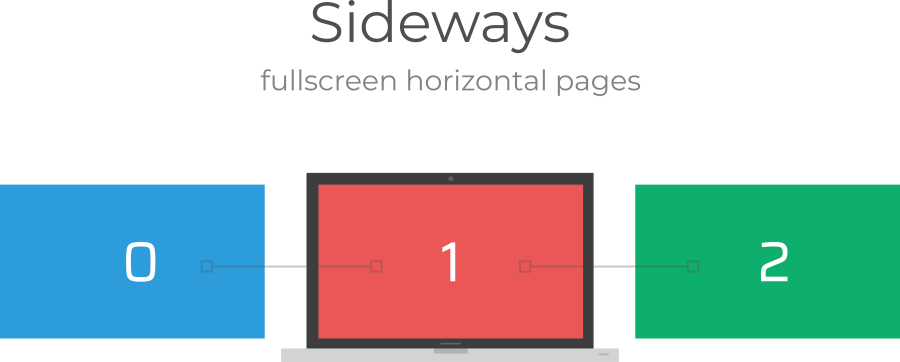
A browser JavaScript library for creating sideways page sections.
This project is undergoing active developement, but it is not ready for use quite yet.
Getting Started
Usage of Sideways is intended to be as straightforward and flexible as possible. Sideways contains only one JavaScript file and does not need any other dependencies like jQuery. You can install Sideways either with normal browser tags or as a module with NPM.
Installing with browser tags
Clone this repository and copy index.min.js to your folder.
<script src="./index.min.js"></script>Alternitavely, you may use a CDN. Remember to use the latest version number in your link!
<script src="https://cdn.jsdelivr.net/npm/[email protected]/index.min.js"></script>You will then need to load the library using sideways.init(pageNumber). Make sure you initialize Sideways before doing any DOM manipulations.
<script>
  sideways.init(0)
</script>
Installing with NPM
Sideways is not fully setup to work out of the box with NPM as of yet. In the future, you will be able to simply import the module.
npm install sideways -sYou will then need to initialize it in the entry point of your application.
import sideways from 'sideways'

sideways.init(0)
Usage
Sideways allows you to easily create pages with simple markup. The most basic HTML structure should look something like this:
<!DOCTYPE html>
<main class="sideways">
  <div class="pages">
    <section class="page blue">
        <div class="page-right">Right</div>
    </section>
    <section class="page red">
      <div class="page-left">Left</div>
      <div class="page-right">Right</div>
    </section>
    <section class="page green">
      <div class="page-left">Left</div>
    </section>
  </div>
</main>

<script src="https://cdn.jsdelivr.net/npm/[email protected]/index.min.js"></script>
<script>
  sideways.init(1)
</script>
The .sideways and .pages elements are required for Sideways to work. You should only have one element of each of those two types. Inside .pages you may include as many pages as you want. Simply give an element the class .page, and Sideways will make it fullpage for you. The .page-right and .page-left elements allow you to easily move from one page to another. You may style your pages and page-lefts/page-rights however you would like as long as you have the basic structure the same.
When you run sideways.init(1) Sideways will create an array based on the number of pages you have and start on the index you pass in as an argument. This example will look like the picture above.
Advanced Usage
Sideways was intended to be lightweight and simple to use. However, sometimes you may want more control over exactly how your pages are structured. Because of this, Sideways provides several libary functions you can use to have more control and functionality.
sideways.init(pageNumber)
The main command used to initialize Sideways.
sideways.init(1)sideways.getCurrentPage()
Gets the array index of the current page you are on.
sideways.getCurrentPage()sideways.getPages()
Returns an array of all the page DOM nodes.
sideways.getPages()sideways.moveTo(pageNumber)
Used to move to a specified page number. Sideways will immediately move to the page without any animation.
sideways.moveTo(2)sideways.moveLeft()
Smoothly slide to the next page on the left of your current page.
sideways.moveLeft()sideways.moveRight()
Smoothly slide to the next page on the right of your current page.
sideways.moveRight()sideways.movePageToLeft(pageNumber)
Takes a page and moves it to the left of the current page you are on. Moving a page updates the DOM and might update the current page index you are on. Be sure to call sideways.getCurrentPage() if you need to reference your new current page number.
sideways.movePageToLeft(0)
sideways.moveLeft()
sideways.movePageToRight(pageNumber)
Takes a page and moves it to the right of the current page you are on. Moving a page updates the DOM and might update the current page index you are on. Be sure to call sideways.getCurrentPage() if you need to reference your new current page number.
sideways.movePageToRight(0)
sideways.moveRight()
sideways.delay(ms)
A promise-based implementation of setTimeout useful for async functions. Nothing special is added onto this method, so you may safely use the default setTimeout or your own variations of it if you desire.
async function moveSomewhere() {
  await sideways.delay(300)
  sideways.moveToPage(1)
}
TODO: update HTML documentation.