
signalk-ais-target-prioritizer
v0.4.16
Published
Plots and priorizes AIS targets according to guard and CPA criteria.

Maintainers
 jaffadog
Readme

SignalK AIS Target Prioritizer
A SignalK plugin that prioritizes AIS targets according to guard and CPA criteria.
What Does It Do?
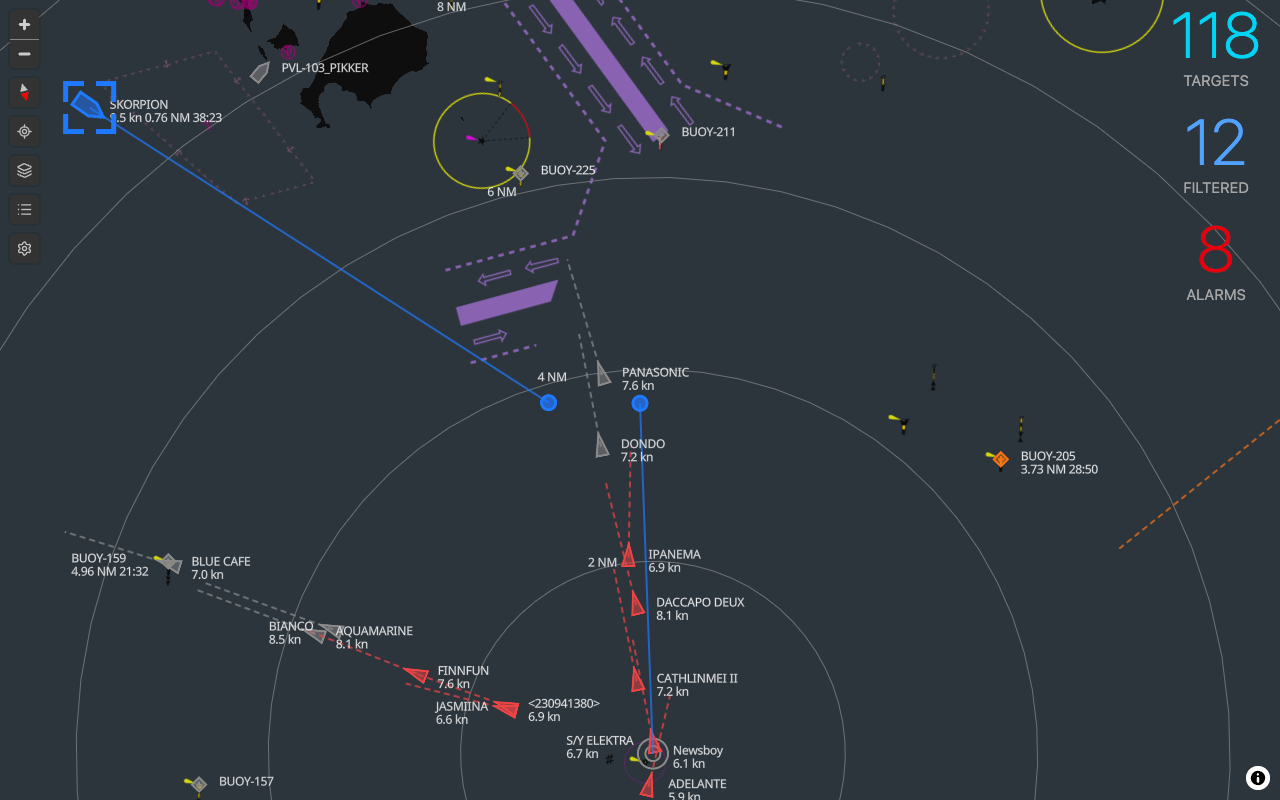
The SignalK AIS Target Prioritizer plugin processes SignalK AIS data and applies configurable collision risk criteria to each AIS target. It calculates CPA and time to CPA (TCPA) and establishes a collision risk rating for each AIS target. This rating can be used to rank AIS targets and highlight those targets that represent the most immediate risk/danger. The plugin will also trigger warnings and alarms when AIS target vessels meet the collision risk criteria.
Features
Webapp
- Plots AIS targets
- Different symbols for Class A, Class B, ATONS, BASE, and MOB/EPIRB/SART targets
- Noth-up or course-up map rotation
- Show full AIS target details
- Configurable CPA and guard warnings and alarms with separate profiles for anchored, Harbor, coastal, and offshore
- Restore default CPA and guard warnings and alarms configuration
- Select current active profile (anchored, Harbor, coastal, or offshore)
- Calculates AIS target range, bearing, CPA, time to CPA (TCPA), collision risk rating, and warning/alarm status
- Visual and audible CPA and guard alarm announcements
- Visually highlights AIS targets that represent higher collision risk
- Visually indicates AIS crossing situation by projecting vessel positions to the moment of CPA. This makes it very easy to understand if the target will pass ahead or behind you.
- Lists AIS targets in order of collision risk
- Mute alarms - such that muted vessels will no longer raise further alarms
- Visually indicates lost AIS targets with red X
- Includes 4 built-in basemap layers: street, satellite, offline (world map), and empty
- Supports additional basemaps, including raster, mbtiles, and pmtiles, via Signal K chart resource API providers such as Signal K Charts and PMTiles Chart provider. Note that offline charts can be setup using these features. I highly recommend creating your own PMTiles maps using Protomaps, as the resulting files are quite small. For example, a PMTiles extracted subset covering all of French polynesia with zoom 1-15 comes out at 22MB.
- Prevent screen sleep
- Dark mode for night time use
- Fullscreen mode
Plugin
- Calculates AIS target range, bearing, CPA, time to CPA (TCPA), collision risk rating, and warning/alarm status
- Publishes SignalK vessel deltas containing range, bearing, CPA, time to CPA (TCPA), collision risk rating, and warning/alarm status
- Publishes SignalK notification messages for AIS CPA and gurad warnings and alarms. These can be wired up to produce audible alarms and/or push notifications using various available notification plugins or the Node-RED plugin. This facilitates "headless" alarming.
- Notifications can be muted using the webapp or REST API (
GET /plugins/signalk-ais-target-prioritizer/muteAllAlarms)
The Plugin must be running in order to use the webapp.
Vessel Deltas Published
The plugin emits the following SignalK deltas on the AIS targets in the SignalK data model:
| Data | Description | SignalK Path | | --------------------- | -------------------------------------------------------------------------- | -------------------------------------------------------------------------------------------------------- | | CPA | Closest point of approach | navigation.closestApproachObject value with property: distance (m) | | TCPA | Time to closest point of approach | navigation.closestApproach Object value with property: timeTo (s) | | Range | Current range to target | navigation.closestApproachObject value with property: range (m) | | Bearing | Current bearing to target | navigation.closestApproachObject value with property: bearing (rad True) | | Collision Risk Rating | A numerical rating of collision risk. A low number represents higher risk. | navigation.closestApproach Object value with property: collisionRiskRating | | Collision Alarm Type | "guard", "cpa" | navigation.closestApproachcollisionRiskRatingObject value with property: collisionAlarmType | | Collision Alarm State | "warn", "danger" | navigation.closestApproachObject value with property: collisionAlarmState |
Configuration
The configuration consists of the Collision Profile criteria used to evaluate collision risk:
- Collision Warning - Configured using CPA, TCPA, and target SOG threshholds. Trips an CPA Warning when a target vessel meets these conditions. Intended to warn you of targets approaching your Collision Alarm thresholds.
- Collision Alarm - Configured using CPA, TCPA, and target SOG threshholds. Trips an CPA Alarm when a target vessel meets these conditions.
- Guard Alarm - Configured using target Range and SOG threshholds. Trips an Guard Alarm when a target vessel meets these conditions.
There are four sets of the above criteria for different navigation situations:
- Anchored
- Harbor
- Coastal
- Offshore
Attribution
- Ship and boat icons created by Peter van Driel - The Noun Project CC BY 3.0.
- Buoy icon created by sentya irma - The Noun Project CC BY 3.0.
- Life Buoy icon created by Alex Podolsky - The Noun Project CC BY 3.0.
- UFO icon created by Dian Chandra Lesmono - The Noun Project CC BY 3.0.