
signalk-polar-performance-plugin
v2.0.0
Published
Calculates live sailing performance from the active polar selected in a polar management plugin (e.g. signalk-polar-management).

Maintainers
 hanstool
Readme
Polar Performance — Signal K Plugin
Polar Performance calculates live sailing performance metrics — target boat speeds, beat and run angles, target VMG, polar speed ratio, and optimum wind angles — in real time from your boat's instruments in Signal K. An integrated webapp and full-screen plotter let you inspect live values, target angles, and polar curves while sailing.
Architecture & Polar Providers
Polar Performance works together with a polar provider plugin (such as signalk-polar-management).
Starting in version 2.0.0, polar file storage, file format conversion, ORC imports, and polar selection are decoupled from this compute plugin:
- Polar Provider (
signalk-polar-management): Stores polar files, imports ORC/CSV/text polar files, manages polar metadata, and publishes the selected active polar to Signal K (polars.activePolar) along with any performance factor (polars.performanceFactor). - Performance Plugin (
signalk-polar-performance-plugin): Subscribes to the active polar and boat instrument data (TWS, TWA, STW/SOG), calculates real-time performance values using thepolar-mathengine, and publishes the resulting performance metrics back to the Signal K delta stream.
When a polar lookup cannot be completed or required instrument data is missing/stale, output paths are cleanly set to null and the webapp status indicates the exact cause.
Installation
Install both plugins from the Signal K App Store, or via npm:
cd ~/.signalk
npm install signalk-polar-performance-plugin signalk-polar-management
Then restart Signal K and enable both plugins in Server → Plugin Config. Without a polar resource provider installed and enabled, Polar Performance will wait for an active polar to be published and indicate this in its status.
Quick start
- Open the Polar Management webapp and import or select an active polar (and optionally set a performance factor).
- Open the Polar Performance webapp from Webapps → Polar Performance.
- The Overview tab shows the active polar's details, live performance numbers, and a polar diagram.
- Enable the outputs you want in the Outputs tab.
The webapp
The webapp is the primary interface for the plugin. Open it from the Signal K dashboard.
Overview
Shows the currently active polar (name, boat type, sail number, year, source) and performance factor — read-only, selected in the polar management webapp — followed by a polar diagram on the left and live performance numbers on the right. The diagram shows a live TWS curve interpolated for the current wind speed, and two dots — the polar target speed (what the polar says you should be doing) and your actual boat speed — both at the current TWA. The targets section shows the beat and run angle and VMG interpolated from the polar for the current wind speed. Any data quality warnings appear at the bottom.
Inputs
Shows the raw instrument values as they arrive from Signal K (before smoothing) and the smoothed values actually used for computation, side by side. Useful for spotting stale sensors or checking whether the smoother settings make sense for your data. Smoother type/parameter and speed source are configured here. Any missing inputs are listed as warnings.
Outputs
Shows the current value of each output path and lets you enable or disable each group with a toggle. Only enabled outputs are published to the Signal K bus.
Configuration
Most configuration is done through the webapp.
Active polar and performance factor
These are not configured here. Select the active polar and set the performance factor in the polar management webapp (e.g. signalk-polar-management); this plugin reads them from the polars.activePolar and polars.performanceFactor Signal K paths. If no polar is active, the plugin runs but publishes nothing; any previously published values are nullified immediately.
Smoother
Input smoothing prevents noisy instrument data from producing erratic outputs. The available smoothers are:
| Type | Parameter | Best for | |------|-----------|----------| | Exponential (EMA) | Time constant τ (seconds) | General use. Smooth but responsive. | | Moving average | Window size (seconds) | Uniform weighting over a fixed time window. | | Kalman filter | Steady-state gain (0–1) | Automatically balances noise and responsiveness. | | None | — | When your instruments already filter their output. |
All three input channels — true wind speed, true wind angle, and boat speed — use the same smoother type and parameter.
Speed source
Choose between speed through water (navigation.speedThroughWater) and speed over ground (navigation.speedOverGround). Use SOG when a working paddlewheel is not available, but be aware that SOG includes current — this makes boat speed appear higher or lower depending on the tidal state.
Outputs
Enable each group in the Outputs tab.
Beat and run angles
| Path | Description |
|------|-------------|
| performance.beatAngle | Optimal upwind TWA for the current TWS. Negative = port tack. |
| performance.gybeAngle | Optimal downwind TWA for the current TWS. Negative = port tack. |
These are the angles at which VMG is maximised, read directly from the polar. Use these as target wind angles for optimal upwind and downwind sailing.
Beat and run VMG
| Path | Description |
|------|-------------|
| performance.beatAngleVelocityMadeGood | Best achievable VMG upwind for the current TWS. |
| performance.gybeAngleVelocityMadeGood | Best achievable VMG downwind for the current TWS. |
Target TWA and VMG
Automatically selects between beat and run depending on whether you are sailing upwind or downwind (TWA < 90° = upwind).
| Path | Description |
|------|-------------|
| performance.targetAngle | Target TWA for the current point of sail. Negative = port. |
| performance.targetVelocityMadeGood | Target VMG for the current point of sail. |
Optimum wind angle
| Path | Description |
|------|-------------|
| performance.optimumWindAngle | Difference between your current TWA and the optimal angle. Negative = bear away, positive = head up. Zero means you are sailing at the optimal angle. |
VMG and polar VMG ratio
| Path | Description |
|------|-------------|
| performance.velocityMadeGood | Your actual VMG: boatSpeed × cos(TWA). |
| performance.polarVelocityMadeGood | Polar target VMG for the current TWS. |
| performance.polarVelocityMadeGoodRatio | Actual VMG divided by polar VMG. 1.0 = perfect; 0.85 = 85 % of theoretical optimum. |
Polar speed and speed ratio
| Path | Description |
|------|-------------|
| performance.polarSpeed | The polar target boat speed for the current TWS and TWA. |
| performance.targetSpeed | The boat speed you would need at the optimal angle to achieve target VMG. |
| performance.polarSpeedRatio | Actual boat speed divided by polar speed. 1.0 = on target; <1.0 = below target. |
Maximum speed
| Path | Description |
|------|-------------|
| performance.maxSpeed | Maximum polar boat speed achievable at the current TWS. |
| performance.maxSpeedAngle | The TWA at which maximum speed is achieved. |
Opposite tack heading
| Path | Description |
|------|-------------|
| performance.tackTrue | True heading on the opposite tack, calculated from the beat angle and current heading. Useful for tactical displays and layline charts. |
Requires navigation.headingTrue to be available.
Smoothed inputs
| Path | Description |
|------|-------------|
| environment.wind.angleTrueWaterDamped | Smoothed TWA as used internally by the plugin. |
| performance.boatSpeedDamped | Smoothed boat speed as used internally by the plugin. |
Useful when you want downstream instruments to use the same smoothed values that drive the performance calculation.
Managing polars
Polar storage, import (ORC, text formats), and active-polar/performance-factor selection are handled by a separate 'polars' resource-provider plugin, such as signalk-polar-management. See that plugin's documentation for import formats, the ORC certificate search, and extrapolation behaviour of the underlying polar-math library.
Connecting to plotters and instruments
B&G / Navico
Install the B&G Performance Plugin. Map at minimum:
| Signal K path | B&G label |
|---------------|-----------|
| performance.polarSpeed | Polar Speed (POL SPD) |
| performance.polarSpeedRatio | Polar Performance (POL PERF) |
| performance.targetAngle | Target TWA (TARG TWA) |
| performance.beatAngle | Beat Angle |
| performance.gybeAngle | Gybe Angle |
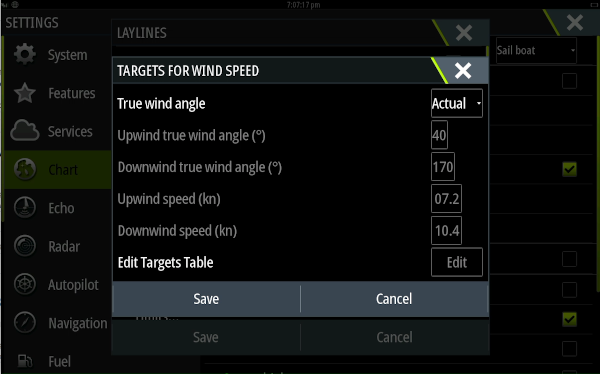
For laylines on charts: Settings → Chart → Laylines → Targets → True wind angle → Actual.
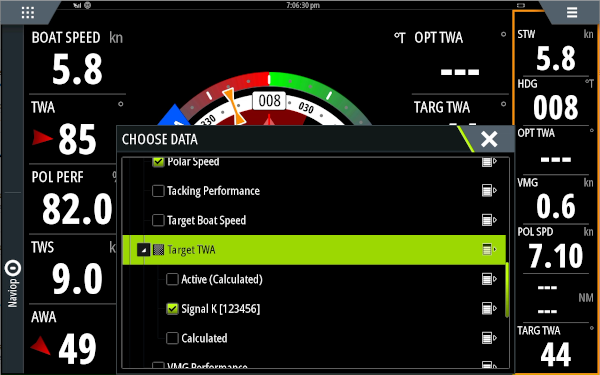
SailSteer screen -> Long press tile to add 'Performance -> Target TWA -> decollapse, choose SignalK':
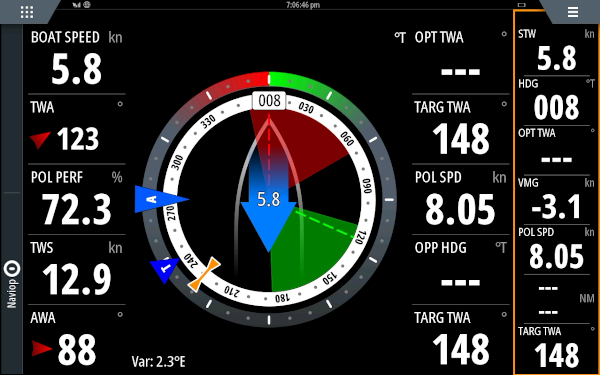
Now the Target TWA is coming from SignalK and the laylines will be drawn based on its value:
Garmin / Raymarine / other NMEA 2000
Use a Signal K → NMEA 2000 gateway plugin (such as canboat or signalk-to-n2k) to forward paths to the PGN fields your plotter expects for performance data. Consult your plotter's documentation for the relevant PGNs — most support Polar Speed, Target TWA, and VMG.
If you have a Raymarine MFD and can share setup instructions, please submit a PR or open an issue!
OpenCPN / KIP / other Signal K displays
Subscribe directly to the paths listed in the Outputs section above.
Full-screen polar plotter
The plugin includes a separate full-screen polar plotter page at:
http://<your-server>:<port>/signalk-polar-performance-plugin/plotter.htmlThis is a dark-themed, full-screen canvas display suitable for a chartplotter or secondary monitor. It shows all library curves, the live TWS curve, and the performance dots, and updates in real time.
Data quality and warnings
The webapp shows warnings whenever something prevents accurate calculation:
| Warning | Cause |
|---------|-------|
| True wind speed — no data | environment.wind.speedTrue is not arriving from Signal K. |
| True wind angle — no data | environment.wind.angleTrueWater is not arriving. |
| Boat speed — no data | navigation.speedThroughWater (or SOG) is not arriving. |
| No active polar | No polars.activePolar is published. Select an active polar in the polar management webapp. |
| Sailing in irons | TWA is below the minimum angle in the polar. No output is produced. |
| Pinching | TWA is between the minimum polar angle and the beat angle. Values come from the extrapolated beat zone. |
| Extrapolated beyond run angle | TWA is deeper than the run angle. Values come from the cosine-VMG extrapolation model. |
| Wind speed below/above polar range | TWS is outside the range covered by the polar. Values are extrapolated from the nearest TWS entry. |
Input data quality
Performance calculations are only as good as the inputs. A few things are worth checking before relying on the output:
- True wind must already be correctly calculated. If your setup uses a basic instrument or the Signal K Derived Data plugin, check that the calculation is using the right boat speed source and that heading is calibrated. The Advanced Wind plugin provides additional corrections for sensor mounting angle, heel, mast movement, and upwash if your true wind data quality is poor.
- Boat speed calibration has a direct effect on polar ratio calculations. A 3 % paddlewheel error produces a 3 % offset in
performance.polarSpeedRatio. The Speed and Current plugin can automate paddlewheel calibration. - Data consistency: the plugin uses its own internal smoother for all inputs.
For integrators and API users
If you want to consume this plugin's live performance queries, use the developer reference:
- Developer reference for the plugin REST API.
- openApi.json for the authoritative machine-readable contract.
- For the canonical
polarTablestructure, polar storage, and import, see signalk-polar-management and the polar-format / polar-math packages it depends on.
Known limitations
- Heel angle is not taken into account in the polar lookup. Most ORC polars are upright polars.
- Requires a 'polars' resource-provider plugin (e.g.
signalk-polar-management) to be installed and running for polar storage, import, and active polar selection.