
signalk-racebox-imu
v1.2.2
Published
Auto-discovers and connects to a RaceBox Mini or Micro over BLE, sending high-precision IMU, GNSS, and calculated wave data to Signal K.

Maintainers
 theseal666
Readme
signalk-racebox-imu
A Signal K plugin to auto-discover, connect, and stream telemetry from a RaceBox Mini, RaceBox Mini S, or RaceBox Micro over Bluetooth Low Energy (BLE).
This plugin parses the RaceBox binary protocol (UBX-framed, per the official RaceBox BLE Protocol Description rev 8) and converts it into standard Signal K paths. Streams at 25Hz with full 6-axis IMU (accelerometer + gyroscope), GPS/GNSS position, course/speed, battery monitoring, and satellite tracking.
Bluetooth connectivity is handled by node-ble, which talks to the standard Linux BlueZ daemon over D-Bus — no native modules, no raw HCI access, and no conflicts with the system Bluetooth stack.
Features
- Zero Configuration Pairing: Auto-discovers and connects to the first device advertising as "RaceBox" — no MAC addresses to find or type.
- Full Telemetry Mapping: Position, SOG, COG, Pitch, Roll, satellite count, battery status, and GPS accuracy.
- 6-Axis IMU Streaming: Raw accelerometer (X/Y/Z) and gyroscope (X/Y/Z) data at 25Hz.
- Experimental Wave & Slam Detection: Advanced math (True Z rotation + leaky integration) to estimate wave height, period, and detect complex hull slams.
- Fix-Aware Position Gating: Position, SOG, and COG are only published when the receiver reports a valid 2D/3D fix.
- In-App Calibration: Zero out Pitch & Roll offsets while the boat is level — saved to config for future sessions.
- Self-Healing Connection: Automatic reconnect with backoff, plus a data-staleness watchdog that tears down and re-establishes a silent connection.
- High-Quality Codebase: Decoupled metadata and automated unit tests for reliability and a high Signal K Registry score.
Screenshots
Plugin Configuration
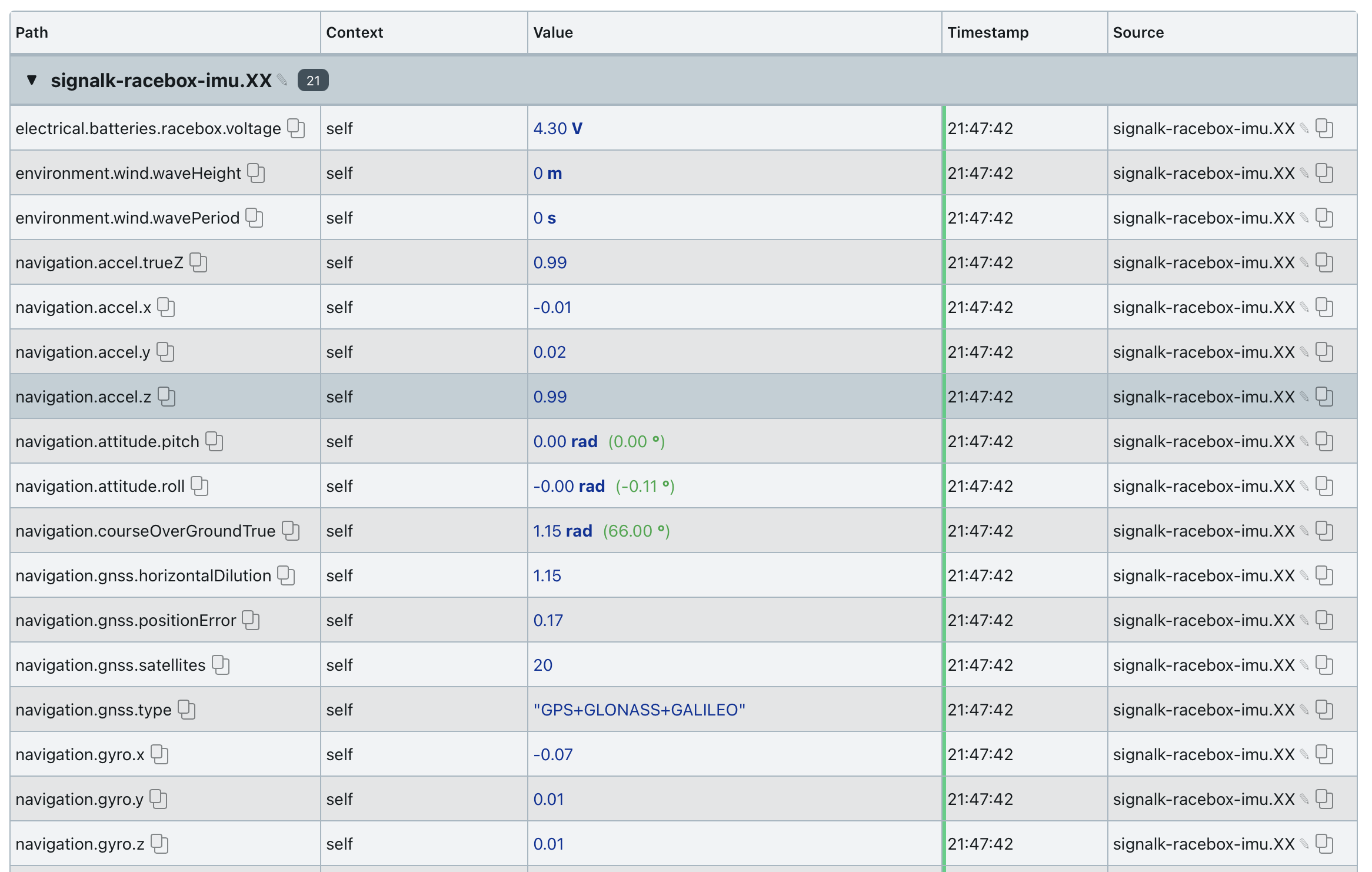
Live Data Stream (25Hz)

Connection Status

Experimental: Wave & Performance Detection
This plugin performs real-time processing of the 25Hz IMU stream to derive advanced metrics for racing and analysis (e.g. in Expedition):
1. True Vertical Acceleration (True Z)
To isolate actual vertical motion from the boat's rotation, the plugin performs a 3D rotation of the raw accelerometer data into an Earth-fixed frame using the current Pitch and Roll.
- Path:
navigation.accel.trueZ(m/s²) - Math: $a_z^{earth} = -a_x \sin(P) + a_y \sin(R)\cos(P) + a_z \cos(R)\cos(P)$
2. Wave Height & Period
Estimating wave height from acceleration requires double-integration. This plugin uses a Leaky Integration (High-Pass Filter) approach to prevent drift:
- Paths:
environment.wind.waveHeight(m),environment.wind.wavePeriod(s) - Logic: The boat's Pitch cycle identifies wave start/peak/end. We integrate vertical acceleration to velocity, then displacement. Wave height is the peak-to-peak displacement within each pitch-detected half-cycle.
- Persistence: Metrics are reported at 25Hz and auto-reset to
0after 20s of inactivity to ensure clean logging.
3. Complex Slam Detection
- Path:
performance.hull.slamAcceleration(m/s²),performance.hull.slamAngularJolt(rad/s²) - Logic: Monitors the 3D G-Force Resultant magnitude. This captures impacts from any direction (side hits, bow-on slams, or falling off waves).
- Angular Jolt: Measures the derivative of angular rates to capture sudden, violent orientation changes.
- Persistence: Uses a 1-second peak-hold to ensure events are captured in logs.
Prerequisites & System Dependencies
The plugin uses the standard Linux Bluetooth stack (BlueZ) via D-Bus.
1. Ensure BlueZ is installed and running
sudo apt-get install bluetooth bluez
sudo systemctl enable --now bluetooth
bluetoothctl power on
Note: If you previously disabled the Bluetooth service to accommodate a noble-based plugin, re-enable it — this plugin requires
bluetoothdrunning.
2. Grant D-Bus permission
Create /etc/dbus-1/system.d/signalk-ble.conf (replace theseal666 with your Signal K user):
<!DOCTYPE busconfig PUBLIC "-//freedesktop//DTD D-BUS Bus Configuration 1.0//EN"
  "http://www.freedesktop.org/standards/dbus/1.0/busconfig.dtd">
<busconfig>
  <policy user="theseal666">
    <allow own="org.bluez"/>
    <allow send_destination="org.bluez"/>
    <allow send_interface="org.bluez.GattCharacteristic1"/>
    <allow send_interface="org.bluez.GattDescriptor1"/>
    <allow send_interface="org.freedesktop.DBus.ObjectManager"/>
    <allow send_interface="org.freedesktop.DBus.Properties"/>
  </policy>
</busconfig>
Reload D-Bus: sudo systemctl reload dbus.
Installation & Development
Method 1: Via Signal K App Store (Recommended)
Search for signalk-racebox-imu in Appstore → Available. Install and restart Signal K.
Method 2: Manual Installation
cd ~/.signalk
npm install signalk-racebox-imu
sudo systemctl restart signalk
Development & Testing
# Run automated tests
npm test
Signal K Paths Emitted
Navigation & IMU
navigation.position— Latitude/Longitude (degrees)navigation.speedOverGround(m/s),navigation.courseOverGroundTrue(rad)navigation.attitude.{roll, pitch}(rad)navigation.rateOfTurn(rad/s)navigation.accel.{x, y, z}(g),navigation.gyro.{x, y, z}(rad/s)navigation.gnss.{satellites, horizontalDilution, positionError}
Experimental (Enabled in Config)
navigation.accel.trueZ(m/s²)environment.wind.waveHeight(m),environment.wind.wavePeriod(s)performance.hull.slamAcceleration(m/s²),performance.hull.slamAngularJolt(rad/s²)
Electrical
electrical.batteries.racebox.capacity.stateOfCharge(0 to 1)electrical.batteries.racebox.chargingMode(charging/not charging)electrical.batteries.racebox.voltage(V, RaceBox Micro only)
Troubleshooting
Plugin Won't Start / "Bluetooth adapter init timed out"
- Confirm the Bluetooth service is running:
systemctl status bluetooth - Confirm the adapter is powered:
bluetoothctl show(look forPowered: yes) - Confirm the D-Bus policy exists and names the correct user, then
sudo systemctl reload dbusand restart Signal K.
Scanning Never Finds the RaceBox
- Verify the device is advertising: blue LED should be flashing. A solid blue LED means another device (like the phone app) is connected.
- Check visibility to OS:
bluetoothctl scan onshould listRaceBox Mini/Micro <serial>.
Connected But No Data
- Check Provider Status in Signal K and the server log:
sudo journalctl -u signalk -f | grep RaceBox - Watchdog reconnects if data stalls for 15s. Persistent cycles may indicate another client fighting for the device.
- Try the RESET BLUETOOTH button in plugin config.
Good to know
- One central at a time: A RaceBox accepts only one BLE connection. Fully close the RaceBox phone app.
- Standalone recording (Mini S / Micro): If set to record at lower rates (e.g. 1Hz), live BLE data arrives at that rate too.
- No position indoors: Navigation data is gated on a valid GNSS fix. IMU and battery data flow immediately.
License
MIT License.