
signalk-racer
v1.3.6
Published
Signalk plugin to calculate values of interest to sail racers, such as: Time to Start; Time of Start, Time to Burn; Distance to Line; Next leg TWA.

Maintainers
 gregwilkins
Readme
Signal K Racing Plugin
This plugin adds sail racing relevant data to a Signal K server. It focuses on real-time information useful during the start of a race, such as:
- A server side race timer that can be displayed on multiple screens and be finely adjusted
- A mechanism to set and adjust the start line using waypoints and REST commands
- Calculation of the distance to the line.
- Calculation of the TWA for the next leg of the course.
GitHub repository: https://github.com/gregw/signalk-racer
📌 Features
This plugin calculates and publishes the following Signal K paths:
| Path | Description | Units | Std |
|--------------------------------------------|------------------------------------------------------------------------|----------------------------------------------------|-----|
| navigation.racing.distanceStartline | Signed minimum distance from the bow to the start line | m | Y |
| navigation.racing.startLineLength | Total length of the start line | m | |
| navigation.racing.startLineBearing | Bearing of the start line, from the stb end to the port end | rad | |
| navigation.racing.stbLineBias | Bias of the start line toward the starboard end | m | |
| navigation.racing.bestVmg.toCourseSide | Best VMG across the line towards the course side | m/s | |
| navigation.racing.bestVmg.fromCourseSide | Best VMG back across the line from the course side (used when OCS) | m/s | |
| navigation.racing.bestVmg.toPortEnd | Best VMG along the line towards the port end (pin) | m/s | |
| navigation.racing.bestVmg.toStbEnd | Best VMG along the line towards the stb end (boat) | m/s | |
| navigation.racing.bestVmg.*.override | The manual adjustment behind each best VMG, null when not adjusted | m/s | |
| navigation.racing.effectiveVmg.toLine | VMG the perpendicular leg of the time to line is divided by | m/s | |
| navigation.racing.effectiveVmg.alongLine | VMG the along-line leg is divided by, 0 when inside the start zone | m/s | |
| navigation.racing.startLinePort | Location of the port (pin) end of the start line | {latitude,longitude} | Y |
| navigation.racing.startLineStb | Location of the starboard (boat) end of the start line | {latitude,longitude} | Y |
| navigation.racing.nextLegHeading | True heading for the next leg of the course | rad | |
| navigation.racing.nextLegTrueWindAngle | True Wind Angle for the next leg of the course | rad | |
| navigation.racing.timeToStart | Period of time until the race start | s | Y |
| navigation.racing.timeToLine | Period of time to sail to the line at best VMG | s | |
| navigation.racing.timeToBurn | Period of time delay before sailing to the at best VMG | s | |
| navigation.racing.startTime | The start time as an ISO timestamp | rfc3339 | |
These values can be displayed in Skip/KIP widgets, Freeboard-SK, or other Signal K clients.
There are dedicated widgets for the start timer and line adjustment since 3.5.0 of KIP
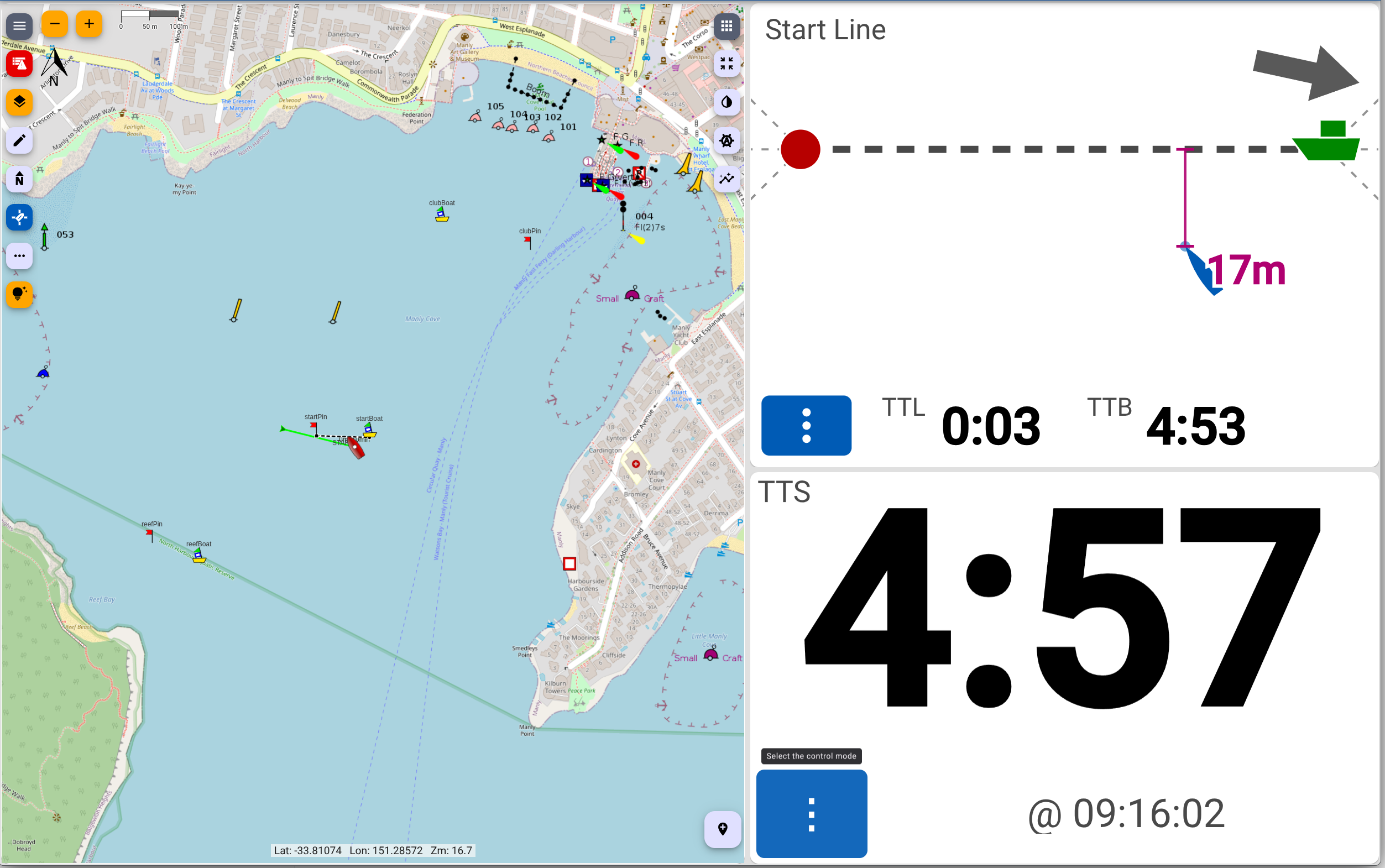
Skip start line view and timer widgets besides Freeboard-SK
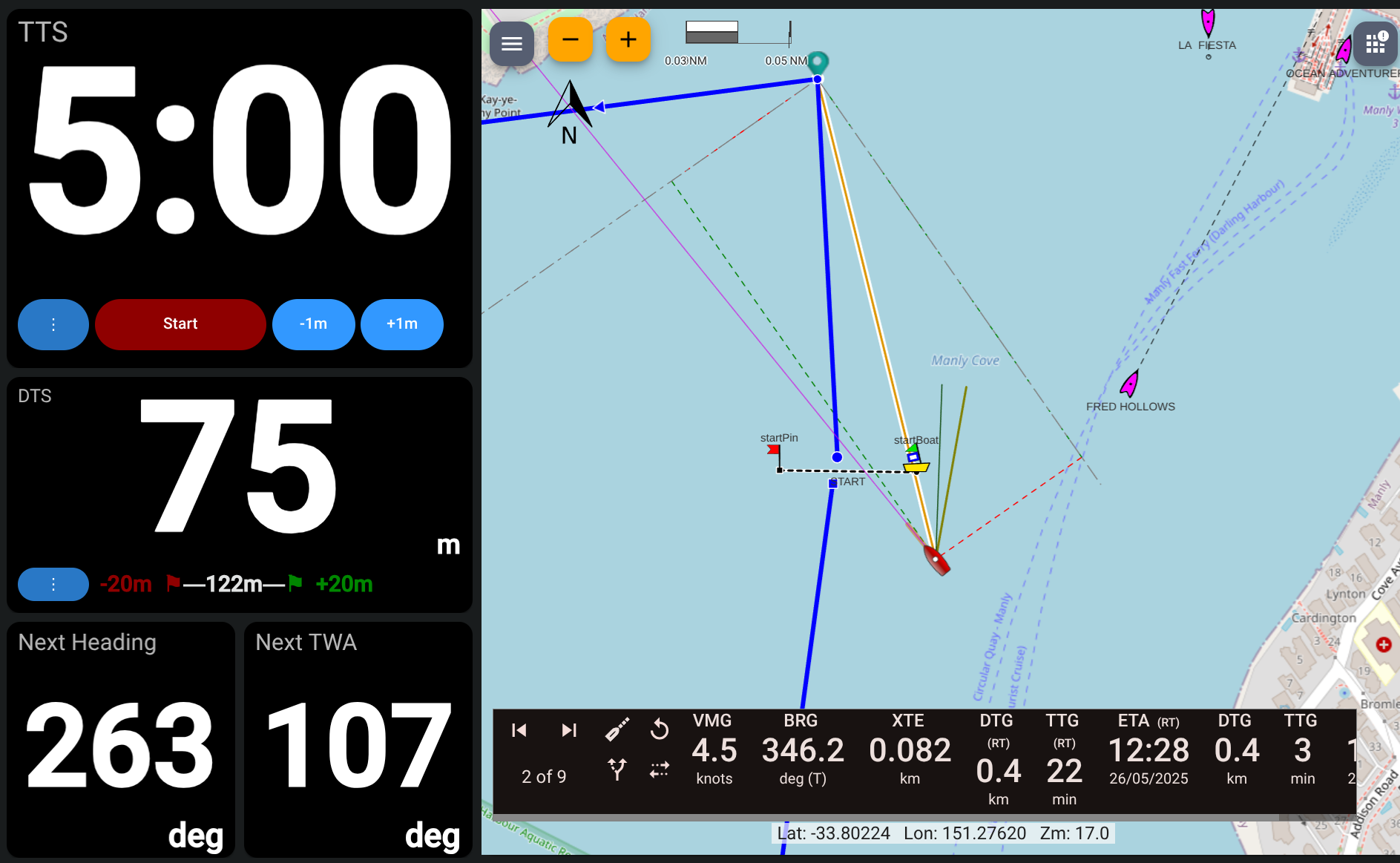
KIP racer timer and line widgets beside Freeboard-SK showing the next leg
There is also a webapp to: adjust the line, visualise the approach to the line, adjust VMGs, and configure the timer. See the Skip widgets below for a full description of the line visualisation.
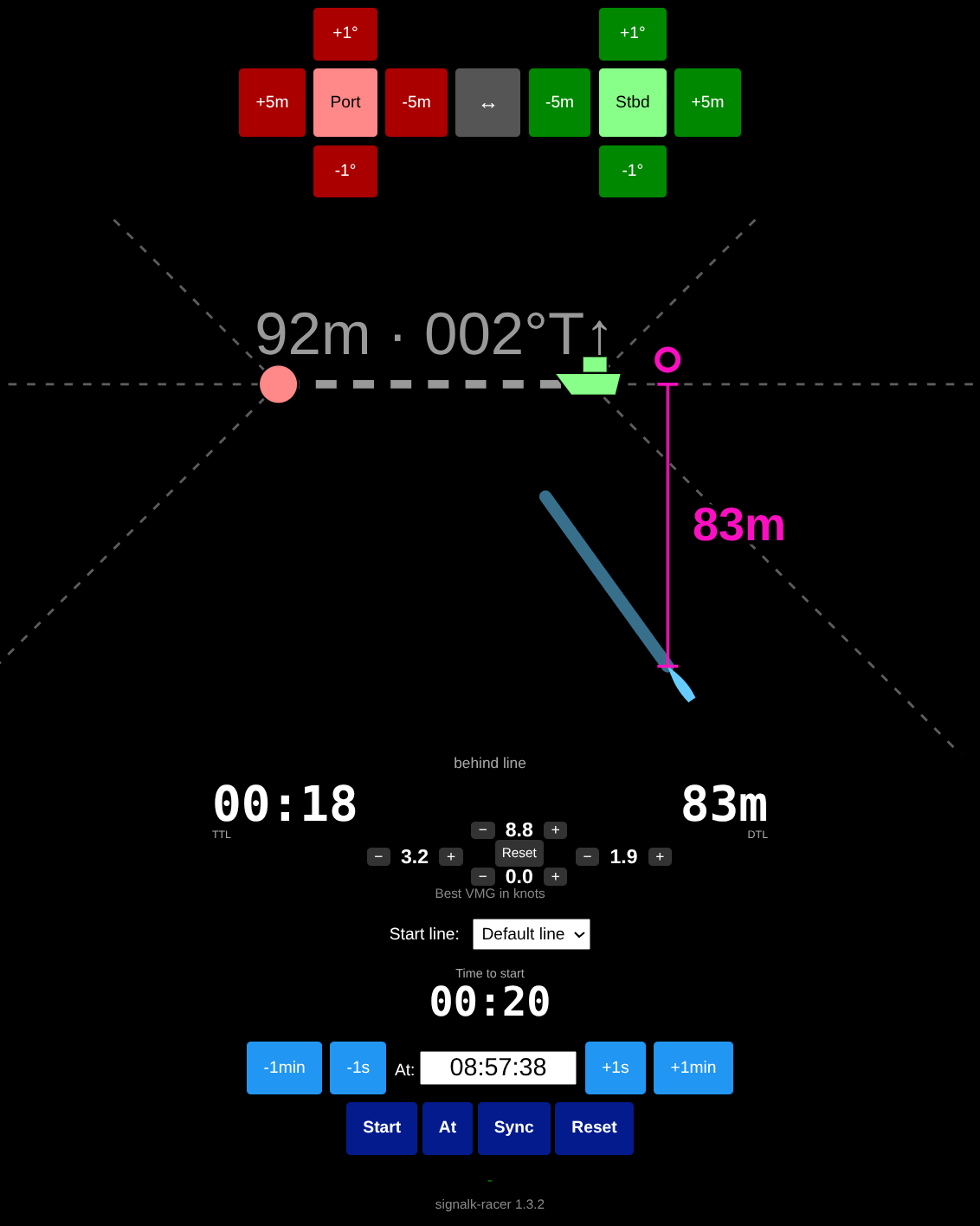
The racer webapp: line adjustment, the approach to the line, best VMGs and the start timer
⚙️ Configuration
You can configure the plugin via the Signal K web interface or by editing settings.json manually.
Parameters:
| Parameter | Description | Default |
|---------------------------|-------------------------------------------------------------------------|---------------|
| startLineStb | Name of the waypoint for the starboard (committee boat) end of the line | "startBoat" |
| startLinePort | Name of the waypoint for the port (pin) end of the line | "startPin" |
| timer | Initial time for the race timer (in seconds) | 300 |
| period | How often to update values (in milliseconds) | 1000 |
| updateStartLineWaypoint | Should the waypoints be updated if the line is set/adjusted | true |
| createStartLineWaypoint | Should the waypoints be created if the line is set | true |
| minEffectiveVmg | Floor under each effective VMG used for time to line (in knots) | 0.5 |
| nearLineDistance | Distance to line within which it is calculated without a countdown (nm) | 1 |
| lines | Array of named lines | null |
🧠 Algorithm Descriptions
Waypoint selection (navigation.racing.startLinePort and navigation.racing.startLineStb)
The startLineStb and startLinePort configurations are used to search resources for matching waypoints. These waypoints can be modified in real time (e.g. moving or setting in Freeboard SK) and the algorithm with update to the new line. Named lines can also be used to substitute different pairs of named waypoints to use as a line.
Bow position
The GPS position provided is assumed to be the bow of the boat. The offsets should be set in the signalk-server configuration to make this so. If the offsets are not set correctly, then the consistency in angle when pinging the line ends and approaching to start will compensate.
Distance to Start Line (navigation.racing.distanceStartline)
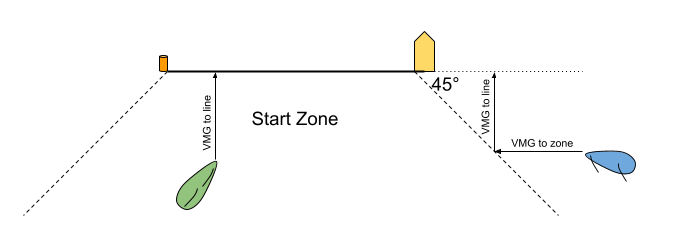
The start zone: inside it the distance is straight across to the line, outside it the boat must first reach the zone
- Computes the distance from the bow of the boat to the configured start line.
- For boats within the start zone (defined as with a 45 degree bearing to each end of the line), the perpendicular distance to the line is used.
- For boats outside of the start zone, the distance parallel to the line to reach the zone is added to their perpendicular distance to the line.
- Uses
sensors.gps.fromBowandsensors.gps.fromCenteroffsets to calculate the actual bow position. - The result is:
- Negative when the bow is over the line (OCS)
- Positive when the bow is behind the line
- The distance to line is calculated while the start timer is counting down, or otherwise when within
nearLineDistance(default 1nm) of the line. The active route is not considered.
Start Line Bias (navigation.racing.stbLineBias)
- Measures how far ahead (downwind) the pin end is relative to the boat end.
- The
environment.wind.directionTrueis used as well as the calculated line length and bearing. - A positive value means the pin end is more downwind, implying the starboard (boat) end is favored for upwind starts.
Time To Line (navigation.racing.timeToLine)
- Uses the effective VMG as the maximum VMG of either the current COG/SOG or the 90th percentile of the VMG recently achieved (approx in the last 10 minutes). This allows a boat to luff / delay without changing the time to line.
- Each effective VMG is floored at
minEffectiveVmg(default 0.5 knots), so a direction with nothing collected yet - or a drifting boat - still yields a time rather than none. The floor is not applied to the along-line leg when the boat is inside the start zone, there being no such leg to sail. - A boat within the start zone has the time calculated by the perpendicular distance to the line divided by their effective VMG to the line.
- A boat outside the start zone also has the perpendicular time plus the time calculated by the parallel distance to the zone divided by their effective VMG in that direction.
- If the line is changed, then the samples used to calculate the effective VMGs are cleared.
- The four collected VMGs are published under
navigation.racing.bestVmg.*and may be manually adjusted. An adjustment stands in for the 90th percentile of the samples, but the VMG the boat is actually sailing still wins if it is better, so an adjustment can never make the estimate ignore real progress. Adjustments are cleared when the start timer reaches zero, when the line changes, and by theresetcommand. - Like the distance to line, it is only calculated while the start timer is counting down or when within
nearLineDistanceof the line.
Time To Burn (navigation.racing.timeToBurn)
- If the start timer is running and the boat is not OCS, then the time to burn is calculated by subtracting the time to line from the remaining start time.
- Like the distance to line, it is only calculated while the start timer is counting down or when within
nearLineDistanceof the line.
Line Coordinates & Length
- The plugin reads Signal K
waypointsresources for the names you configure. - If both endpoints are found, it calculates:
- Line length (using
geolib.getPreciseDistance) - Line bearing (rhumb line from starboard to port)
Next Leg
- If a course is active then the true bearing for the next leg is calculated as
navigation.racing.nextLegHeading - If the
environment.wind.directionTrueis available, then the True Wind Angle for the next leg is also calculated asnavigation.racing.nextLegTrueWindAngle - The active route does not affect the start line calculations.
📉 Webapp Start Line Visualization
The webapp draws the line "line up": always horizontal, with the port (pin) end to the left and the starboard (committee boat) end to the right. The course side of the line is therefore always the upper half of the drawing and the pre-start side the lower half, so the arrow beside the line length and start heading always points straight up. The drawing is auto-scaled to fit the line and the boat, so it zooms as the boat closes. The line length and the heading to sail to cross the line are marked on the line itself, and the boat is drawn as a triangle pointing along its heading, amber when OCS.
A projection runs from the boat, drawn to the same scale as the rest of the drawing, so its tip can be read directly against the line. Hovering the boat reports its SOG and COG and names the line running from it.
Course projection — "Current cog/sog to start"
Runs along the boat's present navigation.courseOverGroundTrue. While the start timer is counting
down, its length is SOG × timeToStart: the distance the boat will cover before the gun if nothing
changes. Its tip is therefore where the boat will be when the start fires:
- tip short of the line — the boat will be late at current speed and heading.
- tip on the line — a perfect start
- tip beyond the line — the boat is early and will be OCS unless speed reduces or heading changes.
With no timer running there is nothing to project against, so it degrades to a short fixed-length stub showing course only.
VMG projection — "Best VMG to start"
A round hollow dot is displayed along the distance to line vectors that shows where the boat could be if it sails its best VMG into the zone and then its best VMG to the line. If the dot is not displayed, then either the timer has not started or the best VMG takes the boat beyond the current view.
Ideally, when approaching the line, the VMG projection should be just over the line and the Course projection just behind the line. This indicates that the boat is sailing near to the line at the start and can speed up to be exactly on time.
See the Skip widgets below for a full description of the line visualisation.
🌐 API Access
This plugin uses the following WebSocket-based PUT requests to Signal K model paths.
navigation.racing.setStartLine
Used to set or adjust either end of the start line.
Payload:
{
  "end": "port" | "stb",
  "position": "bow" | { "latitude": ..., "longitude": ... },
  "delta": 10,
  "rotate": 0.1
}end: which end to modify.position:"bow"or{ latitude, longitude }.delta: distance in meters along bearing.rotate: angle in radians.
navigation.racing.swapStartLine
Used to swap the port (pin) and starboard (boat) ends of the line, reversing its bearing. Takes no parameters. Collected VMG samples and any manual adjustments are exchanged along with the ends rather than discarded, since reversing the bearing flips the sign of both VMG components and so leaves every sample valid, just relabelled.
navigation.racing.setBestVmg
Used to adjust or reset the best VMGs used to estimate the time to line.
Payload:
{
  "vmg": "toCourseSide" | "fromCourseSide" | "toPortEnd" | "toStbEnd",
  "value": 5.0,
  "delta": 0.0514,
  "command": "reset" | "clear"
}vmg: which best VMG to adjust. Optional forreset, which otherwise clears all four.value: absolute best VMG inm/s.delta: adjustment inm/sapplied to the current best VMG.command:"reset"to clear the override and revert to the collected samples, or"clear"to throw away the collected samples themselves and start again.
An absolute value may also be put directly to navigation.racing.bestVmg.<name>.
navigation.racing.setStartTime
Used to start, sync, reset, or set a fixed start time.
Payload:
{
  "command": "start" | "reset" | "sync" | "adjust" | "set",
  "delta": 30,
  "startTime": "2025-06-18T04:15:00Z"
}
🧩 Skip Widgets
The Skip instrument plugin includes widgets for racer-timer, racer-line and race-line-view. The KIP plugin also contains older racer-timer and racer-line widgets.
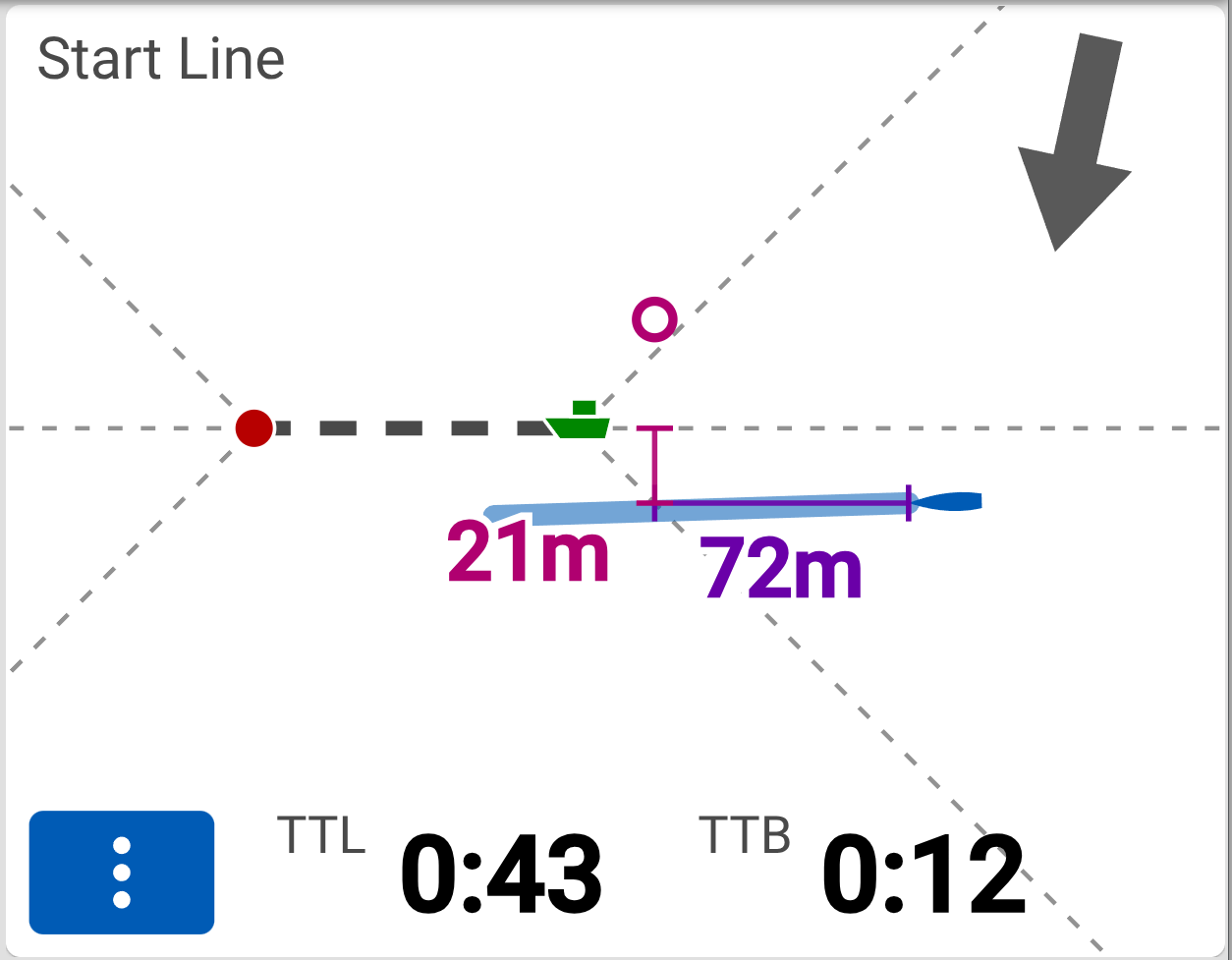
Approaching the start zone
The skip-line-view widget is a graphical alternative to the racer-line widget, both have similar features.
The screenshot above shows the Skip racer-line-view widget with:
- Line always displayed horizontally, with extension lines and 45-degree approaches
- The current True Wind Direction (TWD) is shown in the top right
- The distance the boat needs to cover to both reach the start zone (72m) and to reach the line (21m) is shown.
- The blue projection line showing where the boat will be at the start time on the current course and speed (COG/SOG)
- The best VMG dot showing where the boat could be if it sails to the zone and then the line at its best VMG.
- The time to line (0:43) is shown in seconds for the boat's best VMG.
- The time to burn (0:12) is shown in seconds for the time the boat must waste to arrive on the line on time.
- The '...' mode selector to access other views/configurations.
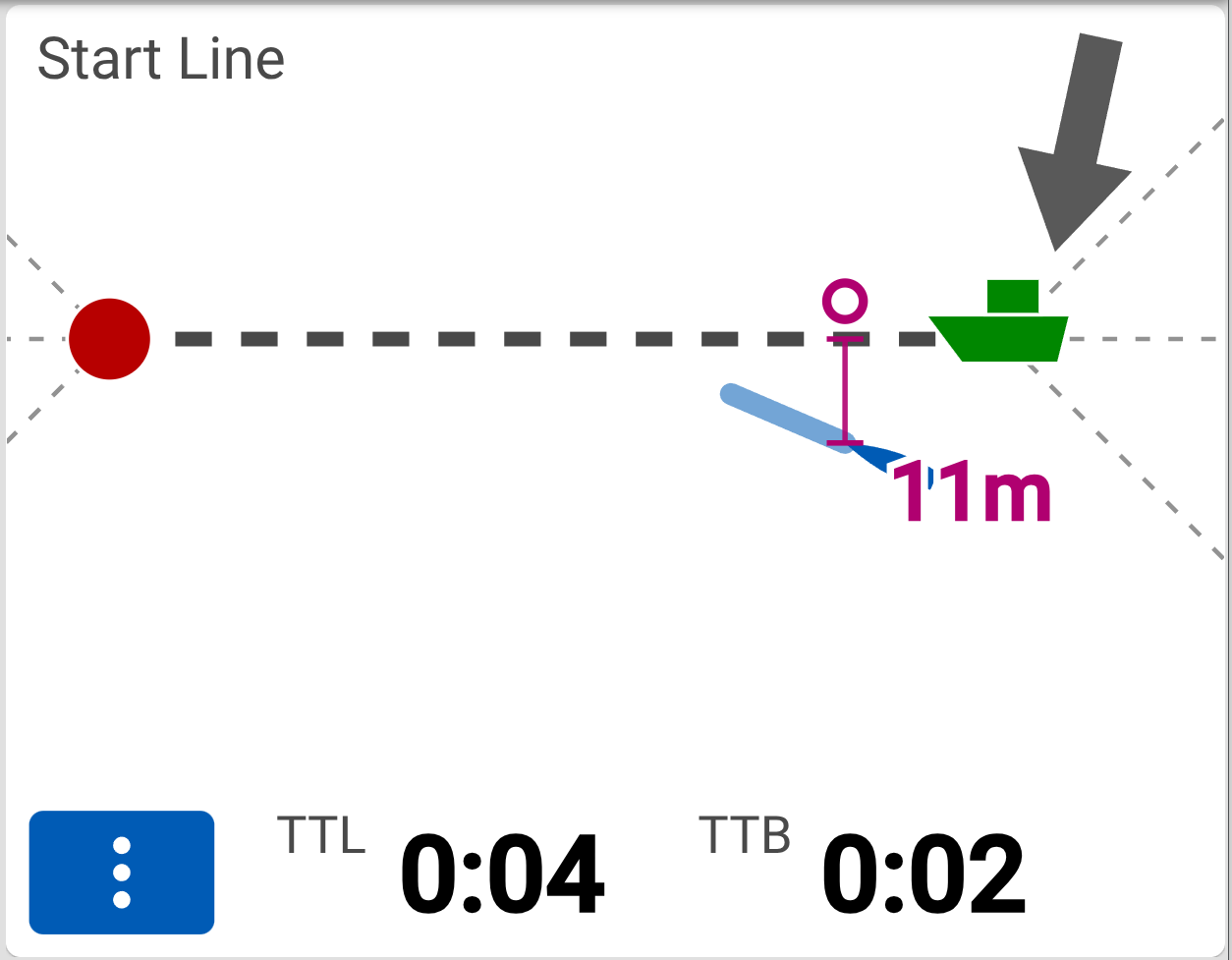
Final Approach to the start line
The screenshot above shows the Skip racer-line-view widget with the boat in the final approach to the line: 4s/11m from the line with 2s to burn. The current course projection has not crossed the line, but the best VMG dot is just over the line. This view indicates that boat should accelerate to full speed in 2 seconds for a perfect start.
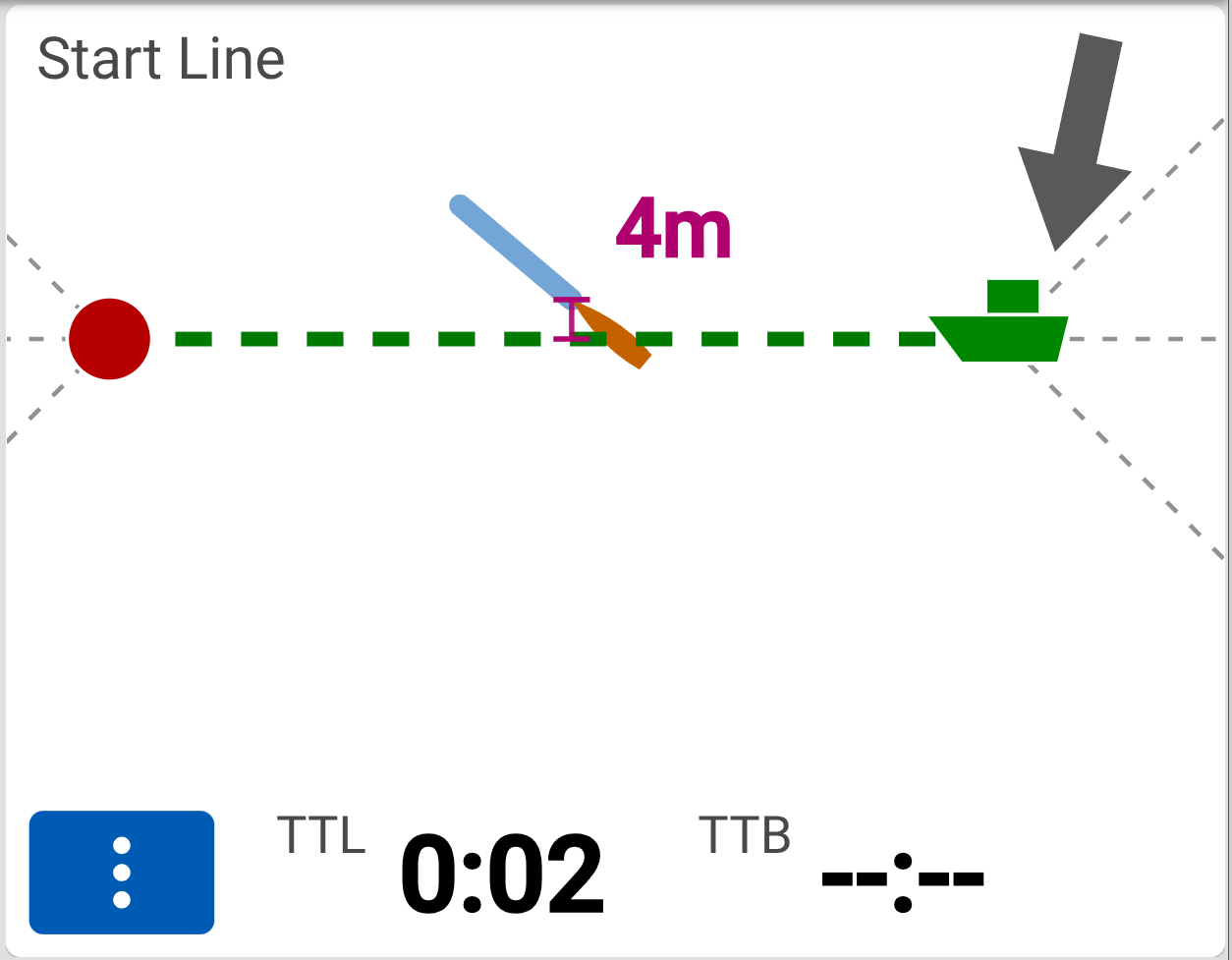
Good start line goes Green
On a good start, the line goes green and stays green until the timer is reset.
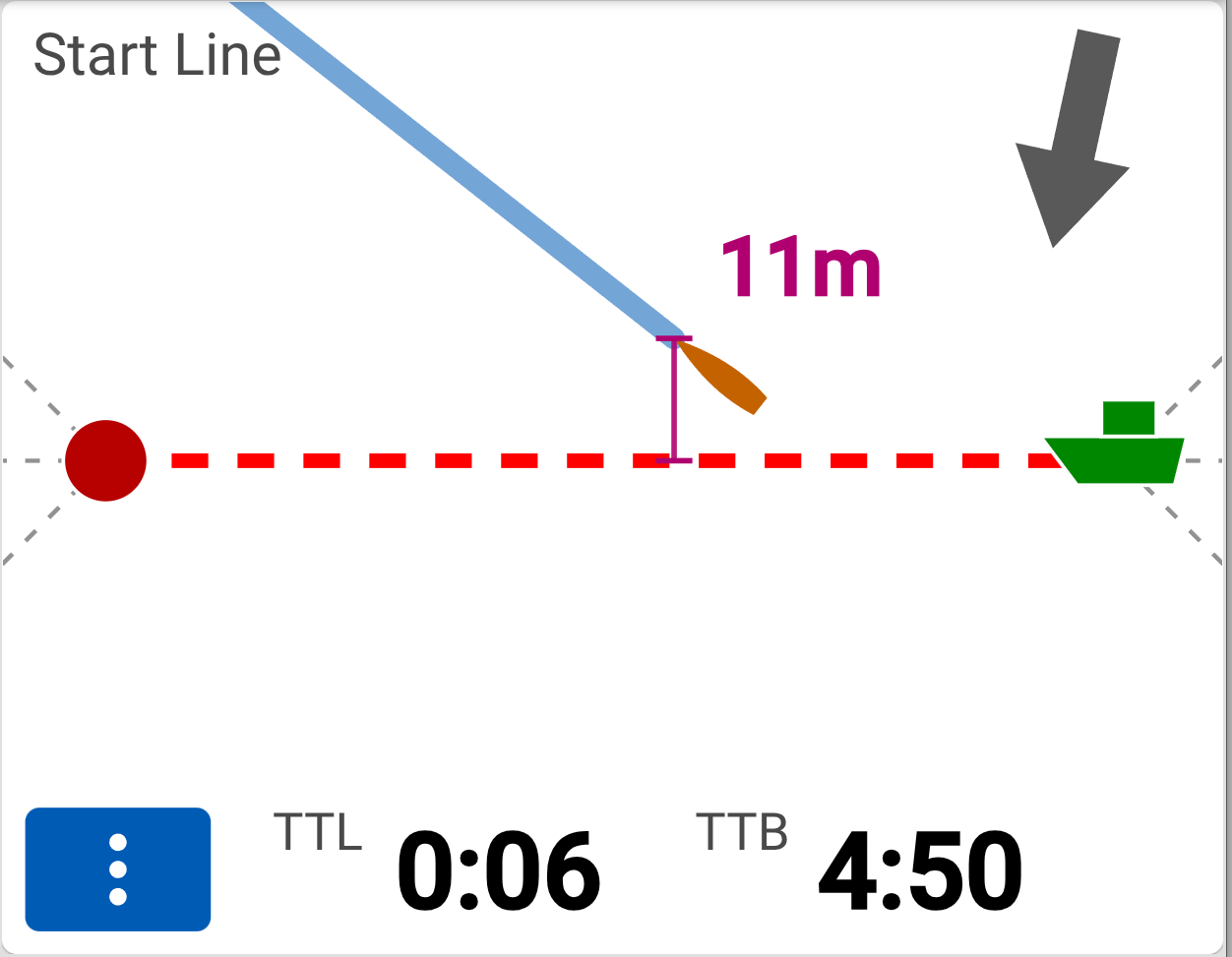
OCS start line goes Red
If the boat is on the course side (OCS) when the timSet start linecounts to zero, then the line goes red and stays green until the timer is reset.
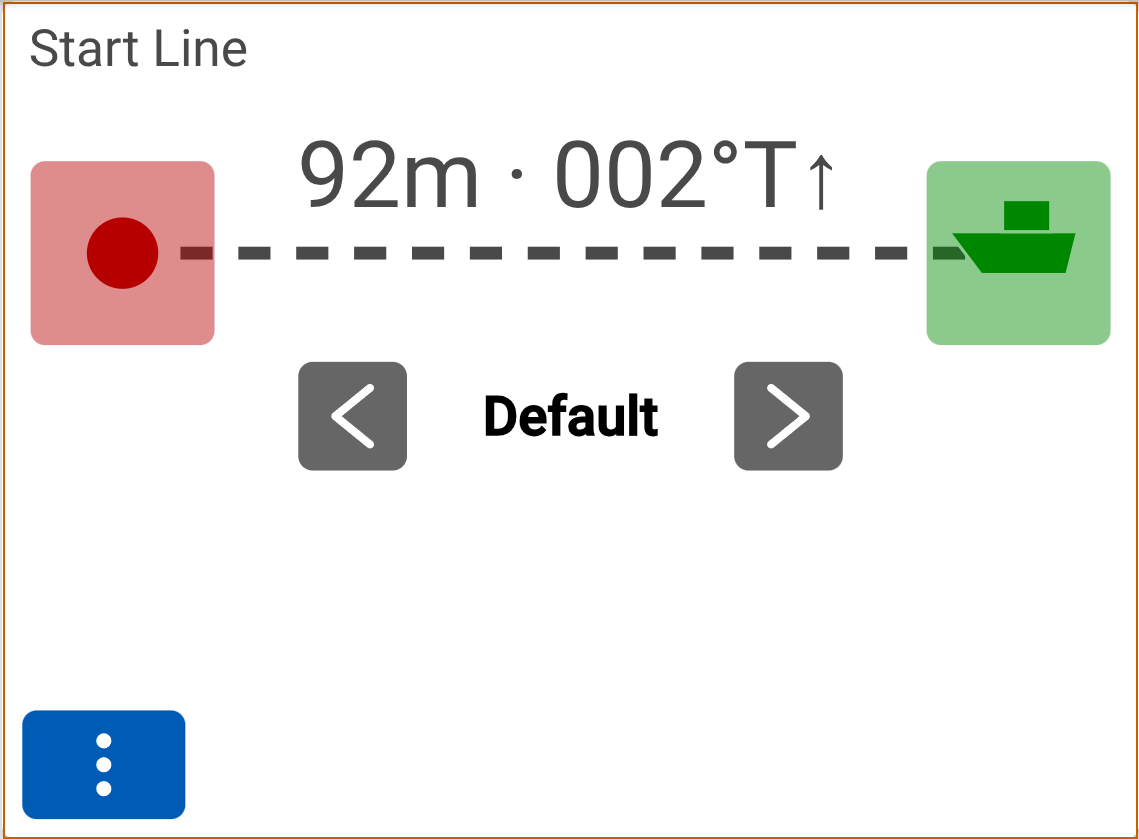
Set the line
The first mode screen selected from the racer-line-view widget displays the current line length and perpendicular header. The ends of the lines may be "pinged" by press the button at either either end. Alternately, a known line can be configured in the plugin configuration and selected by name on this screen.
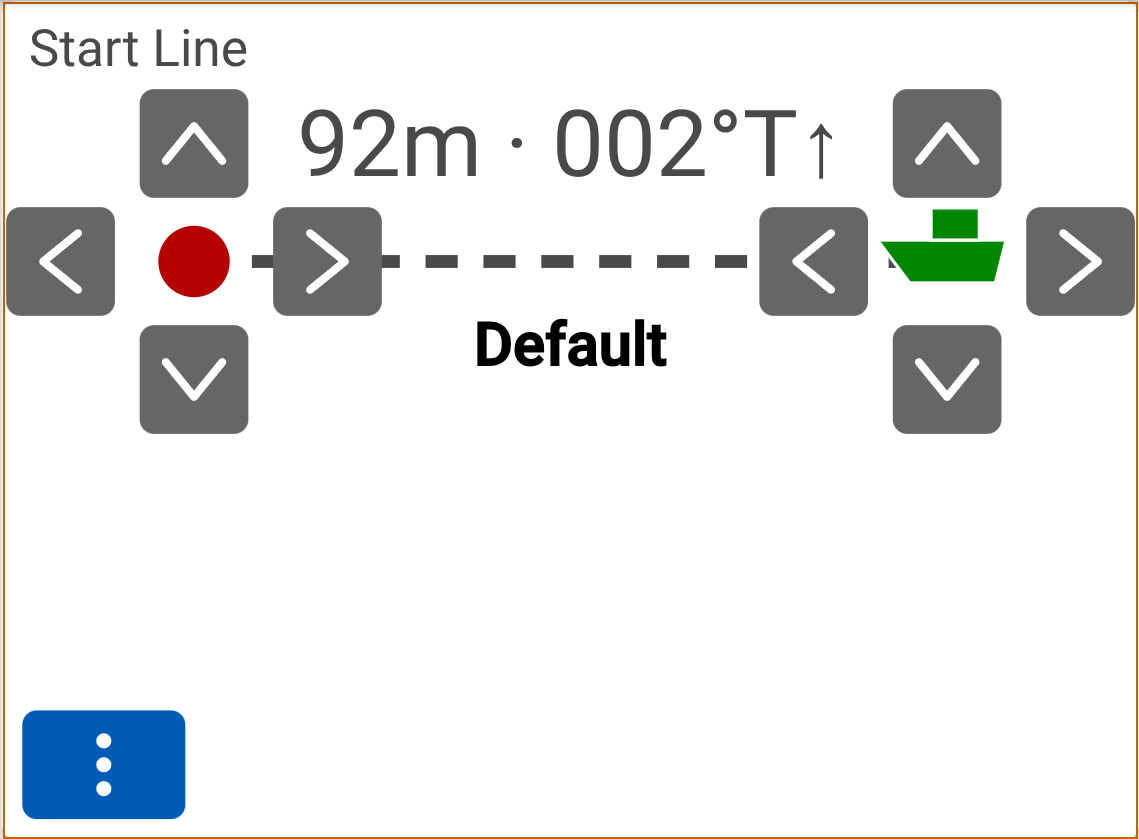
Adjust the line
The second mode screen selected from the racer-line-view widget allows each ends of the line to be adjusted manually if there is no time to "ping" an end after it has been moved or incorrectly set.
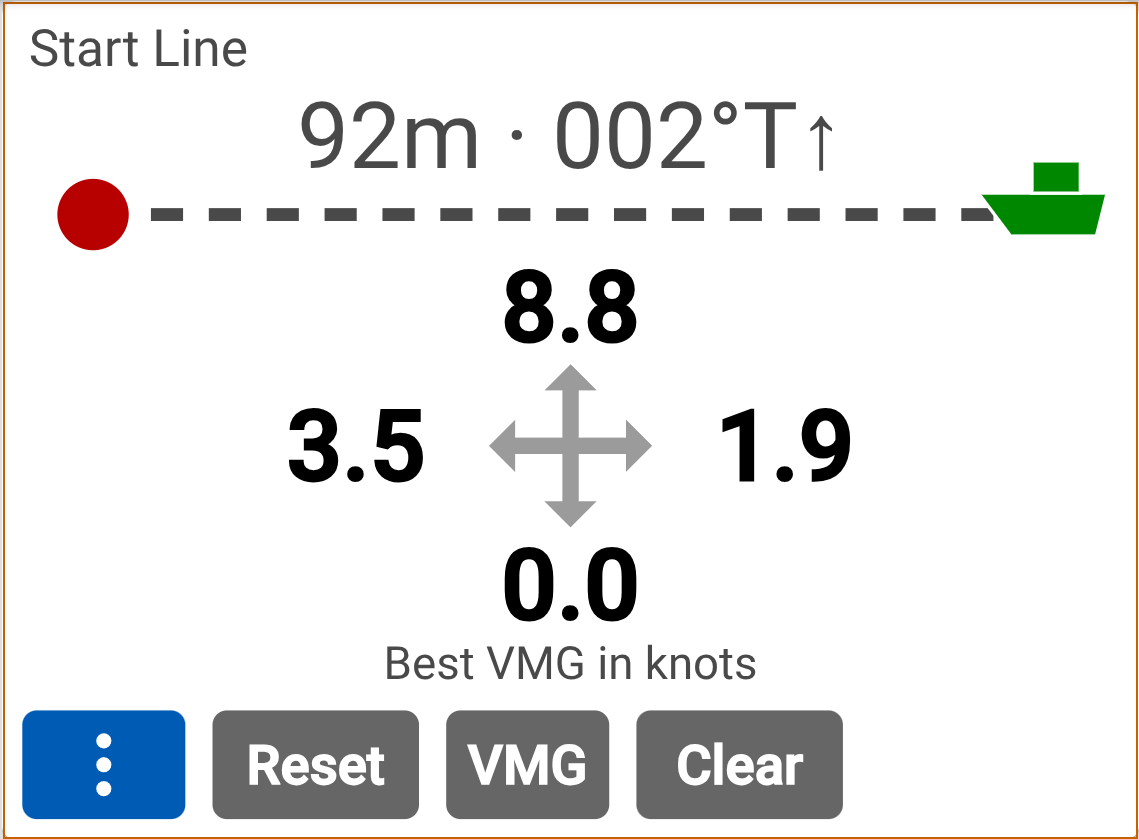
Best VMGs
The third mode screen selected from the racer-line-view widget displays the effective best VMGs relative to the line that have been calculated by the plugin. These may be selected and manually adjusted with the "VMG" button; "Reset" to remove all manual adjustments; or "Clear" to discard all collected VMG samples.
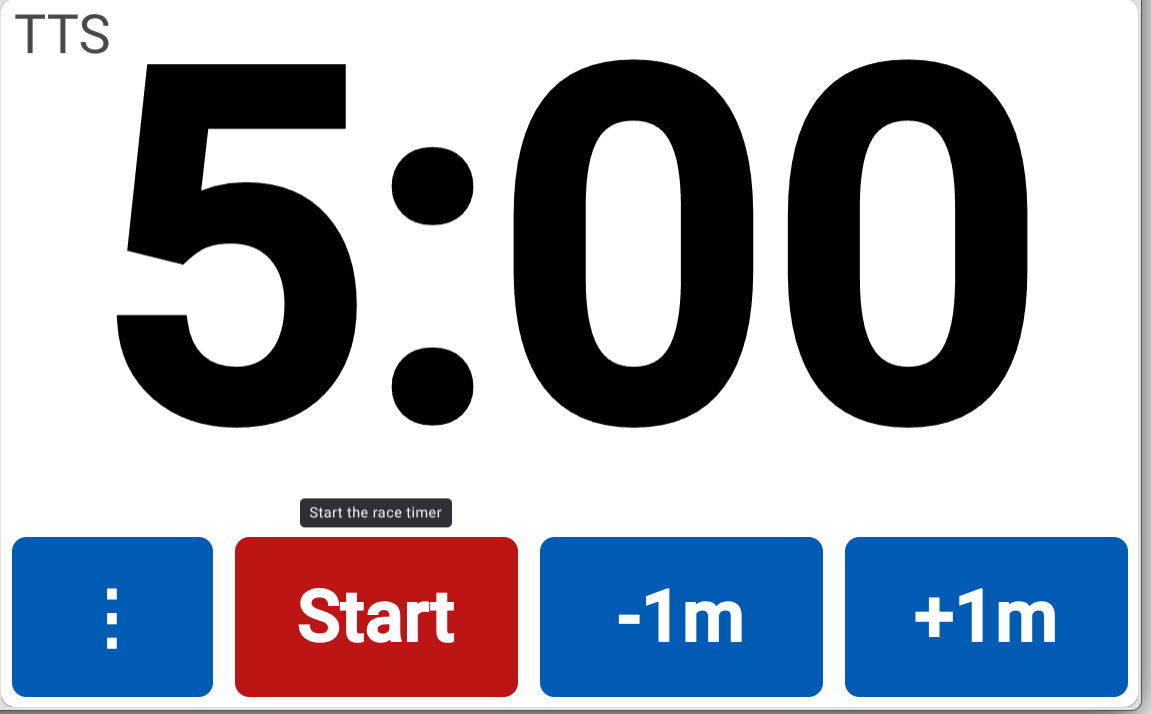
Start Timer
The screenshot above shows the Skip racer-timer widget with the start button available to start the timer and the +/- minute adjustment buttons. Other views are available via the "..." mode button.
Adjust Timer
The adjust mode screen of the racer-timer widget allows the start time to be adjusted by +/- minutes or +/- seconds, even when the timer is running.
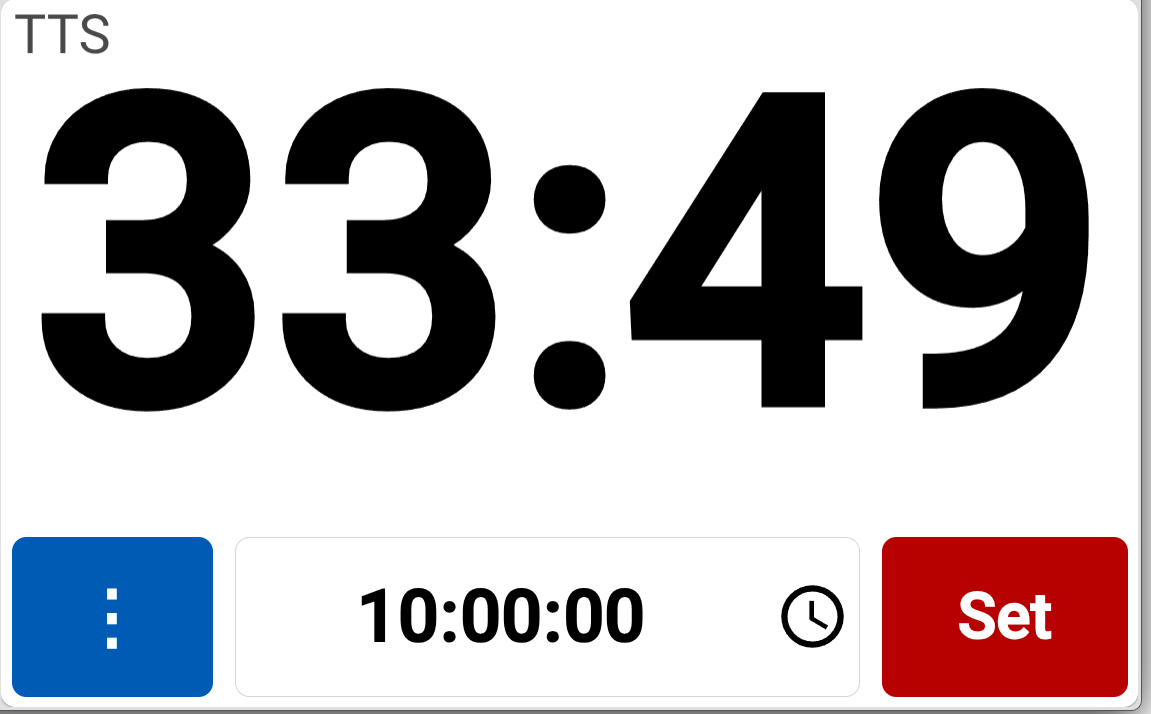
Set Timer
The set mode screen of the racer-timer widget allows the start time to be set to a specific absolute time. Perfect for pursuit style races.
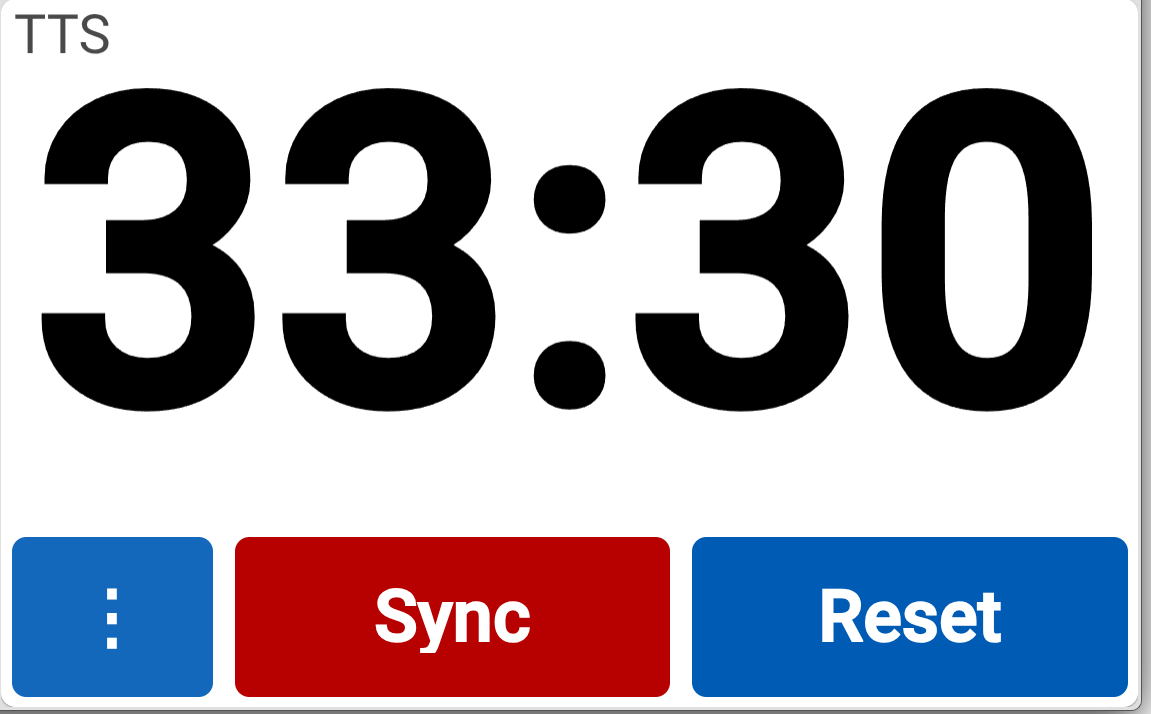
Sync Timer
The sync mode screen of the racer-timer widget allows the start time to be synced to the nearest whole minute, or reset to the initial value.
Libraries
geolib: for distance and bearing calculations.
🧪 Future Plans
- Polars - include polars in the effective VMG calculations
- Laylines and distance/time to them
📬 Feedback
Bug reports and suggestions are welcome at
https://github.com/gregw/signalk-racer
Development
Linking the plugin into a local server
npm install
npm link
cd ~/.signalk
npm link signalk-racer
This replaces ~/.signalk/node_modules/signalk-racer with a symlink to your checkout, so
edits take effect on the next server restart with no reinstall. Verify the link with:
readlink -f ~/.signalk/node_modules/signalk-racer⚠️ The link is fragile.
~/.signalk/package.jsonstill listssignalk-raceras a normal dependency, so runningnpm install(or installing/updating any plugin from the server's Appstore) will overwrite the symlink with the published release from npm, silently reverting you to the registry version. Re-runnpm link signalk-racerin~/.signalkwhenever that happens.
Checking which build is actually running
The plugin stamps its version in three places, so a stale link is easy to spot:
- the Plugin Config page in the admin UI, as the plugin status
signalk-racer <version> started - the bottom of the racer webapp
- the server log, via
app.debug, including the directory it was loaded from
During development the version carries a -dev.N suffix (e.g. 1.2.0-dev.0), so it is
immediately distinguishable from a released version installed from npm.
A restart is required for any change to plugin code — the server does not hot-reload plugins.
Changes to files under public/ are served statically, so those only need a browser reload
(with cache bypass: Ctrl+Shift+R).
Running the server on this machine
The server is installed globally (npm root -g → /usr/lib/node_modules) and runs as a
system service, using ~/.signalk as its config directory:
sudo systemctl status signalk       # is it running?
sudo systemctl restart signalk      # pick up plugin changes
journalctl -u signalk -f            # follow the log
Updating signalk-server
Because it is installed into a system directory, updating needs sudo, and the service must be
restarted afterwards:
npm view signalk-server version                 # latest published
npm ls -g --depth=0 signalk-server              # currently installed
sudo npm install -g signalk-server              # update to latest
sudo systemctl restart signalk
To pin a specific version instead, use sudo npm install -g [email protected].
Note that ~/.signalk/package.json also lists signalk-server as a dependency; that entry is
only bookkeeping for the Appstore and is not what the service runs — the globally installed
copy in /usr/lib/node_modules/signalk-server is. Updating the global copy is what counts.
🚀 Releasing
Releases are cut manually from a clean main checkout and published to npm.
Pre-flight
- Confirm
mainis up to date and clean:git checkout main && git pull && git status. - Run the test suite:
npm test. - Review commits since the last release:
git log $(git describe --tags --abbrev=0)..HEAD --oneline. - Decide the version bump (semver):
patchfor bug fixes,minorfor features,majorfor breaking changes.
Cut the release
- Update
ReleaseNotes.md— add a new entry at the top with the new version and a short bullet list of changes, thengit add ReleaseNotes.md. - Bump the version and create the git tag in one step (note the non-default tag prefix so it matches the existing
signalk-racer-X.Y.Zconvention):
This rewritesnpm version <patch|minor|major> --tag-version-prefix=signalk-racer-package.json, includes any staged files (e.g.ReleaseNotes.md) in the bump commit, and creates tagsignalk-racer-X.Y.Z. - Push the commit and the tag:
git push origin main
git push origin signalk-racer-X.Y.Z
Publish to npm
- Confirm npm auth:
npm whoami(login withnpm loginif needed). - Dry-run the publish to inspect the tarball contents:
npm publish --dry-run. - Publish:
npm publish(the package is public and unscoped; no--accessflag needed).
After release
- Verify on npm:
npm view signalk-racer versionshould report the new version. - (Optional) Create a GitHub release from the new tag with notes copied from
ReleaseNotes.md.