
sim-grab
v0.1.11
Published
Inspect and drive a live iOS Simulator from a browser with accessibility metadata for AI coding workflows.

Maintainers
 pranavkarthik
Readme
sim-grab
sim-grab turns the iOS Simulator into something an agent can actually work with.
Open a browser tab, mirror the simulator live, and inspect what is on screen with real accessibility metadata: labels, roles, frames, ancestor chains, and point-level refinement when the screen dump is too coarse. It is built for coding workflows where you want an AI assistant to understand a running app without adding instrumentation to the app itself.
It works with SwiftUI, UIKit, React Native, Flutter, and anything else that surfaces accessibility data inside the simulator.
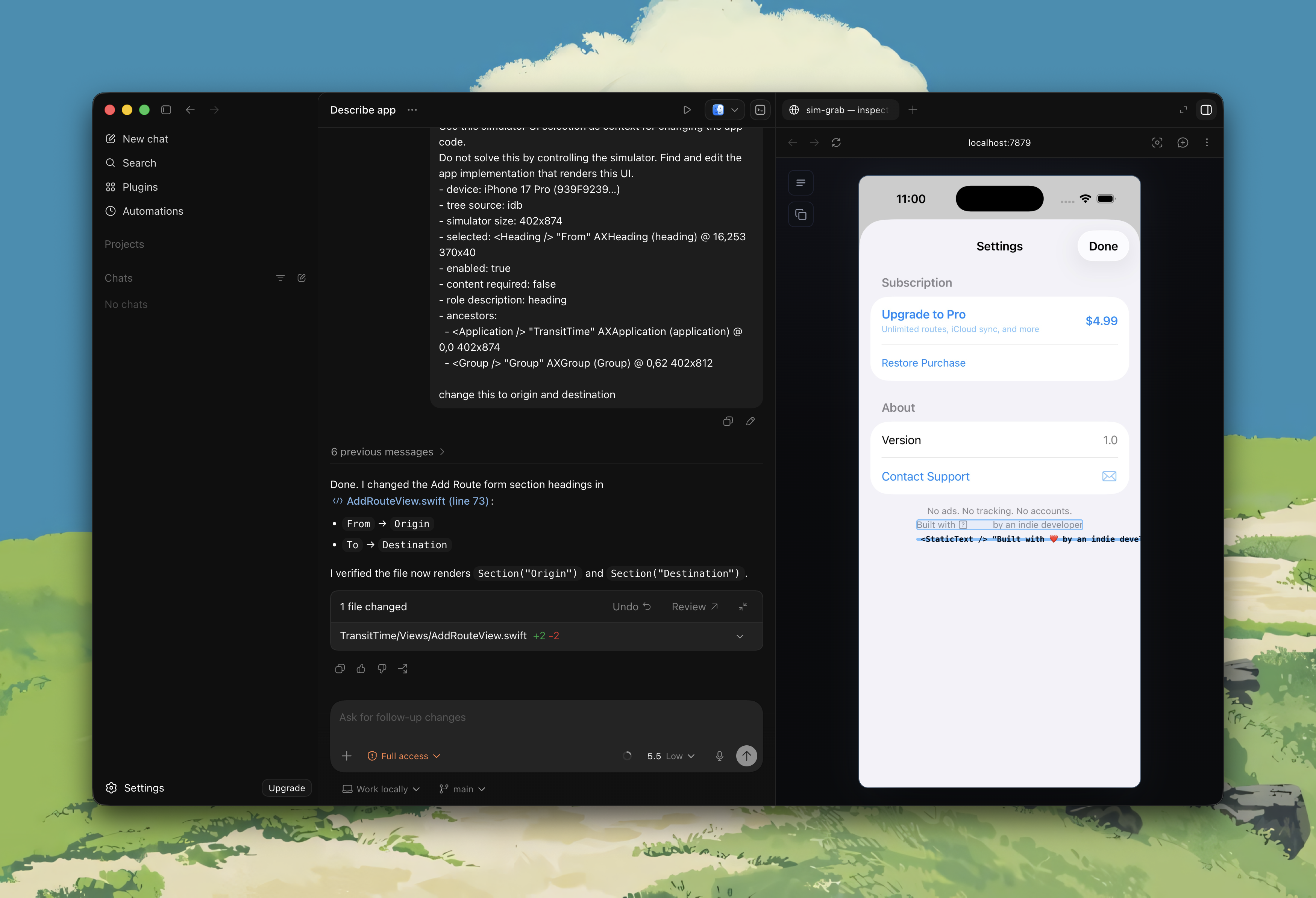
What It Does
- Mirrors a booted iOS Simulator in the browser.
- Lets you inspect on-screen elements through the accessibility tree.
- Refines selections with point-based lookup when needed.
- Automatically copies an agent-ready context block when you select an element.
- Supports pass-through taps, swipes, text input, and hardware-style buttons.
- Mirrors the AX tree into latent DOM nodes so tools like Cursor’s picker can target simulator elements from the page DOM.
- Falls back to mock mode when no simulator or bridge is connected, so you can still demo the UI.
Why It Exists
Most agent tools can read code, but they struggle with a live mobile UI. sim-grab closes that gap by giving the browser a live view of the simulator plus a structured model of what is on screen.
That means you can:
- point at a control and get its accessible label and bounds
- hand an agent concrete UI context instead of screenshots alone
- inspect apps you do not own or cannot modify
- drive the simulator from the same surface you inspect
Modes
Inspect mode
Use Inspect when you want hover highlighting, selection, and the component stack in the sidebar.
- Hover shows the deepest AX node under the cursor.
- Click selects an element, logs a structured payload for agents, and copies an agent-ready context block to the clipboard.
- A point-based AX query runs on selection to improve precision when the flat tree is ambiguous.
Interaction mode
Turn inspect off to interact with the simulator.
- Click sends a tap.
- Mouse drag sends a swipe.
- Wheel scrolling sends a coalesced swipe for list navigation.
Keyboard Shortcuts
| Key | Action |
| -------------- | ------------------------------- |
| I | Toggle Inspect mode |
| R | Refresh the accessibility tree |
| H | Press Home |
| Esc | Clear selection |
| Cmd / Ctrl | Freeze current hover while held |
| Shift + I | Hide or show the sidebar |
Quick Start
Run without installing:
bunx sim-grabThen open http://localhost:7879.
sim-grab runs on Bun. Install Bun first if you do not already have it:
curl -fsSL https://bun.sh/install | bashFor local development from this repository:
bun install
bun run dev
Or run the two sides separately:
# Terminal 1
bun run dev:web

# Terminal 2
bun run dev:bridge
If the bridge is offline, the web app starts in mock mode automatically.
Requirements
For a real simulator session:
- Bun
- Xcode /
xcrun simctl - a booted iOS Simulator
[idb](https://fbidb.io)for accessibility inspection and input injection
Install idb with:
brew install facebook/fb/idb-companion
pipx install fb-idb
The bridge will automatically run idb connect <udid> for the active simulator target.
Without idb, you still get video frames, but not AX inspection or input injection.
Troubleshooting
bun: command not found
Install Bun, restart your terminal, and run bunx sim-grab again.
no booted simulator
Open Simulator.app and boot a device, or run:
xcrun simctl boot <udid>You can list devices with:
xcrun simctl list devicesidb not found
Frames can still stream, but inspection and input need idb.
brew install facebook/fb/idb-companion
pipx install fb-idb
After installing, restart sim-grab.
Screen recording permission denied
ScreenCaptureKit needs Screen Recording permission for the terminal or process
that launched sim-grab.
Open System Settings → Privacy & Security → Screen Recording, enable permission
for your terminal app, then restart the terminal and sim-grab.
On first run, sim-grab builds a small local ScreenCaptureKit helper from the
Swift source included in the package. If that build fails, the bridge falls back
to slower simctl screenshots.
You can also force the slower screenshot fallback:
CAPTURE=0 bunx sim-grabPort already in use
The bridge uses 7878 and the web UI uses 7879 by default.
PORT=8787 SIM_GRAB_WEB_PORT=8788 bunx sim-grabArchitecture
sim-grab has two pieces:
web/: the browser UI, built with Vite + TypeScriptbridge/: a Bun websocket bridge that talks tosimctl,idb, and ScreenCaptureKit
The bridge streams:
- binary image frames for the simulator view
- JSON snapshots for the accessibility tree
- JSON responses for point inspection and control messages
Transport Behavior
In Auto video mode:
- Inspect mode uses
simctlscreenshots for tighter AX/frame alignment. - Interaction mode uses ScreenCaptureKit when available for smoother live video.
- If ScreenCaptureKit cannot start, the bridge falls back to
simctlscreenshots.
You can also force CaptureKit or simctl from the UI.
Bridge Configuration
Environment variables:
| Var | Default | Purpose |
| ------------------- | ------- | ------------------------------------------------- |
| PORT | 7878 | WebSocket / health server port |
| FRAME_MS | 120 | Screenshot cadence for the simctl fallback |
| FRAME_FORMAT | jpeg | Screenshot encoding: jpeg or png |
| CAPTURE_FPS | 50 | Target ScreenCaptureKit frame rate |
| CAPTURE_QUALITY | 0.7 | JPEG quality for ScreenCaptureKit frames |
| CAPTURE_MAX_WIDTH | 1200 | Max streamed frame width |
| CAPTURE=0 | unset | Disable ScreenCaptureKit and use screenshots only |
Good Fits
sim-grab is especially useful for:
- agent-assisted debugging sessions
- UI inspection without source access
- pairing with Cursor, Codex, or Claude on iOS tasks
- quickly checking what an app is actually exposing via accessibility
Current Limitations
- The underlying AX tree can still collapse some grouped controls, especially complex nav and tab bars.
- The latent DOM mirror can only expose what the simulator accessibility APIs provide.
- If
idbis unavailable or unstable, point inspection and input control will degrade or stop working.