
simple-code-inspector-plugin
v1.6.2
Published
Click the dom on the page, it will copy the source code location of the dom to your clipboard.
Downloads
18

Maintainers
 lakphy
Readme





📖 Introduction
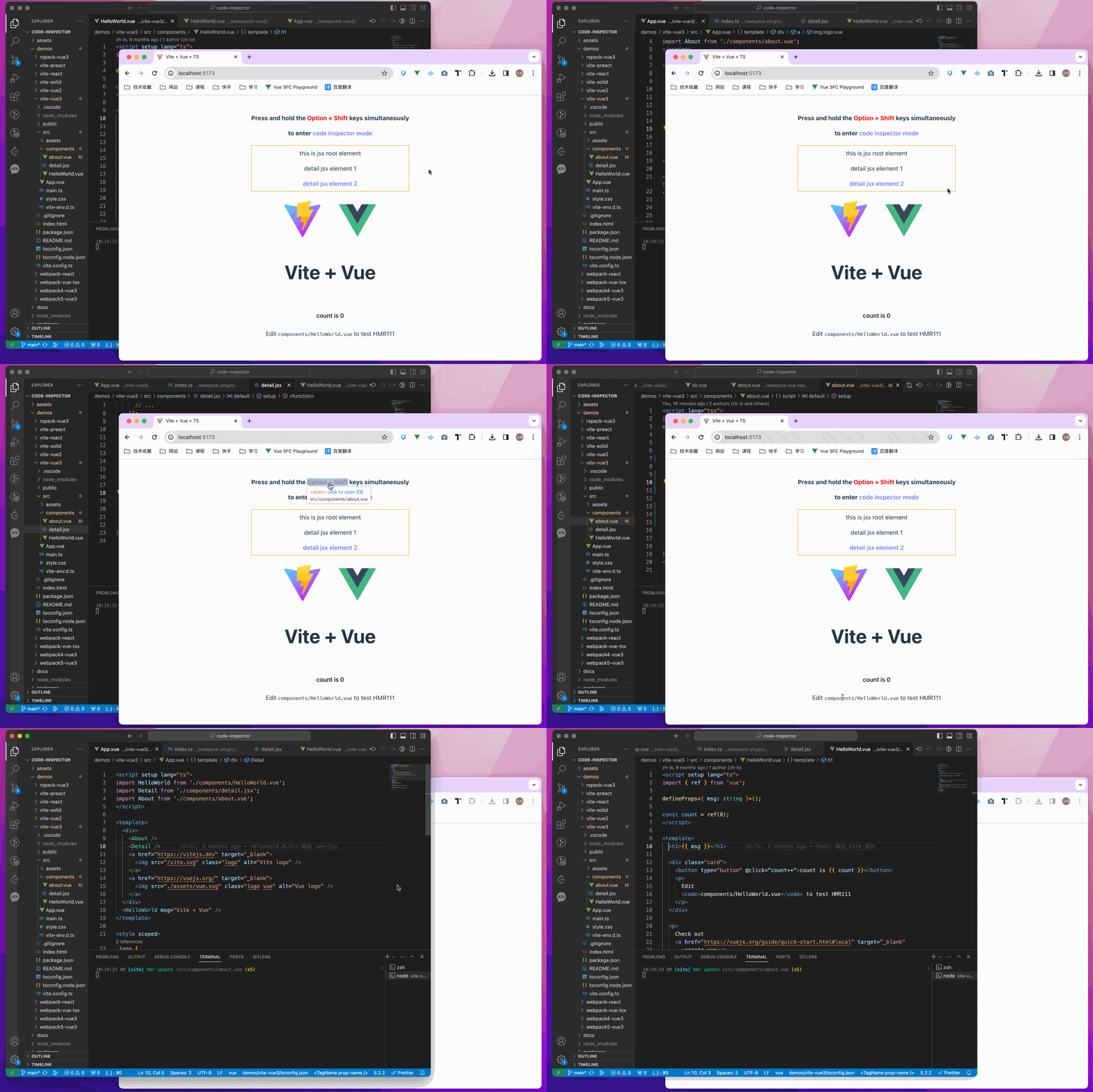
Click the element on the page, it copies the source code location of the element to your clipboard.
💻 Try it out online
- vue online demo
- react online demo
- preact online demo
- solid online demo
- qwik online demo
- svelte online demo
- astro online demo
🎨 Support
The following are which compilers and web frameworks we supported now:
- The following bundlers are currently supported: ✅ webpack ✅ vite ✅ rspack / rsbuild ✅ farm ✅ esbuild ✅ turbopack ✅ mako
- The following Web frameworks are currently supported: ✅ vue2 / vue3 / nuxt ✅ react / nextjs / umijs ✅ preact ✅ solid ✅ qwik ✅ svelte ✅ astro
🚀 Install
npm i simple-code-inspector-plugin -D
# or
yarn add simple-code-inspector-plugin -D
# or
pnpm add simple-code-inspector-plugin -D
🌈 Usage
Please check here for more usage information: simple-code-inspector-plugin configuration
1.Configuring Build Tools
// webpack.config.js
const { codeInspectorPlugin } = require('simple-code-inspector-plugin');

module.exports = () => ({
  plugins: [
    codeInspectorPlugin({
      bundler: 'webpack',
    }),
  ],
});
// vite.config.js import { defineConfig } from 'vite'; import { codeInspectorPlugin } from 'simple-code-inspector-plugin'; export default defineConfig({ plugins: [ codeInspectorPlugin({ bundler: 'vite', }), ], });// rspack.config.js const { codeInspectorPlugin } = require('simple-code-inspector-plugin'); module.exports = { // other config... plugins: [ codeInspectorPlugin({ bundler: 'rspack', }), // other plugins... ], };// rsbuild.config.js const { codeInspectorPlugin } = require('simple-code-inspector-plugin'); module.exports = { // other config... tools: { rspack: { plugins: [ codeInspectorPlugin({ bundler: 'rspack', }), ], }, }, };// esbuild.config.js const esbuild = require('esbuild'); const { codeInspectorPlugin } = require('simple-code-inspector-plugin'); esbuild.build({ // other configs... // [注意] esbuild 中使用时,dev 函数的返回值需自己根据环境判断,本地开发的环境返回 true,线上打包返回 false plugins: [codeInspectorPlugin({ bundler: 'esbuild', dev: () => true })], });// farm.config.js import { defineConfig } from '@farmfe/core'; import { codeInspectorPlugin } from 'simple-code-inspector-plugin'; export default defineConfig({ vitePlugins: [ codeInspectorPlugin({ bundler: 'vite', }), // ...other code ], });// vue.config.js const { codeInspectorPlugin } = require('simple-code-inspector-plugin'); module.exports = { // ...other code chainWebpack: (config) => { config.plugin('simple-code-inspector-plugin').use( codeInspectorPlugin({ bundler: 'webpack', }) ); }, };For nuxt3.x :
// nuxt.config.js
import { codeInspectorPlugin } from 'simple-code-inspector-plugin';

// https://nuxt.com/docs/api/configuration/nuxt-config
export default defineNuxtConfig({
  vite: {
    plugins: [codeInspectorPlugin({ bundler: 'vite' })],
  },
});
For nuxt2.x :
// nuxt.config.js
import { codeInspectorPlugin } from 'simple-code-inspector-plugin';

export default {
  build: {
    extend(config) {
      config.plugins.push(codeInspectorPlugin({ bundler: 'webpack' }));
      return config;
    },
  },
};
For next.js(<= 14.x):
// next.config.js
const { codeInspectorPlugin } = require('simple-code-inspector-plugin');

const nextConfig = {
  webpack: (config, { dev, isServer }) => {
    config.plugins.push(codeInspectorPlugin({ bundler: 'webpack' }));
    return config;
  },
};

module.exports = nextConfig;
For next.js(15.0.x ~ 15.2.x):
import type { NextConfig } from 'next';
import { codeInspectorPlugin } from 'simple-code-inspector-plugin';

const nextConfig: NextConfig = {
  experimental: {
    turbo: {
      rules: codeInspectorPlugin({
        bundler: 'turbopack',
      }),
    },
  },
};

export default nextConfig;
For next.js(>= 15.3.x):
// next.config.js
import type { NextConfig } from 'next';
import { codeInspectorPlugin } from 'simple-code-inspector-plugin';

const nextConfig: NextConfig = {
  turbopack: {
    rules: codeInspectorPlugin({
      bundler: 'turbopack',
    }),
  },
};

export default nextConfig;
With webpack:
// umi.config.js or umirc.js
import { defineConfig } from '@umijs/max';
import { codeInspectorPlugin } from 'simple-code-inspector-plugin';

export default defineConfig({
  chainWebpack(memo) {
    memo.plugin('simple-code-inspector-plugin').use(
      codeInspectorPlugin({
        bundler: 'webpack',
      })
    );
  },
  // other config
});
With mako:
// .umirc.ts
import { defineConfig } from 'umi';
import { codeInspectorPlugin } from 'simple-code-inspector-plugin';

export default defineConfig({
  // other config...
  mako: {
    plugins: [
      codeInspectorPlugin({
        bundler: 'mako',
      }),
    ],
  },
});
// astro.config.mjs
import { defineConfig } from 'astro/config';
import { codeInspectorPlugin } from 'simple-code-inspector-plugin';

export default defineConfig({
  vite: {
    plugins: [codeInspectorPlugin({ bundler: 'vite' })],
  },
});
2.Using the function
Now you can enjoy using it!~
When pressing the combination keys on the page, moving the mouse over the page will display a mask layer on the DOM with relevant information. Clicking will copy the corresponding source code location (e.g.
/src/App.tsx:12:3 <div>) to your clipboard. (The default combination keys for Mac areOption + Shift; for Windows, it'sAlt + Shift, and the browser console will output related combination key prompts)
👨💻 Contributors
Special thanks to the contributors of this project:
📧 Communication and Feedback
For any usage issues, please leave a message below my Twitter post or submit an issue on Github.
For Chinese users, you can join the QQ group 769748484 or add the author's WeiXin account zhoulx1688888 for consultation and feedback:
💖 Sponsor
Sponsoring this project can help the author create better. If you are willing, you can sponsor me through Alipay or WeChatPay: