
simple-grapher
v1.1.9
Published
Simple graphing utily, utilizes the HTML canvas and the mathjs library to graph functions

Maintainers
 etasbasi
Readme
simple-grapher
Simple-grapher is a graphing utily that sketches graphs of equations only using HTML canvas and mathjs library.
Github: https://github.com/etasbasi/simple-grapher
Installation
npm i simple-grapherExamples
Drawing on the graph
<canvas></canvas>const Graph = require("simple-grapher");
const MyGraph = new Graph(document.querySelector("canvas"), {
height: 320,
width: 420,
enableCoords: false
});
MyGraph.drawGraph("x^2");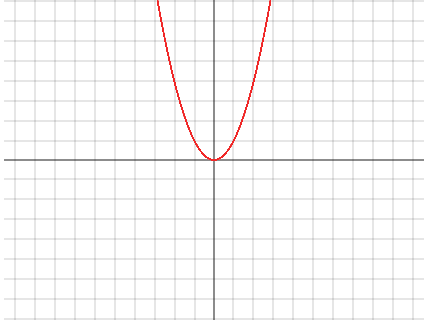
Graph constructor accepts two parameters new Graph(canvas, options)
Options can include:
- width: number - default: 520
- height: number - default: 520
- enableCoords: boolean (when true, the x - y coordinates of the graph will be visible when hovered) - default: true
Binding an input element to the graph
<canvas></canvas><input style="display:block;" type="text" id="input-1" />const Graph = require("simple-grapher");
const MyGraph = new Graph(document.querySelector("canvas"), {
width: 200,
height: 200,
enableCoords: false
});
MyGraph.bindInput(document.querySelector("input"), err => {
if (err) console.log(err);
});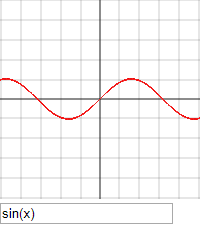
Binds an input element to the graph.
Methods
.drawGraph(equation: String | Array, errCallback: function)
Draws an equation(s) to the graph. Can take an equation string or an array of equations to draw on the board as the first parameter. Second argument is an error callback that will return an error message, if there is a persing error.
.bindInput(input: HTML element, errCallback: function)
Binds an input element's values to the drawGraph() method. First parameter is an HTML input elemement. The input element has to have an id. The second parameter is an error callback, it will return an object with the input's id as the key and the error message as the value.
.bindInputs(inputs: Array, errCallback: function)
Same as .bindInput(), except takes an array of inputs to bind to graph.
.inputRemoved(input: HTML element)
Stops listening to events from the specified input.
Contributing
Any help is much appreciated.
Some improvement suggestions:
- Add tests
- Improve code readability
- Convert the
drawGraph()to an async function.
Fork the repo and check the issues tab, to start contributing.