
simple-virtual-table-react
v1.4.4
Published
A declarative, high-performance virtual table component for React with automatic row virtualization.

Maintainers
 simplyrujal
Readme
Simple Virtual Table - React
A declarative, high-performance virtual table component for React with automatic row virtualization.
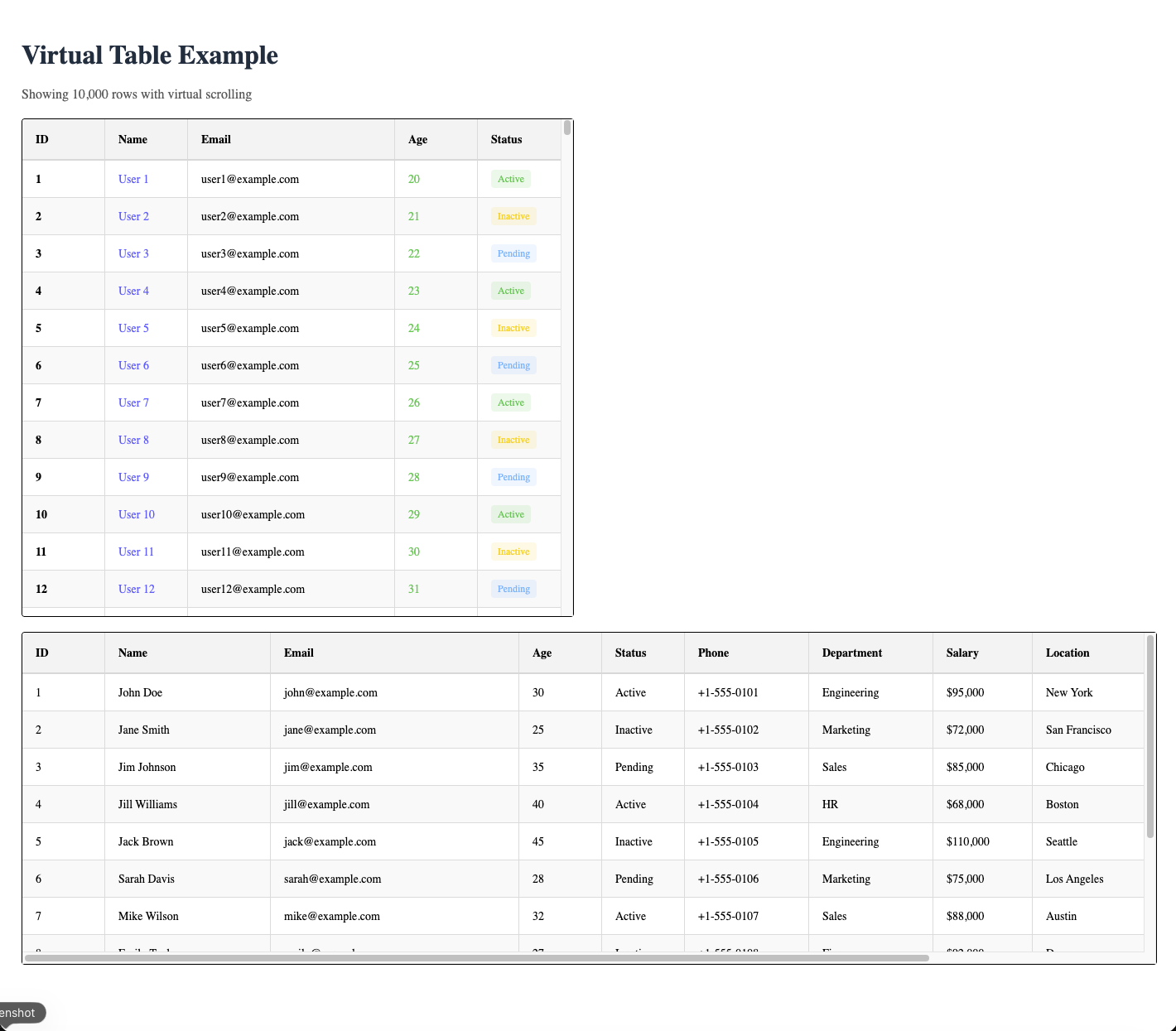
Installation
npm install simple-virtual-table-react
# or
yarn add simple-virtual-table-react
# or
pnpm add simple-virtual-table-react
Quick Start
import { Table, Tbody, Td, Th, Thead, Tr } from "simple-virtual-table-react";

interface User {
  id: number;
  name: string;
  email: string;
  age: number;
  status: string;
  width?: number;
  phone?: string;
  department?: string;
  salary?: number;
  location?: string;
  joinDate?: string;
  manager?: string;
}

const colors: Record<string, string> = {
  Active: "#51cf66",
  Inactive: "#ffd43b",
  Pending: "#74c0fc",
};

const generateData = (count: number): User[] => {
  return Array.from({ length: count }, (_, i) => ({
    id: i + 1,
    name: `User ${i + 1}`,
    email: `user${i + 1}@example.com`,
    age: 20 + (i % 50),
    status: i % 3 === 0 ? "Active" : i % 3 === 1 ? "Inactive" : "Pending",
  }));
};

const data = generateData(10000); // Large dataset to showcase virtualization

const smallData: User[] = [
  {
    id: 1,
    name: "John Doe",
    email: "[email protected]",
    age: 30,
    status: "Active",
    width: 100,
    phone: "+1-555-0101",
    department: "Engineering",
    salary: 95000,
    location: "New York",
    joinDate: "2020-01-15",
    manager: "Alice Johnson",
  },
  {
    id: 2,
    name: "Jane Smith",
    email: "[email protected]",
    age: 25,
    status: "Inactive",
    width: 200,
    phone: "+1-555-0102",
    department: "Marketing",
    salary: 72000,
    location: "San Francisco",
    joinDate: "2021-03-22",
    manager: "Bob Williams",
  },
  {
    id: 3,
    name: "Jim Johnson",
    email: "[email protected]",
    age: 35,
    status: "Pending",
    width: 150,
    phone: "+1-555-0103",
    department: "Sales",
    salary: 85000,
    location: "Chicago",
    joinDate: "2019-06-10",
    manager: "Carol Davis",
  },
  {
    id: 4,
    name: "Jill Williams",
    email: "[email protected]",
    age: 40,
    status: "Active",
    width: 180,
    phone: "+1-555-0104",
    department: "HR",
    salary: 68000,
    location: "Boston",
    joinDate: "2022-02-08",
    manager: "David Brown",
  },
  {
    id: 5,
    name: "Jack Brown",
    email: "[email protected]",
    age: 45,
    status: "Inactive",
    width: 120,
    phone: "+1-555-0105",
    department: "Engineering",
    salary: 110000,
    location: "Seattle",
    joinDate: "2018-09-12",
    manager: "Alice Johnson",
  },
  {
    id: 6,
    name: "Sarah Davis",
    email: "[email protected]",
    age: 28,
    status: "Pending",
    width: 160,
    phone: "+1-555-0106",
    department: "Marketing",
    salary: 75000,
    location: "Los Angeles",
    joinDate: "2021-11-05",
    manager: "Bob Williams",
  },
  {
    id: 7,
    name: "Mike Wilson",
    email: "[email protected]",
    age: 32,
    status: "Active",
    width: 140,
    phone: "+1-555-0107",
    department: "Sales",
    salary: 88000,
    location: "Austin",
    joinDate: "2020-07-20",
    manager: "Carol Davis",
  },
  {
    id: 8,
    name: "Emily Taylor",
    email: "[email protected]",
    age: 27,
    status: "Inactive",
    width: 170,
    phone: "+1-555-0108",
    department: "Finance",
    salary: 92000,
    location: "Denver",
    joinDate: "2022-04-14",
    manager: "Frank Miller",
  },
  {
    id: 9,
    name: "David Anderson",
    email: "[email protected]",
    age: 38,
    status: "Pending",
    width: 110,
    phone: "+1-555-0109",
    department: "Engineering",
    salary: 105000,
    location: "Portland",
    joinDate: "2019-12-03",
    manager: "Alice Johnson",
  },
  {
    id: 10,
    name: "Lisa Martinez",
    email: "[email protected]",
    age: 33,
    status: "Active",
    width: 190,
    phone: "+1-555-0110",
    department: "HR",
    salary: 70000,
    location: "Miami",
    joinDate: "2021-08-18",
    manager: "David Brown",
  },
  {
    id: 11,
    name: "Tom Thompson",
    email: "[email protected]",
    age: 29,
    status: "Inactive",
    width: 130,
    phone: "+1-555-0111",
    department: "Finance",
    salary: 78000,
    location: "Phoenix",
    joinDate: "2022-01-25",
    manager: "Frank Miller",
  },
  {
    id: 12,
    name: "Anna Garcia",
    email: "[email protected]",
    age: 36,
    status: "Pending",
    width: 145,
    phone: "+1-555-0112",
    department: "Sales",
    salary: 82000,
    location: "Nashville",
    joinDate: "2020-05-30",
    manager: "Carol Davis",
  },
];

function App() {
  return (
    <div style={{ padding: "20px" }}>
      <h1 style={{ marginBottom: "20px", color: "#213547" }}>
        Virtual Table Example
      </h1>
      <p style={{ marginBottom: "20px", color: "#666" }}>
        Showing {data.length.toLocaleString()} rows with virtual scrolling
      </p>
      <Table totalData={data.length} height={600} rowHeight={45}>
        <Thead>
          <Th width={100}>ID</Th>
          <Th width={100}>Name</Th>
          <Th width={250}>Email</Th>
          <Th width={100}>Age</Th>
          <Th width={100}>Status</Th>
        </Thead>
        <Tbody>
          {data.map((_row: User) => {
            // Pass rowIndex manually since we're mapping ourselves, not letting Tbody map
            // Tr will inject colIndex to Td children automatically
            const status = _row.status;
            return (
              <Tr key={_row.id}>
                <Td>
                  <strong>{_row.id}</strong>
                </Td>
                <Td>
                  <span style={{ color: "#646cff", fontWeight: 500 }}>
                    {_row.name}
                  </span>
                </Td>
                <Td>{_row.email}</Td>
                <Td>
                  <span
                    style={{
                      color: _row.age > 50 ? "#ff6b6b" : "#51cf66",
                    }}
                  >
                    {_row.age}
                  </span>
                </Td>
                <Td>
                  <span
                    style={{
                      padding: "4px 8px",
                      borderRadius: "4px",
                      backgroundColor: colors[status] + "20",
                      color: colors[status],
                      fontSize: "12px",
                      fontWeight: 500,
                    }}
                  >
                    {status}
                  </span>
                </Td>
              </Tr>
            );
          })}
        </Tbody>
      </Table>
      <br />
      <Table totalData={smallData.length} rowHeight={45} height={400}>
        <Thead>
          <Th width={100}>ID</Th>
          <Th width={200}>Name</Th>
          <Th width={300}>Email</Th>
          <Th width={100}>Age</Th>
          <Th width={100}>Status</Th>
          <Th width={150}>Phone</Th>
          <Th width={150}>Department</Th>
          <Th width={120}>Salary</Th>
          <Th width={150}>Location</Th>
          <Th width={120}>Join Date</Th>
          <Th width={180}>Manager</Th>
        </Thead>
        <Tbody>
          {smallData.map((row) => (
            <Tr key={row.id}>
              <Td>{row.id}</Td>
              <Td>{row.name}</Td>
              <Td>{row.email}</Td>
              <Td>{row.age}</Td>
              <Td>{row.status}</Td>
              <Td>{row.phone || "-"}</Td>
              <Td>{row.department || "-"}</Td>
              <Td>{row.salary ? `$${row.salary.toLocaleString()}` : "-"}</Td>
              <Td>{row.location || "-"}</Td>
              <Td>{row.joinDate || "-"}</Td>
              <Td>{row.manager || "-"}</Td>
            </Tr>
          ))}
        </Tbody>
      </Table>
    </div>
  );
}

export default App;
Components
Table
The root component that provides context to all child components.
Props:
| Prop | Type | Required | Default | Description |
| -------------------- | --------------------- | -------- | ------- | --------------------------------------------- |
| totalData | number | Yes | - | Total number of rows in the dataset |
| height | number | No | 200 | Height of the table container |
| rowHeight | number | No | 40 | Height of each row in pixels |
| overscan | number | No | 5 | Number of rows to render outside visible area |
| containerStyle | React.CSSProperties | No | - | Custom styles for the table container |
| containerClassName | string | No | - | CSS classname |
| children | ReactNode | Yes | - | Child components (Thead, Tbody) |
Thead
Header container component. Must wrap all Th components.
Props:
| Prop | Type | Required | Default | Description |
| -------------- | --------------------- | -------- | ------- | --------------------------------------------------------------------------------- |
| headerHeight | number | No | 50 | Height of the header row |
| style | React.CSSProperties | No | - | Custom styles for the header container |
| ...props | HTMLDivElement | No | - | All standard HTML div attributes (className, onClick, onMouseOver, data-*, etc.) |
Note:
Theadautomatically collects column widths fromThchildren and updates the table context.Theadautomatically injectscolIndexprop to allThchildren.- The
headerHeightprop is optional and defaults to 50px. Typically you can omit this prop and use the default. - All standard HTML div attributes are accepted and will be applied to the header container element.
Th
Header cell component. Must be used inside Thead.
Props:
| Prop | Type | Required | Default | Description |
| ---------- | --------------------- | -------- | ------- | --------------------------------------------------------------------------------- |
| width | number | No | 100 | Width of the column in pixels |
| colIndex | number | No | - | Automatically injected by Thead |
| style | React.CSSProperties | No | - | Custom styles for the header cell |
| ...props | HTMLDivElement | No | - | All standard HTML div attributes (className, onClick, onMouseOver, data-*, etc.) |
Note: colIndex is automatically injected by Thead and should not be manually provided.
Tbody
Body container component. Must wrap all Tr components.
Props:
| Prop | Type | Required | Default | Description |
| -------------- | --------------------- | -------- | ------- | --------------------------------------------------------------------------------- |
| offsetHeight | number | No | 45 | Height offset for calculating total height |
| style | React.CSSProperties | No | - | Custom styles for the body container |
| ...props | HTMLDivElement | No | - | All standard HTML div attributes (className, onClick, onMouseOver, data-*, etc.) |
Note:
Tbodyautomatically injectsrowIndexprop to allTrchildren. TherowIndexwill be the absolute index in the data array (accounting for virtualization).Tbodyautomatically calculatestotalHeightandtotalWidthfrom table context.Tbodyonly renders visible rows (plus overscan rows) to optimize performance.- The
offsetHeightprop is optional and used to calculate the total height (defaults to 45px). Typically you can omit this prop and use defaults. - All standard HTML div attributes are accepted and will be applied to the body container element.
Tr
Row component. Must be used inside Tbody.
Props:
| Prop | Type | Required | Default | Description |
| ---------- | --------------------- | -------- | ------- | --------------------------------------------------------------------------------- |
| rowIndex | number | No | - | Automatically injected by Tbody |
| style | React.CSSProperties | No | - | Custom styles for the row |
| ...props | HTMLDivElement | No | - | All standard HTML div attributes (className, onClick, onMouseOver, data-*, etc.) |
Note:
rowIndexis automatically injected byTbodyand should not be manually provided.Trautomatically injectscolIndexprop to allTdchildren.- All standard HTML div attributes are accepted and will be applied to the row element.
Td
Cell component. Must be used inside Tr.
Props:
| Prop | Type | Required | Default | Description |
| ---------- | --------------------- | -------- | ------- | --------------------------------------------------------------------------------- |
| colIndex | number | No | - | Automatically injected by Tr |
| colSpan | number | No | 1 | Number of columns the cell should span |
| rowSpan | number | No | 1 | Number of rows the cell should span |
| style | React.CSSProperties | No | - | Custom styles for the cell |
| ...props | HTMLDivElement | No | - | All standard HTML div attributes (className, onClick, onMouseOver, data-*, etc.) |
Note:
colIndexis automatically injected byTrand should not be manually provided.- The cell width automatically matches the corresponding
Thwidth from the header. - All standard HTML div attributes are accepted and will be applied to the cell element.
Performance Note: Even with 10,000 rows, only ~15-20 DOM nodes (visible rows + overscan) are rendered at any time. The table maintains smooth scrolling and low memory usage regardless of dataset size.
Virtualization
The table automatically handles row virtualization. Only visible rows (plus overscan rows) are rendered in the DOM, making it performant even with thousands of rows.
Important:
- Pass
totalData(the total number of rows) to theTablecomponent - When mapping over data in
Tbody, map over the entire dataset. The table handles virtualization internally by:- Calculating which rows are visible based on scroll position
- Rendering spacers above and below visible rows to maintain correct scroll height
- Automatically injecting correct
rowIndexvalues toTrcomponents - Only rendering visible rows in the DOM
Styling
All components extend standard HTML div attributes and can be styled via:
- Inline
styleprop (available on all components) containerStyleprop onTablecomponent for container-specific styling- Standard HTML attributes (
className,onClick,onMouseOver,data-*attributes, etc.) - CSS targeting the component elements via className
Note: Since all components render as div elements, you can apply any standard HTML div attributes to them.
TypeScript Support
Full TypeScript support is included. The Table component is generic and accepts a type parameter:
<Table<MyDataType> totalData={myData.length} ...>Component Hierarchy Requirements
Thmust be used insideTheadTrmust be used insideTbodyTdmust be used insideTrTablemust wrap everything
Violating these requirements will throw helpful error messages.
Notes
- Column widths are defined declaratively via
Thcomponents - Row heights are consistent (controlled by
rowHeightprop) - The table supports horizontal scrolling when content is wider than container
- Header is sticky and remains visible while scrolling
- All components accept standard HTML div attributes for maximum flexibility
- The
heightprop onTableis optional, but recommended for proper virtualization behavior