
singularity-tui
v0.7.1
Published
Code-red TUI dispatcher for AI coding CLIs (Claude Code, OpenCode, Codex, Antigravity) with LangGraph workflow monitoring.

Maintainers
 jmamda
Readme
Singularity CLI


Race, vote, relay, and plan across multiple AI coding CLIs from a single prompt bar. A war-room, not a chat. Built with an opt-in governance layer so you can safely hand the machine over to agents.
# 60-second try (no API keys needed for --demo)
npx singularity-tui@latest --demo  # boot the demo profile
singularity wizard                 # set up the CLIs you have
singularity                        # launch the room
Not to be confused with Singularity the HPC container runtime. Different project, different domain.
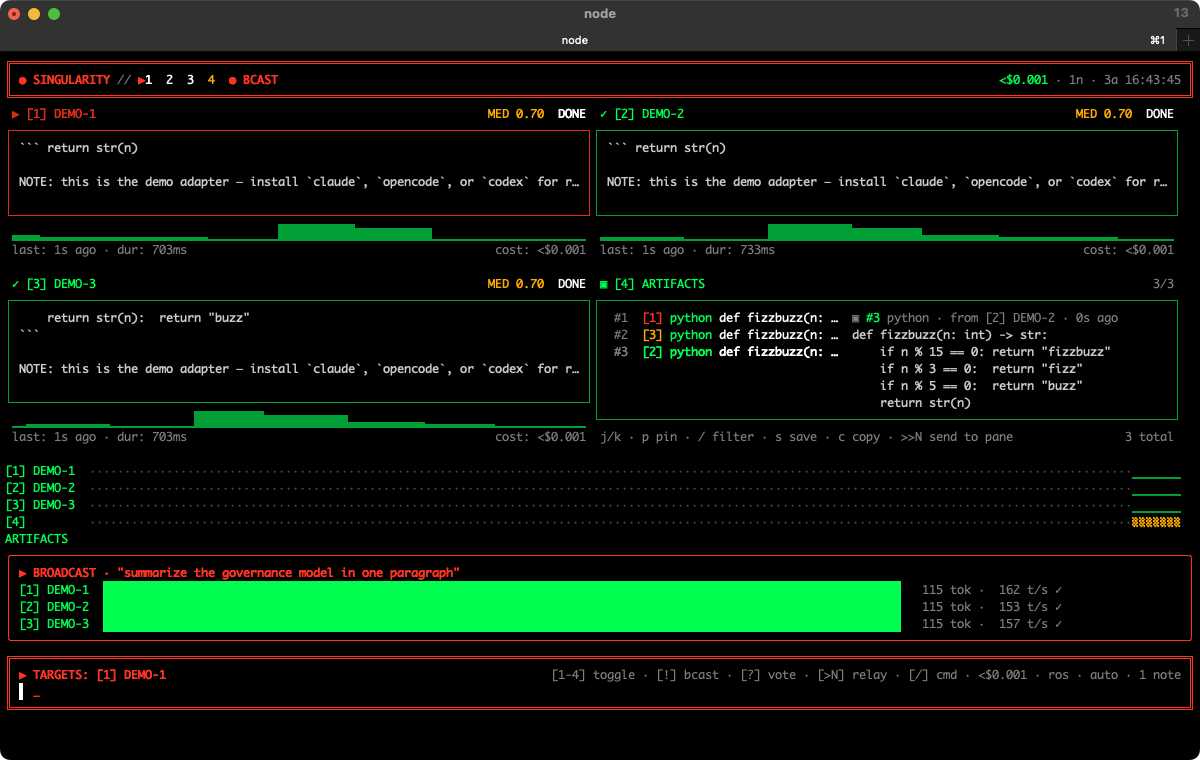
! broadcast racing all panes in parallel — live race bars, per-pane status, artifacts extracted as they stream.
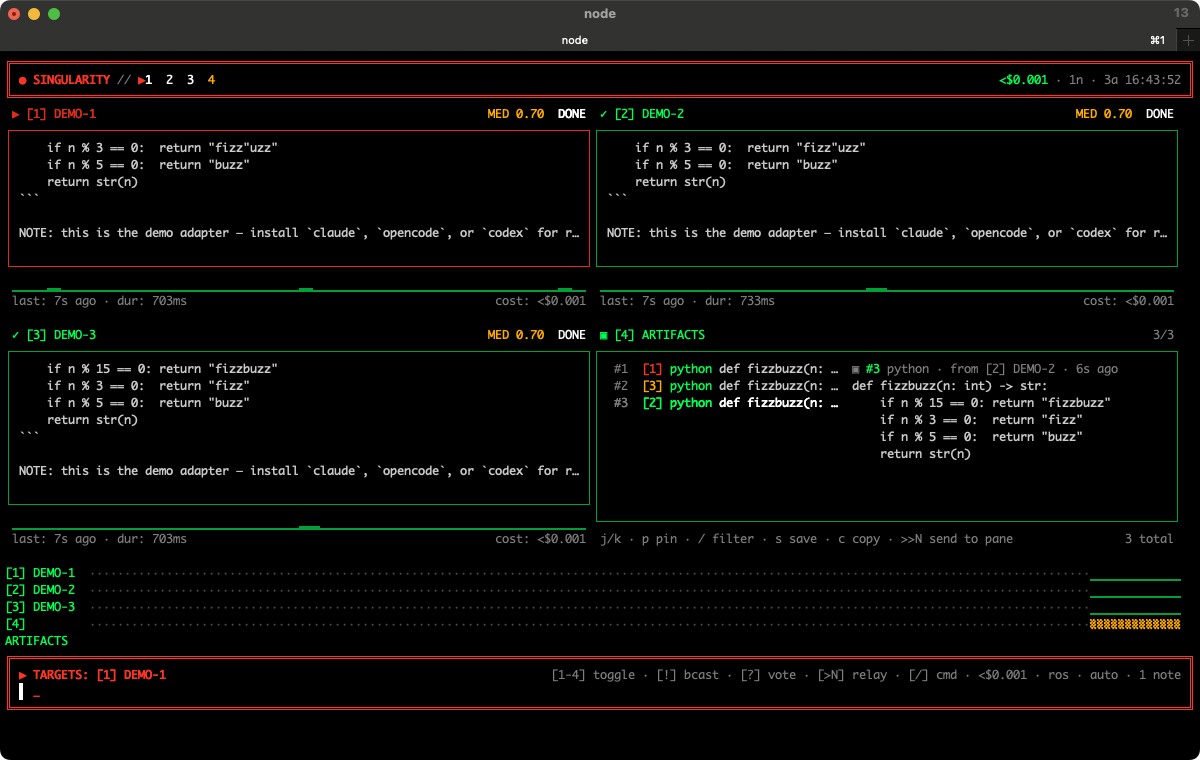 The war-room at rest: 2×2 pane grid, artifact pane with captured code blocks, timeline strip, prompt bar.
Where to start
- docs/manifesto.md — why this exists, in plain prose.
- docs/comparison.md — how it differs from Claude Code, Aider, Crush, Codex CLI, Continue.
- docs/architecture.md — module map + dispatch pipeline.
- PATTERNS.md — the 10 design patterns the project is built on.
- CONTROL.md — the master-control / safety architecture.
- CONTRIBUTING.md — how to add adapters / commands / patterns.
- SECURITY.md — the trust surface and how to report a sandbox escape.
- examples/ — runnable profiles, triggers, snippets, recipes.
The dispatch grammar
| Type this | What happens |
|---|---|
| text | dispatch to the selected pane(s) |
| !text | broadcast — race all eligible panes in parallel; live race bars overlay |
| ?text | quorum — broadcast + classify YES/NO/ABSTAIN; live vote tally |
| >N text | relay — pipe current target's last response into pane N |
| @plan goal | plan-execute — planner drafts JSON steps; workers auto-dispatch |
| /cmd args | slash command (no model call) |
The first character selects the multi-agent topology. npm run dev then /grammar prints the cheat sheet inside the TUI; singularity grammar prints it from the shell.
Shared context, agent-curated
Every dispatch is composed: persona + op_context + roster + shared_notes + git_context + your_prompt. Notes propagate automatically — type NOTE: staging is postgres 17 in any prompt (or watch an agent emit it in any response) and it's pinned to every future dispatch. See PATTERNS.md §3.
╔══════════════════════════════════════════════════════════════════════╗
║ ●  S I N G U L A R I T Y   //   COMMAND CONSOLE       21:47:03  UTC  ║
╠══════════════════════════════════════════════════════════════════════╣
║ ◢ [1] CLAUDE       ENGAGED       ⠹ [2] OPENCODE      STANDBY          ║
║ ✗ [3] CODEX        FAULT         ▣ [4] LANGGRAPH     MONITOR          ║
║   last: 3s ago · dur: 1.2s         sid: w0t0p2                       ║
║                                                                      ║
║ ▶ TARGET: [1] CLAUDE     │ [1-4] select │ [ENTER] dispatch           ║
╚══════════════════════════════════════════════════════════════════════╝
Two modes
First-run setup wizard
The first time you launch the TUI, a wizard auto-prompts. It detects which CLIs are installed, walks you through auth, and writes API keys to ~/.singularity/.env. Re-run any time:
npm run wizard                  # interactive setup
npm run dev -- --wizard         # run wizard then launch the TUI
npm run dev -- --no-wizard      # skip the first-run check entirely
The wizard handles: installing missing npm CLIs, running codex login / opencode providers login for OAuth, prompting for LANGSMITH_API_KEY, and configuring Antigravity's CLI command. In non-TTY contexts (CI, scripts) it just prints a status table and exits cleanly.
In-Ink mode (default, no iTerm required)
npm install
npm run dev
Each pane renders streamed output inline. Works in any terminal.
iTerm2 native splits (macOS + iTerm2)
npm run build
node dist/cli.js launch     # creates a new iTerm2 window with a 2x2 of real CLIs
node dist/cli.js            # then run the controller in any terminal
node dist/cli.js down       # close everything when done
The actual interactive CLIs run in real iTerm2 sessions — so they get the full PTY, real ANSI rendering, history, etc. The controller just dispatches prompts by writing text into the target session via AppleScript.
Effects (the "code red" feel)
- Boot sequence — typewriter banner on launch (~2s)
- Pulsing border — targeted pane's border breathes red
- Streaming shimmer — braille spinner glyph when ENGAGED/STREAMING
- Glitch overlay — block-character static when a pane enters FAULT (~1s)
- Per-pane status footer — last-dispatch time, duration, session id
Controls
| Key | Action |
|---|---|
| 1–4 | Select target pane |
| Tab | Cycle target |
| Esc | Clear target + draft |
| Enter | Dispatch prompt to target |
| Ctrl+C | Quit |
Status vocabulary
IDLE · STANDBY · ENGAGED · STREAMING · DONE · MONITOR · FAULT · OFFLINE
Subcommands
| Command | What it does |
|---|---|
| singularity | open the controller TUI |
| singularity wizard | first-run setup (install/auth/env) |
| singularity launch | create iTerm2 splits + start the AI CLIs (macOS only) |
| singularity down | close iTerm2 sessions + clear state |
| singularity status | show iTerm2 mode + session ids + profiles |
| singularity run --target <id> --prompt "..." | headless one-shot dispatch (scripts/CI) |
| singularity watch <dir> --target <id> --on "..." | auto-dispatch on file change ({{file}} substituted) |
| singularity review <pr#> [--target <id>] | pull a GitHub PR + dispatch a review prompt |
| singularity recipe list | list available recipes |
| singularity recipe <name> [--var=value] | run a recipe (see Recipes below) |
| singularity serve --mcp | act as an MCP server (stdio) for other agents to call |
| singularity serve --http [--port N] [--host H] | REST + SSE HTTP server with OpenAPI (binds 127.0.0.1; non-loopback requires SINGULARITY_SERVER_PASSWORD) |
| singularity web [--port N] [--open] | same HTTP server + tiny embedded browser UI |
| singularity daemon | run configured OS-event triggers in the background |
| singularity showcase [--fast] | scripted demo walkthrough |
| singularity grammar | print the dispatch grammar cheat sheet |
| singularity help | usage |
Recipes
Recipes are declarative YAML/JSON sequences of dispatches and slash commands — a way to bundle a multi-step workflow as a runnable file. Drop YAML files in ~/.singularity/recipes/ or read the bundled ones in examples/recipes/.
# examples/recipes/cross-model-code-review.yaml
name: cross-model-code-review
description: Multi-model vote on whether the current PR should ship
steps:
  - do: "!git diff origin/main...HEAD"          # broadcast
  - do: "?should we ship this PR?"              # quorum
  - do: "@plan summarize disagreements"         # plan-execute
  - do: "/share review-{{date}}.md"             # slash command
    target: 1
Per-step fields: do (required, operator-prefixed prompt or /slash), target (slot or list), timeoutSec, needs (auto-/grant), continueOnError. Template vars {{date}} / {{time}} are built in; pass more via CLI: singularity recipe my-recipe --topic=auth.
Inside the TUI, /recipe <name> runs the same recipe through the live dispatcher.
Adapters
All four CLI adapters are wired. Each shows OFFLINE in its pane if the underlying binary isn't on PATH.
| Adapter | Command | Notes |
|---|---|---|
| CLAUDE | claude -p --output-format stream-json | Streams JSON; cost from real token counts; multi-turn via --resume <session_id> |
| OPENCODE | opencode run "<prompt>" | sst/opencode; --continue used on follow-up turns |
| CODEX | codex exec "<prompt>" | OpenAI codex CLI; single-turn for now |
| ANTIGRAVITY | configurable via env | Set SINGULARITY_ANTIGRAVITY_CMD + (optional) SINGULARITY_ANTIGRAVITY_ARGS='["exec","__PROMPT__"]'. OFFLINE until configured. |
| LANGGRAPH | LangSmith API | Polls every 5s. Needs LANGSMITH_API_KEY and optionally LANGSMITH_PROJECT_ID. Renders a live table of recent runs. |
Adding a new CLI tool is one file using the makeSpawnCliAdapter factory — see src/adapters/opencode.ts for a 10-line example.
Project layout
src/
  cli.tsx           entry + subcommands (launch, wizard, serve, recipe, …)
  App.tsx           controller TUI + key handling
  dispatcher.ts     dispatch orchestration + operator grammar routing
  store.ts          global state (panes, targets, artifacts, capabilities, trust)
  httpServer.ts     REST + SSE server (`serve --http`, `web`)
  mcp.ts            MCP stdio server (`serve --mcp`)
  adapters/         one file per CLI/API backend (claude, opencode, codex, …)
  commands/         slash-command registry
  components/       Ink components (panes, bars, overlays, tickers)
  lib/              everything else: governance (capabilities/sentinel/shadowfs/
                    trust), recipes, triggers, notes, artifacts, plan-exec, …
  iterm/            AppleScript integration for native split mode
See docs/architecture.md for the full module map.