
sk-nodeexpress
v1.1.0
Published
Production-ready Node.js & TypeScript Express REST API generator pre-configured with JWT Auth, Mongoose, Zod Validation, Helmet Security, Rate Limiting, Docker & Swagger.
Downloads
91

Maintainers
 shobhitkumar
Readme
🚀 sk-nodeexpress




sk-nodeexpress is an ultra-fast, zero-config CLI generator that instantly scaffolds production-ready Node.js & TypeScript Express backend REST APIs.
Say goodbye to spending hours writing repetitive Express boilerplate, JWT authentication logic, Zod validation schemas, environment handling, CORS, Helmet security headers, rate limiting, Docker setups, and database connections from scratch!
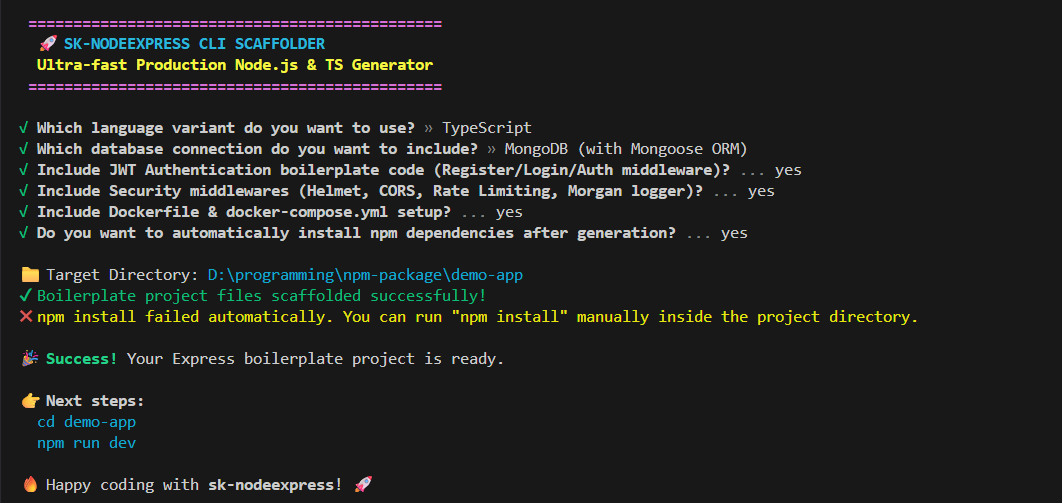
npx sk-nodeexpress my-app📌 Table of Contents
- 🚀 Features
- 📊 Comparison Table
- 🏗️ Architecture Flow
- 📦 Installation
- ⚡ Quick Start & CLI Flags
- 📁 Project Structure
- 🐳 Docker Support
- 🔧 Environment Variables
- 📜 Available Scripts
- 📚 API Example
- ❓ FAQ & Troubleshooting
- 🗺️ Roadmap
- 🤝 Contributing
- 📄 License
🚀 Features
- ⚡ Express Server Core: Pre-configured app & server entry point with clean modular architecture.
- 📐 Dual Language Support: Choose between JavaScript (ES Modules) and TypeScript.
- 🛡️ Zod Payload Validation: Integrated Zod validation middleware for all authentication endpoints.
- 🔐 Pre-built JWT Authentication:
- User Registration (
POST /api/v1/auth/register) - User Login (
POST /api/v1/auth/login) - Forgot & Reset Password Stubs (
POST /api/v1/auth/forgot-password,/reset-password) - Protected User Profile (
GET /api/v1/auth/me) - Password hashing using
bcryptjs - JWT token generation & Verification Middleware
- User Registration (
- 🍃 Database Integration: MongoDB setup using
mongoose(User Schema, connection handlers, duplicate key error handling). - 🐳 Docker Ready: Multi-stage
Dockerfileanddocker-compose.ymlfor instant containerization. - 🛡️ Production Security & Middlewares:
helmet: Protects HTTP headerscors: Handles cross-origin requestsexpress-rate-limit: Prevents DDoS / Brute-force attacksmorgan: Request loggingcookie-parser: Parses cookies safely- Global Error Handling & 404 Route Catchers
- 🎯 Dynamic File Scaffolding: Strips unused files dynamically based on your selections.
📊 Comparison Table
| Feature | sk-nodeexpress | express-generator | NestJS CLI |
| :--- | :---: | :---: | :---: |
| TypeScript Native | ✅ | ❌ | ✅ |
| Pre-built JWT Auth | ✅ | ❌ | ❌ |
| Zod Input Validation | ✅ | ❌ | Manual |
| Docker & Compose Setup| ✅ | ❌ | Manual |
| Security (Helmet/RateLimit) | ✅ | ❌ | Manual |
| Setup Time | < 5s | ~30s | ~60s |
| Zero Configuration | ✅ | ❌ | ❌ |
🏗️ Architecture Flow
graph TD
    Client["🌐 HTTP Client / Postman"] --> Router["🛣️ Express Router (/api/v1/auth)"]
    Router --> RateLimit["🛡️ Rate Limiter & Helmet Middleware"]
    RateLimit --> ZodVal["Validating Zod Schema Middleware"]
    ZodVal --> Controller["🎮 Controller Layer (Async Handler Wrapper)"]
    Controller --> Model["🍃 Mongoose Model / Bcrypt Password Hash"]
    Model --> Response["📦 Standardized API Response Helper"]
    Response --> Client
📦 Installation
No global installation is required! Run directly using npx:
npx sk-nodeexpressOr specify your project name directly:
npx sk-nodeexpress my-express-api⚡ Quick Start & CLI Flags
1. Interactive Mode (Default)
npx sk-nodeexpress my-app2. Sub-Second Non-Interactive Flags
# JavaScript + MongoDB + Auth + Docker
npx sk-nodeexpress my-app --yes

# TypeScript + MongoDB + Auth + Docker
npx sk-nodeexpress my-ts-app --ts --auth --docker

# Standalone Express Server without Auth/DB
npx sk-nodeexpress my-minimal-app --js --no-auth --db none --no-docker
Supported Flags:
--ts/--js: Select language template--auth/--no-auth: Include or exclude JWT Authentication--db <type>: Database type (mongodbornone)--docker/--no-docker: Include or exclude Docker & docker-compose--install/--no-install: Control automaticnpm install
📁 Project Structure
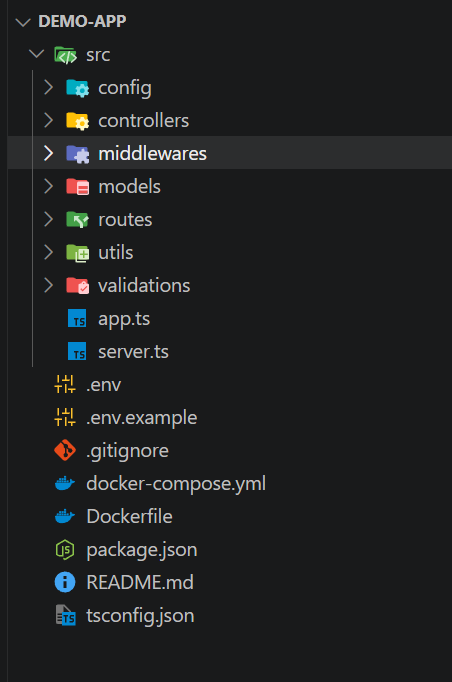
my-express-api/
├── src/
│   ├── config/
│   │   └── db.js            # MongoDB Mongoose Connection
│   ├── controllers/
│   │   ├── authController.js# Register, Login, Profile, Password Reset
│   │   ├── userController.js# User management logic
│   │   └── healthController.js # Server healthcheck endpoint
│   ├── middlewares/
│   │   ├── authMiddleware.js# JWT Guard & Role verification
│   │   ├── validate.js      # Zod Schema Validator Middleware
│   │   ├── errorMiddleware.js# Global Error & 404 handler
│   │   └── rateLimiter.js   # Rate limiting guards
│   ├── validations/
│   │   └── authValidation.js# Zod Validation Schemas
│   ├── models/
│   │   └── User.js          # Mongoose User Schema & Bcrypt methods
│   ├── routes/
│   │   ├── authRoutes.js    # Auth endpoints with Zod Guards
│   │   ├── userRoutes.js    # User endpoints
│   │   └── healthRoutes.js  # Health endpoint
│   ├── utils/
│   │   ├── apiResponse.js   # Standardized JSON response wrapper
│   │   ├── asyncHandler.js  # Async Error Handler Wrapper
│   │   └── jwt.js           # JWT Sign & Verify helpers
│   ├── app.js               # Express application setup
│   └── server.js            # Server listener
├── Dockerfile               # Production Docker Container setup
├── docker-compose.yml       # Express API + MongoDB Services setup
├── .env.example             # Environment template
├── package.json             # App dependencies & npm scripts
└── README.md                # Generated project documentation
🐳 Docker Support

To run your API inside a Docker container with MongoDB:
# Build and start containers in detached mode
docker-compose up -d --build

# View container logs
docker-compose logs -f

# Stop containers
docker-compose down
🔧 Environment Variables
PORT=5000
NODE_ENV=development
MONGODB_URI=mongodb://localhost:27017/my_sknodejs_db
JWT_SECRET=super_secret_jwt_key_change_in_prod
JWT_EXPIRES_IN=7d
CORS_ORIGIN=*
📚 API Example
1. Register User
POST /api/v1/auth/register
{
  "name": "Jane Doe",
  "email": "[email protected]",
  "password": "password123"
}
2. Login User
POST /api/v1/auth/login
{
  "email": "[email protected]",
  "password": "password123"
}
❓ FAQ & Troubleshooting
Q: JWT_SECRET environment variable is missing error?
Ensure you have created a .env file from .env.example and specified a valid JWT_SECRET.
Q: MongoDB Connection Refused?
Ensure MongoDB service is running locally (mongod) or start it via docker-compose up -d mongo.
🗺️ Roadmap
- [x] v1.1.0: Zod Validation, Async Process Execution, Docker Support, Non-interactive Flags.
- [ ] v1.2.0: Swagger OpenAPI documentation endpoint (
/api-docs). - [ ] v2.0.0: Prisma ORM Support (PostgreSQL / MySQL).
🤝 Contributing
Please read our Contributing Guide and Code of Conduct before submitting pull requests.
📄 License
MIT © Shobhit Kumar