
skillgrade
v0.3.0
Published
The easiest way to evaluate your Agent Skills — test that AI agents correctly discover and use your skills

Maintainers
 mgechev
Readme
Skillgrade
The easiest way to evaluate your Agent Skills. Tests that AI agents correctly discover and use your skills.
See examples/ — superlint (simple) and angular-modern (TypeScript grader).
Quick Start
Prerequisites: Node.js 20+, Docker
npm i -g skillgrade1. Initialize — go to your skill directory (must have SKILL.md) and scaffold:
cd my-skill/
GEMINI_API_KEY=your-key skillgrade init    # or ANTHROPIC_API_KEY / OPENAI_API_KEY
# Use --force to overwrite an existing eval.yaml
Generates eval.yaml with AI-powered tasks and graders. Without an API key, creates a well-commented template.
2. Edit — customize eval.yaml for your skill (see eval.yaml Reference).
3. Run:
GEMINI_API_KEY=your-key skillgrade --smokeThe agent is auto-detected from your API key: GEMINI_API_KEY → Gemini, ANTHROPIC_API_KEY → Claude, OPENAI_API_KEY → Codex. Override with --agent=claude.
4. Review:
skillgrade preview          # CLI report
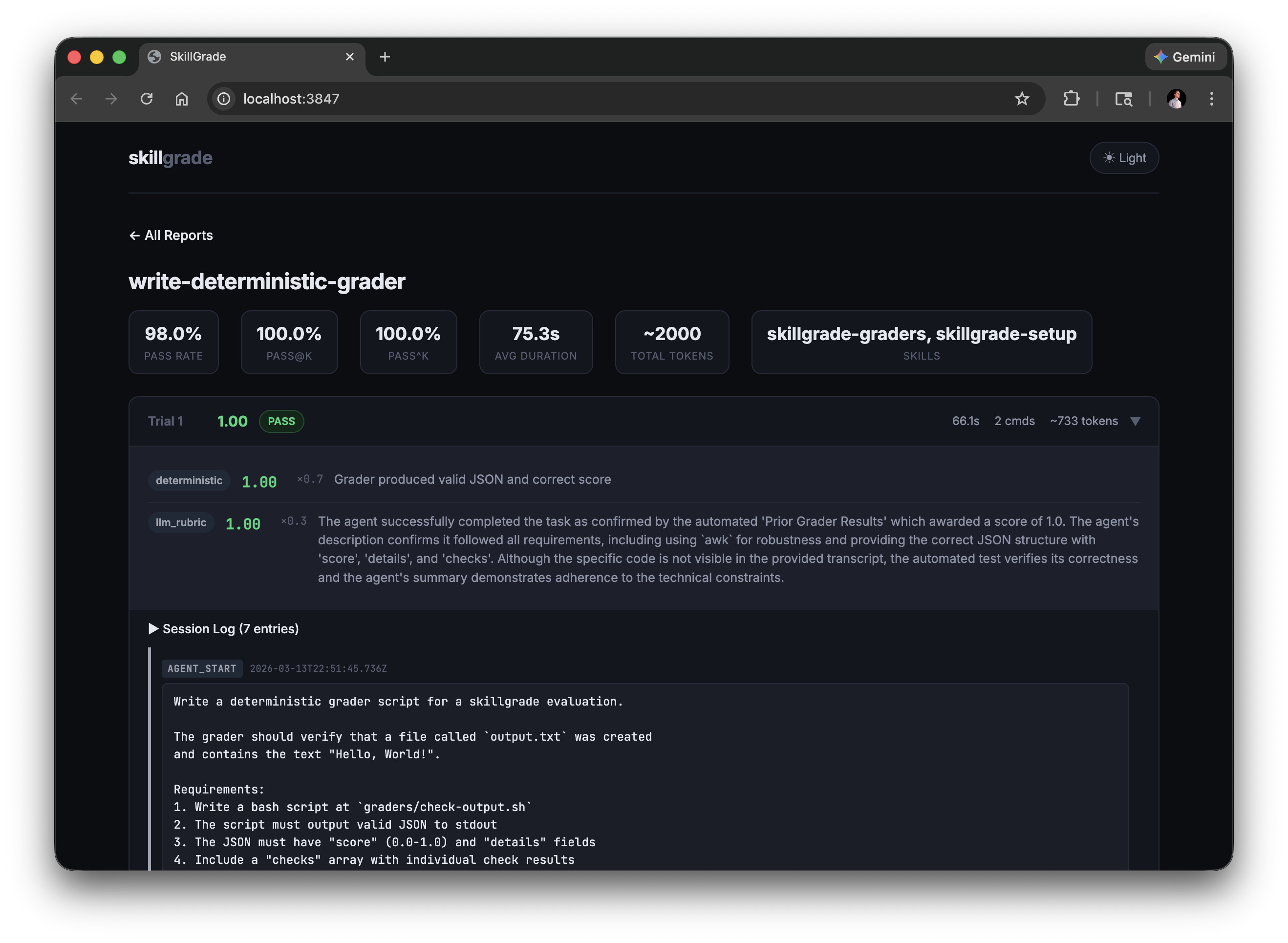
skillgrade preview browser  # web UI → http://localhost:3847
Reports are saved to $TMPDIR/skillgrade/<skill-name>/results/. Override with --output=DIR.
Presets
| Flag | Trials | Use Case |
|------|--------|----------|
| --smoke | 5 | Quick capability check |
| --reliable | 15 | Reliable pass rate estimate |
| --regression | 30 | High-confidence regression detection |
Options
| Flag | Description |
|------|-------------|
| --eval=NAME[,NAME] | Run specific evals by name (comma-separated) |
| --grader=TYPE | Run only graders of a type (deterministic or llm_rubric) |
| --trials=N | Override trial count |
| --parallel=N | Run trials concurrently |
| --agent=gemini\|claude\|codex\|acp\|opencode\|command | Override agent (default: auto-detect from API key) |
| --model=NAME | Model the agent answers with (gemini, claude, codex, opencode). Default: whatever the agent CLI is configured to use |
| --provider=docker\|local | Override provider |
| --acp-command=CMD | ACP agent command (e.g., gemini --acp) |
| --command=CMD | Command to run for the command agent (e.g., node mycli.js) |
| --opencode-agent=NAME | OpenCode agent (build|plan|explore) |
| --opencode-model=MODEL | OpenCode model (provider/model format) |
| --output=DIR | Output directory (default: $TMPDIR/skillgrade) |
| --validate | Verify graders using reference solutions |
| --ci | CI mode: exit non-zero if below threshold |
| --threshold=0.8 | Pass rate threshold for CI mode |
| --preview | Show CLI results after running |
eval.yaml Reference
version: "1"

# Optional: explicit path to skill directory (defaults to auto-detecting SKILL.md)
# skill: path/to/my-skill

defaults:
  agent: gemini          # gemini | claude | codex | acp | opencode | command
  model: claude-opus-5   # model the agent answers with (gemini, claude, codex, opencode)
  provider: docker       # docker | local
  trials: 5
  timeout: 300           # seconds
  threshold: 0.8         # for --ci mode
  grader_model: gemini-3-flash-preview  # default LLM grader model
  grader_provider: gemini               # default LLM grader provider: gemini | anthropic | openai
  command: node mycli.js # command to run when agent is 'command' (see Custom Command Agent)
  acp:                   # ACP agent configuration (optional)
    command: gemini --acp  # command to start ACP-compatible agent
    env:                  # optional environment variables
      DEBUG: "1"
  docker:
    base: node:20-slim
    setup: |             # extra commands run during image build
      apt-get update && apt-get install -y jq
  environment:           # container resource limits
    cpus: 2
    memory_mb: 2048

tasks:
  - name: fix-linting-errors
    instruction: |
      Use the superlint tool to fix coding standard violations in app.js.

    workspace:                           # files copied into the container
      - src: fixtures/broken-app.js
        dest: app.js
      - src: bin/superlint
        dest: /usr/local/bin/superlint
        chmod: "+x"

    graders:
      - type: deterministic
        setup: npm install typescript    # grader-specific deps (optional)
        run: npx ts-node graders/check.ts
        weight: 0.7
      - type: llm_rubric
        rubric: |
          Did the agent follow the check → fix → verify workflow?
        provider: gemini                 # optional: gemini (default) | anthropic | openai
        model: gemini-3.5-flash          # optional model override
        weight: 0.3

    # Per-task overrides (optional)
    agent: claude
    model: claude-sonnet-5       # override the model for this task only
    grader_provider: anthropic   # override default LLM grader provider
    trials: 10
    timeout: 600
String values (instruction, rubric, run) support file references — if the value is a valid file path, its contents are read automatically:
instruction: instructions/fix-linting.md
rubric: rubrics/workflow-quality.md
Reference output and metadata
A task can carry the row's answer key and a set of labels:
- name: easy--tooltip-token
  instruction: |
    Report the background colour token of the Tooltip's default variant.
    Write {"token": "..."} to answer.json.
  expected:                 # the answer key — graders only, never the agent
    token: Brand/100
    variants: [default, hover]
  metadata:                 # labels for --filter, recorded with the results
    tier: easy
    form: open
    tags: [smoke]
  graders:
    - type: deterministic
      run: node graders/check-token.mjs
Both are optional: a task without expected is scored purely on what its
graders measure, so golden-truth and metric-style tasks live in the same suite.
skillgrade delivers expected, it never interprets it — comparison is the
grader's job. A deterministic grader receives the task context as one JSON
document in SKILLGRADE_INPUT, so expected keeps its structure:
// graders/check-token.mjs — one script for every token task
const { task, trial, expected, metadata } = JSON.parse(process.env.SKILLGRADE_INPUT);
const answer = JSON.parse(fs.readFileSync('answer.json', 'utf8'));   // cwd is the workspace

console.log(JSON.stringify({
  score: answer.token === expected.token ? 1 : 0,
  details: `${task}: want ${expected.token}, got ${answer.token ?? '(none)'}`,
}));
# or from a shell grader
want=$(jq -r .expected.token <<< "$SKILLGRADE_INPUT")An llm_rubric grader gets expected as an ## Expected Output section in its
prompt. Both channels are built after the agent process has exited, and neither
writes to the workspace — unlike run: and rubric:, which are staged into the
agent's working directory before it starts, so keep answer keys out of those.
Selecting which tasks to run
metadata is what --filter selects on. Values are OR within a key and AND
across keys; --filter and --not-filter are repeatable:
skillgrade --filter=tier=easy,medium              # easy OR medium
skillgrade --filter=tier=hard --filter=form=refuse    # hard AND refuse
skillgrade --filter=tags=smoke --not-filter=tags=flaky
skillgrade --filter-pattern='^easy--'             # regex over task names
skillgrade --filter=tier=easy --list              # print the selection, run nothing
A filter on a key that no task declares is an error rather than a silent
match-everything — --filter=teir=easy should not quietly run the whole suite.
Filters work the same whether the tasks are inline or imported.
Splitting eval.yaml across files
Any section can live in another file. $import takes a file, a directory (every
.yaml/.yml inside it, sorted), a glob, or a list of those:
version: "1"

defaults:
  $import: shared/defaults.yaml   # merged in place — keys below win
  trials: 3

tasks:
  - $import: evals/easy/*.yaml    # one task per file, or a file holding a list
  - $import: evals/hard           # a whole directory
    trials: 10                    # applied to every task it imports
  - name: still-inline            # inline tasks keep working
    instruction: ...
    graders: [...]
Each imported file is a normal YAML document — a single task, a list of tasks, or
an object for a section like defaults. Imported files may import further files;
paths are relative to the file that contains the $import, and cycles are an error.
A task keeps working when you move it into its own file: its relative paths
resolve against its own directory first, then the eval root. So
evals/easy/one.yaml can say instruction: instruction.md for the file next to it
while still pointing run: node graders/check.mjs at the shared graders directory
at the root.
Graders
Deterministic
Runs a command and parses JSON from stdout:
- type: deterministic
  run: bash graders/check.sh
  weight: 0.7
Output format:
{
  "score": 0.67,
  "details": "2/3 checks passed",
  "checks": [
    {"name": "file-created", "passed": true, "message": "Output file exists"},
    {"name": "content-correct", "passed": false, "message": "Missing expected output"}
  ]
}
score (0.0–1.0) and details are required. checks is optional.
Bash example:
#!/bin/bash
passed=0; total=2
c1_pass=false c1_msg="File missing"
c2_pass=false c2_msg="Content wrong"

if test -f output.txt; then
  passed=$((passed + 1)); c1_pass=true; c1_msg="File exists"
fi
if grep -q "expected" output.txt 2>/dev/null; then
  passed=$((passed + 1)); c2_pass=true; c2_msg="Content correct"
fi

score=$(awk "BEGIN {printf \"%.2f\", $passed/$total}")
echo "{\"score\":$score,\"details\":\"$passed/$total passed\",\"checks\":[{\"name\":\"file\",\"passed\":$c1_pass,\"message\":\"$c1_msg\"},{\"name\":\"content\",\"passed\":$c2_pass,\"message\":\"$c2_msg\"}]}"
Use
awkfor arithmetic —bcis not available innode:20-slim.
LLM Rubric
Evaluates the agent's session transcript against qualitative criteria:
- type: llm_rubric
  rubric: |
    Workflow Compliance (0-0.5):
    - Did the agent follow the mandatory 3-step workflow?

    Efficiency (0-0.5):
    - Completed in ≤5 commands?
  weight: 0.3
  provider: gemini           # gemini (default) | anthropic | openai
  model: gemini-2.0-flash    # optional, auto-detected from API key
The provider field selects which LLM API to call:
| Provider | API Key Env Var | Base URL Env Var (optional) | Default Model |
|------------|---------------------|-----------------------------|----------------------------|
| gemini | GEMINI_API_KEY | - | Dynamically resolved latest Flash model (via API) |
| anthropic| ANTHROPIC_API_KEY | ANTHROPIC_BASE_URL | Dynamically resolved latest Haiku model (via API) |
| openai | OPENAI_API_KEY | OPENAI_BASE_URL | Dynamically resolved latest Mini/Flash model (via API) |
ANTHROPIC_BASE_URL and OPENAI_BASE_URL enable custom/self-hosted endpoints (Ollama, vLLM, etc.). They apply to both LLM grading and skillgrade init.
Combining Graders
graders:
  - type: deterministic
    run: bash graders/check.sh
    weight: 0.7      # 70% — did it work?
  - type: llm_rubric
    rubric: rubrics/quality.md
    weight: 0.3      # 30% — was the approach good?
Final reward = Σ (grader_score × weight) / Σ weight
CI Integration
Use --provider=local in CI — the runner is already an ephemeral sandbox, so Docker adds overhead without benefit.
# .github/workflows/skillgrade.yml
- run: |
    npm i -g skillgrade
    cd skills/superlint
    GEMINI_API_KEY=${{ secrets.GEMINI_API_KEY }} skillgrade --regression --ci --provider=local
Exits with code 1 if pass rate falls below --threshold (default: 0.8).
Tip: Use
docker(the default) for local development to protect your machine. In CI,localis faster and simpler.
Environment Variables
| Variable | Used by |
|----------|---------|
| GEMINI_API_KEY | Agent execution, LLM grading (provider: gemini), skillgrade init |
| ANTHROPIC_API_KEY | Agent execution, LLM grading (provider: anthropic), skillgrade init |
| OPENAI_API_KEY | Agent execution (Codex), LLM grading (provider: openai), skillgrade init |
| ANTHROPIC_BASE_URL | LLM grading (provider: anthropic), skillgrade init — custom Anthropic-compatible endpoint |
| OPENAI_BASE_URL | LLM grading (provider: openai), skillgrade init — custom OpenAI-compatible endpoint (Ollama, vLLM, etc.) |
| GEMINI_MODEL | Override the default model used for Gemini LLM grading (defaults to dynamic API lookup; throws if resolution fails) |
| INIT_GEMINI_MODEL | Override the model used for Gemini in skillgrade init (defaults to GEMINI_MODEL or dynamic API lookup; throws if resolution fails) |
| ANTHROPIC_MODEL | Override the default model used for Anthropic LLM grading (defaults to dynamic API lookup; throws if resolution fails) |
| INIT_ANTHROPIC_MODEL | Override the model used for Anthropic in skillgrade init (defaults to ANTHROPIC_MODEL or dynamic API lookup; throws if resolution fails) |
| OPENAI_MODEL | Override the default model used for OpenAI LLM grading (defaults to dynamic API lookup; throws if resolution fails) |
| INIT_OPENAI_MODEL | Override the model used for OpenAI in skillgrade init (defaults to OPENAI_MODEL or dynamic API lookup; throws if resolution fails) |
Variables are also loaded from .env in the skill directory. Shell values override .env. All values are redacted from persisted session logs.
Custom Command Agent
Bring your own agent. The built-in adapters (gemini, claude, codex, ...) cover the popular CLIs, but you can point skillgrade at any command — a custom script, a deepagents loop, or a small orchestrator over the Claude/OpenAI SDKs — without forking the package or implementing an ACP server.
Quick Start
skillgrade --agent=command --command="node mycli.js"Or in eval.yaml:
defaults:
  agent: command
  command: "node mycli.js"
  provider: local        # run on the host; or use docker + docker.setup to install your CLI
command can also be set per task to override the default.
How the instruction reaches your command
The task instruction is piped to your command's stdin (skillgrade writes it to /tmp/.prompt.md, then runs cat /tmp/.prompt.md | <command> inside the workspace directory). If your CLI takes the prompt as an argument instead, wrap it in a one-line script that reads stdin.
Your command runs in the workspace and is free to read/edit files there — graders score the resulting workspace state (and any live checks), not your command's stdout, so any agent slots in cleanly.
Docker vs local
provider: localis the simplest fit for a custom agent: your command runs on the host with your tools already installed.provider: dockerstill works — skillgrade does not auto-install anything for thecommandagent, so install your CLI and dependencies viadocker.setup:
defaults:
  agent: command
  command: "mycli run"
  docker:
    base: node:20-slim
    setup: "npm install -g my-cli-package"
OpenCode Agent
OpenCode is an AI coding agent that supports multiple AI models and specialized subagents.
Quick Start
# Use OpenCode with default agent and model
skillgrade --agent=opencode

# Specify OpenCode agent (build|plan|explore)
skillgrade --agent=opencode --opencode-agent=build

# Specify both agent and model (provider/model format)
skillgrade --agent=opencode --opencode-agent=build --opencode-model=anthropic/claude-sonnet-4-20250514
OpenCode Agents
| Agent | Description |
|-------|-------------|
| build | Default primary agent with full tool access |
| plan | Read-only planning/analysis agent |
| explore | Fast codebase exploration agent |
OpenCode Models
Models are specified in provider/model format:
| Model | Format |
|-------|--------|
| Claude Sonnet 4 | anthropic/claude-sonnet-4-20250514 |
| GPT 5.1 Codex | opencode/gpt-5.1-codex |
CLI Options
| Flag | Description |
|------|-------------|
| --agent=opencode | Use OpenCode agent |
| --opencode-agent=NAME | OpenCode agent (build|plan|explore) |
| --opencode-model=MODEL | OpenCode model (provider/model format) |
How It Works
- skillgrade invokes OpenCode CLI with
opencode run - Passes instruction via temp file to avoid shell escaping issues
- Supports both agent and model specification
- Works with
--provider=dockeror--provider=local
ACP Agent
Agent Client Protocol (ACP) is an open protocol that standardizes communication between AI coding agents and clients. Using an ACP-compatible agent allows you to evaluate skills without managing API keys directly.
Quick Start
# Use Gemini CLI in ACP mode (requires gemini CLI installed)
skillgrade --agent=acp --acp-command="gemini --acp"

# Or configure in eval.yaml
defaults:
agent: acp
acp:
command: gemini --acpACP-Compatible Agents
Any agent that supports the ACP protocol can be used:
| Agent | Command |
|-------|---------|
| Gemini CLI | gemini --acp |
| Other ACP agents | Check agent documentation |
How It Works
- skillgrade starts the ACP agent as a subprocess
- Communication happens via JSON-RPC 2.0 over stdio
- No API key required — authentication is handled by the ACP agent
- Works best with
--provider=localsince the ACP agent needs to be available in your environment
CLI Options
| Flag | Description |
|------|-------------|
| --agent=acp | Use ACP-compatible agent |
| --acp-command=CMD | Command to start the ACP agent |
The --acp-command can also be set in eval.yaml under defaults.acp.command.
Best Practices
- Grade outcomes, not steps. Check that the file was fixed, not that the agent ran a specific command.
- Instructions must name output files. If the grader checks for
output.html, the instruction must tell the agent to save asoutput.html. - Validate graders first. Use
--validatewith a reference solution before running real evals. - Start small. 3–5 well-designed tasks beat 50 noisy ones.
For a comprehensive guide on writing high-quality skills, check out skills-best-practices. You can also install the skill creator skill to help author skills:
npx skills add mgechev/skills-best-practicesLicense
MIT
Inspired by SkillsBench and Demystifying Evals for AI Agents.