
slidaiv
v0.0.12
Published
Slidaiv extension leverages AI/LLM to automatically generate content for Slidev presentations, making it easier for users to write a Slidev presentation.


Readme


Slidaiv
Slidaiv leverages AI/LLM to automatically generate content for Slidev presentations, making it easier for users to write a Slidev presentation.
 )
)
Features
- Automatic Content Generation: Generate Slidev content using AI/LLM based on user prompts.
- Easy Integration: Seamlessly integrates with VS Code for a smooth workflow.
- Customizable: Users can use OpenAI or OpenAI-compatible API, choose favorite models, and specify their own prompts to generate contents.
- Generate all slides: With slidaiv-cli, enable to generate multiple page slide in one command.
Getting started
VS Code Extension
- Install Slidaiv Extension from VS Code or Marketplace
- Set your API Key to call OpenAI (or OpenAI-comptible) service
- If the popup to enter API Key didn't open, type
Sliadiv: Set API Keyin the command palette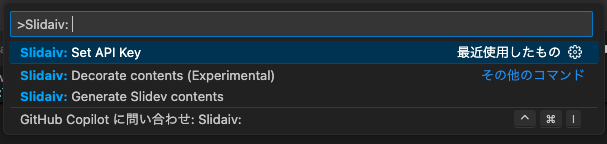
- If the popup to enter API Key didn't open, type
- Configure Slidaiv settings from preferences (see Extension settings)
- Write prompt in frontmatter and run (Right click) > Slidaiv > Generate Slide contents on .md file

...
---
# Write prompt to LLM in frontmatter and generate Slidev contents
# by "Context Menu > Generate Slidev contents".
slidaiv:
  prompt:
    - Generate awesome page to introduce Slidev
    - features, how to start it
  # Can specify the language for generated content. If unspecified,
  # VS Code's language setting will be used.
  locale: en
---

<!-- Generated contents from here -->
## Slide Title: Why You Should Use Slidev

Slidev is a versatile slideshow platform that offers:

- Simple Markdown syntax, easy to learn and use!
- Highly customizable themes, UNOCSS support for styling
- Interactive features for audience engagement
- Export to HTML, PDF, or reveal.js

Get started:
` ``bash
npm i -g slidev
slidev init <template>  # select a template
cd .slidev && slidev serve
` ``

<!-- End -->

---
# Wrap up
...
Extension settings
| Name | Description | Default |
|:-|:-|:-|
| API Key | API Key to send request to OpenAI(-compatible) service. | (Set via popup) |
| Base URL | API endpoint to send request | https://api.openai.com/v1 |
| Model | LLM model name | gpt-3.5-turbo |
| Prompt: Generate | System prompt to be used when generating Slidev contents | See prompts.ts |
| Prompt: Decorate | System prompt to be used when decorating contents | See prompts.ts |
| Debug | Turn on outputing debug log | false |
CLI
- Install
slidaivbynpm install slidaiv - Write
slides.yamlto generate slides - Run
npx slidaiv
$ npx slidaiv -h
Usage: slidaiv [options]

Options:
  -i, --input <file>     input yaml file path to generate slide (default: "slides.yaml")
  -o, --output <file>    output path to write markdown file
  -l, --locale <locale>  locale of generated slide
  -s, --service <service>  service to use ("openai" or "azure-ai-inference") (default: "openai")
  -u, --apiurl <url>     base url of openai api (e.g.: https://api.openai.com/v1)
  -k, --apikey           api key of openai (or openai-compatible) api
  -m, --model <model>    model of openai api
  -d, --debug            output extra debugging (default: false)
  -h, --help             display help for command

$ cat slides.yaml
context:
  baseUrl: http://api.openai.com/v1
  apiKey: xxxxxxxxx
  model: gpg-4o
  locale: ja
slides:
  - prompts:
    - What is the capital of France?
  - prompts:
    - What is the capital of Germany?
  - prompts:
    - What is the capital of United States?
  - prompts:
    - What is the capital of Japan?
    - Where is it?
License
See LICENSE.txt