
slopsplorer
v0.9.0
Published
Local, token-weighted source tree explorer. See where the mass of a codebase actually sits.

Maintainers
 ptencheg
Readme
Slopsplorer

Slopsplorer is an interactive map of where the slop sits in a codebase.
Point it at a repository. It weighs every file in tokens, lines, and structure, then shows you which folders and which files carry the mass.
Vibed code is slop until proven otherwise, and the bigger the number, the denser the slop. Slopsplorer sniffs out where it piled up.
npx slopsplorer /path/to/vibe-coded-repoThe scan opens in your browser on http://127.0.0.1:8765.
# Install it if you use it often
npm install -g slopsplorer

cd vibe-coded-repo

# review slop already in the repo
slopsplorer .

# review slop brought by diffs
slopsplorer --pr 619           # fetch and review a pull request
slopsplorer --diff             # HEAD against the working tree
slopsplorer --staged           # HEAD against the index
slopsplorer main...HEAD        # a pull-request-style comparison
slopsplorer f53f4f9eb          # one commit against its parent
slopsplorer v1.4 v1.5          # any two revisions

# Use `-C <dir>` when the repository is elsewhere.
slopsplorer -C /path/to/another-repo --pr 1543

# A pull request of any project, from any folder.
slopsplorer https://github.com/owner/project/pull/199
The Before - Diff - After control moves between the complete repository on either side and the change itself without checking out either revision.
The commit band allows to focus layer-by-layer on the whole PR, selected run of multiple commits, or one commit at a time.
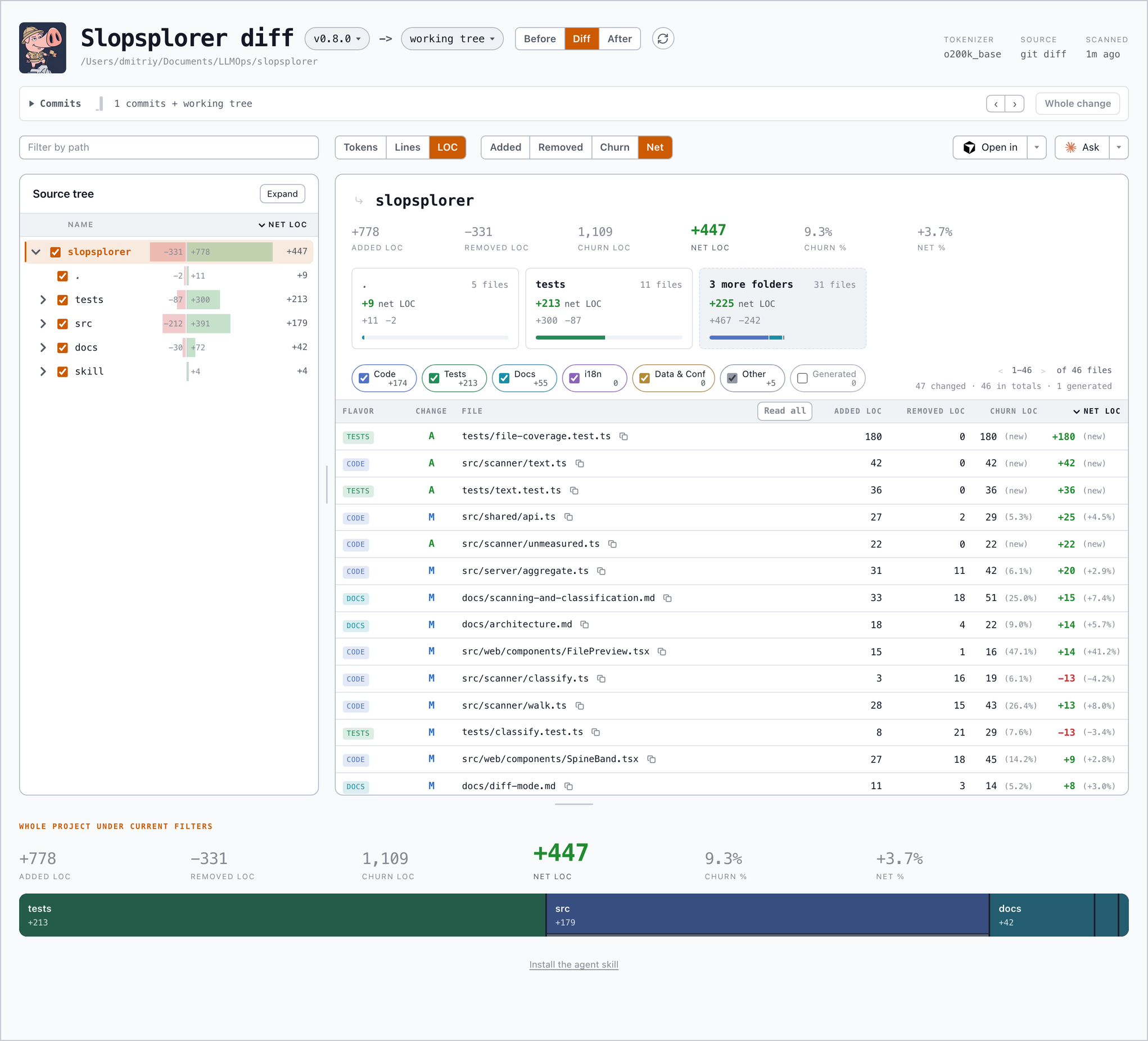
Slopsplorer comparing v0.5.0 with HEAD, in net LOC.
--pr accepts a GitHub or GitLab pull request number or URL and needs the matching gh or glab CLI signed in.
A URL works from anywhere, including a folder that is no repository: when no remote here serves that project, slopsplorer clones it to a read-only temporary folder and removes it when the run ends.
Click a file to read its source or diff, or use Read all to open every matching file in path order.
All text formats count, including extensionless build files and patches; changed files that cannot be measured show a reason when their category is enabled.
Read the map
- Choose Tokens, Lines, or LOC to set the unit for every total, bar, and ranking.
- Use flavor switches and path search to decide which files count.
- Use tree checkboxes to exclude folders from the page.
- Double-click a folder to drill into it.
- Click a column heading to sort the file table.
Every file is classified as Code, Tests, Docs, i18n, Data & Conf, or Other.
Generated output has its own switch and starts off.
Git-ignored files stay out unless you pass --all-files.
| Metric | Counts | | --- | --- | | Tokens | The tokenizer weight of the whole file | | Lines | Non-blank lines | | LOC | Non-blank lines that are not entirely comments | | Functions, classes, branches | Tree-sitter structure for supported languages |
Scanning and classification documents the complete acceptance, flavor, grammar, and counting rules.
Reports and snapshots
Print the map as text for a terminal or coding agent:
slopsplorer --report
slopsplorer --report main...HEAD --unit loc --aspect net --threshold 1
Export the portable interactive explorer static to a folder:
slopsplorer --export ./site
slopsplorer --export ./branch-review main...HEAD
slopsplorer --export ./pr-619 https://github.com/owner/repo/pull/619
A snapshot keeps filters, rankings, commit context, and source or diff previews.
It contains the accepted source text, so protect it like the repository and serve it over HTTP rather than file://.
See text reports and static exports for the full behavior.
Local tools
Open in opens the project root or drilled folder in Cursor, VS Code, or the operating system's file manager.
Ask sends a question and the current view to an installed Claude Code, Codex, Cursor, or opencode process on your machine. The agent runs in the background and returns an answer when ready.
The Install the agent skill link provides a command that copies the bundled Slopsplorer skill into the local agent skill folders. The link itself installs nothing.
Safety
The server binds to loopback by default, serves only scanned files, and refuses paths outside the scan root.
Use --host 0.0.0.0 only when you intend to expose it.
Run slopsplorer --help for all CLI options.
Development
npm install
npm run dev      # scan the current folder with hot reload
npm test
Development needs Node 22.18 or later. The published package supports Node 20.19 and later. AGENTS.md covers the architecture and repository conventions.
License
MIT