
smart-copy2clip
v1.2.1
Published
A simple React button component to copy a string or number to clipboard.

Maintainers
 nisharga
Readme
📋 smart-copy2clip
A lightweight React component that adds a simple copy-to-clipboard button to your app. Supports both strings and numbers. Includes dynamic icon feedback: a copy icon before clicking, and a checkmark icon after successful copy.
🚀 Installation
From npm registry:
npm install smart-copy2clip🚀 Uses
simple (Just Import and use it in your React or Next.js project)
import { Clipboard } from 'smart-copy2clip';

export default function App() {
  return (
    <div>
      <Clipboard value="Hello World" />
      <Clipboard value={12345} size={50} color="red" />
      <Clipboard value="string" size={20} color="#ff0000" />
    </div>
  );
}
You need to use "use client" if you are using nextjs
Features
✅ Copy both string and number values
✅ Visual feedback: checkmark after successful copy
✅ Fully customizable size and color
✅ Works out-of-the-box with no extra dependencies
🔧 Props
| Prop | Type | Required | Default | Description |
| ------- | ------------------ | -------- | --------- | -------------------------------------------- |
| value | string \| number | ✅ Yes | – | The text or number to copy to the clipboard |
| size | number | ❌ No | 16 | Size in pixels for both copy and check icons |
| color | string | ❌ No | #619BFF | Icon color. Accepts any valid CSS color |
🖼 Example
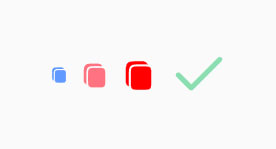
<Clipboard value={'By Default'} />
<Clipboard value='Hello World' size={25} color='#FF7280' />
<Clipboard value={12345} size={30} color='red' />
<Clipboard value={'After copy'} size={50} color='#8BDEB0' />
🔌 Icon Behavior
🖱️ Default shows Copy icon
✅ On click, copies the value and switches to a Check icon
⏱️ After 3 seconds, automatically reverts to the Copy icon
🔁 You can click again to copy again