
smart-playwright-reporter
v0.1.2
Published
An intelligent Playwright test reporter with AI-powered failure analysis, detailed test insights, and beautiful HTML reports

Maintainers
 reedxia
Readme
Smart Playwright Reporter
🧪 An intelligent Playwright test reporter with AI-powered failure analysis and beautiful HTML reports.
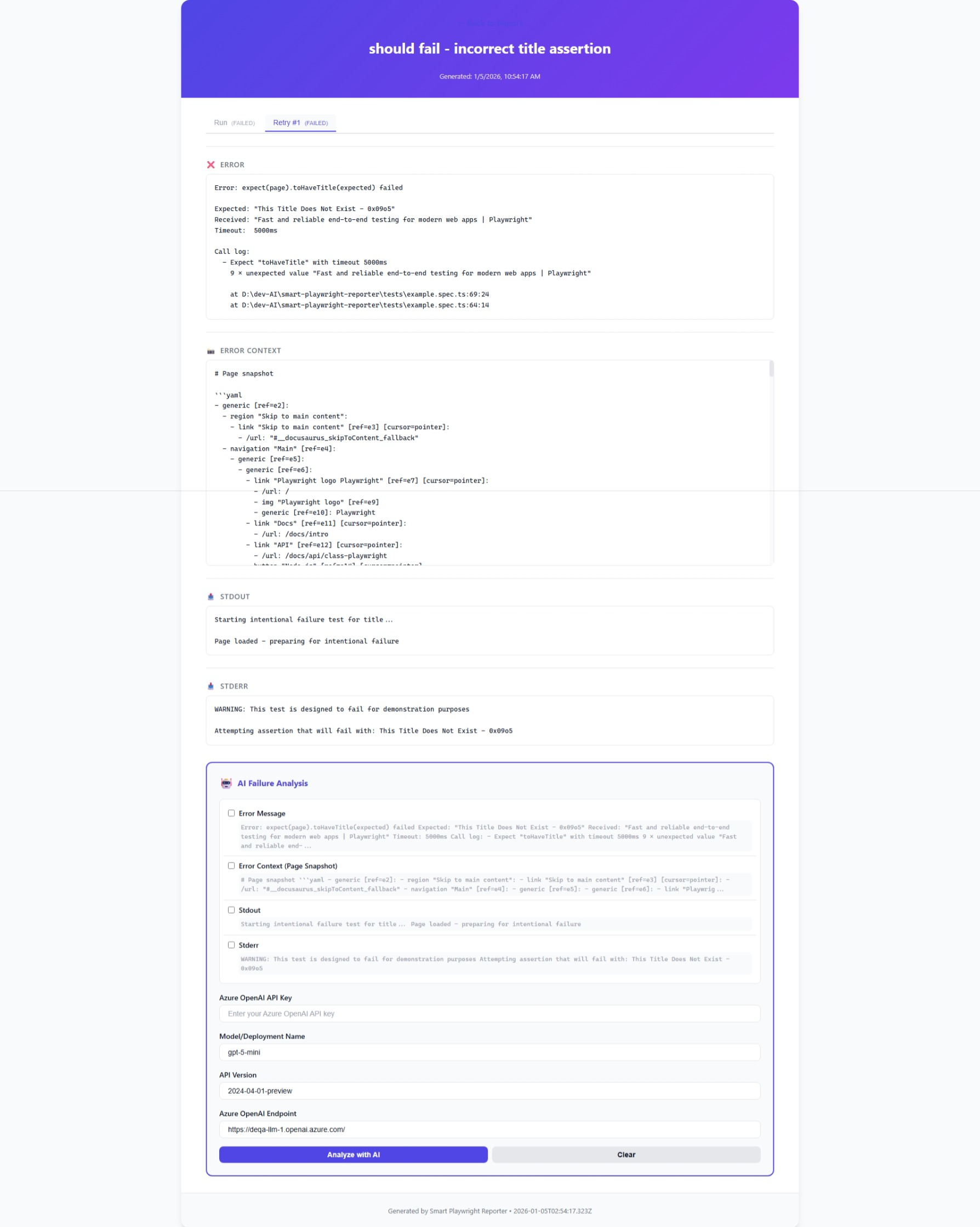
Features
- 📊 Beautiful HTML Reports - Clean, modern interface with detailed test results, CSS variables theming, and dark mode support
- 🤖 AI-Powered Analysis - Integrate Azure OpenAI to analyze test failures automatically with pre-filled configuration
- 📸 Rich Error Context - Captures page snapshots, console logs, and full error details
- 🔄 Retry Visualization - Clear tabs showing each test attempt (Run, Retry #1, Retry #2, etc.)
- 🎯 Smart Organization - Automatically groups tests by status (Failed, Flaky, Passed)
- 📁 Clean File Structure - Organized output with separate detail pages for each test
Installation
npm install --save-dev smart-playwright-reporterUsage
Add the reporter to your playwright.config.ts:
import { defineConfig } from '@playwright/test';

export default defineConfig({
  reporter: [
    ['list'],
    ['smart-playwright-reporter']
  ],
  // ... other config
});
Configuration
No additional configuration required! The reporter works out of the box.
Reports are generated in the smart-playwright-report/ directory:
smart-playwright-report/
├── index.html          # Main report page
└── tests/              # Individual test detail pages
    ├── test-0.html
    ├── test-1.html
    └── ...
AI-Powered Failure Analysis
For failed tests, the reporter provides an interactive AI analysis feature:
- Open any failed test detail page
- Select the data sources you want to analyze (Error, Page Snapshot, Stdout, Stderr)
- Enter your Azure OpenAI credentials
- Click "Analyze with AI" to get intelligent insights
Azure OpenAI Setup
You'll need:
- API Key: Your Azure OpenAI API key
- Model/Deployment Name: Your deployment name (e.g.,
gpt-4,gpt-5-mini) - pre-filled withgpt-5-mini - API Version: Azure OpenAI API version (e.g.,
2024-04-01-preview) - pre-filled with2024-04-01-preview - Endpoint: Your Azure OpenAI endpoint URL - pre-filled with demo endpoint
Report Features
Main Report Page
- Summary statistics (Total, Passed, Failed, Flaky tests)
- Categorized test lists with visual status indicators
- Click any test to view its detail page
Test Detail Pages
- Tabbed Interface: Switch between different retry attempts
- Error Information: Full stack traces and error messages
- Page Snapshots: Captured page state at failure time
- Console Output: Stdout and stderr logs
- AI Analysis: Optional intelligent failure analysis
Example
// playwright.config.ts
import { defineConfig } from '@playwright/test';

export default defineConfig({
  testDir: './tests',
  reporter: [
    ['list'],
    ['html', { open: 'never' }],
    ['smart-playwright-reporter']
  ],
  use: {
    trace: 'on',
    screenshot: 'only-on-failure',
  },
});
Run your tests:
npx playwright testView the report:
open smart-playwright-report/index.htmlWhy Smart Playwright Reporter?
- Better Insights: AI-powered analysis helps you understand failures faster
- Clear Visualization: Tabbed interface makes it easy to compare retry attempts
- Rich Context: Captures everything you need to debug (snapshots, logs, traces)
- Production Ready: Clean, professional reports suitable for CI/CD pipelines
- Easy to Use: Zero configuration, works with existing Playwright tests
Requirements
- Node.js >= 16.0.0
- Playwright >= 1.40.0
License
MIT