
smart-validator-ts
v2.0.1
Published
A simple form validating widget
Downloads
1


Readme
Smart Validator
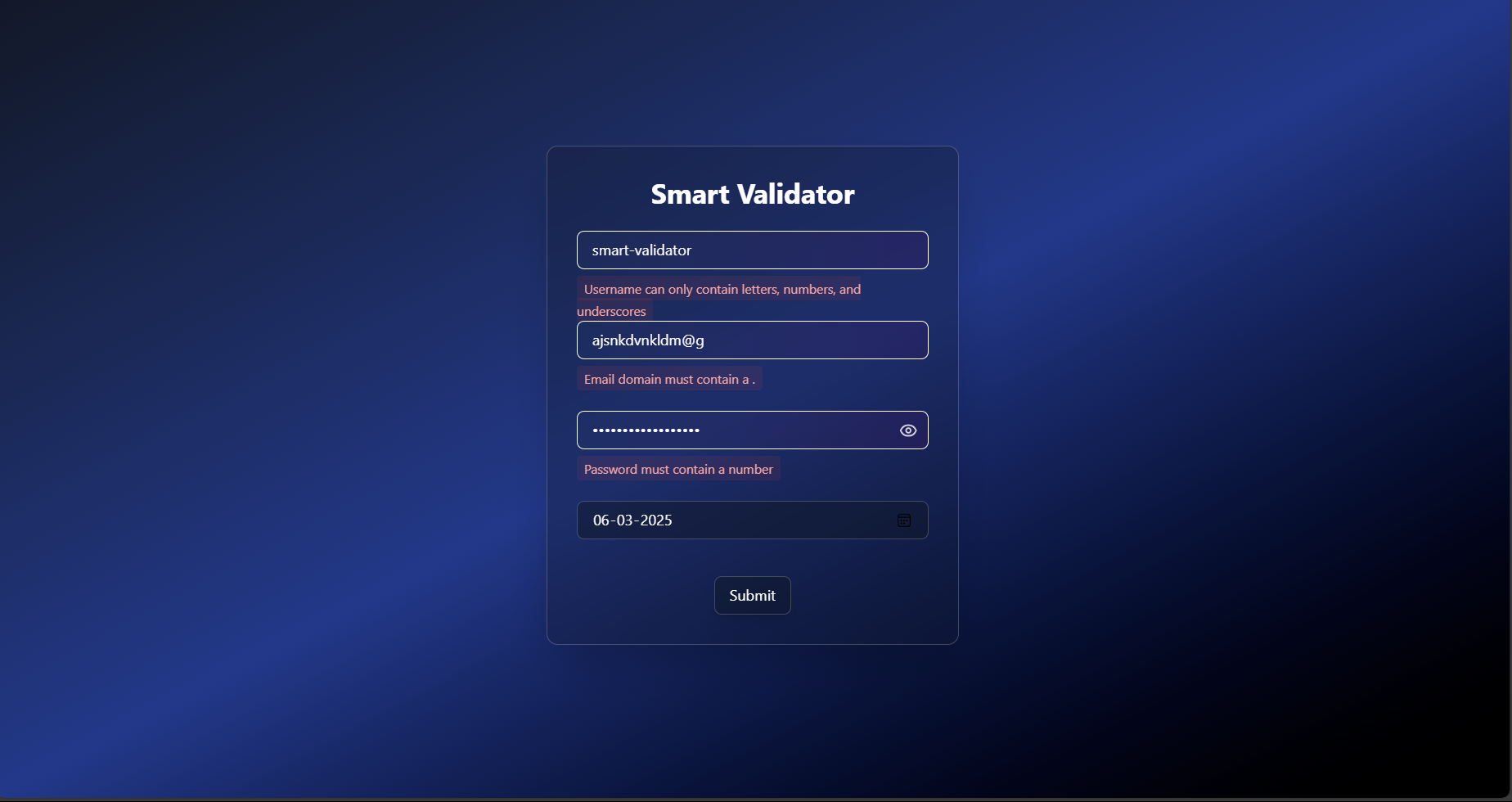
A reusable and customizable Form Validator Widget built with React and TypeScript. This npm package provides modular form components with real-time validation, debouncing for inputs, and throttling for actions. Easily integrate into any React application.
Smart Validator
Smart Validator is a reusable and customizable Form Validator Widget built with React and TypeScript. This widget provides comprehensive form validation, error handling. It is designed to be easy to import into other React applications.
Table of Contents
Features
- Modular Components: Use
Username,Email,Password,DatePicker, andButtonindividually. - Real-Time Validation: Comprehensive validation with error feedback.
- Debouncing: Input validation triggers after a pause (default: 500ms) for performance.
- Throttling: Button actions limited to once per interval (default: 1000ms).
- TypeScript Support: Fully typed components and props.
- Customizable: Adjust debounce/throttle delays and validation via props.
Components
Username
- Props:
value: stringonChange: (value: string) => voiddebounceDelay?: number
- Validation:
- Required
- 3-20 characters
- Letters, numbers, and underscores only
Email
- Props:
value: stringonChange: (value: string) => voiddebounceDelay?: number
- Validation:
- Required
- Valid format (e.g.,
[email protected]) - Domain rules (must include a
.and valid extension)
Password
- Props:
value: stringonChange: (value: string) => voiddebounceDelay?: number
- Validation:
- Required
- 8+ characters
- Must include a capital letter, number, and special character
DatePicker
- Props:
value: stringonChange: (value: string) => voidminDate?: stringmaxDate?: stringrequired?: booleandebounceDelay?: number
- Validation:
- Required (if set)
- Valid date
- Within
minDateandmaxDaterange
Button
- Props:
onClick?: () => voidlabel: stringthrottleLimit?: number
- Behavior:
- Throttled clicks
- Defaults to 1000ms interval
Advanced JavaScript Concepts
- Debouncing: Inputs use a
useDebouncehook to delay validation. - Throttling: Button uses a
useThrottlehook to limit click frequency. - Custom Hooks: Reusable logic bundled in the package.
Installation
To install the Smart Validator package, use npm or yarn:
npm install smart-validator-tsor
yarn add smart-validator-tsUsage
To use the Smart Validator in your React application, follow these steps:
- Import the desired components into your form.
- Use the components to create your form and handle validation as needed.
Example
Here’s a simple example of how to use the Smart Validator components in a form:
import { useState } from "react";
import { Username } from "./components/Username";
import { Email } from "./components/Email";
import { Password } from "./components/Password";
import { DatePicker } from "./components/DatePicker";
import { Button } from "./components/Button";

function App() {
  const [username, setUsername] = useState("");
  const [email, setEmail] = useState("");
  const [password, setPassword] = useState("");
  const [birthDate, setBirthDate] = useState("");

  const handleSubmit = () => {
    console.log("Submitted!", { username, email, password, birthDate });
  };

  const today = new Date().toISOString().split("T")[0];

  return (
    <div className="min-h-screen bg-gradient-to-br from-gray-900 via-blue-900 to-black flex items-center justify-center p-4">
      <div className="bg-gray-900/30 backdrop-blur-lg border border-white/20 rounded-xl p-8 w-full max-w-md shadow-2xl">
        <h1 className="text-3xl font-bold text-white text-center mb-6 bg-clip-text bg-gradient-to-r from-blue-400 to-purple-600">
          Smart Validator
        </h1>
        <div className="space-y-4">
          <Username value={username} onChange={setUsername} debounceDelay={500} />
          <Email value={email} onChange={setEmail} debounceDelay={500} />
          <Password value={password} onChange={setPassword} debounceDelay={500} />
          <DatePicker
            value={birthDate}
            onChange={setBirthDate}
            minDate="1900-01-01"
            maxDate={today}
            required={true}
            debounceDelay={500}
          />
          <div className="text-center">
            <Button onClick={handleSubmit} label="Submit" throttleLimit={10000} />
          </div>
        </div>
      </div>
    </div>
  );
}

export default App;
Contributing
Contributions are welcome! If you would like to contribute to the Smart Validator, please follow these steps:
- Fork the repository.
- Create a new branch (
git checkout -b feature-branch). - Make your changes and commit them (
git commit -m 'Add new feature'). - Push to the branch (
git push origin feature-branch). - Create a new Pull Request.