
smithers-orchestrator
v0.32.0
Published
Multi-agent workflows with full observability and time travel: watch every step live, rewind, fork, and replay any run. Claude Code, Codex, Gemini, any model or harness.

Maintainers
 fucory
Readme
smithers-orchestrator
Run long-horizon coding-agent work as durable workflows.



Tell your coding agent to do real, multi-step work, then Smithers runs it for minutes or days with crash recovery, retries, human approvals, and full observability. The same workflow runs across Claude Code, Codex, Cursor, Pi, AI SDK models, and remote sandboxes.
This package is the published Smithers runtime: the engine, the smithers CLI, the JSX
workflow primitives, the agent adapters, and the Gateway. Install it once and your coding
agent drives the rest.
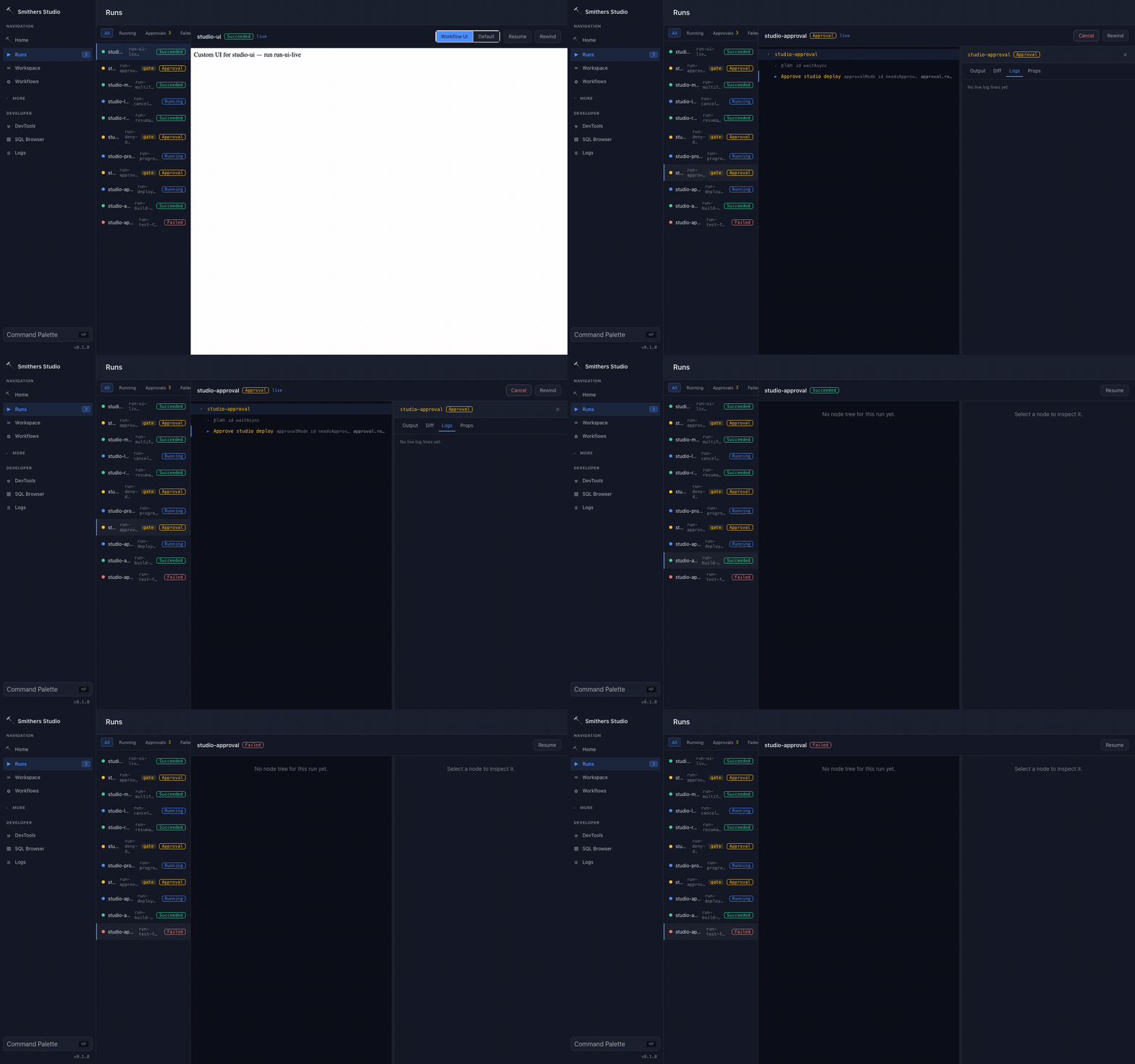
Watch every step of a workflow run, pause execution, approve gates, and rewind to an earlier checkpoint. Independent steps can run at the same time.
What you get
- 🛡️ Durable runs that survive crashes: every completed step is persisted the moment it finishes, so a run resumes from where it stopped instead of starting over.
- 🔌 Any agent, any model: Claude Code, Codex, Cursor, Pi, Antigravity, and more, plus any model through the AI SDK. Swap the harness without rewriting the workflow.
- 🛠️ Higher-quality output: review loops, human approvals, and evals give agents the structure that real work demands.
- 🧩 A workflow builder, not a fixed library:
initinstalls a focused authoring pack (create-workflow,create-skill,docs-driven-development); your agent designs, scaffolds, and documents new workflows — planning, implementation, review, debugging, tickets, audits, long-horizon missions — from a plain-English ask.
When to use Smithers
Smithers is the durable runtime for coding-agent work: when the unit of work is an agent editing a real repository over many steps, and you need that work to be inspectable, approvable, and recoverable. Use it when order matters across multiple AI steps, you need crash recovery, a human must approve or answer mid-run, or different tasks need different models. For a single prompt → single response, call your model provider's SDK directly; Smithers adds nothing there.
Get started
Smithers is driven by your coding agent, not a GUI you click. Your agent runs Smithers on your behalf: it scaffolds workflows, kicks off runs, watches them, and handles approvals.
One command sets everything up. From inside your project:
bunx smithers-orchestrator initinit does everything:
- Installs the
smithersskill into the coding agents on your machine (Claude Code, Pi, and more), so your agent knows how and when to use Smithers. Nomkdir, nocurl. - Scaffolds
.smithers/with a focused authoring pack —create-workflow,create-skill, anddocs-driven-development— so your agent builds the exact workflow you need instead of picking from a fixed library. Former starter workflows (hello,plan,review,debug, and more) are preserved as copyable patterns underexamples/init-pack/.
Then just ask:
"orchestrate an agent to add rate limiting and keep iterating until the tests pass."
Your agent picks the right workflow, starts the run, and keeps going through retries and review loops until the work is actually done.
Always run
bunx smithers-orchestrator, neverbunx smithers. On npm,smithersis an unrelated package. The installed binary aliassmithersis only safe inside a project that resolvesnode_modules/.bin/smithers.
To wire the MCP server into every detected agent too, run
bunx smithers-orchestrator mcp add. See Agent Support
for the full per-agent matrix.
Drive it yourself
Prefer the CLI? Ask create-workflow to build something for you:
# describe the workflow you want; create-workflow clarifies, scaffolds, and documents it
bunx smithers-orchestrator workflow run create-workflow --prompt "add rate limiting, audit logging, and API key rotation"
Or copy one of the 29 archived starter patterns (hello, plan, review, debug, and
more) from examples/init-pack/ into .smithers/workflows/ and run it directly — see
examples/init-pack/README.md for the full inventory.
Watch what's happening, whether your agent started the run or you did:
bunx smithers-orchestrator ps              # list active, paused, and recently completed runs
bunx smithers-orchestrator inspect RUN_ID  # steps, agents, approvals, and outputs for one run
bunx smithers-orchestrator logs RUN_ID     # tail the event log
bunx smithers-orchestrator chat RUN_ID     # read the agent's chat output
Run bunx smithers-orchestrator starters to browse plain-English starters, and
bunx smithers-orchestrator workflow list to see what's installed.
Durable by default
Durability is the differentiator. Runs survive crashes, restarts, and flaky tools because every completed step is persisted to SQLite the moment it finishes. The runtime always knows what's done and what to run next. Approvals, human questions, retries, and replay are first-class.
prompt → render workflow → run task → validate output → persist to SQLite → re-render → resume · inspect · replayThat loop is the whole model: a task runs, its output is validated against a schema and written down, then the workflow re-renders from persisted state to decide the next task. A crash at any point resumes from the last write, not from the top.
bunx smithers-orchestrator up workflow.tsx --input '{"description":"Fix bug"}'
bunx smithers-orchestrator up workflow.tsx --run-id abc123 --resume true   # resume after a crash
bunx smithers-orchestrator rewind abc123 --frame 4                          # time-travel to an earlier frame
bunx smithers-orchestrator fork abc123                                      # branch an alternate timeline
bunx smithers-orchestrator replay abc123                                    # replay from a checkpoint
Author your own
The curated init workflows are normal Smithers TSX files, and the archived starter catalog
under examples/init-pack/ remains available to copy or adapt. Run create-workflow to
author a repository-specific workflow from the same primitives. A workflow is a JSX tree of
tasks, each with a Zod-validated output:
import { createSmithers, Sequence } from "smithers-orchestrator";
import { z } from "zod";

const { Workflow, Task, smithers, outputs } = createSmithers({
  analyze: z.object({
    summary: z.string(),
    severity: z.enum(["low", "medium", "high"]),
  }),
  fix: z.object({
    patch: z.string(),
    explanation: z.string(),
  }),
});

export default smithers((ctx) => (
  <Workflow name="bugfix">
    <Sequence>
      <Task id="analyze" output={outputs.analyze} agent={analyzer}>
        {`Analyze the bug: ${ctx.input.description}`}
      </Task>

      <Task id="fix" output={outputs.fix} agent={fixer}>
        {`Fix this issue: ${ctx.latest("analyze").summary}`}
      </Task>
    </Sequence>
  </Workflow>
));
Each task output is validated against its Zod schema and persisted to SQLite. If the process crashes, Smithers resumes from the last completed node without re-running finished work.
| Component | Purpose |
| ------------ | ------------------------------------- |
| <Workflow> | Root container |
| <Task> | AI or static task node |
| <Sequence> | Ordered execution |
| <Parallel> | Concurrent execution |
| <Branch> | Conditional execution |
| <Loop> | Repeat tasks until a condition is met |
There are many more: approvals, merge queues, sub-workflows, signals, timers, sagas, sandboxes, and composite patterns. See Components.
Package entry points
The main entry re-exports the full toolkit, so most code only needs
import { ... } from "smithers-orchestrator". Dedicated subpaths exist for focused imports:
| Import | What it gives you |
| --- | --- |
| smithers-orchestrator | createSmithers, the workflow components, agent adapters, errors, and the rest of the core API. |
| smithers-orchestrator/tools | The built-in agent tool sandbox. |
| smithers-orchestrator/gateway-client | Typed client for the Gateway RPC/WS control plane. |
| smithers-orchestrator/gateway-react | React hooks for live, multi-run state. |
| smithers-orchestrator/sandbox | The <Sandbox> primitive and SandboxProvider interface. |
| smithers-orchestrator/microsandbox | The first-class Microsandbox microVM provider. |
| smithers-orchestrator/control-plane | Programmatic control-plane API for launching and steering runs. |
| smithers-orchestrator/server | The Gateway server (startServer, createServeApp). |
| smithers-orchestrator/observability | Prometheus metrics and OpenTelemetry tracing layers. |
| smithers-orchestrator/memory | Cross-run memory store and recall. |
| smithers-orchestrator/scorers | Eval scorers (LLM-judge, relevancy, faithfulness, …). |
| smithers-orchestrator/openapi | Generate AI SDK tools from OpenAPI specs. |
Any agent, any model
Point each task at whichever agent is best for the job, mix several in one workflow, and switch freely. The workflow doesn't change when the model does, so a frontier model can plan, a fast model can fan out, and a specialized harness can do the edits.
Agent adapters ship in the box, including ClaudeCodeAgent, CodexAgent, CursorAgent, PiAgent,
AntigravityAgent, GeminiAgent, and AnthropicAgent / OpenAIAgent for any AI SDK
model (with tools, structured output, and MCP). The same <Sandbox> primitive runs an
agent in a local hardware-isolated microVM with
Microsandbox, through Bubblewrap or
Docker, or on any backend you implement against SandboxProvider.
Requirements
- Bun ≥ 1.3
- TypeScript ≥ 5 (only for authoring TSX workflows)
- Model or provider credentials (e.g.
ANTHROPIC_API_KEY) - A version control system for snapshotting and isolating agent work:
jj (Jujutsu) or git. jj is
preferred and powers durability, time-travel, and per-task worktrees; the optional
@smithers-orchestrator/jj-<platform>package bundles a jj binary so a fresh install works with no system jj.
Docs
Full documentation lives at smithers.sh.
- Introduction — what Smithers is and when to use it.
- Quickstart — scaffold and run a workflow in two commands.
- Tour — a guided walk through a real run.
- How It Works — the durable execution model.
- Components — the full primitive set.
License
MIT