
sms-dispatch
v1.1.3
Published
Send SMS with 47+ ready-made templates using your Android phone as a gateway. Includes OTP, appointments, payments, promotions & more!

Maintainers
 dhruvil02
Readme
📱 TextBee SMS Dispatch
Send SMS messages programmatically using your Android phone as a gateway with ready-made templates!


✨ What's New in v1.1.2
- 🎉 Almost 50 Ready-Made Templates - Birthday wishes, OTP, appointments, promotions & more!
- 🚀 Simple to Use - Just provide template name and variables
- 🔄 Fully Backward Compatible - Old code still works perfectly
- 💡 Time Saver - No need to write repetitive messages
Installation
npm i sms-dispatchSetup
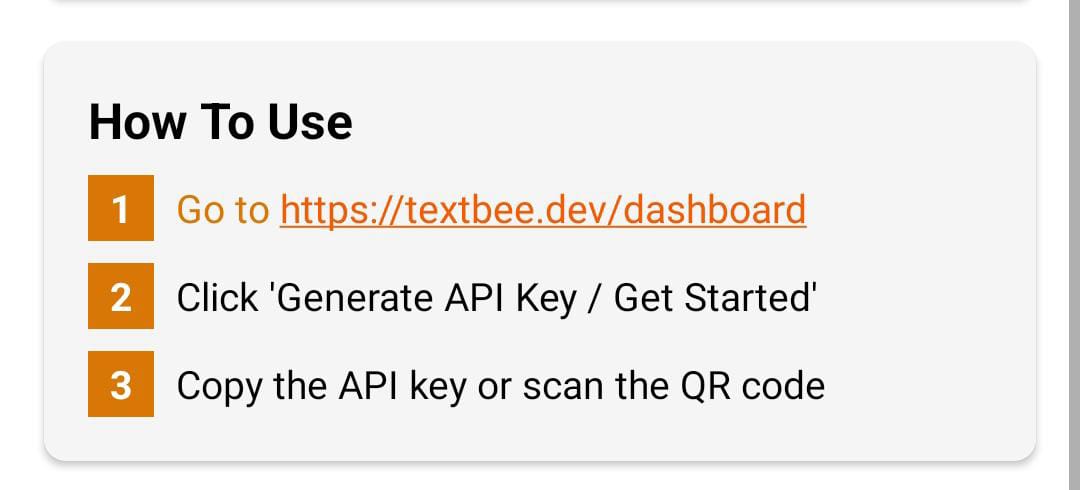
1. Install the Android App
Download the TextBee.dev APK from https://textbee.dev and install it on your Android phone.
2. Generate API Key
- Open the TextBee app
- Tap "Generate API Key / Get Started"
- Copy the API key
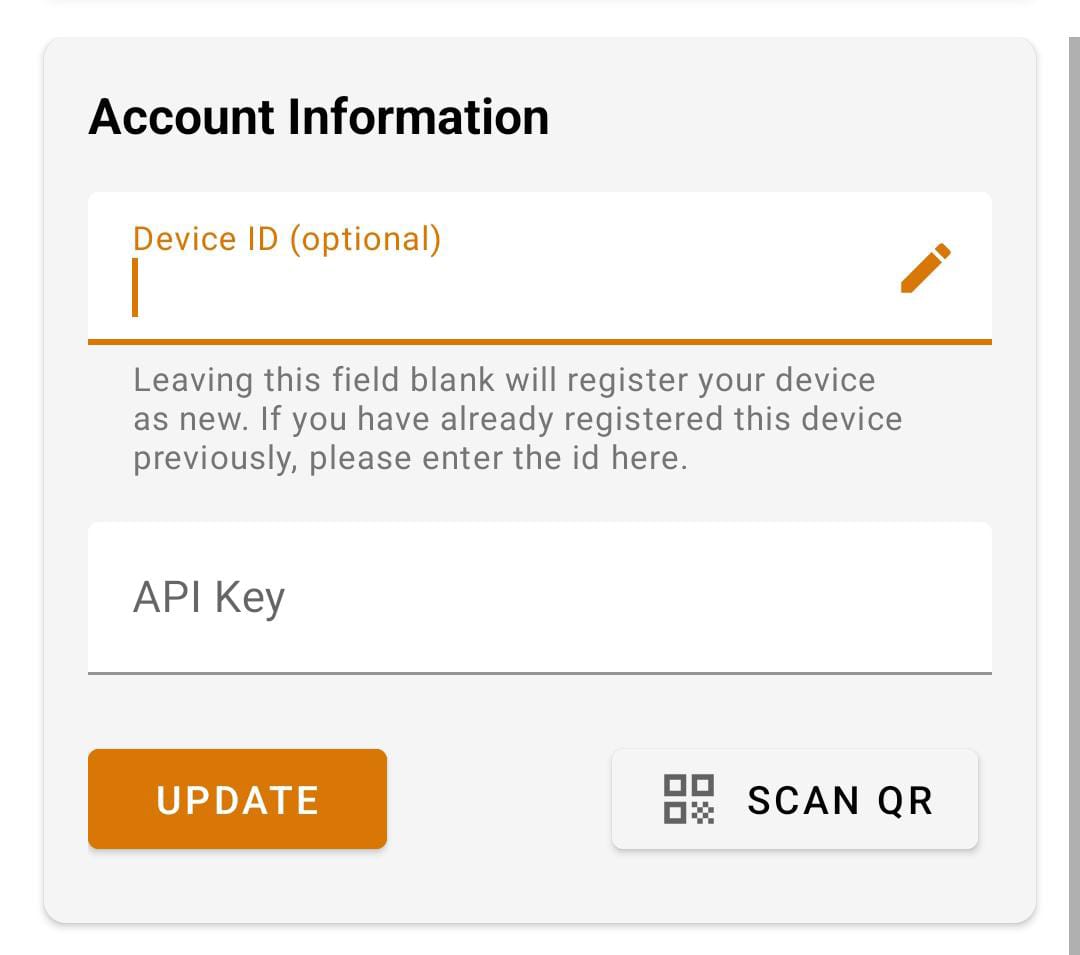
3. Register (Optional)
- Enter a Device ID (optional—auto-assigned if blank)
- Paste your API Key
- Tap "UPDATE"
⚠️ Important Warnings
- The TextBee app MUST remain installed on your Android device for the service to work
- Uninstalling the app will break the SMS functionality immediately
- Keep the app running in the background
- Stable internet connection required on your Android device
- Active SIM card required to send SMS messages
🚀 Quick Start
Create a .env file:
TEXTBEE_KEY=your_api_key_here
TEXTBEE_DEVICE=your_device_id_here
Important: Add .env to your .gitignore to keep credentials safe.
Usage
Method 1: Use Templates (NEW! ⭐ Recommended)
import "dotenv/config";
import { sendSmsWithTemplate } from "sms-dispatch";

async function sendBirthdayWish() {
  try {
    const result = await sendSmsWithTemplate({
      apiKey: process.env.TEXTBEE_KEY,
      deviceId: process.env.TEXTBEE_DEVICE,
      recipients: ["+1234567890"],
      template: "birthday",
      data: { name: "John" },
    });

    console.log("Success:", result);
  } catch (error) {
    console.error("Error:", error.message);
  }
}

sendBirthdayWish();
Method 2: Custom Message (Original - Still Works!)
import "dotenv/config";
import { sendSms } from "sms-dispatch";

async function sendCustomMessage() {
  try {
    const result = await sendSms({
      apiKey: process.env.TEXTBEE_KEY,
      deviceId: process.env.TEXTBEE_DEVICE,
      recipients: ["+1234567890"],
      message: "Your custom message here",
    });

    console.log("Success:", result);
  } catch (error) {
    console.error("Error:", error.message);
  }
}

sendCustomMessage();
📋 Available Templates (47 Templates!)
🔐 Security & Authentication
otp- One-time password with validity (requires:otp,validity,company)otp_short- Short OTP format (requires:otp,company,validity)password_reset- Password reset code (requires:name,code,validity)password_changed- Password change confirmation (requires:name,date,time)two_factor- Two-factor authentication code (requires:code,validity,company)account_verification- Account verification code (requires:name,company,code,validity)login_alert- New login notification (requires:name,device,location,time)
👤 Account Management
account_created- Welcome new account (requires:name,company,username)account_suspended- Account suspension notice (requires:name,reason)
💳 Payment & Transactions
payment_success- Payment confirmation (requires:amount,name,transactionId)payment_failed- Payment failure notice (requires:name,amount,reason)payment_reminder- Payment due reminder (requires:name,amount,date)invoice_generated- Invoice creation (requires:name,invoiceId,amount,dueDate,paymentUrl)receipt- Payment receipt (requires:name,amount,date,transactionId)
📦 Delivery & Shipping
delivery_dispatched- Order dispatched (requires:name,orderId,trackingUrl)delivery_out- Out for delivery (requires:orderId,name,time)delivery_delivered- Delivery successful (requires:orderId,name)delivery_cancelled- Delivery cancelled (requires:name,orderId)shipping_delay- Shipping delay notice (requires:name,orderId,reason,newDate)
📅 Booking & Appointments
appointment- Appointment reminder (requires:name,date,time)booking_confirmed- Booking confirmation (requires:name,service,date,time,bookingId)booking_cancelled- Booking cancellation (requires:name,bookingId)booking_reminder- Booking reminder (requires:name,service,time,location)
💎 Subscription & Membership
subscription_activated- Subscription start (requires:name,plan)subscription_expiring- Expiration warning (requires:name,plan,days,renewUrl)subscription_expired- Subscription ended (requires:name,plan,renewUrl)subscription_renewed- Renewal confirmation (requires:name,plan,expiryDate)trial_started- Free trial started (requires:name,plan,duration)trial_ending- Trial ending soon (requires:name,plan,days,upgradeUrl)
🎁 Promotions & Marketing
promotion- Promotional offer (requires:name,discount,product,code)flash_sale- Flash sale alert (requires:discount,category,hours,name,shopUrl)coupon_code- Coupon distribution (requires:name,coupon,discount,expiry)price_drop- Price drop alert (requires:product,newPrice,oldPrice,name,productUrl)low_stock- Stock availability (requires:name,product,productUrl)
🎉 General & Celebrations
birthday- Birthday wishes (requires:name)greeting- Simple greeting (requires:name)welcome- Welcome message (requires:name,company)thankyou- Thank you note (requires:name,action)reminder- General reminder (requires:name,topic)confirmation- Order confirmation (requires:name,orderId,date)milestone- Achievement celebration (requires:name,milestone)
🎊 Events & Invitations
event_invitation- Event invite (requires:name,event,date,location,rsvpUrl)event_reminder- Event reminder (requires:event,time,name,location)event_cancelled- Event cancellation (requires:name,event,date)
⭐ Feedback & Reviews
feedback_request- Request feedback (requires:name,service,ratingUrl)review_thank- Thank for review (requires:rating,name)
🎁 Referral & Rewards
referral- Referral program (requires:name,company,reward,referralCode)reward_earned- Reward notification (requires:name,points,totalPoints,redeemUrl)
🚨 Alerts & Notifications
emergency_alert- Emergency message (requires:message,contact)maintenance- Maintenance notice (requires:name,date,startTime,endTime)
Example Usage
// OTP Example
await sendSmsWithTemplate({
  template: "otp",
  data: { otp: "123456", validity: "10", company: "MyApp" },
});

// Appointment Example
await sendSmsWithTemplate({
  template: "appointment",
  data: { name: "John", date: "Jan 15", time: "3:00 PM" },
});

// Payment Success Example
await sendSmsWithTemplate({
  template: "payment_success",
  data: { amount: "99.99", name: "Sarah", transactionId: "TXN123" },
});
📖 API Reference
sendSmsWithTemplate(options)
Send SMS using a pre-made template.
Parameters:
apiKey(string, required) - Your TextBee API keydeviceId(string, required) - Your device IDrecipients(string | array, required) - Phone number(s) with country codetemplate(string, required) - Template namedata(object, required) - Variables for the templatebaseUrl(string, optional) - Custom API URL
Returns: Promise with API response
sendSms(options)
Send SMS with custom message.
Parameters:
apiKey(string, required) - Your TextBee API keydeviceId(string, required) - Your device IDrecipients(string | array, required) - Phone number(s)message(string, required) - Your custom messagebaseUrl(string, optional) - Custom API URL
listTemplates()
Get array of all available template IDs.
Returns: Array of template names
Example:
import { listTemplates } from "sms-dispatch";
console.log(listTemplates());
// ["birthday", "greeting", "otp", "appointment", ...]
getTemplate(templateName, data)
Get rendered template message without sending.
Parameters:
templateName(string) - Template IDdata(object) - Variables to replace
Returns: Rendered message string
Example:
import { getTemplate } from "sms-dispatch";
const message = getTemplate("birthday", { name: "John" });
console.log(message);
// "🎂 Happy Birthday John! 🎉..."
getAllTemplates()
Get all templates with their original messages.
Returns: Object with all templates
💡 Tips & Best Practices
- Use environment variables for API keys - never hardcode them
- Test with one recipient first before bulk sending
- Keep messages under 160 characters for single SMS (some templates may use 2-3 SMS)
- All templates support emojis - they work perfectly in SMS
- Phone numbers must include country code (e.g., +1 for US)
- Check template variables - missing variables will show as
{variable}in message
🔥 Multiple Recipients
Send to multiple people at once:
await sendSmsWithTemplate({
  apiKey: process.env.TEXTBEE_KEY,
  deviceId: process.env.TEXTBEE_DEVICE,
  recipients: ["+1234567890", "+0987654321", "+1122334455"],
  template: "promotion",
  data: {
    name: "Customer",
    discount: "25",
    product: "summer collection",
    code: "SUMMER25",
  },
});
How It Works
- Your code calls the TextBee API with your API key
- The API routes the message to your registered Android device
- The TextBee app sends the SMS through your SIM card
- You receive a confirmation response
Pricing
- Free tier: 50 SMS per day
- Upgrades: Available in-app for higher volumes
No credit card required to start!
🤝 Contributing
Want to add more templates? Found a bug? Feel free to:
- Open an issue on GitHub
- Submit a pull request
- Suggest new template ideas
📄 License
MIT
Start sending professional SMS in milliseconds! 📱✉️
Made with ❤️ for developers