
social-music-player
v0.1.1
Published
## What is it?


Readme
Social Music Player
What is it?
About the package
social-music-player is a browser module, distributed via NPM and allows you to play video clips/music from one of the major
social video providers such as Youtube, Vimeo and SoundCloud. Enabled via a unified and clear API regardless the provider you use.
Here's a quick, hideous demo
Usage
Add social-music-player to your package.json file and install it via npm install.
npm install social-music-player --save-devQuick Start
Getting started is pretty easy. Creating and playing a video takes only few lines.
The first order of business in order to do anything with SMP SDK, is to natually initialize the library. This is best done with this asynchronous code:
<div id="social-music-player"></div>

<script type="text/javascript">
    window.SMPAsyncInit = function() {
        var player = window.SocialMusicPlayer.create({
            elID: '#social-music-player'
        });

        player.render();

        setTimeout(function() {
            player.play('https://www.youtube.com/watch?v=w319Ew1quF0');
        }, 1500);
    };

    // SMP SDK async load
    (function(d, s, id){
        var js, sjs = d.getElementsByTagName(s)[0];
        if (d.getElementById(id)) return;
        js = d.createElement(s); js.id = id;
        js.src = '//landrover.github.io/social-music-player/js/smp.min.js';
        sjs.parentNode.insertBefore(js, sjs);
    }(document, 'script', 'social-music-player-sdk'));
</script>
Once smp.min.js file is loaded, it will try to call the window.SMPAsyncInit function.
That is why inside that function you should call the create() method in order to initialize the library. It is extermly important that the code is inserted exactly as is (the SDK async load part).
It is important to have the callback window.SMPAsyncInit function set prior to the actualy SDK as in the example before to avoid racing coniditions.
Full demo is available in the ./playground dir, with more use cases or the same LIVE DEMO
Options overrides
To specify for the API a spesific setting, it should passed as the first property for the contructor.
// overrides the default configs found in the package source.
// @see ./src/core/config.js
var options = {
    elID: '#social-music-player',
    width: '100%',
    height: '100%',
    fullscreen: true
};

var player = window.SocialMusicPlayer.create(options);
new aka. create() - Instance
var player = window.SocialMusicPlayer.create(options)
Call create with an options object to create a new player instance with the specific options required.
Create must be binded to a var as it contains the instance of the SMP and returns an API instance.
API Playground
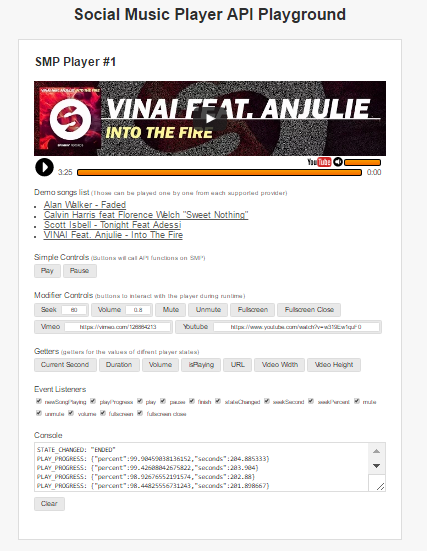
API
API instance is a result of the window.SocialMusicPlayer.create()
Getters
player.isPlaying():Promise
player.getCurrentSecond():Promise
player.getVolume():Promise
player.getDuration():Promise
player.getURL():String
player.getVideoWidth():String
player.getVideoHeight():String
player.getVersion():String
Modifiers
player.play(url:String):API
player.play(songModel:Object):API
player.pause():API
player.seek(second:Number):API
player.fullscreenOpen():API
player.fullscreenClose():API
player.mute():API
player.unmute():API
player.setVolume(volume:Number):API
player.render():API
player.on(eventName:String, callback:Function):API
Events
The SDK allows subscribing via player.on to any of the following event:
PLAYER_INITIALIZEDPLAYPAUSEVOLUME:NumberMUTEUNMUTESEEK_TO_PERCENT:NumberSEEK_TO_SECOND:NumberSTATE_CHANGED:String - This event fires whenever the player's state changes. The value that the API passes to your event listener function will specify an constant to the new player state. Possible values are:PLAYINGPAUSEDBUFFERINGENDEDENDINGERROR
PLAY_PROGRESS:ObjectNEW_SONG_PLAYING:ObjectFULLSCREEN_OPENFULLSCREEN_CLOSE
Building and Modifing
Clone this repo (or fork it)
git clone [email protected]:landrover/social-music-player.gitInstall deps
npm installCompiling
gulp webpack:devTodo
- fix tests
- document API
- comments
Credits
- Playground is inspired by the Vimeo great Playground UI and concept.