
softbox
v4.25.1
Published
Batteries-included React 3D viewer — any GLB looks studio-shot in one line

Maintainers
 muhmundr
Readme
softbox





The batteries-included React 3D viewer — any GLB looks studio-shot in one line.
Formerly published as
threedviewer— renamed in 4.0.0, same API. See MIGRATION_GUIDE.md.
<SimpleViewer object="/model.glb" />Balanced studio lighting, a baked soft contact shadow that grounds the model, auto-framing, compressed-asset decoders — all on by default, zero configuration (the real-scale concrete paver floor is one option away). Lighting needs zero network requests (the studio environment is procedural); the DRACO/KTX2 decoder wasm is fetched only when a model actually uses that compression, from a CDN by default or self-hosted for offline use. The core is ~102 kB gzip; the path tracer lives in a lazy chunk that loads only when enabled. Every release is gated by 790+ unit tests plus a Playwright suite that asserts real WebGL pixels in CI.
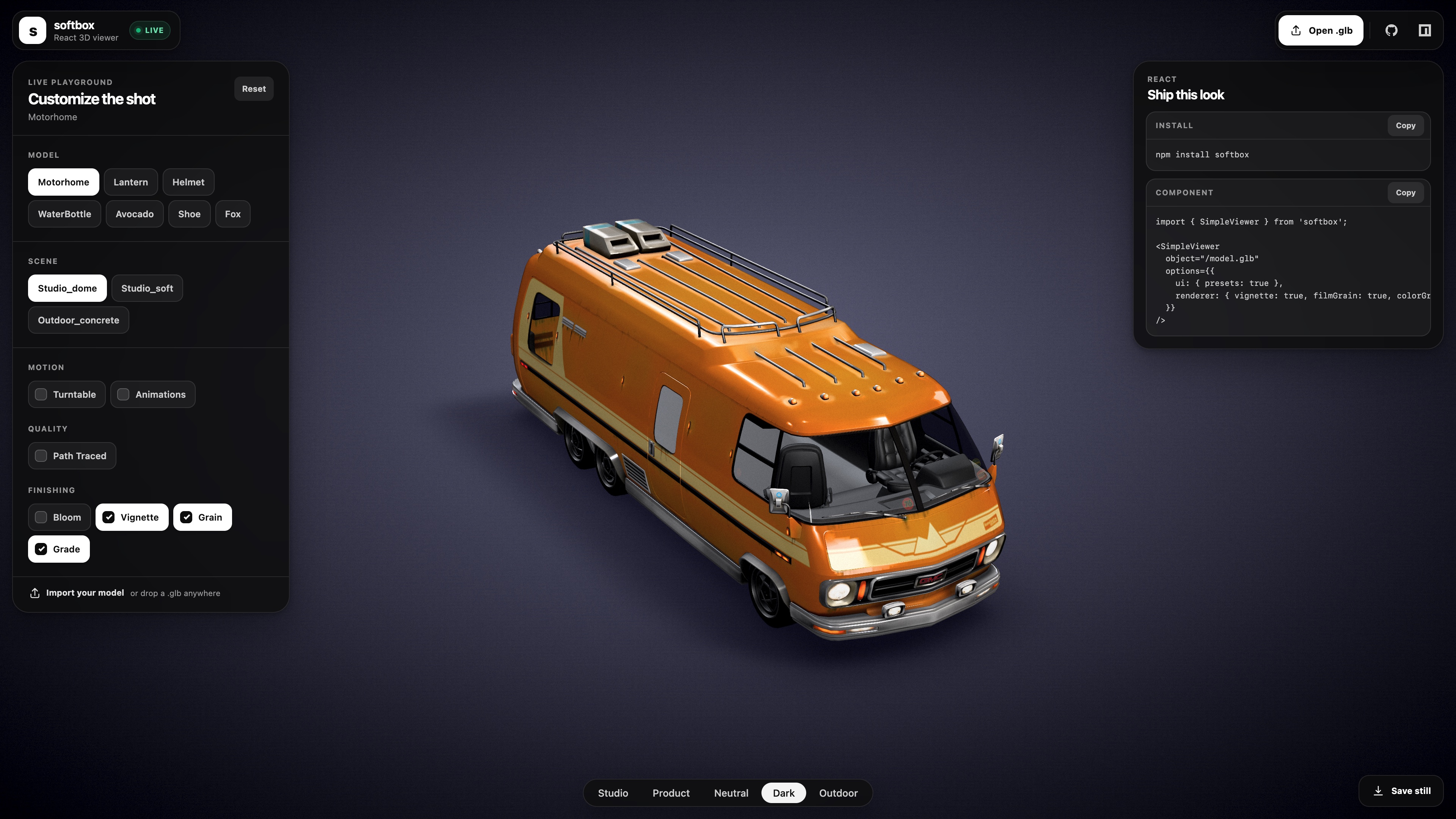
▶ Live playground — drag & drop your own .glb, switch presets live, click the model to pin hotspots, download a still.
What you get
- Visual presets —
studio · product · neutral · dark · outdoor, one word, switched live - Scenes —
studio_dome · studio_soft · outdoor_concrete, one word picks the set the model stands in - Turntable — one-word showcase auto-rotate that pauses while the user drags
- Animations — GLTF clips autoplay with one word; play/pause/clip-picker API
- Material variants — KHR_materials_variants colorways, switched live with one option
- AR — one option hands the model to AR Quick Look (iOS) / Scene Viewer (Android)
- Poster — an image is the instant first paint; the live model dissolves in when ready
- Photoreal mode — progressive path tracing +
captureStill()PNG export - Video capture —
captureVideo()records the canvas to WebM/MP4, zero dependencies - Hotspots & click selection — DOM pins on world-space points, BVH-accelerated picking
- Compressed assets — DRACO, KTX2/Basis and Meshopt decoders wired in, fetched lazily
- Built-in chrome — loading overlay, preset picker, viewport gizmo — all optional, all off-or-subtle by default
- Typed end to end — every option, event payload and handle method ships TypeScript types
Install
npm install softboxPeer dependencies: react / react-dom >=18 <20, three >=0.177 <0.186.
Quick start
import { SimpleViewer } from 'softbox';

function App() {
  return (
    <div style={{ width: '100%', height: '400px' }}>
      <SimpleViewer object="https://modelviewer.dev/shared-assets/models/RobotExpressive.glb" />
    </div>
  );
}
A THREE.Object3D works too:
<SimpleViewer object={new THREE.Mesh(geometry, material)} />Visual presets
One word sets a cohesive look — background, tone mapping, environment intensity. Presets switch live: no rebuild, no model reload.
<SimpleViewer object={url} preset="product" />
// studio | product | neutral | dark | outdoor
Let your users switch presets with the built-in picker (off by default):
<SimpleViewer object={url} options={{ ui: { presets: true } }} />Scenes
Presets grade the picture; scenes choose the set. options.scene selects
the physical set the model stands in — the floor, the backdrop and how the
built-in studio environment is built. Unlike presets, a scene is structural:
switching one rebuilds the viewer.
<SimpleViewer object={url} options={{ scene: 'outdoor_concrete' }} />
// studio_dome (default) | studio_soft | outdoor_concretestudio_dome— the default set: shadow-catcher floor, baked soft contact shadow and a crisp, contrast-pushed studio light with distinct highlights.studio_soft— the same set lit softly: an even, low-contrast wraparound light that flatters matte materials and softens speculars.outdoor_concrete— open air: a daylight HDRI lights the model and paints the sky (ground-projected, so the model stands in the world), on a large photographic PBR concrete ground rendered with untiled sampling — no visible texture repetition at any distance. The HDRI and concrete maps (CC0, Poly Haven, ~6 MB total on first view) come from their CDN by default; override or self-host viaenvironment.urlandhelpers.grid.styleOptions, like the decoder paths. Offline, the ground falls back to a built-in procedural concrete and the lighting to the studio environment.
Scenes compose with presets — scene picks the set, preset grades it, and
any explicit option you pass overrides both.
Material variants
Models that carry KHR_materials_variants (product colorways baked into one GLB) switch live — no rebuild, no reload:
<SimpleViewer object={url} options={{ variant: 'beach' }} />Enumerate and switch imperatively via the handle:
viewerRef.current.getVariantNames();   // e.g. ['midnight', 'beach', 'street']
viewerRef.current.setVariant('street');
viewerRef.current.setVariant(null);    // back to the authored materials
Semantics worth knowing: variant: null is the declarative reset, while
leaving the option out is "uncontrolled" — an imperative setVariant()
pick survives unrelated option changes. Variant materials materialize in
the background right after load (first paint never waits for colorways
nobody opened); an early pick is applied the moment they're ready.
AR
One option puts an AR button over the canvas that opens the model in the platform's native AR viewer — no WebXR session, no extra bundle:
<SimpleViewer object={url} options={{ ar: true }} />

// iOS AR Quick Look cannot read GLB — give it the USDZ counterpart:
<SimpleViewer object={url} options={{ ar: { iosSrc: '/shoe.usdz', title: 'Runner' } }} />- Android → Scene Viewer, straight from the model's own URL (
ar: trueis enough). The model must be loaded from an https URL — a droppedblob:file has no address a native app could fetch, and Scene Viewer refuses plain http. ImperativeloadModel()swaps are tracked — the button always hands off the model that is on stage. - iOS → AR Quick Look, from
iosSrc(USDZ). - Desktop / unsupported → the button simply never renders, so setting
arunconditionally is safe. On an Android-UA device that turns out to have no AR component (Quest, TV boxes), the failed handoff bounces back reload-free and the button retires itself.
placement picks the corner (bottom-left by default; it lifts above the
built-in preset picker on its own). UI-only: toggling ar never rebuilds
the viewer or reloads the model.
Poster
A poster image is the viewer's instant first paint — shown until the model's first painted frame, then dissolved into the live scene:
<SimpleViewer object={url} options={{ poster: '/hero.webp', loading: 'lazy' }} />With loading: 'lazy' the combination is LCP-friendly: the page paints the
poster immediately with zero WebGL work, and the real viewer boots only
when scrolled into view. Generate posters with handle.captureStill() —
same studio look, pixel-identical to what the live viewer will show. While
opaque, the poster catches input (nothing invisible underneath can be
tapped). If the load fails, the poster stays up as the backdrop under the
built-in error overlay — with loadingIndicator: false it steps aside
instead, so a dead load never masquerades as a frozen hero image.
Turntable
One word puts the model on a slowly rotating showcase turntable. It pauses while the user drags and resumes on release; toggling is live, like presets.
<SimpleViewer object={url} turntable />
// speed: options.controls.autoRotateSpeed (2 ≈ one orbit / 30 s)
Animations
One word plays everything the GLTF carries — all clips, looped, from the moment the model loads.
<SimpleViewer object={url} animations />Pick one clip, tune the speed, or build your own play/pause UI via the handle:
<SimpleViewer object={url} options={{ animations: { autoplay: 'Walk', speed: 1.5 } }} />

viewerRef.current.getAnimationNames(); // ['Walk', 'Idle', ...]
viewerRef.current.pauseAnimations();
viewerRef.current.playAnimations('Idle');
Turntable and animations compose — a spinning, walking robot is two words.
Photoreal mode & stills
<SimpleViewer object={url} pathTraced />pathTraced turns on interactive progressive path tracing: the frame converges whenever the camera rests, and orbiting shows plain raster frames until the camera settles again — then a fresh accumulation starts from the new viewpoint. It works with every preset, including the default procedural studio. Capture a PNG programmatically — in raster mode at any resolution, in path-traced mode once the accumulation completes:
const handle = viewerRef.current;
const dataUrl = await handle.captureStill({ width: 1920 }); // PNG data URL
Video capture
Record the live canvas into a clip — no dependencies, straight through MediaRecorder (WebM in Chromium/Firefox, MP4 in Safari). Motion is captured as it happens, so turntable + captureVideo is a ready-made product-card orbit:
<SimpleViewer ref={viewerRef} object={url} turntable />

const blob = await viewerRef.current.captureVideo({ duration: 5 }); // Blob
// also: fps, mimeType, videoBitsPerSecond
Hotspot annotations & click selection
Pin DOM content to a world-space point — it tracks orbiting, zooming and resizes:
import { SimpleViewer, Hotspot } from 'softbox';

<SimpleViewer object="/model.glb">
  <Hotspot position={[0, 1.2, 0]}>
    <div className="pin">Engine</div>
  </Hotspot>
  <Hotspot position={[0.4, 0.2, 0.8]} occlude /> {/* hidden when the model covers it */}
</SimpleViewer>
Without children a built-in dot pin is rendered. occlude hides the hotspot while the model blocks the line of sight to its anchor.
A click on the model (drags and pinches are ignored) emits object:selected with the hit object and world-space point — feed it straight into a <Hotspot>:
handle.events.on('object:selected', ({ object, point }) => {
  addPin([point.x, point.y, point.z]);
});
Raycasts are BVH-accelerated per loaded model (logarithmic on high-poly meshes); opt out with options.selection = { bvh: false }.
Events
Subscribe through the imperative handle:
const { events } = viewerRef.current;
events.on('model:loaded', ({ model, loadTime }) => console.log('loaded in', loadTime, 'ms'));
| Event | Fires |
|---|---|
| model:loading / model:loaded / model:error | around every model load |
| render:complete | after each rendered frame |
| pathtracing:complete | once the sample cap is reached |
| controls:change | when the camera controls move |
| object:selected | when a click hits the loaded model ({ object, point }) |
| error | any viewer error |
Imperative handle
const viewerRef = useRef<SimpleViewerHandle>(null);
<SimpleViewer ref={viewerRef} object={url} />
The handle exposes scene, camera, renderer, controls, events, loadModel(source), captureStill(options?), captureVideo(options?), getAnimationNames(), playAnimations(name?), pauseAnimations() and dispose().
Configuration
Everything is optional — the defaults are the point. Pass options to override any part:
import { ControlType, defaultOptions } from 'softbox';

const options: SimpleViewerOptions = {
  preset: 'studio',              // one-word look; explicit options below win over it
  backgroundColor: '#f0f0f7',
  staticScene: false,            // stop the render loop when nothing moves

  // Unit your model is authored in: meters (default) | centimeters | millimeters
  // | feet | inches. Non-meter models are rescaled on load to the viewer's
  // 1-unit-=-1-meter convention (the real-scale floor, shadows and framing
  // depend on it) without touching the model's own transform.
  units: 'meters',

  camera: { position: [60, 60, 60], fov: 45, autoFitToObject: true },

  // The procedural studio environment lights the scene by default (zero network
  // requests). Point environment.url at an HDR/EXR/image to use your own.
  environment: { environmentIntensity: 0.5 },

  // Khronos PBR Neutral tone mapping by default — keeps saturated material
  // colours through the highlight rolloff (see renderer.toneMapping to change).
  renderer: { antialias: true, toneMappingExposure: 1.0 },

  controls: { type: ControlType.OrbitControls, enableDamping: true, autoRotate: false },

  animations: { autoplay: true, speed: 1 }, // GLTF clip playback

  helpers: {
    grid: { type: 'hexagonal_glass' }, // hex-tile floor (matte concrete by default); also: hexagonal_wire, square_wire, stone_tiles
    gizmo: false,                      // optional viewport orientation gizmo
    studioEnvironment: true,
  },

  pathTracing: { enabled: false, maxSamples: 16 },

  ui: { presets: false },        // built-in preset picker chips
  selection: { bvh: true },      // BVH-accelerated raycasts for picking/occlusion
  loadingIndicator: true,        // built-in loading overlay (object form customizes it)
  loaders: {},                   // DRACO/KTX2/Meshopt decoder config (self-host paths, toggles)

  // Like <img loading="lazy">: defer the WebGL context and model download until
  // the viewer first approaches the viewport. On pages with many viewers only
  // the visible ones boot — browsers cap concurrent WebGL contexts, so an
  // eager grid can silently kill the oldest ones. Once booted, always booted.
  loading: 'eager',              // or 'lazy'
};
See defaultOptions for the full annotated set and the typed option interfaces exported from the package root.
Loading indicator
A built-in overlay shows while a model loads (and an error state if it fails) — the scene is never blank. Customize or disable it:
<SimpleViewer object={url} options={{ loadingIndicator: { label: 'Loading…' } }} />
<SimpleViewer object={url} options={{ loadingIndicator: false }} /> // drive your own via events
Loaders
DRACO, KTX2/Basis and Meshopt decoders are wired into the glTF loader by default — compressed exports from Blender, gltfpack or gltf-transform just load. Meshopt is bundled; the DRACO/KTX2 wasm decoders are fetched on demand (only the first time a model actually uses that compression) from a version-pinned jsDelivr URL. For a fully offline, no-CDN setup, self-host the decoder directories:
loaders: {
  dracoDecoderPath: '/decoders/draco/',   // copy of three/examples/jsm/libs/draco/
  ktx2TranscoderPath: '/decoders/basis/', // copy of three/examples/jsm/libs/basis/
}
Viewport gizmo
helpers: { gizmo: { placement: 'top-right', size: 128 } }Interactive orientation cube: click to snap the camera to axis views, synchronized with the controls.
Path tracing options
pathTracing: enabled, maxSamples (completion cap), bounces, transmissiveBounces, renderScale, lowResScale, dynamicLowRes. The converged frame stays on the live canvas and re-accumulates on camera moves; replaceWithScreenshotOnComplete: true (off by default) restores the legacy behavior of swapping in a DOM snapshot instead.
Next.js / SSR
The viewer renders into a WebGL canvas, so it is client-only. In Next.js, load it dynamically:
'use client';
import dynamic from 'next/dynamic';

const SimpleViewer = dynamic(
  () => import('softbox').then((m) => m.SimpleViewer),
  { ssr: false }
);
Upgrading
- 3.x → 4.0: the package was renamed —
threedvieweris nowsoftbox. Swap the dependency and the import specifier; the API is unchanged. See MIGRATION_GUIDE.md. - 3.0 → 3.x: additive all the way — presets,
ui,pathTraced,captureStill,Hotspot,object:selected,selection,turntable,animationsare new surface on top of 3.0; existing options keep working. React peer is>=18 <20. - 2.x → 3.0: breaking release (removed no-op APIs, ESM+CJS packaging). See MIGRATION_GUIDE.md.
Full history: CHANGELOG.md
License
MIT