
software-factory
v0.2.4
Published
Overnight Software Factory: Give it a GitHub issue, wake up to a deployed PoC. Powered by SuperPlane + Render.

Maintainers
 agentpackages
Readme
🏭 Software Factory
Give it a GitHub URL. Get a deployed app + PR — orchestrated by SuperPlane.





Your AI coding agent reads the spec, writes the code, deploys a live preview, opens a PR — all visible live in SuperPlane cloud.
Built at SuperPlane Hackathon: Bash Script Funeral /w Render · NYC, June 27 2026
npm → · GitHub → · Quick Start ↓
What it does
Paste a GitHub URL into any AI agent. The Software Factory MCP tools handle the rest — automatically routing everything through SuperPlane cloud so you can watch every stage live:
You:       "Use software-factory tools to build: https://github.com/you/myapp/issues/42"

Pipeline:  fetch_github_spec   → reads issue, auto-triggers SuperPlane pipeline
           [SuperPlane cloud]  → requirement-agent: Claude writes spec + Mermaid diagram
           [SuperPlane cloud]  → implementation-agent: Claude writes code, pushes branch
           [SuperPlane cloud]  → validation-agent: npm test / lint / build
           [SuperPlane cloud]  → render-deploy: live on Render in ~20s
           [SuperPlane cloud]  → pr-agent: opens PR + posts preview comment

You get:   🚀 https://factory-myapp.onrender.com
           🔀 https://github.com/you/myapp/pull/42
           🌐 https://app.superplane.com/canvases/<id>
No extra AI key needed in your agent. Software Factory is the infrastructure layer — SuperPlane + Render + GitHub, wired as 10 MCP tools that auto-orchestrate everything.
🚀 Quick Start
npx software-factory initThree prompts, then MCP is auto-registered in Claude Code, Codex, and OpenCode.
npx software-factory doctor # verify all connections📐 How It Works
End-to-End Flow

💡 GitHub users: The diagrams below also render interactively as native Mermaid.
flowchart LR
    A(["You give a GitHub URL"]) --> B["fetch_github_spec"]
    B --> C["SuperPlane pipeline triggers"]
    C --> D["requirement-agent: Claude writes spec"]
    D --> E["implementation-agent: Claude writes code"]
    E --> F["render-deploy: Render live in 20s"]
    F --> G(["🚀 Preview + 🔀 PR + 🌐 Canvas URLs"])
Full Architecture
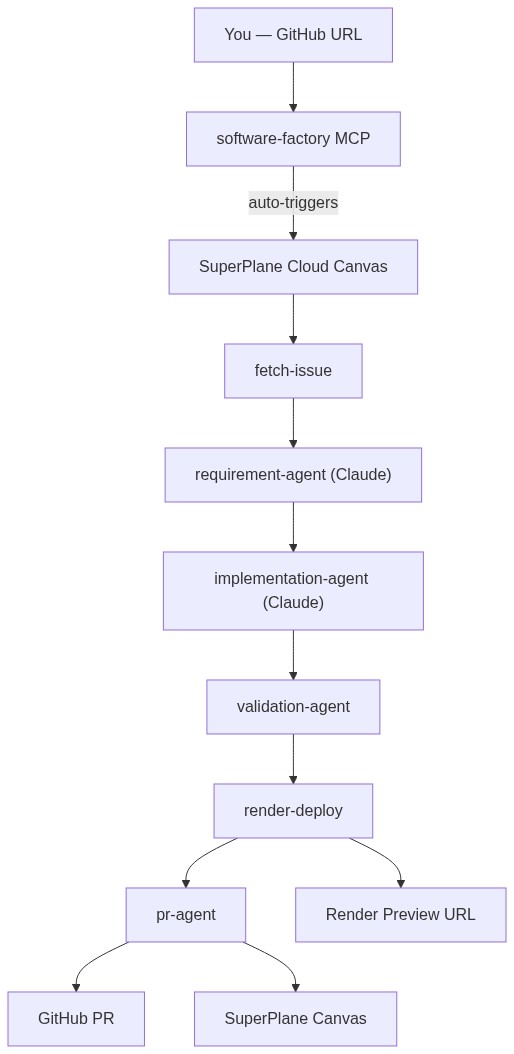
graph TB
    U["You — GitHub URL"] --> M["software-factory MCP"]
    M --> |"auto-triggers"| SP["SuperPlane Cloud Canvas"]
    SP --> FI["fetch-issue"]
    FI --> RA["requirement-agent (Claude)"]
    RA --> IA["implementation-agent (Claude)"]
    IA --> VA["validation-agent"]
    VA --> RD["render-deploy"]
    RD --> PA["pr-agent"]
    RD --> R1["🚀 Render Preview URL"]
    PA --> R2["🔀 GitHub PR"]
    PA --> R3["🌐 SuperPlane Canvas"]
Pipeline Stages
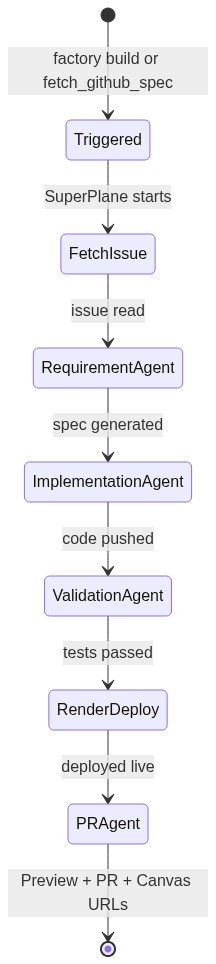
stateDiagram-v2
    [*] --> Triggered : factory build or fetch_github_spec
    Triggered --> FetchIssue : SuperPlane starts
    FetchIssue --> RequirementAgent : issue read
    RequirementAgent --> ImplementationAgent : spec generated
    ImplementationAgent --> ValidationAgent : code pushed
    ValidationAgent --> RenderDeploy : tests passed
    RenderDeploy --> PRAgent : deployed live
    PRAgent --> [*] : Preview + PR + Canvas URLs
Live terminal output when following a build:
⟳ fetch-issue          running...
✔ fetch-issue          3s
⟳ requirement-agent    running...  (Claude writing spec + Mermaid diagram)
✔ requirement-agent    44s
⟳ implementation-agent running...  (Claude writing code + pushing branch)
✔ implementation-agent 2m 18s
⟳ render-deploy        running...
✔ render-deploy        24s
✔ pr-agent             8s

  ━━━━━━━━━━━━━━━━━━━━━━━━━━━━━━━━━━━━━━━━
  ✅  PIPELINE COMPLETE — Share these links:
  ━━━━━━━━━━━━━━━━━━━━━━━━━━━━━━━━━━━━━━━━
  🚀  Preview:    https://factory-myapp.onrender.com
  🔀  PR:         https://github.com/owner/repo/pull/42
  🌐  SuperPlane: https://app.superplane.com/canvases/<id>
  ━━━━━━━━━━━━━━━━━━━━━━━━━━━━━━━━━━━━━━━━

✔ Done in 4m 37s
🔌 SuperPlane & Render — Integration Details
🌌 SuperPlane: Orchestration Engine
SuperPlane is the brain of the factory — it runs the entire pipeline in cloud-hosted, dockerised environments:
| What SuperPlane does | Details |
|---|---|
| Visual Canvas | Watch every stage run live in the UI — no black box |
| Agent Orchestration | Connects Claude Sonnet to bash runners for spec, code, validation |
| Secret Vault | Encrypts GitHub Token, Render key, Anthropic key org-wide |
| Canvas Auto-Sync | factory init always updates the remote canvas to the latest spec |
| Event Triggering | fetch_github_spec → auto-fires pipeline; visible immediately in canvas |
⚡ Render: Instant Preview Hosting
Render provides zero-config, always-on preview environments:
| What Render does | Details |
|---|---|
| Auto-Provisioning | First build for a repo → creates factory-{repo} static site automatically |
| Fast Redeploys | Repeat builds update branch + redeploy in ~20s |
| PR Previews | Each PR gets its own factory-{repo}-pr-{N}.onrender.com URL |
| Root Mapping | Serves poc/public/ — isolated from the rest of your source |
| URL Feedback | Preview URL is returned to SuperPlane, embedded in PR body + issue comment |
🛠 Setup (One Time)
Step 1 — Install & configure
npx software-factory initYou'll be asked for 3 things:
| # | What | Where to get it |
|---|------|-----------------|
| 1 | SuperPlane API token | app.superplane.com → Profile → API Tokens |
| 2 | GitHub personal access token | github.com → Settings → Developer → PATs (repo scope) |
| 3 | Render API key | dashboard.render.com/u/settings → API Keys |
No Anthropic key needed in your agent — keys live in SuperPlane's vault and are injected into pipeline nodes automatically.
After entering keys, init automatically:
- Stores all secrets encrypted in SuperPlane
- Creates (or refreshes) the pipeline canvas in SuperPlane
- Registers
software-factoryin Claude Code (claude mcp add software-factory) - Writes
~/.mcp.jsonfor Codex / OpenCode / any MCP agent
Step 2 — Verify
npx software-factory doctor🏥 Software Factory Doctor
✔ SuperPlane API Connected as you
✔ Factory Canvas "software-factory" (a414dc62…)
🌐 https://app.superplane.com/canvases/a414dc62-...
✔ GitHub Token @yourgithub
✔ Render API Key Render API reachable
✔ anthropic-api-key stored
✔ github-token stored
✔ render-api-key stored
✅ All systems operational! End-to-end workflow:
1. Give the agent a GitHub issue/repo URL
2. fetch_github_spec → auto-triggers SuperPlane pipeline
3. SuperPlane runs: spec → code → deploy → PR (all visible in cloud)
4. get_pipeline_status → poll until complete
5. Report 🚀 Preview URL + 🔀 PR URL + 🌐 Canvas URL to user🤖 Using with Your AI Agent
Open Claude Code, Codex, or OpenCode (MCP is already registered). Paste this:
Use the software-factory tools to build and deploy this:
https://github.com/owner/repo/issues/42
The URL can be:
| URL type | Example | What happens |
|----------|---------|--------------|
| Issue | https://github.com/you/myapp/issues/42 | Reads issue → auto-triggers pipeline |
| Repo | https://github.com/you/myapp | Reads SPEC.md / README.md → triggers pipeline |
| File | https://github.com/you/myapp/blob/main/SPEC.md | Reads that file → triggers pipeline |
The agent always gets back three links when the pipeline finishes:
🚀 Preview:    https://factory-xyz.onrender.com
🔀 PR:         https://github.com/owner/repo/pull/42
🌐 SuperPlane: https://app.superplane.com/canvases/<canvas-id>
🛠 MCP Tools Reference
| Tool | What it does | SuperPlane visible? |
|------|-------------|---------------------|
| factory_doctor | Verify all connections + show canvas URL | — |
| fetch_github_spec | Read spec/issue + auto-trigger pipeline | ✅ triggers all 6 stages |
| trigger_autonomous_pipeline | Explicitly trigger full pipeline | ✅ all 6 stages |
| get_pipeline_status | Poll progress — returns all 3 URLs when done | ✅ live stage data |
| get_repo_structure | List files in a GitHub repo | — |
| read_repo_file | Read a specific GitHub file | — |
| push_branch | Push code to a new branch (manual fallback) | — |
| deploy_preview | Deploy to Render → live HTTPS URL (manual fallback) | — |
| get_deploy_status | Poll a specific Render deploy | — |
| create_pr | Open PR + comment preview URL on issue (manual fallback) | — |
📋 CLI Reference
# Setup
npx software-factory init              # One-time setup: keys, canvas, MCP registration
npx software-factory doctor            # Verify all connections

# Run the pipeline
npx software-factory build <url>       # Trigger autonomous pipeline
npx software-factory build <url> --follow  # With live stage-by-stage output

# Monitor
npx software-factory status            # Current pipeline run status
npx software-factory status --watch    # Auto-refresh every 10s
npx software-factory logs              # Per-stage execution logs

# MCP server (called by your agent automatically)
npx software-factory mcp
🤝 Agent Setup Details
Claude Code
# Auto-registered by factory init, or manually:
claude mcp add software-factory -- npx software-factory mcp
Codex / OpenCode / Any MCP Agent
~/.mcp.json (written automatically by factory init):
{
  "mcpServers": {
    "software-factory": {
      "command": "npx",
      "args": ["software-factory", "mcp"]
    }
  }
}
🔑 Environment Variables
export SUPERPLANE_TOKEN="TuovNZZl..."      # SuperPlane API token
export GITHUB_TOKEN="ghp_..."             # GitHub personal access token
export RENDER_API_KEY="rnd_..."           # Render API key
export RENDER_SERVICE_ID="srv-..."        # Optional: skip service lookup
export FACTORY_TARGET_REPO="owner/repo"  # Default target repo
export FACTORY_CANVAS_ID="uuid"          # SuperPlane canvas ID
Non-interactive (CI/CD):
npx software-factory init --yes📁 Codebase
bin/
  factory.js          CLI entrypoint

src/
  mcp/
    server.js         10 MCP tools (JSON-RPC 2.0 stdio)
  commands/
    init.js           setup + MCP auto-register + canvas sync
    doctor.js         health checks
    build.js          autonomous pipeline trigger + --follow watcher
    status.js         pipeline status
    logs.js           execution logs
  superplane/
    client.js         SuperPlane REST client
    canvas-template.js  6-node pipeline definition
  config.js           ~/.factory/config.json
🌟 Demo — Try It Now
# Build a feature from a real SuperPlane issue
npx software-factory build https://github.com/superplanehq/superplane/issues/5368 --follow

# Watch all 6 stages complete in your terminal
# Then open the 3 links: Preview · PR · SuperPlane Canvas
🤝 Contributing
git clone https://github.com/hongchengw/superplane-render-nyc-hack
cd superplane-render-nyc-hack
npm install
node bin/factory.js --help
Built with SuperPlane · Deployed on Render
MIT © Roshan Sharma