
solregex
v0.3.1
Published
generates Solidity smart contracts to match regular expressions


Readme
solregex



Tool to generate a Solidity smart contract for a given regular expression.
Installing
npm install -g solregexUsage
Provide optional --name parameter and regex as argument.
$ solregex --name EmailRegex '[a-zA-Z0-9._%+-]+@[a-zA-Z0-9.-_]+\.[a-zA-Z]{2,}'solregex prints the contents of a standalone Solidity source file (.sol)
to your terminal's standard out.
You may want to:
- Save to disk (e.g.
solregex 'ab*c?' > Regex.sol) - Copy/paste it into an IDE (e.g.
solregex '.+abc.*' | pbcopyon macOS, or select with mouse)
Workflow Usage
There are many different workflows for developing / deploying applications with Ethereum.
Generally the process follows these steps:
- Run
solregexwith a regular expression (generates Solidity smart contract) - Compile smart contract
- Deploy compiled contract
- Use in another contract
Graphviz Output
solregex supports generating Graphviz DOT output for a given regular
expression's DFA (deterministic finite automaton).
To generate DOT output instead of Solidity, pass the --dot parameter.
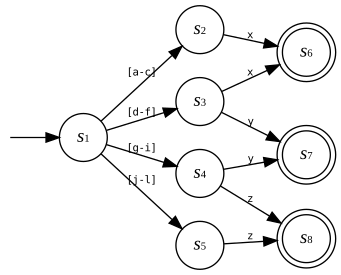
Sample DOT Output: solregex --dot '[a-f]x|[d-i]y|[g-l]z' | dot -Tsvg > sample-regex.svg
Examples
A contract to match email addresses is deployed at
0x537837D00047C874D19B68E94ADbA107674C21b8
(Etherscan)
A contract to match Ethereum addresses is deployed at
0x62C8b4aC2aEF3Ed13B929cA9FB20caCB222E3fA6
(Etherscan)
Approach
Compiling a regular expression to Solidity is done via several steps:
Parse regex using regjsparser
Build NFA (non-deterministic finite automaton) from parse result. Use graph.js for underlying state machine data.
Split overlapping character class ranges into non-overlapping subset ranges (e.g.
[a-f],[d-i]become[a-c],[d-f],[g-i]) using interval trees Ref. Graphviz output above for example to highlight this behavior.Use powerset construction to convert NFA to DFA (deterministic finite automaton)
Convert DFA into Solidity source using a handlebars template.
Status
What's Supported
Supports disjunctions |, alternations (e.g. ab, concatenation), quantifiers
(+, *, ?, {n}, {n,m}, {n,}), wildcard matching (.), quantified
groups ((...)*, etc.), character classes (positive, negative, ranges)
Supports true/false result for string matching against a regex.
What's Missing
- Assertions (
^,$for start/end). Currently "enabled" by default. - Capturing groups (e.g.
(a*)(b*)indicating a/b groups in input string) - Backreferences (e.g.
(a*)\1) - Escape sequences for things like tabs, newlines, word characters, etc.
- Any kind of multi-line smartness
- Unicode support
- Probably more, let me know!
Known Inefficiencies
Quantifiers using numeric literals (e.g.
a{40}) generate numerous resulting DFA states. This makes the output code very large very fast.It may be possible to add support for compressing mostly-identical states into a single state with parameters, to avoid so much output code.
Contributing
Feel free to contact me in the Gitter channel for this repository with any comments, concerns, questions. Let me know if anything is unclear about usage or if you encounter any problems!
If you are interested in helping improve the state of efficient string pattern matching on the EVM, get in touch or open a pull request! Feedback, fixes, and improvements of all kinds are most appreciated :). Thank you!