
soma-style
v1.3.1
Published
The soma ecosystem's universal design system — tokens (NativeWind/Tailwind preset) + React Native components (Text, Button, Card, Pill, Badge, Input, Bar, Ring, Modal, SegmentedControl, NavBar) that render on web and native. Modeled on macro-engine.


Readme
soma-style
Shared design tokens for the soma ecosystem. One source of truth for macro colors, the chart palette, and the Tailwind v4 theme, so soma and the standalone macro-engine / hevy2garmin / garmin-auth UIs all render the same palette instead of each copy-pasting hex values.

Install
npm install soma-styleThe tokens
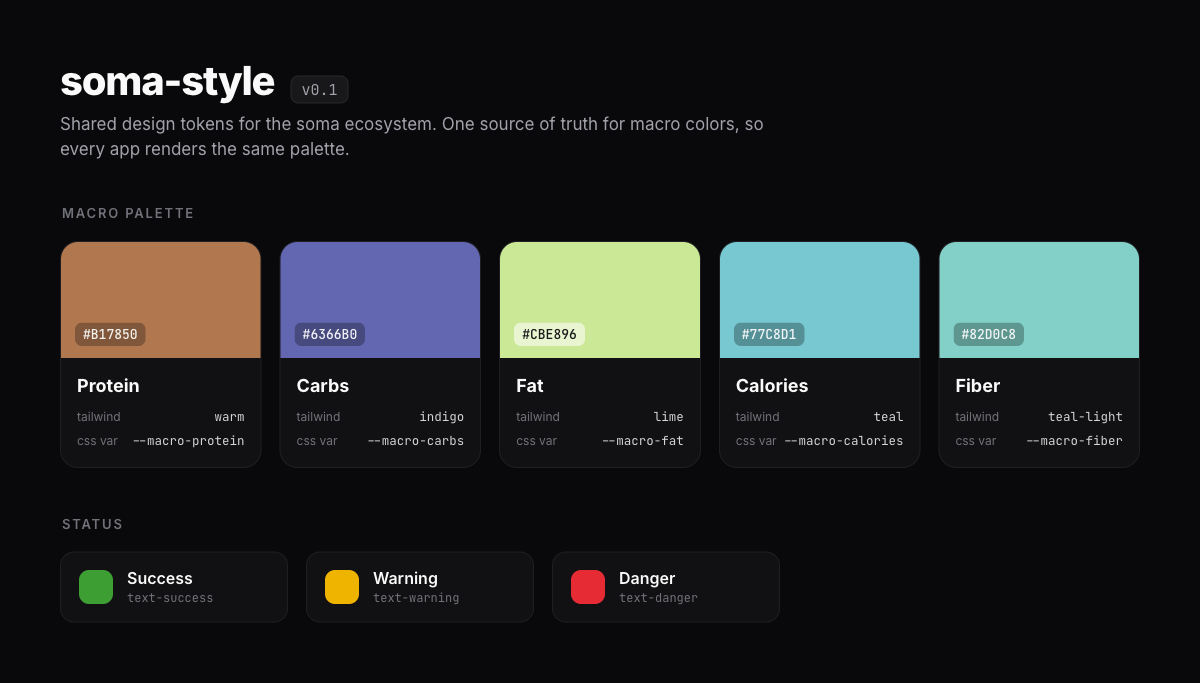
| Macro | Hex | Tailwind | CSS var |
| -------- | --------- | ------------- | ------------------ |
| protein | #B17850 | warm | --macro-protein |
| carbs | #6366B0 | indigo | --macro-carbs |
| fat | #CBE896 | lime | --macro-fat |
| calories | #77C8D1 | teal | --macro-calories |
| fiber | #82D0C8 | teal-light | --macro-fiber |
Status colors (success / warning / danger) back the progressColor and deficitColor helpers.
Use it
TypeScript tokens
import { MACRO_COLORS, progressColor, deficitColor, ChartColors } from "soma-style";

MACRO_COLORS.protein.hex;    // "#B17850"
MACRO_COLORS.protein.bg;     // "bg-warm"          (Tailwind class, needs theme.css)
MACRO_COLORS.protein.cssVar; // "--macro-protein"  (needs tokens.css)

progressColor(102);          // "text-success"
deficitColor(450, 500);      // "text-warning"
Tailwind v4 apps
Import the theme after Tailwind. base.css is the whole app theme (surface + brand + chart tokens, dark/light, teal primary); theme.css adds the macro + status colors:
@import "tailwindcss";
@import "soma-style/base.css";
@import "soma-style/theme.css";
Now the shadcn-style tokens (bg-background, bg-card, text-primary, bg-chart-1, …) and the macro classes (bg-warm, text-indigo, bg-teal, text-success, …) all resolve to the ecosystem palette. If you reference the classes indirectly (via MACRO_COLORS), add a @source so Tailwind still generates them:
@source "../node_modules/soma-style/dist";Non-Tailwind apps
Import the plain CSS variables and reference them directly:
@import "soma-style/tokens.css";.protein { color: var(--macro-protein); }Develop
npm run build   # tsc → dist/
npm test        # vitest