
sottochat
v0.1.10
Published
A quiet back-channel for long autonomous agent runs — tails Claude Code / Codex transcripts and gives you a multilingual Q&A thread about each session.

Maintainers
 oronanschel
Readme
sottochat
A quiet back-channel for long autonomous agent runs.
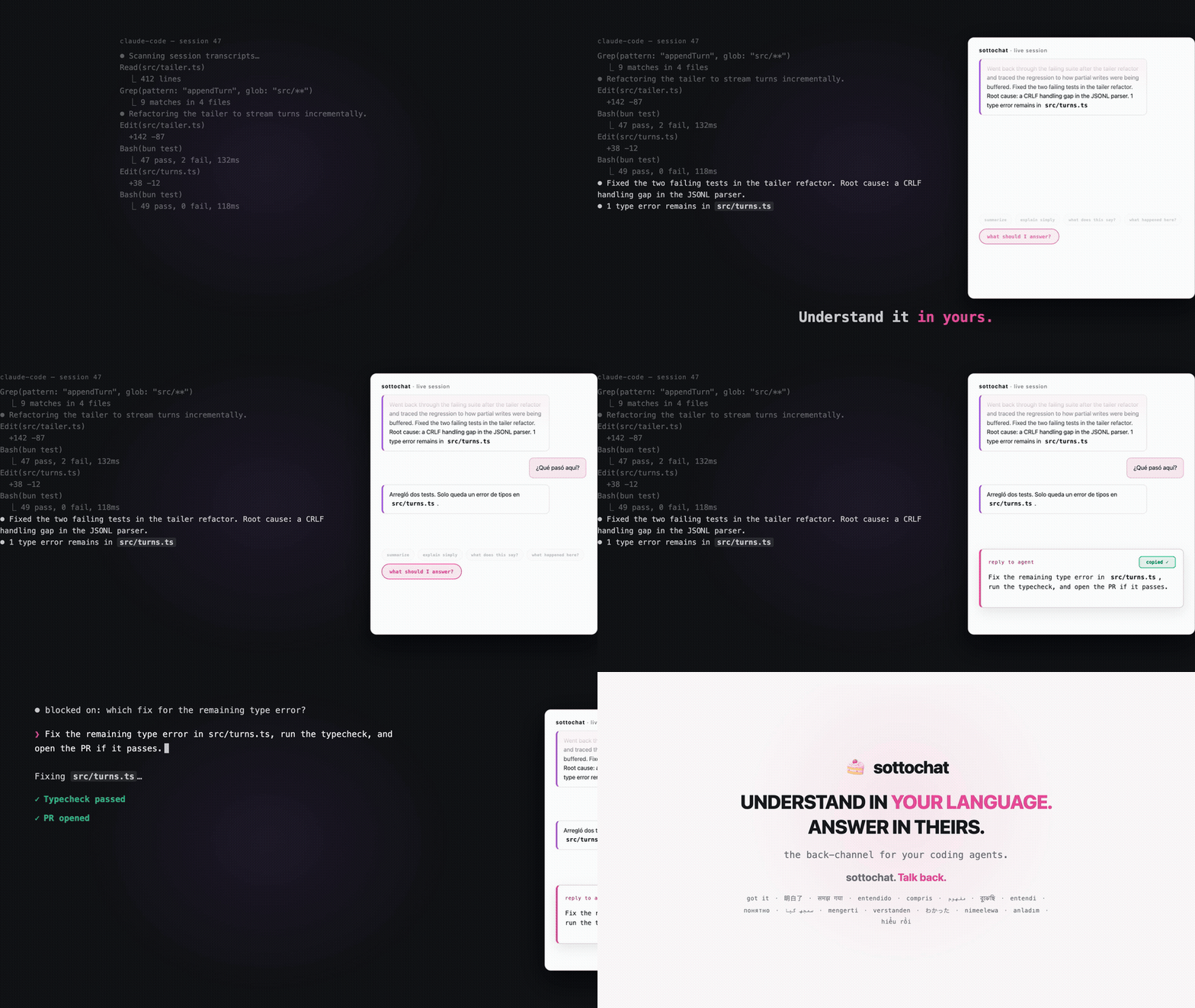
sottochat tails your local Claude Code, Claude app (local agent mode), and Codex session transcripts in real time, groups them into an inbox of live runs, and gives you a multilingual Q&A thread about each run — so you can understand what the agent did, discuss it in your own language, and prepare a targeted reply to paste back into the original terminal.
The name comes from sotto voce ("under the voice"): the agent monologues at full voice in the terminal; sottochat is your undertone conversation on the side.
What it does
- Live inbox — discovers active agent sessions from local transcript files (
~/.claude,~/.codex/sessions) and running processes, and keeps a stable list of recent runs. - Turn view — groups raw JSONL events into turns, with compact turn/diff charts and the latest agent exchange pinned to the useful tail.
- Multilingual Q&A — a chat thread per session, seeded with recent turns, so you can ask "what happened, what matters, what should I answer?" in your own language.
- Reply drafting — when the assistant drafts something worth sending back, it appears as a copyable
to-agentcard. Copy-paste is the bridge back to the real agent. - Read-only by design — sottochat never writes into the watched session, pauses the agent, or approves anything.
Full product definition: PRODUCT.md. Design language: DESIGN.md.
Install
With Bun installed, install the command globally:
bun add --global sottochatThen start it now or any time later with:
sottochatIf a sottochat server is already running on the target port, sottochat
doesn't start a second one — it prints the URL and opens it in your browser.
To try it without installing, use bunx sottochat. bunx immediately starts
the server in the foreground; press Ctrl-C to stop it, and run the same
bunx sottochat command again next time.
Or install the standalone macOS/Linux binary (Bun is not required):
curl -fsSL https://raw.githubusercontent.com/latent-spaces/sottochat/main/install.sh | sh
sottochat
The installer verifies the release checksum and installs to /usr/local/bin by
default (it may prompt for sudo). To choose a user-owned directory instead:
curl -fsSL https://raw.githubusercontent.com/latent-spaces/sottochat/main/install.sh | SOTTOCHAT_INSTALL_DIR="$HOME/.local/bin" shPrebuilt archives are also attached to every GitHub release for macOS and Linux on Apple Silicon/ARM64 and x64.
Requirements
- Bun ≥ 1.1 when using
bunx(not needed for the standalone binary) - macOS or Linux (discovery paths and process scanning are only exercised there; Windows is untested)
- Anthropic auth for the Q&A and observer features: the first-run panel supports a Claude Code Subscription,
ANTHROPIC_API_KEY, Amazon Bedrock, and Google Vertex AI. Authentication is optional; transcript tailing remains available in read-only mode.
Quick start
bun install
bun run start          # serves http://localhost:3737
Open http://localhost:3737. On first run, choose how Claude-backed chat and summaries should authenticate, or continue read-only. The browser never asks for or stores an API key. Any recent Claude Code or Codex session on this machine appears in the inbox; open one to see its turns and start a discussion.
Working from a checkout, run bun link once to register a global sottochat
command that points at your working copy — every launch runs current source,
no republish or rebuild needed.
Configuration
Open http://localhost:3737/settings to edit every setting. Language and the
browser-local color system change immediately; startup settings are saved to
~/.sottochat/settings.json and apply after a restart. CLI flags and
environment variables override saved settings. The environment equivalents are
documented in .env.example. The main ones:
| Variable | Default | Purpose |
| --- | --- | --- |
| META_PORT | 3737 | HTTP/websocket port |
| META_OBSERVER_ENABLED | 1 | Background observer that summarizes active sessions (0 to disable) |
| META_CHAT_MODEL / META_OBSERVER_MODEL | claude-sonnet-5 | Models used by the chat and observer subprocesses |
| META_EXPLAIN_LANG | zh | Default explanation language for the Q&A thread (switchable in the UI; each browser remembers its own last-picked language) |
| META_INBOX_MINUTES | 1440 | How far back the inbox looks for recent sessions (24 hours) |
| META_PROJECT_SLUG | (unset) | Restrict discovery to a single Claude Code project slug |
| META_UPDATE_CHECK | 1 | Daily npm check for a newer sottochat, shown in the banner and UI (0 to disable) |
Runtime state (chat sandboxes, persistence) lives under ~/.sottochat/.
Sottochat's own chat and summary token history is attributed to the exact model
reported by the SDK and retained by local calendar day
for 90 days in ~/.sottochat/usage.json; it does not include token usage from
the watched coding-agent sessions.
Run and debug locally with Bun
Install dependencies once, then start the normal foreground server:
bun install
bun run start
This serves http://localhost:3737, opens it in the browser, and stops cleanly
with Ctrl-C. For code changes, use Bun's hot reload on a scratch port so an
installed or already-running sottochat instance is not disturbed:
META_PORT=3947 META_OBSERVER_ENABLED=0 bun --hot src/server.tsOpen http://localhost:3947. Leave the observer disabled for ordinary UI and transcript work to avoid spawning a background summary subprocess. Enable it only when testing summaries.
To attach Bun's interactive debugger, replace --hot with --inspect:
META_PORT=3947 META_OBSERVER_ENABLED=0 bun --inspect src/server.tsBun prints a debug.bun.sh URL where you can set breakpoints, inspect local
variables, and use the debugger console. Use --inspect-wait instead when the
server must pause before executing its first line. See the
Bun debugger documentation for the
available inspector modes.
Useful diagnostics while the scratch server is running:
curl http://localhost:3947/state
curl http://localhost:3947/api/auth/status
curl http://localhost:3947/api/usage
curl http://localhost:3947/diag/discovery
If the port is already occupied, choose another META_PORT instead of stopping
an unknown process. Runtime state is written under ~/.sottochat/; use a
scratch instance carefully when testing persistence or chat history.
Development checks
bun run typecheck      # tsc, no emit
bun test               # parser/turn tests under tests/
The frontend is deliberately build-free: plain script files under public/assets/, with third-party libraries vendored in public/assets/vendor/ — no bundler, no CDN tags.
Releasing
Set the version in package.json, then push a matching tag such as v0.1.0.
The release workflow tests the project, publishes the npm package, and attaches
checksum-protected standalone binaries for macOS and Linux to a GitHub release.
For the first npm publication, create a short-lived granular token at npmjs.com → Access Tokens with Packages and scopes: Read and write and All Packages. Enable Bypass 2FA only if npm requires it for automated publishing. Add the token to this repository through the hidden GitHub CLI prompt (do not put it in the command or commit it):
gh secret set NPM_TOKEN --repo latent-spaces/sottochat
gh secret list --repo latent-spaces/sottochat
After the first release, prefer npm trusted publishing and remove the
long-lived NPM_TOKEN secret.
Architecture at a glance
src/server.ts— Bun HTTP + websocket server; polls discovery, tails transcripts, pushes state to the SPA.src/claude-discovery.ts/src/codex-discovery.ts/src/process-discovery.ts— find candidate sessions from transcript directories and running processes.src/jsonl.ts/src/codex-jsonl.ts/src/turns.ts— parse transcript JSONL into normalized events and group them into turns.src/chat-agent.ts/src/observer.ts— Claude Agent SDK subprocesses for per-session Q&A and background summaries (run with an empty tool allowlist).public/index.html+public/assets/app.js— the no-build SPA.