
source-map-parser-mcp
v1.6.0
Published
Parse JavaScript error stack traces back to original source code using source maps


Readme
Source Map 解析器





本项目实现了一个基于 WebAssembly 的 Source Map 解析器,能够将 JavaScript 错误堆栈信息映射回源代码,并提取相关的上下文信息,开发者可以方便地将 JavaScript 错误堆栈信息映射回源代码,快速定位和修复问题。希望本项目的文档能帮助开发者更好地理解和使用该工具
MCP 串接
注意: 需要 Node.js 20+ 版本支持
方式一:NPX 直接运行
npx -y source-map-parser-mcp@latest方式二:下载构建产物
从 GitHub Release 页面下载对应版本的构建产物,然后运行:
node dist/main.es.js作为 npm 包在自定义 MCP 服务中使用
你可以在自己的 MCP 进程中嵌入本项目提供的工具,并按需定制行为。
安装:
npm install source-map-parser-mcp最小示例(TypeScript):
import { McpServer } from '@modelcontextprotocol/sdk/server/mcp.js';
import { StdioServerTransport } from '@modelcontextprotocol/sdk/server/stdio.js';
import {
  registerTools,
  Parser,
  type ToolsRegistryOptions,
} from 'source-map-parser-mcp';

const server = new McpServer(
  { name: 'your-org.source-map-parser', version: '0.0.1' },
  { capabilities: { tools: {} } }
);

// 可选:通过环境变量控制上下文行数
const options: ToolsRegistryOptions = {
  contextOffsetLine:
    Number(process.env.SOURCE_MAP_PARSER_CONTEXT_OFFSET_LINE) || 1,
};

registerTools(server, options);

// 以 stdio 方式启动
const transport = new StdioServerTransport();
await server.connect(transport);

// 如果不通过 MCP,也可以在代码中直接调用解析:
const parser = new Parser({ contextOffsetLine: 1 });
// await parser.parseStack({ line: 10, column: 5, sourceMapUrl: 'https://...' });
// await parser.batchParseStack([{ line, column, sourceMapUrl }]);
构建与类型声明
本项目同时提供 ESM 与 CJS 构建,并打包为单一的 TypeScript 声明文件:
- 构建产物:
- ESM:
dist/index.es.js - CJS:
dist/index.cjs.js - CLI 入口:
dist/main.es.js - 类型声明:
dist/index.d.ts(单文件打包)
- ESM:
本地快速构建:
npm install
npm run build
在你的项目中使用类型:
import {
  Parser,
  registerTools,
  type ToolsRegistryOptions,
} from 'source-map-parser-mcp';
运行参数配置
通过环境变量可灵活配置系统运行参数,满足不同场景需求
SOURCE_MAP_PARSER_RESOURCE_CACHE_MAX_SIZE:设置资源缓存占用的最大内存空间,默认为 200MB。适当调整此值可平衡性能与内存占用。SOURCE_MAP_PARSER_CONTEXT_OFFSET_LINE:定义错误位置周围需显示的上下文代码行数,默认为 1 行。增大此值可获取更多上下文信息,便于问题诊断。
示例:
# 设置 500MB 缓存并显示 3 行上下文
export SOURCE_MAP_PARSER_RESOURCE_CACHE_MAX_SIZE=500
export SOURCE_MAP_PARSER_CONTEXT_OFFSET_LINE=3
npx -y source-map-parser-mcp@latest
功能概述
- 堆栈解析:根据提供的行号、列号和 Source Map 文件,解析出对应的源代码位置。
- 批量解析:支持同时解析多个堆栈信息,返回批量结果。
- 上下文提取:可以提取指定行数的上下文代码,帮助开发者更好地理解错误发生的环境。
- 上下文查找:查找编译代码中特定位置对应的原始源代码上下文。
- 源文件解包:从 source map 中提取所有源文件及其内容。
MCP 服务工具说明
operating_guide
获取 MCP 服务的使用说明。提供到通过聊天交互的方式了解到该 MCP 服务如何使用
parse_stack
传入堆栈信息和 Source Map 地址进行解析。
请求示例
- stacks :堆栈信息,包含行号、列号和 Source Map 地址。
- line :行号,必填。
- column :列号,必填。
{
  "stacks": [
    {
      "line": 10,
      "column": 5,
      "sourceMapUrl": "https://example.com/source.map"
    }
  ]
}
响应示例
{
  "content": [
    {
      "type": "text",
      "text": "[{\"success\":true,\"token\":{\"line\":10,\"column\":5,\"sourceCode\":[{\"line\":8,\"isStackLine\":false,\"raw\":\"function foo() {\"},{\"line\":9,\"isStackLine\":false,\"raw\":\"  console.log('bar');\"},{\"line\":10,\"isStackLine\":true,\"raw\":\"  throw new Error('test');\"},{\"line\":11,\"isStackLine\":false,\"raw\":\"}\"}],\"src\":\"index.js\"}}]"
    }
  ]
}
lookup_context
查找编译/压缩代码中特定行列位置对应的原始源代码上下文。
请求示例
- line: 编译代码中的行号(从1开始),必填。
- column: 编译代码中的列号,必填。
- sourceMapUrl: Source Map 文件的 URL,必填。
- contextLines: 包含的上下文行数(默认:5),可选。
{
  "line": 42,
  "column": 15,
  "sourceMapUrl": "https://example.com/app.js.map",
  "contextLines": 5
}
响应示例
{
  "content": [
    {
      "type": "text",
      "text": "{\"filePath\":\"src/utils.js\",\"targetLine\":25,\"contextLines\":[{\"lineNumber\":23,\"content\":\"function calculateSum(a, b) {\"},{\"lineNumber\":24,\"content\":\"  if (a < 0 || b < 0) {\"},{\"lineNumber\":25,\"content\":\"    throw new Error('Negative numbers not allowed');\"},{\"lineNumber\":26,\"content\":\"  }\"},{\"lineNumber\":27,\"content\":\"  return a + b;\"}]}"
    }
  ]
}
unpack_sources
从 source map 中提取所有源文件及其内容。
请求示例
- sourceMapUrl: 要解包的 Source Map 文件 URL,必填。
{
  "sourceMapUrl": "https://example.com/bundle.js.map"
}
响应示例
{
  "content": [
    {
      "type": "text",
      "text": "{\"sources\":{\"src/index.js\":\"import { utils } from './utils.js';\\nconsole.log('Hello World!');\",\"src/utils.js\":\"export const utils = { add: (a, b) => a + b };\"},\"sourceRoot\":\"/\",\"file\":\"bundle.js\",\"totalSources\":2}"
    }
  ]
}
4. 解析结果说明
success:表示解析是否成功。token:解析成功时返回的 Token 对象,包含源代码行号、列号、上下文代码等信息。error:解析失败时返回的错误信息。
运行示例
系统提示词
根据实际需求,可以通过系统提示词引导模型如何解析堆栈信息。部分团队出于安全性或性能考虑,不希望直接将 Source Map 暴露给浏览器解析,而是对 Source Map 的上传路径进行处理。例如,将路径 bar-special.js 转换为 special/bar.js.map。此时,可以通过提示词规则指导模型完成路径转换。
以下是一个示例:
# 错误堆栈解析规则

在进行 source map 解析时,请遵循以下规则:

1. 如果 URL 中包含 `special`,则需将文件解析到 `special/` 目录下,并移除文件名中的 `-special`。
2. 所有 source map 文件均存放于以下 CDN 目录:
   `https://cdn.jsdelivr.net/gh/MasonChow/source-map-parser-mcp@main/example/`

## 示例

- `bar-special.js` 的 source map 地址为:
  `https://cdn.jsdelivr.net/gh/MasonChow/source-map-parser-mcp@main/example/special/bar.js.map`
运行效果
错误堆栈
Uncaught Error: This is a error
    at foo-special.js:49:34832
    at ka (foo-special.js:48:83322)
    at Vs (foo-special.js:48:98013)
    at Et (foo-special.js:48:97897)
    at Vs (foo-special.js:48:98749)
    at Et (foo-special.js:48:97897)
    at Vs (foo-special.js:48:98059)
    at sv (foo-special.js:48:110550)
    at foo-special.js:48:107925
    at MessagePort.Ot (foo-special.js:25:1635)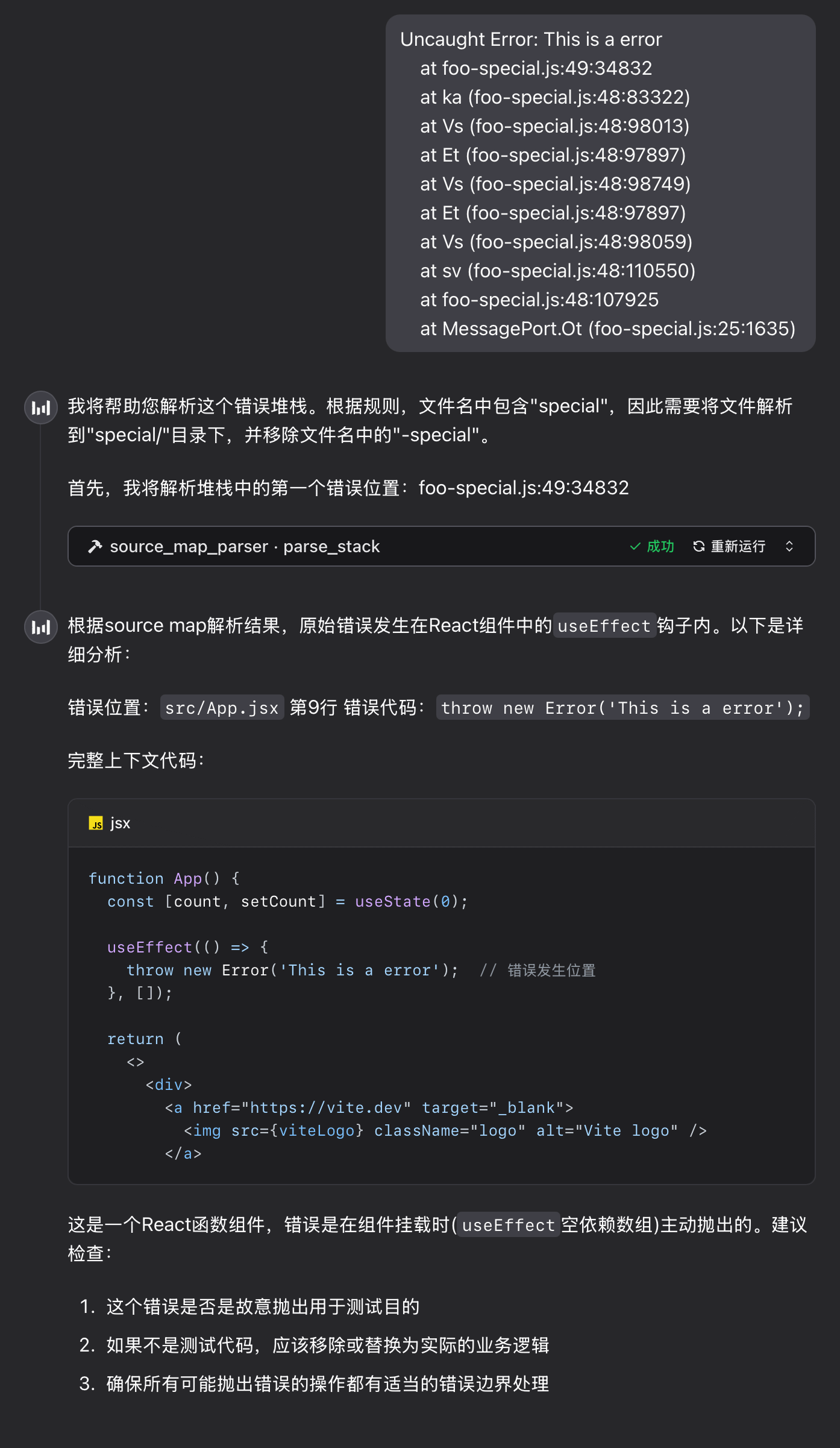
FAQ
1. WebAssembly 模块加载失败
如果工具返回以下错误信息,请按照以下步骤排查问题:
parser init error: WebAssembly.instantiate(): invalid value type 'externref', enable with --experimental-wasm-reftypes @+86
- 检查 Node.js 版本:确保 Node.js 版本为 20 或更高。如果版本低于 20,请升级 Node.js。
- 启用实验性标志:如果 Node.js 版本为 20+ 但仍然遇到问题,请使用以下命令启动工具:
npx --node-arg=--experimental-wasm-reftypes -y source-map-parser-mcp@latest
本地开发指南
1. 安装依赖
确保已安装 Node.js 和 npm,然后运行以下命令安装项目依赖:
npm install2. 链接 MCP 服务
运行以下命令启动 MCP 服务器:
npx tsx src/main.ts内部逻辑概要
1. 主要文件说明
stack_parser_js_sdk.js:WebAssembly 模块的 JavaScript 封装,提供了堆栈解析的核心功能。parser.ts:解析器的主要实现,负责初始化 WebAssembly 模块、获取 Source Map 内容并解析堆栈信息。server.ts:MCP 服务器的实现,提供了parse_stack工具接口,供外部调用。
2. 修改解析逻辑
如果需要修改解析逻辑,可以编辑 parser.ts 文件中的 getSourceToken 方法。
3. 添加新工具
在 server.ts 文件中,可以通过 server.tool 方法添加新的工具接口。
注意事项
- Source Map 文件:确保提供的 Source Map 文件地址可访问,且文件格式正确。
- 错误处理:解析过程中可能会遇到网络错误、文件格式错误等问题,建议在调用时做好错误处理。
贡献指南
欢迎提交 Issue 和 Pull Request,共同改进本项目。
许可证
本项目采用 MIT 许可证,详情请参阅 LICENSE 文件。