
spa-seo
v0.0.3
Published
Single Page App SER

Maintainers
 mayajuni
Readme
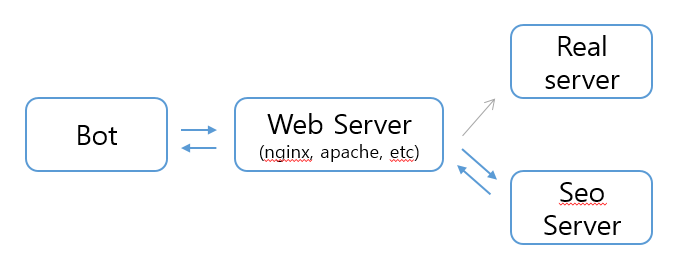
#spa-seo (parameter validation set) 싱글페이지 어플리케이션에서 SEO에 대한 이슈를 처리하기 위해 많들었습니다. bot이 접속을 하면 웹서버에서 체크를 한 후 프록시 서버로 연결해주는 방식을 체택했습니다.
##사용 모듈
- phantomjs-prebuilt : https://github.com/Medium/phantomjs
##설치
- spa-seo 설치
$ npm install spa-seo- CentOs
$ sudo yum install fontconfig- Ubuntu
$ sudo apt-get install libfontconfig##설명 1. Bot 접속 2. Nginx혹은 apache에서 bot인지 체크 후 Seo Server 연결 3. 해당 url이 html 파일로 있을시, html 파일 리턴, 없을시 팬텀Js를 이용하여 리턴 및 파일 생성
##생성된 html 초기화 등록된(저장된) html 디렉토리를 삭제해주시면 됩니다. 초만간 일자별로 삭제 하는걸 추가해 놓겠습니다.
##설정 ####1. Paramter | 구분 | 설명 | 비고| |-------|---|-----------| | PORT | SEO 서버를 띄우기 위한 포트 | Default: 9999 | | fileDirectory | html파일을 저장하기 위한 디렉토리 | Default: ./files |
####2. Nginx 설정
server {
	...
    location / {
    	set $rot 0;
    	if ($http_user_agent ~* "Googlebot|cowbot|yeti|empas|MSNBot|daumoa|baiduspider|twitterbot|facebookexternalhit|rogerbot|linkedinbot|embedly|quora link preview|showyoubot|outbrain|pinterest|slackbot|vkShare|W3C_Validator") {
            set $rot 1;
        }
         if ($args ~ "_escaped_fragment_") {
            set $rot 1;
        }

		# rot 일때
        if ($rot = 1) {
        	proxy_set_header X-Real-IP $remote_addr;
            proxy_set_header X-Forwarded-For $proxy_add_x_forwarded_for;
            proxy_set_header Host $http_host;
            proxy_set_header X-NginX-Proxy true;
            # 아래의 것을 안넣어주면 기본 protocol을 http로 설정됩니다.
            proxy_set_header X-Forwarded-Proto $scheme;

            proxy_pass http://localhost:9999/;
        }
        # rot이 아닐시
        if ($rot = 0) {
        	...
        }
        ...
    }
    ...
}
####3. Apache 설정 제가 Apache를 사용안해서 아직 알아보지 못했습니다.
####4. Html 설정 안에 아래의 태그를 넣어주세요.
<meta name="fragment" content="!">##사용
- server.js 만들기
	const Spaseo = require('spa-seo');

    const spaseo = new Spaseo(/*PORT*/, /*File_Directory*/);
spaseo.startServer();- pm2 혹은 forever 등록
pm2 start server.js
or
forever start server.js