
spec-first
v1.13.2
Published
AI Coding Harness for Claude Code, Codex, Kiro, Qoder, and Cursor generated-runtime preview — turns one-off AI coding chats into a repo-backed, verifiable engineering loop for spec-driven development. Scripts prepare facts; LLMs decide; evidence stays in

Maintainers
 leokuang
Readme
spec-first








面向 Claude Code、Codex、Kiro、Qoder 与 Cursor 的 AI Coding Harness。
spec-first 让 Claude Code、Codex、Kiro、Qoder 和 Cursor 在真实项目中更容易被信任:一次性的 AI coding 对话会变成仓库承载的 requirements、plans、scoped work、review 和 reusable learning 闭环。脚本强制确定性不变量并准备事实,LLM 判断这层地板之上的语义充分性,证据留在你的仓库里。Kiro 与 Qoder 支持当前是 opt-in preview;Cursor 当前更保守,是 opt-in generated_runtime_preview,只证明可生成 .cursor/skills/**、.cursor/spec-first/** 与 .cursor/mcp.json 相关证据,本机尚未验证 Cursor skill discovery/invocation,generated skills 可能不会被 Cursor 加载。
90 秒看懂
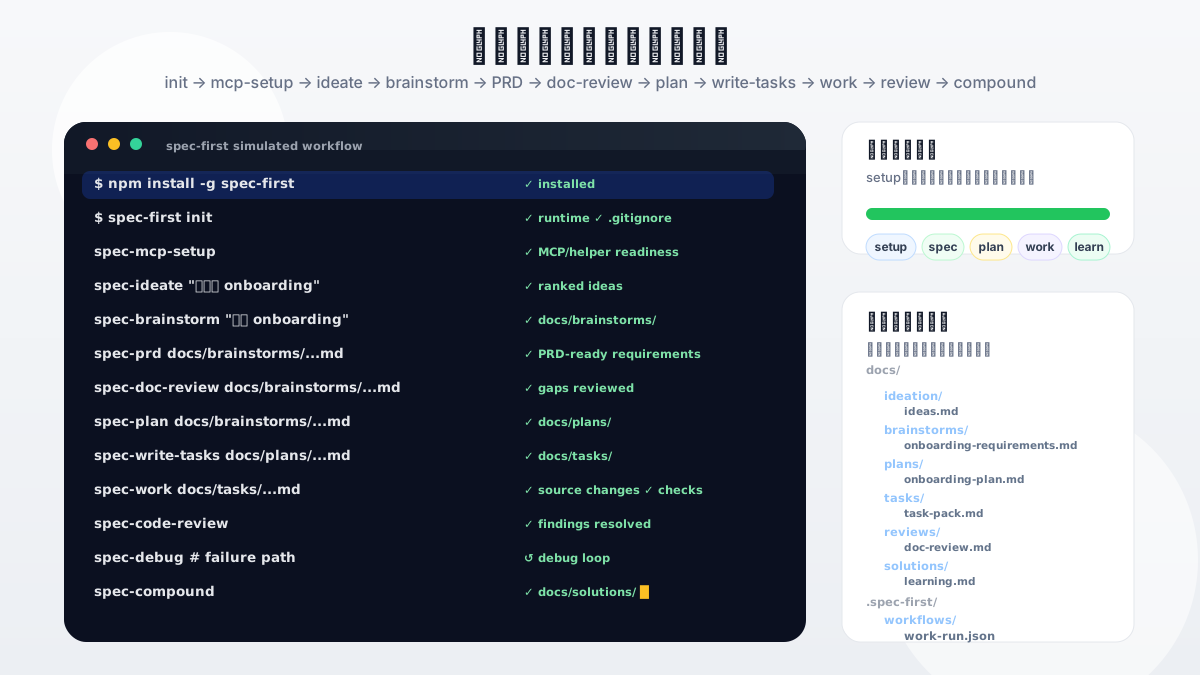
首次评估时,重点不应该是 agent 数量或 prompt 库,而是一次 workflow 是否会留下可复用的东西。健康的第一圈会给你已有的 Claude Code、Codex、Kiro、Qoder 或 Cursor 会话加上一条可治理路径:定义问题、规划方案、必要时拆 task、执行、评审,并把经验沉淀下来。
最小成功信号是具体可检查的:安装和 init 后,在宿主里运行一个 workflow,然后查看它写入仓库的 Markdown artifact,通常位于 docs/brainstorms/ 或 docs/plans/。更深的治理内容可以稍后再读;第一次试用先确认工作是否变得可检查。
模拟演示路径:安装 → init → mcp-setup → ideate → brainstorm → prd → doc-review → plan → write-tasks → work → code-review → compound;mcp-setup 是 helper 或 MCP readiness facts 缺失时运行的准备步骤,debug 作为测试失败或根因不明时的旁路循环,并在仓库中留下可检查的 Markdown artifacts。动画源文件:spec-first-cli-workflow-demo.svg。
快速开始
约 5 分钟完成安装、初始化并运行第一个 workflow。
前置条件:
- Node.js
>=20.0.0和 npm。 - Git 已安装并在
PATH中;doctor、setup 和 workflow 检查会读取 Git 仓库事实。 - 已安装 Claude Code、Codex、Kiro、Qoder 或 Cursor,并选择其中一个作为当前宿主。Cursor 需要显式
--cursoropt-in,且当前只处于 generated-runtime preview。 - terminal 位于你想启用
spec-first的项目仓库根目录。首次试用者可以先在 throwaway/test repo 中体验,再初始化真实项目。
步骤 1 — 安装并检查环境
macOS / Linux:
npm install -g spec-first
spec-first doctor
Windows PowerShell 7+ 或 Windows PowerShell 5.1:
npm install -g spec-first
spec-first doctor
Windows cmd.exe:
npm install -g spec-first
spec-first doctor
在 Win64 上,推荐使用 Windows Terminal + PowerShell 7+ 或原生 cmd.exe 做安装和 smoke check。Windows PowerShell 5.1 也支持,但 PowerShell 7+ 的 UTF-8 行为更稳定。
预期结果:doctor 报告无阻断问题。若有问题,按提示修复后再继续。
步骤 2 — 初始化宿主 runtime
spec-first init选择宿主(Claude Code、Codex、Cursor、Kiro 和/或 Qoder)、确认开发者姓名与语言,然后确认写入。在包含大量 child Git repos 的父级 workspace 中,init 默认只写父级 workspace runtime;只有某个 child repo 需要作为独立 agent root 时才使用 --repo <child>,--all-repos 仅保留给显式批量维护。全新机器上的脚本化 init -y 必须传入 -u <name>,因为非交互模式不会再提示输入开发者姓名,例如 spec-first init --codex -y -u <name> --lang <zh|en>。脚本化 preview 初始化可使用 spec-first init --kiro -y -u <name> --lang <zh|en> 初始化 Kiro,使用 spec-first init --qoder -y -u <name> --lang <zh|en> 初始化 Qoder,或使用 spec-first init --cursor -y -u <name> --lang <zh|en> 初始化 Cursor generated-runtime preview。Cursor 不属于 init -y 默认宿主集合。
预期结果:init 列出 .claude/、.codex/、.agents/skills/、.cursor/、.kiro/ 或 .qoder/ 下的生成路径,并确认 setup 完成。生成的 runtime copies 随时可通过 spec-first init 重建。
如果宿主提示缺少 helper 或 MCP readiness facts,继续前先在当前宿主运行统一入口 spec-mcp-setup。
Cursor 注意事项:spec-first init --cursor 会在 .cursor/skills/** 下生成同名 spec-* workflow runtime、在 .cursor/spec-first/** 下生成 spec-first state,并默认把项目 MCP setup 目标设为 .cursor/mcp.json。用户级 ~/.cursor/mcp.json 必须显式使用 --user-scope / CURSOR_USER_SCOPE=1。当前 release evidence 记录的是 cursor_loader_validation_unavailable,不能把 Cursor 视为完整 host support 或 init -y 默认宿主。
所有 init 选项(flags、脚本模式、多仓库)见 完整快速开始指南。
步骤 3 — 重启宿主
重启宿主或开一个新会话,让宿主加载刚生成的 runtime assets。宿主内 workflow 入口不是 shell 命令——它们在 Claude Code、Codex、Kiro、Qoder 或 Cursor 会话里运行,而不是在终端里。
步骤 4 — 运行第一个 workflow
从 brainstorm 开始——这是最自然的第一个入口,并且会写入一个你可以立刻检查的 artifact:
# 在任意受支持宿主会话中
spec-brainstorm "描述你的第一个任务"
步骤 5 — 验证成功
brainstorm 完成后,在仓库里检查是否出现了新文件:
docs/brainstorms/YYYY-MM-DD-NNN-<topic>-requirements.md这就是你的第一个 artifact。工作已经写进仓库,可检查,并可以移交给 plan 继续推进。
后续任务可按这个快速路由选择入口:
| 你的第一个任务是... | 从这里开始... |
|---|---|
| 粗略想法、功能方向或产品变化 | spec-brainstorm |
| 已有 PRD、需求笔记或 brownfield change request | spec-prd |
| bug、失败测试、堆栈或异常行为 | spec-debug |
| 已定计划、task pack 或范围明确的实现请求 | spec-work |
| 需要审查的文档、计划、task pack、diff 或实现 | spec-doc-review 或 spec-code-review |
你能得到什么
一个典型的工作流链路会产出这些仓库内 artifact:
docs/
  ideation/      ranked ideas 与探索记录
  brainstorms/   requirements briefs 与 PRD 级需求
  plans/         可评审、可执行的 implementation plans
  tasks/         结构化 handoff 用 derived task packs
  reviews/       文档与代码审查 findings
  solutions/     解决问题后沉淀的可复用经验
.spec-first/
  workflows/     structured work closeout evidence(默认 gitignore)
不是每个 workflow 都写入所有 artifact。第一次运行只在 docs/brainstorms/ 下写一个文件。更深的链路随着时间积累 plans、tasks、代码变更、review findings 和 learnings——全部在仓库里,全部可检查。
Workflow Entry Points
研发主链路:Codebase → Spec → Plan → Tasks → Code → Review → Knowledge。公开 workflow 标识在受支持宿主中统一使用 spec-* 形式。
| 任务 | 统一入口 | 产物 |
|---|---|---|
| 从粗略想法提炼需求 | spec-brainstorm | docs/brainstorms/ |
| 从已有 PRD 提炼需求 | spec-prd | docs/brainstorms/ |
| 制定实现计划 | spec-plan | docs/plans/ |
| 将计划拆成可执行任务 | spec-write-tasks | docs/tasks/ |
| 执行有范围的工作 | spec-work | 源码变更 + 证据 |
| 代码审查 | spec-code-review | 结构化 findings |
| 文档/计划审查 | spec-doc-review | 结构化 findings |
| 沉淀可复用经验 | spec-compound | docs/solutions/ |
支撑入口(按需触发):spec-mcp-setup 用于 runtime 环境与必备 harness、MCP/helper readiness;debug、optimize、ideate、compound-refresh、polish-beta、write-skill 使用当前宿主对应入口。
你遇到的问题
AI 写代码很快;真正昂贵的是保存代码背后的判断:为什么选这个 scope、检查过哪些证据、哪些 review finding 重要、下一位 agent 或同事应该继承什么上下文。
如果没有仓库承载的轨迹,这些上下文会随聊天窗口一起消失。下一次会话缺上下文,reviewer 看不到计划为什么变化,团队也很难复用一次成功经验。spec-first 把这些工作作为持久 artifact 留在仓库里:requirements、PRD、plans、task packs、work evidence、debug notes、reviews 和 learnings。
为什么使用 spec-first?
spec-first 让软件生命周期本身保持可读,同时不把 prose 当成证明。它不是替代 Claude Code、Codex、Kiro、Qoder 或 Cursor,而是给这些宿主加上一层项目内 harness。Cursor native rules、Kiro native Specs 与 Qoder native rules 仍由宿主拥有;.cursor/rules/**、.kiro/specs/** 和 .qoder/rules/** 只有在显式命名时才作为 advisory input。
| 采纳时真正关心的问题 | Prompt pack / agent 编排 | spec-first | |---|---|---| | 第一次跑完能得到什么? | 更好的聊天答案或 agent transcript | 仓库内 artifact,例如 requirements brief 或 plan | | 决策和证据在哪里? | Session state、消息总线、runtime memory | 项目内文档、generated runtime assets、可验证 CLI facts | | 人要 review 什么? | 通常是最终 diff 或 agent 输出 | Requirements、plans、task packs、diff、review findings、bugs 和 learnings | | 谁守住机械边界? | 主要靠模型自觉或自定义 glue | 脚本强制确定性不变量并准备事实,LLM 在这层地板之上做语义判断 | | Claude Code、Codex、Cursor、Kiro 与 Qoder 怎么对齐? | 分开 setup 和维护 prompt | 一套 source assets 重新生成受支持宿主的 runtime surface |
你今天就能检查的当前机制:
- requirements 变成持久 brief,而不是会话里消失的 prompt。
- plans 和 task packs 把模糊意图变成可评审、可执行的上下文。
- work closeout 可以指向结构化 verification evidence,而不是一句自由文本的"tests passed"。
- task-pack handoff 会基于 source plan 结构推荐是否拆分,并对高风险 task pack 推荐文档审查,同时保持工程师在环确认。
- work、review、debug、optimize 和 compound workflows 会沉淀证据与经验。
- knowledge handoff 默认 summary-first,召回的
docs/solutions/learning 在回源确认前保持 advisory。 - 团队开发规范合同以 source 文档形式放在
docs/contracts/team-standards.md与docs/standards/**,由 workflow 按 scope 选择 confirmed 规则,而不是新增入口。 - 一套 source assets 以统一
spec-*workflow 入口支持 Claude Code、Codex、Cursor、Kiro 和 Qoder,不需要手工维护生成副本。
这些是当前 repo 机制,不是"已经被外部采纳数据证明"的效果宣称。先相信 artifacts、tests 和 source/runtime boundaries,再相信任何营销句子。
产物与工作方式
spec-first 有两类 durable surface:仓库内 workflow artifacts 和 generated host runtime assets。
Source assets(skills/、agents/、templates/、src/cli/)经 spec-first init 重新生成为 host runtime assets——产出仓库内 workflow artifacts:ideation -> brainstorms -> plans -> tasks -> work/review/debug -> learnings。
.claude/、.codex/、.agents/skills/、.cursor/skills/、.cursor/spec-first/、.kiro/skills/、.kiro/agents/、.kiro/spec-first/、.qoder/commands/spec-*.md、.qoder/commands/spec/(已退役的旧 namespace)、.qoder/skills/、.qoder/agents/ 和 .qoder/spec-first/ 下的 generated runtime copies 是可丢弃镜像,可通过 spec-first init 重建。Cursor project .cursor/mcp.json、spec-first managed .kiro/settings/ 与 Qoder local .qoder/settings.local.json 是配置输出,不是 source;Cursor 与 Qoder clean 会保留用户维护的 MCP entry。Cursor native .cursor/rules/**、Kiro native .kiro/specs/** 和 Qoder native .qoder/rules/** 不是 spec-first source。
详细参考:
Trust Model
核心规则:scripts enforce deterministic invariants; scripts prepare facts; LLM decides semantic adequacy above that floor.
- 脚本负责什么: 在出口和副作用处强制可机械判定的不变量,install、validate、generate、report machine facts。
- LLM 负责什么: requirements framing、scope boundaries、tradeoffs、implementation judgment、review evidence。
- 普通上下文排除什么:
.spec-first/audits/**、.spec-first/governance/**以及.claude/**、.codex/**、.agents/skills/**、.cursor/skills/**、.cursor/spec-first/**、.kiro/skills/**、.kiro/agents/**、.kiro/spec-first/**、spec-first managed.kiro/settings/**、.qoder/commands/spec-*.md、已退役的.qoder/commands/spec/**、.qoder/skills/**、.qoder/agents/**、.qoder/spec-first/**等 generated mirrors,以及.cursor/mcp.json、.qoder/settings.local.json这类 host-local config。
适合使用 spec-first 的情况
适合使用 spec-first:
- 你已经使用 Claude Code、Codex、Kiro、Qoder 或 Cursor,希望用项目内 workflow 替代一次性 prompt。
- 你希望 AI coding work 留下 durable requirements、plans、显式路由的 review summaries 和 learnings。
- 你希望脚本处理确定性 setup 并守住可机器检查的边界,同时让语义判断继续由 LLM 完成。
- 你希望 workflow layer 足够轻,并能从 source assets 重新生成。
如果你只需要单次 prompt 片段、通用 agent marketplace、不依赖宿主的独立应用,或团队流程不希望 workflow artifacts 写入 repo,spec-first 可能不是最合适的形态。
相关文档
快速上手
理解模型
- 整体架构
- Source / Runtime / Provider Customization Boundary
- Verification Run Summary Contract
- Honest Closeout Contract
- 版本更新
详细手册和实施文档均以中文为主。
Runtime 与 CLI Reference
首次接入:source assets -> spec-first init -> host runtime assets -> workflow artifacts
常用命令:
spec-first doctor    # 检查环境
spec-first init      # 生成 runtime
spec-first update    # 升级 CLI + 刷新 runtime
spec-first clean # 移除 generated runtime开发与贡献
npm run typecheck
npm run test:mcp-setup
npm run test:unit
npm run test:smoke
npm run test:integration
npm run test:ai-dev:gate
npm run test:ai-dev:benchmarks
npm run test:release
npm run test:release:website
npm run build
npm test
npm run build 会执行 npm pack --dry-run 并通过 npm 验证 package payload 形态。
修改 source assets 时,编辑 skills/、agents/、templates/ 或 src/cli/,再通过 spec-first init 重新生成 runtime copies,并在 fresh host session 中选择目标宿主。
贡献与支持见 CONTRIBUTING.md、SECURITY.md、LICENSE 和 GitHub Issues。