
speckit-assistant
v0.1.5
Published
Visual orchestrator for Spec-Driven Development (SDD) — Next.js, ReactFlow and Hexagonal Architecture

Maintainers
 rfsales
Readme
🌱 SpecKit Assistant
Visual Orchestrator for Spec-Driven Development (SDD) — Decoupled Hexagonal Architecture, Next.js 15, ReactFlow, and Multi-Agent Orchestration.





🌐 Project Overview
SpecKit Assistant is a visual orchestrator for Spec-Driven Development (SDD). It connects your local specification, planning, and task checklists with AI agents (Claude, Gemini, Copilot) through a modern, Vercel-style dashboard. By utilizing Hexagonal Architecture, it fully decouples the core domain rules from UI and external runners, ensuring that your local file system remains the single source of truth at all times.
📖 Table of Contents
- Core Concept & SDD Flow
- Key Features
- User Interface Screenshots
- Architecture (Hexagonal / Ports & Adapters)
- Installation & Setup
- How to Publish to npmjs
- CLI Usage
- Workspace Anatomy
- Testing & Quality Assurance
- License
🎯 Core Concept & SDD Flow
Spec-Driven Development (SDD) is a software engineering methodology that uses structured markdown documents to guide AI agents and human developers sequentially through software lifecycle stages:
graph TD
    A[1. Constitution] --> B[2. Specification]
    B --> C[3. Planning]
    C --> D[4. Tasks]
D --> E[5. Implementation]- Constitution: Establish project-wide principles, tech stack, and constraints.
- Specification: Document user requirements and features in detail.
- Planning: Outline technical implementation decisions and file modifications.
- Tasks: Break down plans into an actionable checklist of developer-ready tasks.
- Implementation: Execute tasks and generate clean code.
SpecKit Assistant acts as the Visual Dashboard and Command-Line Interface to run, approve, and track these phases, syncing seamlessly with your local file system.
✨ Key Features
- 🎨 Premium UI/UX: High-fidelity dark and light themes styled with a sleek, minimalist Vercel aesthetic.
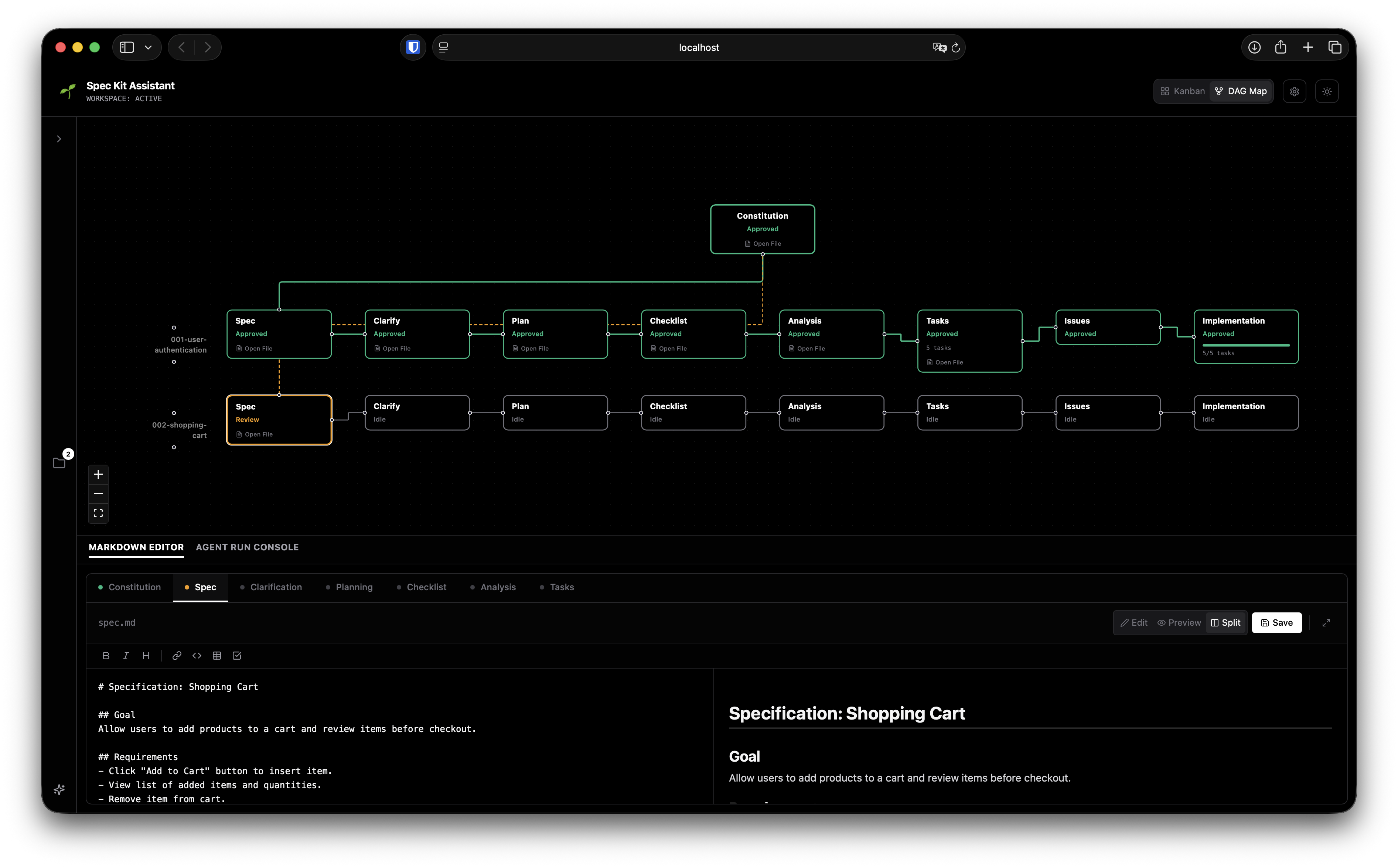
- 🗺️ Interactive ReactFlow DAG Map: Visualizes the dependencies and status of every feature's development lifecycle.
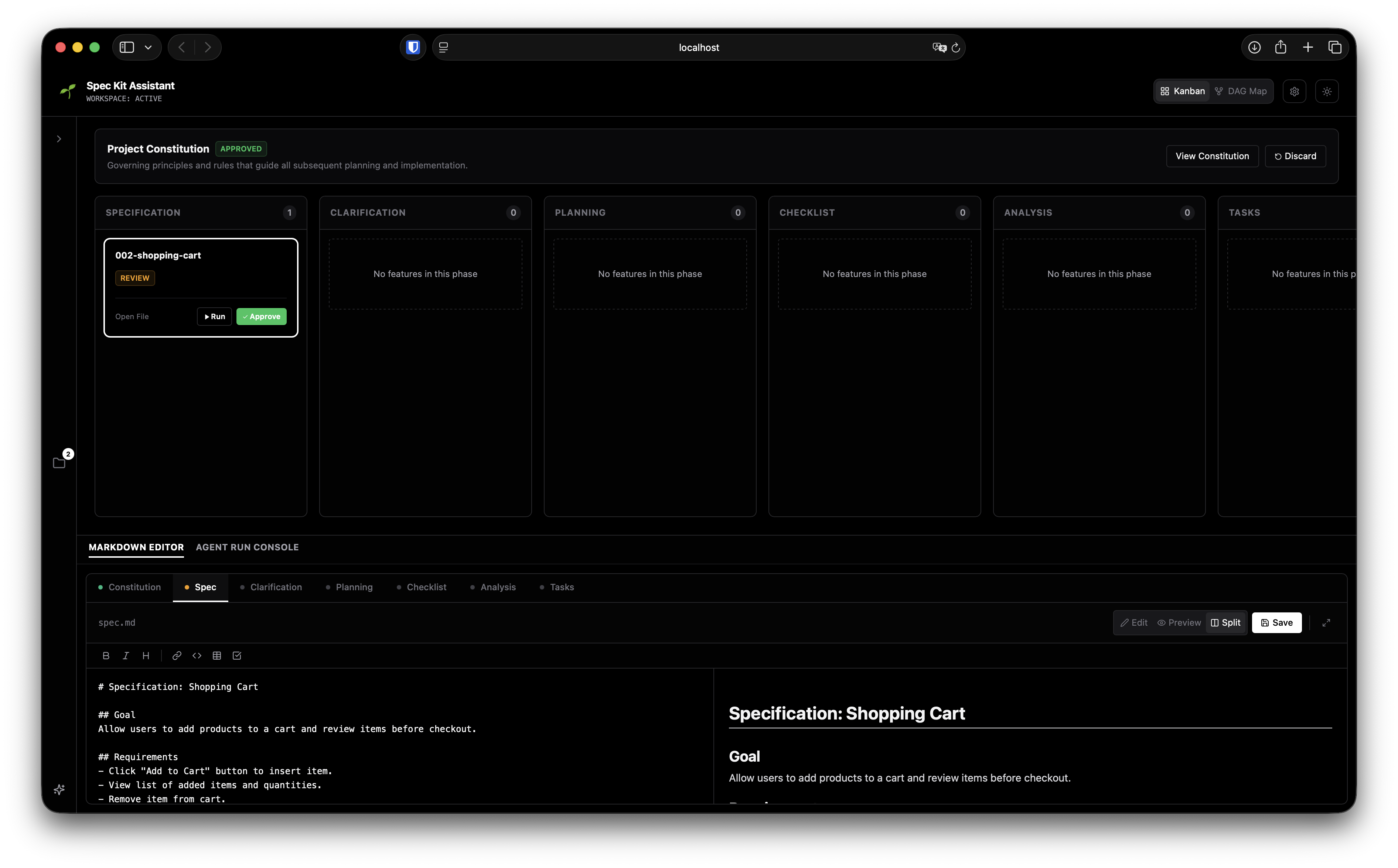
- 📋 Drag-and-Drop Kanban Board: Progress features forward (auto-approving intermediate steps and launching agents) or roll them back (marking downstream files as stale) by simple drag-and-drop.
- 🤖 Agnostic Agent Dispatcher: Spawn executions via terminal subshells for Anthropic's Claude CLI, Google's Gemini CLI, GitHub Copilot CLI, or custom CLI wrappers.
- 📝 WYSIWYG Markdown Editor: Edit specifications or plans with a formatting toolbar (Bold, Italic, Headings, Code Blocks, Tables, Checklists), with support for alternating-row Vercel-style tables.
- 🔄 Conflict & Change Guard: A live watcher (
chokidar+ SSE) detects external changes on disk and alerts you in case of editing conflicts. - 💾 Persistent State: Automatically remembers your active workspace inside
~/.speckit-assistant-config.json.
🖥️ User Interface Screenshots
Kanban Board View (Interactive state progression)
ReactFlow DAG Map View (Feature dependency tracking)
🏛️ Architecture (Hexagonal / Ports & Adapters)
To prevent coupling our core workflows to UI libraries, Next.js, or file system APIs, SpecKit Assistant is built using Hexagonal Architecture.
src/
├── domain/                    # Core business rules
│   ├── models/                # Types (Feature, Phase, Task)
│   └── ports/                 # Ports (Interfaces)
│       ├── in/                # Inbound use cases (GetWorkflowState, RunPhase)
│       └── out/               # Outbound SPIs (WorkspaceRepository, AgentRunner)
├── adapters/                  # Infrastructure implementations
│   ├── primary/               # Next.js API controllers, React/ReactFlow UI
│   └── secondary/             # File system sync, Process spawners
For a detailed analysis of our architectural decisions, read our Architecture Decision Records (ADRs):
- ADR 001: Hexagonal Architecture (Ports and Adapters)
- ADR 002: State Synchronization and Agent Dispatch
⚙️ Installation & Setup
Prerequisites
- Node.js:
v18.0.0or higher - Package Manager:
pnpm(preferred),npmoryarn
🚀 Running Instantly via npx
You don't need to install or clone anything locally to run the assistant. Simply run it inside your target workspace using npx:
npx speckit-assistant(This will download the latest release, start the server on port 18080, and open the Web UI in your browser.)
🛠️ Local Development Quick Start
If you wish to modify the code or contribute to the project:
# Clone the repository
git clone https://github.com/dmux/speckit-assistant.git
cd speckit-assistant

# Install dependencies using pnpm
pnpm install

# Compile the CLI and Next.js assets
pnpm run build

# Start the Web UI on the default port (18080)
pnpm start
📦 How to Publish to npmjs
To publish speckit-assistant under your own account/organization on npm so it can be run via npx:
1. Authenticate with npm
Log in to your npm registry account (sign up at npmjs.com if you haven't already):
npm login2. Verify and Configure the Package Name
Open package.json and verify:
"name": Change this if the package namespeckit-assistantis already taken, or if you want to publish under a scoped organization (e.g."@my-org/speckit-assistant")."version": Bump the version number (e.g."0.1.1","1.0.0") every time you publish new changes.
3. Build & Publish
Run the publish command. The configured prepublishOnly script will automatically compile the Next.js assets and TypeScript files before bundling and uploading the package:
# For public packages
npm publish

# If using a scoped package (e.g. @my-org/speckit-assistant)
npm publish --access public
💻 CLI Usage
SpecKit Assistant comes with a powerful CLI. When installed globally, you can invoke it using speckit-assistant (or via local path ./bin/bin/cli.js).
CLI Commands
Start the Web Server:
speckit-assistantStarts the Next.js server on port
18080(avoids conflicts on Unix/Windows/macOS) and auto-openshttp://localhost:18080in your default browser.Check Workflow Status:
speckit-assistant status [-w <workspace-path>]Displays a terminal-based overview of your Constitution and feature phase statuses.
Approve a Phase:
speckit-assistant approve <phase> [feature-name]Marks a phase (e.g.
specification,planning,tasks) as approved.Discard/Reset a Phase:
speckit-assistant discard <phase> [feature-name]Resets the phase and marks all downstream phases as stale (e.g. discarding
specificationmarksplanning,tasks, andimplementationas stale).Create a New Feature:
speckit-assistant create <feature-name>Generates a new directory under
specs/<feature-name>with template markdown files.Run an Agent Phase:
speckit-assistant run <phase> [feature-name] --agent <claude|gemini|copilot> --prompt "refinement details"
Command Options
-w, --workspace <path>: Specify the target workspace directory. Defaults to the current directory, but persists the last-used workspace in~/.speckit-assistant-config.json.-p, --port <number>: Override the default port18080for the Web UI.--agent <type>: AI agent execution binary (default:claude).--prompt <text>: Feed specific refinements or custom instructions to the AI agent.
📂 Workspace Anatomy
SpecKit Assistant manages markdown files inside your target project workspace. Your workspace directory structure should follow this pattern:
my-project/
├── .specify/
│   ├── memory/
│   │   └── constitution.md     # Project-wide context & rules
│   └── .runtime/
│       └── workflow-state.json # Internal workflow cache (automatically managed)
└── specs/
    ├── 001-user-authentication/
    │   ├── spec.md             # Feature requirements
    │   ├── plan.md             # Implementation strategy
    │   └── tasks.md            # Actionable checklists
    └── 002-database-migration/
        ├── spec.md
        ├── plan.md
        └── tasks.md
🧪 Testing & Quality Assurance
SpecKit Assistant maintains a high bar for reliability and code health:
- Vitest for fast, concurrent unit and integration testing.
- 100% Mocked File Systems in unit tests to prevent disk pollution.
- Isolated temporary workspaces for E2E tests, avoiding workspace write conflicts.
We boast 99.44% statement coverage across our domain rules, API routers, process dispatchers, and repository adapters:
# Run unit and integration tests
pnpm run test
Coverage Report Details
 ✓ src/domain/services/WorkflowService.test.ts (9 tests)
 ✓ src/adapters/secondary/fs/FSWorkspaceRepository.test.ts (2 tests)
 ✓ src/app/api/api.test.ts (9 tests)

 Test Files  3 passed (3)
      Tests  20 passed (20)
   Duration  511ms
📄 License
This project is licensed under the MIT License. See LICENSE for details.