
spinning-loader
v1.0.5
Published
This is a start-stop stopwatch with a spinning progress-bar


Readme
How do you use this?
Just install it with
Then just go ahead and call it in your html files as <script type="module" src="_the relative node-module path_/index.js"></script>
How it works? The internal mechanism

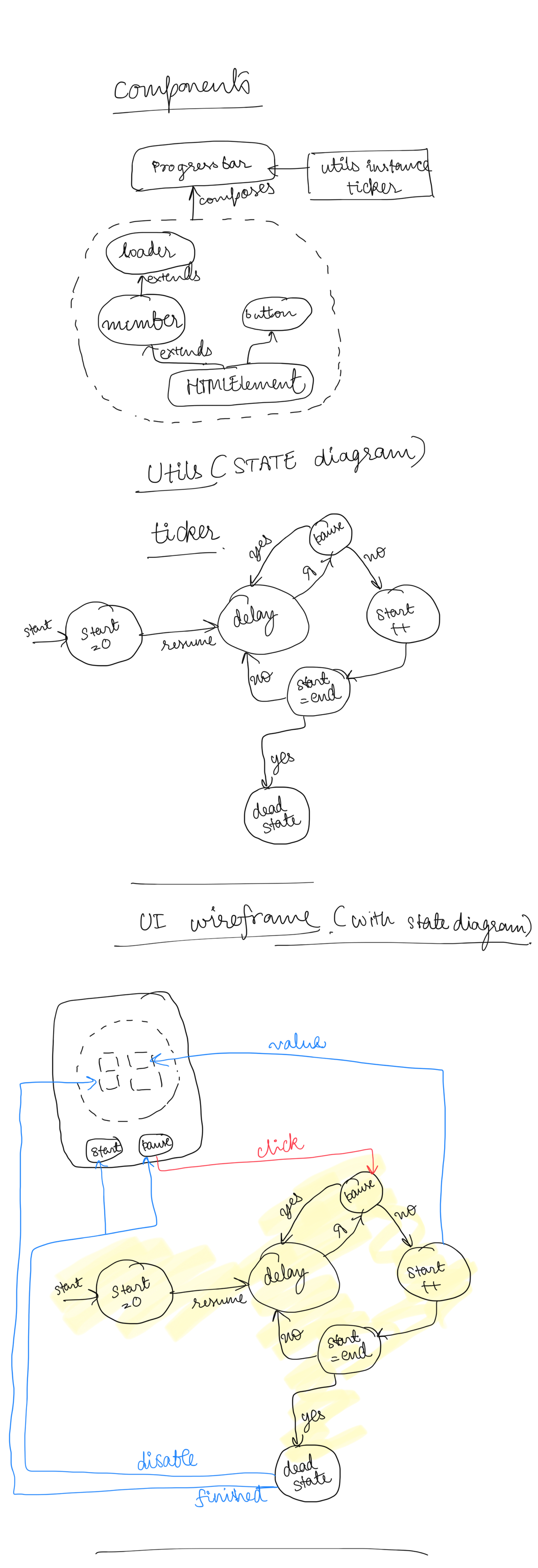
As explained above in the diagrams.
Progress-card is the main exposed component through progress-bar.js which is offered in various sizes and an optional value of the final progress (Lets say you want to have number of files instead of percent of transfer). Additionally you have post symbol for progress and background for the progress-card element.
can be used as <progress-card target=“#final value#” size=“#card_size#” postSym="#success_text#" background="#color_name#"></progress-card>
It uses various components like number, loader(inherited from number), n-btn. All of which are inherited from HTMLElement API.
It strongly utilizes a ticker utility which has an ability to be inititalized, paused and project a finished state (when the start equals the target).
Please refer to the state diagram above, and also how the UI triggers the ticker utility.
progress-card Class takes care of the interactions between ticker and components: There’s a two way communication between ticker utility and the buttons.
Buttons can start and pause the ticker utility The ticker on finishing can disable all the buttons There’s a one-way communication between ticker utility and the number class. The ticker on finishing, informs the number class of its finished state
Additionally the code uses shadow DOM for non-leaky styling for the components on the DOM. Primarily using the custom-elements API and also utilizing the DocumentFragment API for lesser reflow in the document.
(This is a PURE JAVASCRIPT implementation)