
sprite.styl
v0.0.5
Published
Stylus mixins for generating image sprites.


Readme
sprite.styl


Stylus mixins for generating image sprites.
Getting started
Requirements
sprite.styl uses node-canvas to generate images. You have to install Cairo on your computer before getting started. See here for more information.
Installation
$ npm install sprite.stylUsage
JavaScript
First, import sprite.styl to Stylus.
var stylus = require('stylus'),
    sprite = require('sprite.styl');

var style = stylus(str).use(sprite(options));
Option | Description | Default
--- | --- | ---
base_dir | Base directory | process.cwd()
image_dir | Image directory | images
cache_dir | Cache directory | .stylus_cache
base_url | Base URL | /
image_url | Image URL | images
layout | Sprite layout (See algorithms) | vertical
spacing | Spacing between images in sprites | 0
Stylus
icons = sprite-map("icons/*.png")

.cards-club
    sprite(icons, cards-club)
Retina Sprites
If normal and retina images are in the same folder:
icons = retina-sprite-map("icons/*.png")
// icons[0] = sprite-map("icons/!(*@2x).png")
// icons[1] = sprite-map("icons/*@2x.png")
If normal and retina images are separated:
icons = retina-sprite-map("icons/*.png", "icons-2x/*.png")
// icons[0] = sprite-map("icons/*.png")
// icons[1] = sprite-map("icons-2x/*.png")
Clean Cache
$ rm -rf .stylus_cacheAlgorithms
vertical: Allocates images vertically.

vertical-right: Allocates images vertically aligning to the right of the sprite.

horizontal: Allocates images horizontally.

horizontal-bottom: Allocates images horizontally aligning to the bottom of the sprite.

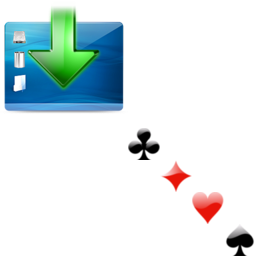
diagonal: Allocates images diagonally.
API
sprite-map(path, [layout=vertical], [spacing=0])
Generates a sprite map.
sprite-url(map)
Returns the URL of a sprite map.
sprite-position(map, name, [offset-x=0], [offset-y=0])
Returns the position of an image in a sprite.
sprite-file(map, name)
Returns a file object in a sprite. A file object contains
- path: Relative path of an image
- x: Horizontal position of an image in a sprite
- y: Vertical position of an image in a sprite
- width: Image width
- height: Image height
sprite-file-path(map, name)
Returns the original path of an image in a sprite.
image-width(path)
Returns the width of an image.
image-height(path)
Returns the height of an image.
image-url(path)
Returns the image URL.
retina-file-path(path, [modifier=@2x])
Returns the file path trailing with modifier. For example:
retina-file-path("icons/foo.png") => "icons/[email protected]"
retina-file-path("icons/bar.png", "-2x") => "icons/bar-2x.png"
retina-sprite-map(path, [path2x], [layout=vertical], [spacing=0])
Generates an array of sprite maps. The first map is for normal display and the second one is for retina display. If path2x is not defined, it will be [email protected].
sprite(map, name, [dimensions=false], [offset-x=0], [offset-y=0])
Generates background property for an element. For example:
.cards-club
    sprite(icons, cards-club)
yields:
.cards-club {
    background: url("/images/sprite.png") 0px -32px no-repeat;
}
sprite-background-position(map, name, [offset-x=0], [offset-y=0])
Generates background-position property for an element. For example:
.cards-club
    sprite-background-position(icons, cards-club)
yields:
.cards-club {
    background-position: 0px -32px;
}
sprite-dimensions(map, name)
Sets the width and the height to the original dimensions of an image. For example:
.cards-club
    sprite-dimensions(icons, cards-club)
yields:
.cards-club {
    width: 32px;
    height: 32px;
}
retina-background(bg, [bg2x])
Sets background property for retina images. If bg2x is not defined, it will be [email protected]. For example:
.foo
  retina-background("icons/foo.png")

.bar
  retina-background("icons/bar.png", "icons-2x/bar.png")
yields:
.foo {
  background-image: url("/images/icons/foo.png");
}
@media (-webkit-min-device-pixel-ratio: 1.5), (min-resolution: 144dpi) {
  .foo {
    background-image: url("/images/icons/[email protected]");
    background-size: 50% auto;
  }
}
.bar {
  background-image: url("/images/icons/bar.png");
}
@media (-webkit-min-device-pixel-ratio: 1.5), (min-resolution: 144dpi) {
  .bar {
    background-image: url("/images/icons-2x/bar.png");
    background-size: 50% auto;
  }
}
License
(The MIT License)
Copyright (c) 2014 Tommy Chen
Permission is hereby granted, free of charge, to any person obtaining a copy of this software and associated documentation files (the "Software"), to deal in the Software without restriction, including without limitation the rights to use, copy, modify, merge, publish, distribute, sublicense, and/or sell copies of the Software, and to permit persons to whom the Software is furnished to do so, subject to the following conditions:
The above copyright notice and this permission notice shall be included in all copies or substantial portions of the Software.
THE SOFTWARE IS PROVIDED "AS IS", WITHOUT WARRANTY OF ANY KIND, EXPRESS OR IMPLIED, INCLUDING BUT NOT LIMITED TO THE WARRANTIES OF MERCHANTABILITY, FITNESS FOR A PARTICULAR PURPOSE AND NONINFRINGEMENT. IN NO EVENT SHALL THE AUTHORS OR COPYRIGHT HOLDERS BE LIABLE FOR ANY CLAIM, DAMAGES OR OTHER LIABILITY, WHETHER IN AN ACTION OF CONTRACT, TORT OR OTHERWISE, ARISING FROM, OUT OF OR IN CONNECTION WITH THE SOFTWARE OR THE USE OR OTHER DEALINGS IN THE SOFTWARE.