
spryte
v0.7.0
Published
Blazing fast 2D renderer for the web: 2-4x faster than the most popular one, at an eighth of its size. Verified in an open benchmark.

Maintainers
 debuffjp
Readme
spryte
Blazing fast 2D rendering for the web: 2-4x faster than the most popular renderer, at an eighth of its size. Every number is checked pixel for pixel in 2dbench, an open benchmark you can run on your own device.
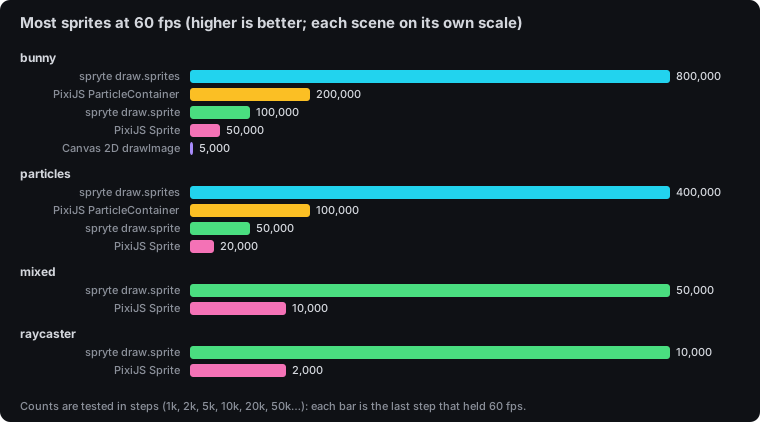
You draw in immediate mode (sprites, bulk sprites, nine-slice panels, tiled fills, shapes and strokes, text, clips, masks, blend modes, filters, render targets and custom shaders), and spryte batches it onto WebGL2 with instancing, falling back to Canvas 2D automatically. No dependencies, no scene graph, no game framework.
Alpha. spryte is the renderer inside debuff, where games already run on it. The API may still change before 1.0. It's measured on desktop Chrome and Chromium (Windows and Linux; NVIDIA and AMD GPUs), iPhone Safari and Chrome, and Firefox on Android, and its one-call-per-sprite path is ahead of PixiJS on every device so far (results across devices). Safari on macOS isn't covered yet: run 2dbench on your device to help.
npm install spryteimport { createRenderer } from "spryte";
const draw = createRenderer(canvas, { smooth: false }); // smooth: false for pixel art
canvas.width = 640;
canvas.height = 360;
draw.resize(canvas.width, canvas.height);
function frame() {
draw.begin("#111", 320, 180, 2); // clear colour, logical size, backing pixels per logical unit
draw.rect(10, 10, 40, 20, "#cffb2d");
draw.sprite(image, 160, 90, { rotation: 0.3, tint: "#f0f" });
draw.text("hello", 8, 8);
draw.end();
requestAnimationFrame(frame);
}
requestAnimationFrame(frame);What it's for
Games are where spryte started, but anything that draws lots of moving 2D things in a browser fits:
- Games: bullet hells, particle effects, crowds, tile maps, sprite-sheet animation.
- Data visualisation: animated scatter plots, flow fields, live sensor and market data with thousands of points.
- Creative coding and generative art: particle systems, trails and shader effects, without a framework.
- Interactive sites and product UI: hero animations, confetti, backgrounds and effects that stay smooth on phones.
- Simulations and education: agent-based models, physics demos and visual explanations.
Why spryte
Against PixiJS 8 on the same machine, assets and simulation, over 3-7 interleaved rounds in 2dbench, after a pixel-parity gate (desktop Chrome, RTX 5060 laptop, spryte 0.2.1). The comparison went through a fairness review aimed at breaking it. Method, raw data and caveats are in benchmarks.
| | spryte | PixiJS 8 | |
| --- | --- | --- | --- |
| JS at startup (brotli) | 11.3 kB | 87.8 kB | ~8x smaller |
| 200k particles, per-particle scale, rotation, tint and alpha all changing | 5.8 ms | 24.2 ms (ParticleContainer) | 4.2x faster |
| 50k sprites with rotation, scale and tint, one call each | 7.8 ms | 27.1 ms (Sprite) | 3.5x faster |
| 200k sprites, position only, bulk | 2.8 ms | 7.2 ms (ParticleContainer) | 2.6x faster |
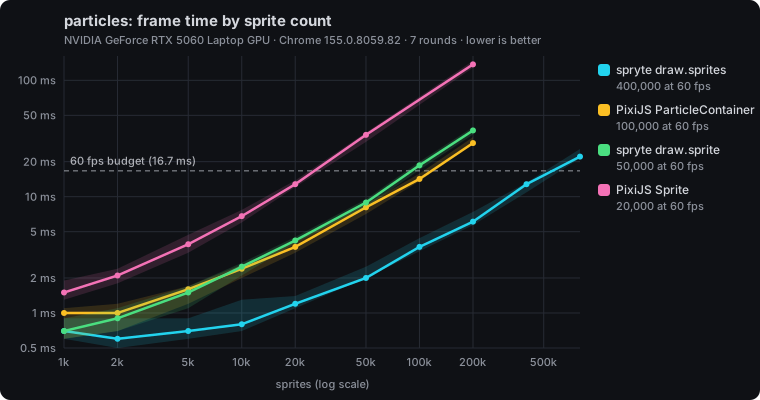
Charts from 2dbench, the same run as the table (3-7 rounds depending on the scene). Lower lines are faster; the dashed line is the 60 fps budget.
In 2dbench's raycaster scene (a retro first-person maze drawn as thousands of texture slices), spryte held 20,000 enemies at 60 fps against PixiJS Sprite's 5,000. The gap is per-sprite work: a PixiJS Sprite is a scene-graph object updated, bounded and batched every frame, while spryte writes a few numbers per sprite into a typed array and the GPU expands them. Static scenes, where PixiJS can cache, are much closer.
Against Phaser 4 on the same laptop, spryte draws moving sprites 2.2-3.1x faster than Phaser's Image and 5x faster than its SpriteGPULayer, at 11.3 kB of JavaScript against Phaser's 276.6 kB (spryte vs Phaser). A Phaser game can keep Phaser and hand its heaviest effects to spryte, inside Phaser's frame and depth order, through an Extern (spryte/phaser, see the API docs). A PixiJS v8 app can do the same through a RenderContainer (spryte/pixi, API docs). Both share the engine's own GPU textures, so nothing is uploaded twice.
- Bulk sprites with no per-sprite JavaScript. On WebGL2, pass a
Float32Arrayof positions (plus optional per-copy scale, rotation and colour arrays) and spryte uploads it as is. - Immediate mode. There are no display objects to create, pool or destroy. Draw what you want this frame.
- Verified output. Real-GPU pixel checks prove that the bulk paths, render targets and shaders draw exactly what the simple path draws.
// Particles: one call, no objects.
draw.sprites(spark, positions, count, { tint: "#ffd36b" }, { scale, rotation, color });

// Post-processing: draw into a target, then draw the target through a shader.
draw.into(scene, () => drawWorld(draw));
draw.withShader(crt, () => draw.sprite(scene, 0, 0, { origin: [0, 0] }));
Docs
- Guides on debuff.jp: getting started, sprites and frames, bulk sprites and particles, shapes and text, transforms and clipping, render targets and shaders, pixel art
- How spryte got fast: the research write-up, from the first profile to the 8-byte instance format
- Migrating from PixiJS: the mental model, side-by-side code and a mapping table
- Migrating from Phaser: what spryte replaces in Phaser, side-by-side code and a mapping table
- Changelog
- Roadmap
- API reference
- Architecture
- Benchmarks and method
- Minimal example: run
npm run example, and add?backend=2dto the URL to see the fallback
Lifecycle
createRenderer(canvas, options)makes aDraw. It uses WebGL2 when available, and otherwise Canvas 2D, loaded on demand.await draw.readywaits until the fallback can draw.- You own the canvas size. After changing
canvas.widthorcanvas.height, calldraw.resize(w, h). - Each frame:
draw.begin(...), then your draw calls in order, thendraw.end(). Call order is draw order. draw.invalidate(source)re-uploads an image whose pixels changed.draw.disposeTarget(t)frees a render target.draw.dispose()releases every GPU resource and listener. Using a disposedDrawthrows.- WebGL context loss is handled: drawing pauses while the context is lost (
draw.contextLost), and textures re-upload after it's restored. Render targets come back blank. This is checked with a real GPU context loss innpm run test:browser.
Help and feedback
Questions, ideas and show-and-tell: Discord. Bugs: open an issue with your browser, GPU and a small repro.
Work with us
All of our projects are free and MIT licensed. Studios after performance help or a bigger partnership: [email protected].
Licence
MIT