
sqlite-explorer-cli
v1.0.2
Published
Professional SQLite database explorer with CLI and web UI

Maintainers
 mohanchinnappan
Readme
🗄️ SQLite Explorer Pro - CLI Edition
A professional SQLite database explorer with a beautiful dark-themed web UI, built with Node.js, Express, and Tailwind CSS.
✨ Features
🎯 Core Functionality
- Interactive SQL Editor: Write and execute SQL queries with syntax highlighting
- Table Browser: View all tables with expandable schemas
- Schema Viewer: Detailed column information with types and constraints
- Query History: Track and reuse your last 10 queries
- CSV Export: Export query results to CSV files
- Real-time Execution: See execution time and row counts
- Error Handling: Detailed error messages for failed queries
🎨 Beautiful UI
- Modern dark theme using Tailwind CSS
- Responsive three-pane layout with resizable panels
- Smooth animations and transitions
- Toast notifications for user feedback
- Professional color scheme and typography
- Status indicators with real-time updates
🚀 CLI Features
- Commander.js integration for command-line arguments
- Colored terminal output with Chalk
- Auto-open browser option
- Graceful shutdown handling
- Optional database file parameter
Screenshots
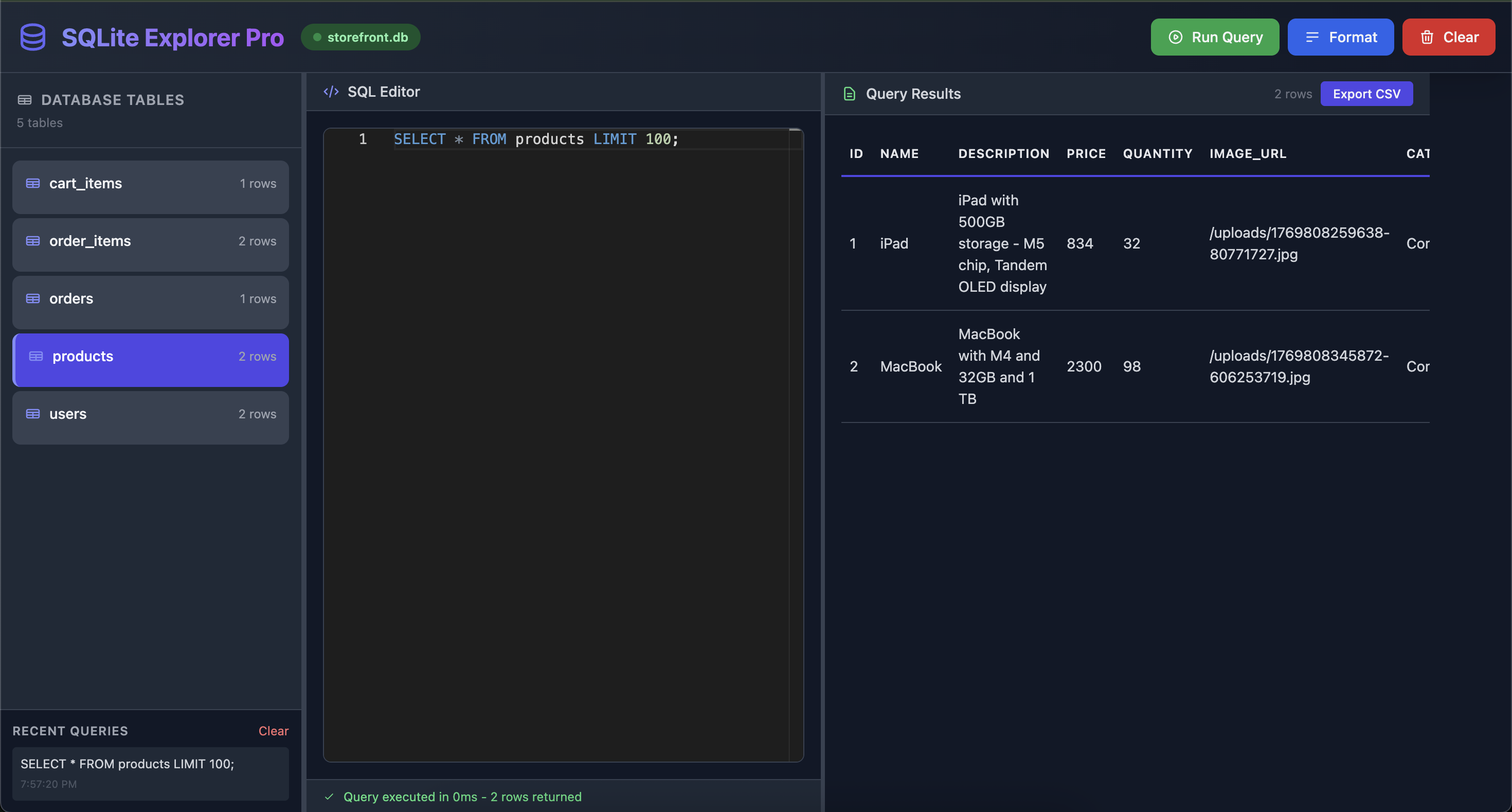
Web Version
📦 Installation
npm install -g sqlite-explorer-cli🔧 Usage
Open a Specific Database
sqlex path/to/database.db -p 7890🎮 Keyboard Shortcuts
- Ctrl/Cmd + Enter: Run query
- Escape: Close notifications
🖥️ User Interface
Left Panel - Table Browser
- Lists all tables in the database
- Shows row count for each table
- Expandable schema view with:
- Column names
- Data types
- Primary key indicators
- Constraints
- Click any table to load a SELECT query
Middle Panel - SQL Editor
- Syntax highlighting
- Multi-line query support
- Auto-formatting option
- Clear button
- Keyboard shortcuts
Right Panel - Results Viewer
- Tabular display of query results
- Scrollable for large datasets
- NULL value highlighting
- Row count display
- CSV export button
Bottom Panel - Query History
- Last 10 queries saved
- Click to restore any query
- Clear history option
- Timestamps for each query
🔌 API Endpoints
The server exposes the following REST API endpoints:
GET /api/info
Get database connection status and metadata
{
  "connected": true,
  "path": "/path/to/database.db",
  "name": "database.db",
  "tableCount": 5,
  "tables": ["users", "products", ...]
}
GET /api/tables
Get all tables with schema information
[
  {
    "name": "users",
    "rowCount": 150,
    "columns": [
      {
        "cid": 0,
        "name": "id",
        "type": "INTEGER",
        "notnull": 1,
        "pk": 1
      },
      ...
    ]
  },
  ...
]
GET /api/tables/:name/schema
Get detailed schema for a specific table
{
  "columns": [...],
  "indexes": [...],
  "foreignKeys": [...]
}
POST /api/query
Execute a SQL query
{
  "sql": "SELECT * FROM users LIMIT 10"
}
Response:
{
  "success": true,
  "result": {
    "type": "select",
    "columns": ["id", "name", "email"],
    "rows": [...],
    "rowCount": 10
  },
  "executionTime": 15.2
}
GET /api/tables/:name/export
Export table as CSV file
🛠️ Technology Stack
- Backend: Node.js + Express.js
- Database: better-sqlite3 (synchronous SQLite)
- CLI: Commander.js
- Terminal: Chalk (colored output)
- Frontend: Vanilla JavaScript + Tailwind CSS
- Browser: Auto-open with 'open' package
🎯 Use Cases
Development
- Quick database inspection during development
- Test SQL queries before implementing in code
- Debug database schema issues
- Explore unfamiliar databases
Data Analysis
- Run ad-hoc queries on SQLite databases
- Export filtered data to CSV
- Analyze table relationships
- Check data integrity
Database Management
- View table structures
- Check row counts
- Inspect indexes and foreign keys
- Execute maintenance queries
🔒 Security Notes
- Read-Only Mode: For production databases, consider implementing read-only mode
- Access Control: No authentication by default - add if exposing to network
- SQL Injection: User input is passed directly to SQLite - use with trusted users
- Local Only: Server binds to localhost by default
💡 Tips & Tricks
Table Navigation: Click on any table in the left panel to auto-generate a SELECT query
Query Formatting: Use the Format button to clean up messy SQL
History: Click any query in the history panel to restore it to the editor
Export: Run a SELECT query, then click "Export CSV" to download results
Multiple Statements: The editor supports multiple statements, but only the last result is shown
NULL Values: NULL values are displayed in italics and gray for easy identification
Keyboard Shortcuts: Use Ctrl/Cmd+Enter to quickly run queries
🐛 Troubleshooting
Database won't load
- Check file path is correct
- Ensure file has read permissions
- Verify it's a valid SQLite database
Port already in use
sqlex database.db -p 3001Browser doesn't open
- Try manually visiting http://localhost:3000
- Or use
--no-openflag and copy the URL
Query fails
- Check SQL syntax
- Verify table/column names
- Look at error message in notification
🚀 Future Enhancements
Potential features for future versions:
- [ ] Monaco Editor integration for better syntax highlighting
- [ ] Query auto-completion
- [ ] Save/load query files
- [ ] Database diff viewer
- [ ] ER diagram generator
- [ ] Multi-tab query support
- [ ] Query performance analysis
- [ ] Transaction support
- [ ] Dark/light theme toggle
📄 License
MIT (c) Mohan Chinnappan