
stackeye
v0.2.1
Published
Local observability, architecture, and resource workbenches for AWS SAM, CDK, Terraform, and Pulumi

Maintainers
 ljacobsson
Readme
StackEye
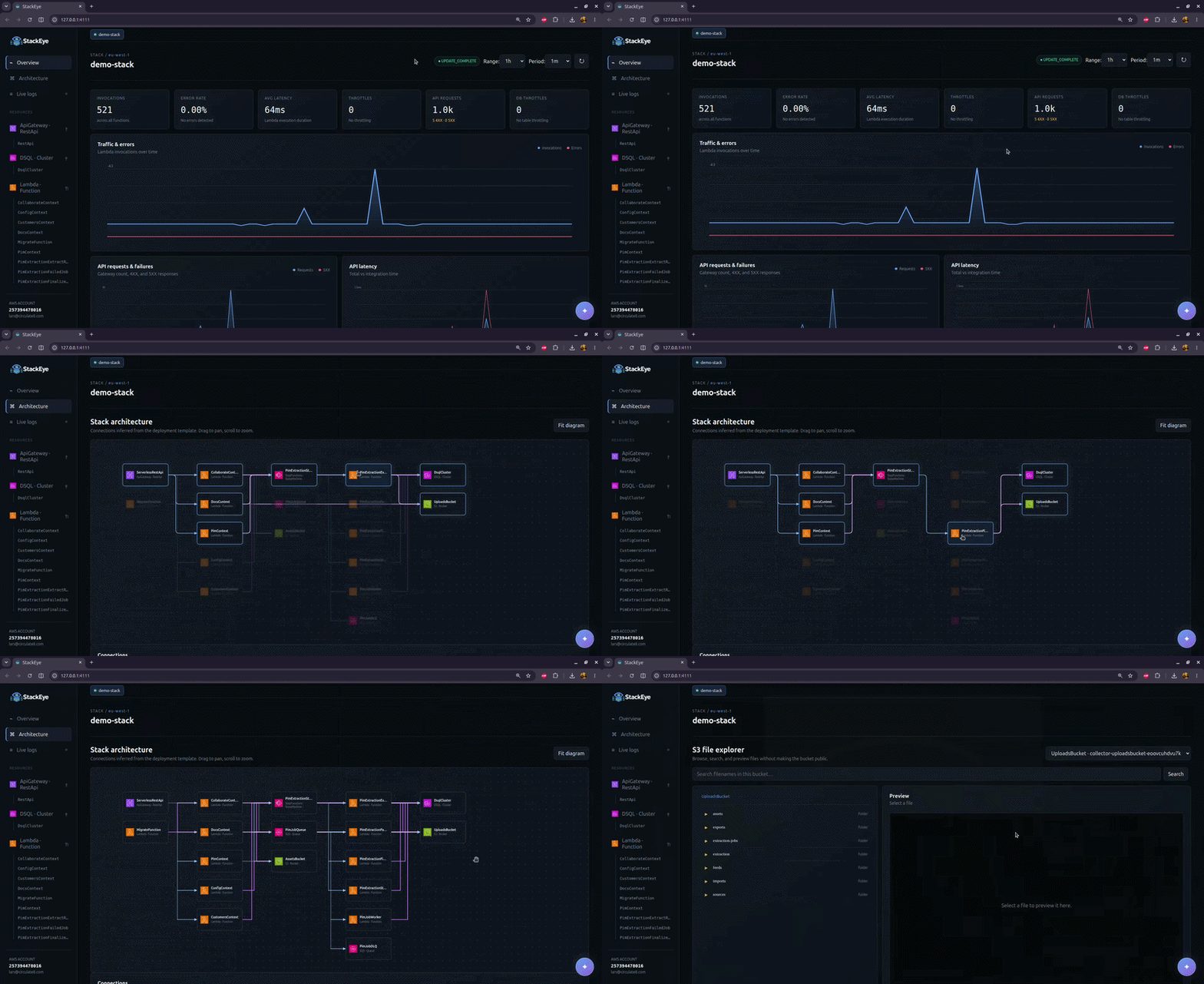
A focused, zero-configuration local observability dashboard for AWS infrastructure deployed with SAM, CDK, Terraform, or Pulumi. It discovers CloudFormation templates, Terraform state, or Pulumi stack exports and shows metrics, architecture, logs, and resource workbenches in a polished local web app.
Install globally
npm install -g stackeye
stackeye
Run stackeye from a SAM, CDK, Terraform, or Pulumi project directory. StackEye opens its local dashboard at http://127.0.0.1:4111.
Develop StackEye against another project
Link the StackEye checkout once, then run its linked binary from the SAM or CDK project you use for testing:
# In the StackEye repository (once)
npm link

# In the SAM or CDK project
stackeye --watch
There is no need to run npm pack again. Changes under src/ and bin/ restart the local server automatically; changes under public/ are served directly with caching disabled, so a browser refresh picks them up. Run npm unlink -g stackeye when you no longer want the global development link.
Use it in a SAM project
npm install --save-dev stackeye
npm pkg set scripts.stackeye="stackeye"
npm run stackeye
Or run it without installing:
npx stackeyeFor SAM projects, the current folder must contain template.yaml, template.yml, sam.yaml, or sam.yml. The deployed stack name and region are read from samconfig.toml. They can also be supplied explicitly:
npx stackeye --stack my-stack --region eu-north-1 --profile devUse it in a CDK project
Synthesize the app, then run StackEye from the CDK project root:
npx cdk synth
npx stackeye
StackEye reads cdk.out/manifest.json, selects its CloudFormation stack artifact, and uses the synthesized template to build the resource and architecture views. If the cloud assembly contains multiple stacks, select the deployed stack with --stack:
npx stackeye --stack MyApplicationStackYou can also point directly at any synthesized CloudFormation JSON or YAML template with --template; when doing so, pass --stack if its deployed stack name cannot be inferred from the containing folder.
Use it in a Terraform project
Run StackEye from an applied Terraform project:
npx stackeye --region eu-north-1StackEye reads terraform.tfstate when present. For remote backends, it runs terraform show -json, so the Terraform CLI must be installed and the working directory initialized. Select another local state file with --state:
npx stackeye --state state/production.tfstate --stack productionTerraform support includes Lambda, DynamoDB, S3, SQS, SNS, EventBridge rules, API Gateway REST and HTTP APIs, Step Functions, Cognito user pools, and Aurora DSQL clusters. StackEye only reads state; it does not run plan, apply, or change Terraform-managed infrastructure.
Use it in a Pulumi project
Run StackEye from a Pulumi project with a selected stack:
pulumi stack select production
npx stackeye
StackEye detects Pulumi.yaml and runs pulumi stack export. Select a stack without changing the current Pulumi stack using --stack, or read an existing export without invoking the Pulumi CLI:
npx stackeye --stack production
npx stackeye --pulumi-state stack-export.json
Both the classic AWS and AWS Native Pulumi providers are supported for the same AWS resource families as Terraform. StackEye only exports stack state; it does not run preview, up, or modify Pulumi-managed infrastructure.
When samconfig.toml contains multiple environments (for example default, staging, and production), StackEye asks which one to use before connecting to AWS. For non-interactive use, select it explicitly:
npm run stackeye -- --config stagingGlobal and deploy parameters from the selected environment are merged, including stack_name, region, and profile. Explicit --stack, --region, and --profile arguments take precedence. SSO profiles use the AWS SDK's standard SSO credential provider; if the cached session has expired, authenticate first with aws sso login --profile <name>.
The dashboard opens at http://127.0.0.1:4111. It only binds to localhost.
Features
| Category | Feature |
|----------|---------|
| Stack Overview | Stack status, deployed resources, and physical IDs |
| | Stack resource composition, outputs, deployment state, and physical identifiers |
| | Operational resource navigator generated from the deployed stack |
| Lambda Metrics | Invocations, errors, error rate, duration, concurrency, and throttles |
| | Traffic, failure rate, concurrency, throttling, latency, and workload ranking |
| | Async age and dead-letter queue failures |
| Lambda Workbench | Test invocations with named JSON events |
| | Events saved locally in .stackeye/payloads.json |
| API Gateway | Request volume and 4XX/5XX failures |
| | Total latency and integration latency metrics |
| DynamoDB | Read/write consumption, throttles, and system/user errors |
| | Table health and workload ranking |
| | Schema-aware scan, primary/GSI query, and conditional update builders |
| | Single-table item-collection navigation and schema discovery |
| | Tabular results with 250-item request limits |
| Aurora DSQL | Read-only SQL editor with schema browsing |
| | One-click table queries and primary-key hints |
| | Typed result columns with 1000-row limits |
| | ER diagrams from declared and inferred foreign keys |
| S3 Explorer | Folder browsing and bucket-wide filename search |
| | Downloads and private localhost previews |
| | Support for images, PDF, text/code, Word, Excel, and PowerPoint |
| CloudWatch Logs | Log tailing with function selection |
| | Server-side filter patterns |
| Amplify Hosting | Build status and console link when an app is connected to the project's GitHub repository |
| Bedrock Assistant | Page-aware assistant powered by Converse API |
| | Model selection and multimodal questions |
| | S3 PDF and image analysis (up to 4.5 MB per request) |
| | Reviewable AI drafts for DSQL queries and DynamoDB operations |
| AWS Integration | AWS profile, credential chain, and region support |
| | SSO profile authentication support |
| | Time-range selection and manual metric refresh |
For SAM and CDK, the active AWS identity needs cloudformation:DescribeStacks and cloudformation:ListStackResources. All project types need cloudwatch:GetMetricData, logs:FilterLogEvents, and sts:GetCallerIdentity. apigateway:GET is optional and lets StackEye resolve REST API names for API Gateway metrics. The optional Amplify Hosting link requires amplify:ListApps, amplify:ListBranches, and amplify:ListJobs; it is omitted when those permissions are unavailable or no app matches the GitHub remote. Workbench actions additionally require lambda:InvokeFunction, lambda:GetFunctionConfiguration, lambda:UpdateFunctionConfiguration, lambda:ListEventSourceMappings, lambda:GetEventSourceMapping, states:DescribeStateMachine, states:TestState, dynamodb:DescribeTable, dynamodb:Scan, dynamodb:Query, and dynamodb:UpdateItem for the resources you want to operate on. The S3 explorer requires s3:ListBucket and s3:GetObject on the discovered buckets. The Aurora DSQL editor requires dsql:DbConnectAdmin on the cluster, or dsql:DbConnect when connecting as a custom database role with --dsql-user.
The assistant requires bedrock:InvokeModel for the selected model in the active region. Questions and visible page context are sent directly from the local StackEye process to Amazon Bedrock in your AWS account. When an S3 PDF or image is visible, StackEye reads at most 4.5 MB with the existing s3:GetObject permission and supplies the bytes to Converse. It does not upload the file to any third-party service. Additional Converse-compatible model IDs can be exposed in the selector with a comma-separated STACKEYE_BEDROCK_MODELS environment variable.
Saved Lambda payloads may contain application data. Add .stackeye/ to the project's .gitignore if events should remain local. StackEye reads existing .samo11y/payloads.json files for migration compatibility.
Options
Run stackeye --help for all options. Use --no-open in remote or containerized environments and --port to select another local port. Use --dsql-user to connect to Aurora DSQL as a database role other than admin; the role must be mapped to the active IAM identity.
Pricing
Standard AWS fees apply for the AWS services and resources used by StackEye.
Security
AWS credentials remain in the Node process. They are never sent to the browser; the browser only talks to the localhost server. Log messages and metrics are not persisted.
Lambda invocations, Step Functions Task-state tests, and DynamoDB writes can affect the deployed stack. TestState does not create a state-machine execution, but a Task state can invoke its configured AWS service. DynamoDB updates require an explicit browser confirmation, are limited to tables discovered in the selected stack, and return the updated item. Scans and queries are capped at 250 items per request.
The Aurora DSQL editor is read-only in two independent ways. Every statement runs inside a BEGIN READ ONLY transaction that is always rolled back, so the database itself rejects any write the query attempts. Before that, StackEye accepts only a single SELECT, WITH, TABLE, VALUES, SHOW, or EXPLAIN statement, rejects statement batches, and rejects data-modifying CTEs — string literals and comments are excluded from that check, so ordinary queries are never blocked by their own data. Connections use IAM authentication tokens generated per request, are limited to clusters discovered in the selected stack, and return at most 1000 rows.
S3 previews are capped at 25 MB. Modern Office Open XML formats (.docx, .xlsx, and .pptx) are extracted locally into a readable text preview; files are never uploaded to a third-party viewer. Legacy binary Office formats (.doc, .xls, and .ppt) can be downloaded but are not rendered in the browser.