
state-db.js
v0.2.2
Published
state management
Downloads
7


Readme
state-db解决了哪些问题?
API 文档
安装
npm i state-db.js创建数据库实例
import DB from 'state-db.js';
const db = new DB();
创建一张表
可以通过schema字段限制字段的类型和是否必填
db.createTable({
    name: 'articals', //required
  	schema: {
        id: {type: 'Number', reuqired: true}
      	title: {type: 'String', required: true},
        content: {type: 'String', required: false},
    },  //options
  	initValue:[{id: 1, title: "我的奋斗", content: "你好。。。"}], //options
    pramaryKey: "id" //options
})
获取表
const articalTable = db.table('artical');删除表
需要注意的是,drop和clear只是在库中删除表,但是如果表对象依然被应用引用,表对象实际在内存中并未被清空
db.drop('artical'); //删除名为artical的表
db.clear();         //清除全部表
监听库变化(增删表时)
db.bindFn((changeInfo) => {
    console.log(changeInfo);
})
监听表变化(增删改数据时)
articalTable.bindFn((changeInfo) => {
    console.log(changeInfo);
})
增
articalTable.insert({ id: 2, name: "hi,你好"});

articalTable.insert([
    {id: 3, name: '21天精通C++'},
    {id: 4,name: '21天精通Java'}
])
删
articalTable.where('line.name=="我的奋斗"').delete()改
将查到的第一个值update
articalTable.where('line.id==1').update({name: "你的奋斗"});将查到的全部值update成同一个值
articalTable.where('line.id==1').updateAll({name: "你的奋斗"});传入一个数组 和 一个key值,当遇到key值相等的行时进行update
articalTable.updateByKey([{ id: 2, name: '奥特曼大战变形金刚' }, {id: 3, name: 'lee',}], 'id');查
//指定条件的值
//getValues()保证每次取出的都是全新的对象,values则会使用缓存,和上次同一个查询使用同样的对象,使用values性能更好,使用getValues()更安全。
//只要进行过增删改操作,缓存都会清空。
articalTable.where('line.name=="我的奋斗 && index !== 1"').getValues(); //值是原值,后续操作不安全,仅能用于展示
articalTable.where('line.name=="我的奋斗 && index !== 1"').values; //值是原值,后续操作不安全,仅能用于展示

articalTable.where('line.name=="我的奋斗 && index !== 1"').getValues('safe'); //值是深copy出来的,后续操作是安全的。


//查前三个
articalTable.first(3).getValues();
//查后三个
articalTable.last(3).getValues();
辅助工具
因为DB是非常结构化的并且能够反映全局的,可以有一个完整的视图来告知我们页面当前的状态,方便我们开发和debug。
import DB from 'state-db.js';
import devtool from 'state-db.js/build/devtool.bundle.esm.js'; //引入devtool
const db = new DB();
devtool(db, 'html', {hide: true}); //第二个参数默认为console
export default db;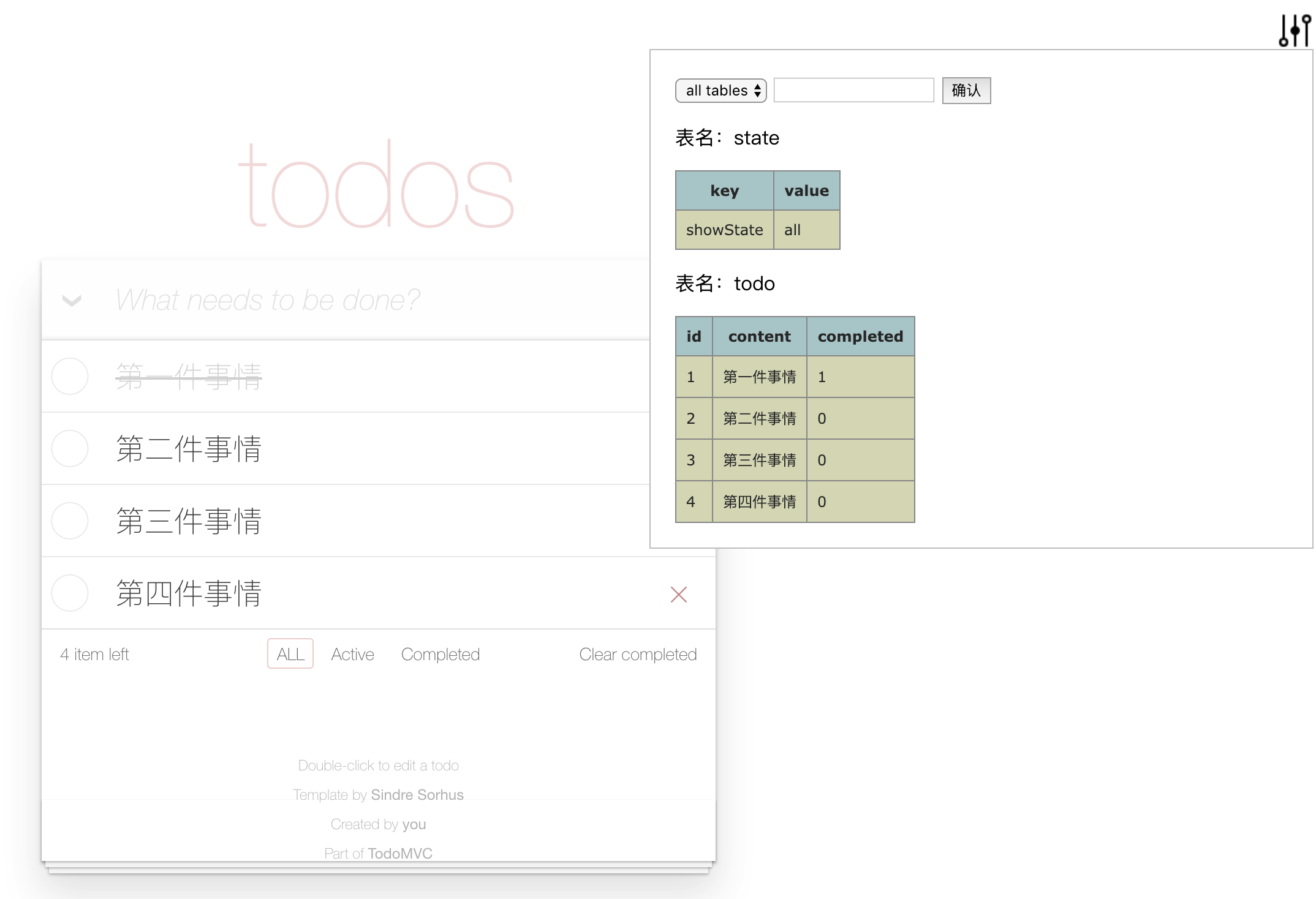
如何与框架结合
结合模板使用
const getArticals = articalTable.getValues();
const render = () => {
    str = `<ul>
        ${getArticals().map(artical => `<li>${artical.title}/</li>`)}
    </ul>`
    $('#app').innerHTML = str;
}

articalTable.bindFn(render);
结合react使用
数据表和组件进行绑定(表变化触发组件render)
const getArticals = articalTable.getValues()

@db.dbconnectReact('artical')
class Artical extends Component {
    render() {
        return (<ul>
            {getArticals().map(artical => <li>{artical.title}/</li>)
        </ul>)
    }
}
结合vue使用
const getArticals = articalTable.getValues()

new Vue({
  mixins: [db.dbconnectVue('artical')],
  //... your own logic
})

//全局模式,
//不传参数表示监听所有表(在mixin之前)
Vue.mixin(db.dbconnectVue())
推荐开发模式
step1: 创建一个库,建议每个应用只有一个库, 并加入devtool;
import DB from 'state-db.js';
import devtool from 'state-db.js/build/devtool.bundle.esm.js';
const db = new DB();
devtool(db, 'html'); //第二个参数默认为console
export default db;
step2: 分析我们的单页APP,哪些状态是某个路由独有的,哪些是页面生命周期内持久存在的
step3.1: 对于持久存在的状态,比如我们从服务端拉一个配置列表下来, 这时我们的建表语句和操作方法定义要放在组件的定义阶段,然后就可以在组件中调用这些方法了,比如:
import db from '../db.js' //刚才已经new好的DB实例
db.createTable({name: 'configList'});
const configTable = db.table('configList');

const fetchConfigList = () => {
    $.ajax({
        url: url,
        success: (res) => {configTable.init(res.data); }
    })
}

const getConfig = (confName) => {
    var arr = configTable.where('line.name == "'+ confName +'"').getValues;
    if (arr.length) {
        return arr[0].value;
    }
    else{
        return none;
    }
}
 export {fetchConfigList, getConfig}
step3.2: 对于某个路由或组件下独有的状态,比如一块独立的业务逻辑, 这时我们的建表语句和操作方法定义要放在组件的执行阶段 ,可以把model包装为一个函数,在组件入口执行处进行调用。db.dbconnectReact('todos')高阶组件会帮你进行组件和表之间的绑定和解绑。
import db from '../db.js'
const model = () => {
    db.todoTable({name: 'todos' });
    const todoTable = db.table('todos');
    const fetchTodos = () => {
        $.ajax({
             url: url,
             success: (res) => {todoTable.init(res.data);}
        })
    }
    const getTodos = () => todoTable.getValues();
    return { fetchTodos,  getTodos}
}

@db.dbconnectReact('todos')
class Todo extends Component {
    constructor() {
      this.model = model();
    }
    componentDidMount(){
        this.model.fetchTodos();
    }
    render() {
        return(
            return (<ul>
                {this.model.getTodos().map(todo => <li>{todo.content}/</li>)
            </ul>)
        )
    }
}