
stix2vis
v1.2.2
Published
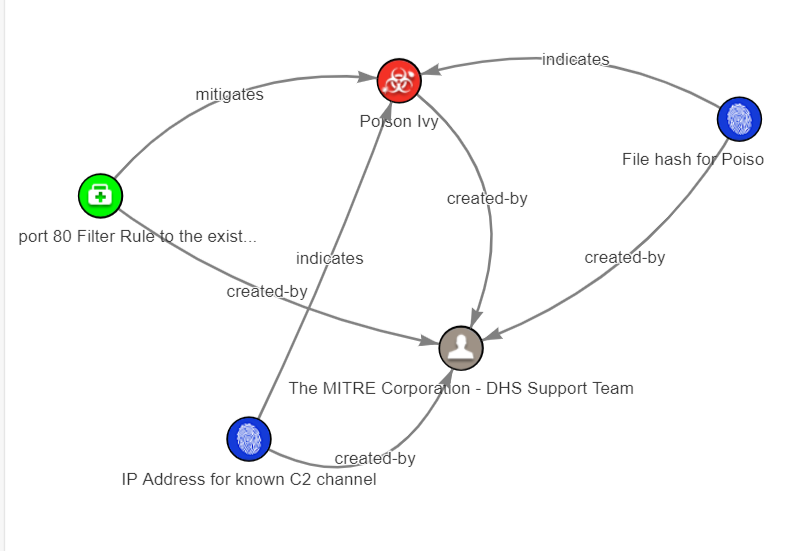
React component that turns STIX 2.1 content into an interactive relationship graph, entirely in the browser.


Readme
Stix2Vis — visualise STIX 2.1 as an interactive graph




🖥️ Try the live demo — drop in any STIX 2.1 bundle and explore it as a graph. Nothing to install, nothing uploaded.
A React component that renders STIX 2.1 content — bundles, arrays of objects or a single object — as an interactive relationship graph. Everything runs entirely in the browser: your threat intel never leaves the page.
Why stix2vis?
- Built for CTI analysts — relationship and embedded-reference edges, ghost nodes for dangling references, a detail panel, search, type filters and PNG/JSON export out of the box.
- Tiny and dependency-light — three runtime dependencies (
vis-network,vis-data,prop-types);reactis a peer you already have. Everything else is native DOM. - Private by design — no telemetry, no network calls; STIX content never leaves the page.
- TypeScript-first — ships type declarations; input can be a bundle, object array, single object or raw JSON string.
- Production-hardened — behaviour-locked test suite, CI on Node 22/24,
bundle-size budget,
publint+ type-resolution checks and provenance-backed publishes.
Inspired by the OASIS CTI STIX Visualisation project.
Contents
- Install
- Quick start
- Props
- Supported input
- What gets rendered
- Filtering and labelling with
config - Dangling references (
showDanglingRefs) - Toolbar and detail panel
- Bundle formats
- Development
- Contributing
- Community
- Roadmap
Install
npm install stix2visreact is a peer dependency (^18.2.0 || ^19.0.0) — install it in your app (you
almost certainly already have it). react-dom is not required. The published
package has only three runtime dependencies (vis-network, vis-data,
prop-types) and pulls in no build tooling.
Quick start
import StixViewerView from "stix2vis";
import bundle from "./bundle.json"; // STIX 2.1 bundle

export default function App() {
  return (
    <div>
      <StixViewerView stixJson={bundle} />
    </div>
  );
}
With styles and a click handler:
<StixViewerView
  stixJson={bundle}
  wrapStyle={{ backgroundColor: "white" }}
  graphStyle={{ width: "100%", height: 600, backgroundColor: "white" }}
  onNodeclick={(nodeId) => console.log("clicked", nodeId)}
/>
Note on the callback name: the prop is
onNodeclick(lower-casec). It has been spelled that way since 1.0 and is kept as-is so existing integrations keep working.
Props
| Prop | Type | Required | Description |
| ------------------- | ------------------------------------------------ | -------- | ------------------------------------------------------------------------------------------------------------------------------------------------------- |
| stixJson | object \| array \| string | yes | STIX 2.1 content to visualise (bundle, array of objects, single object, or a JSON string). |
| graphStyle | React.CSSProperties | no | Styles for the graph container, merged on top of the default 600x600. |
| wrapStyle | React.CSSProperties | no | Styles for the wrapper element around the graph. |
| onNodeclick | (nodeId: string) => void | no | Called with the STIX id of the clicked node. |
| onNodeSelect | (nodeId, stixObject \| null) => void | no | Called with the clicked node's STIX id and its full STIX object (as plain JSON). stixObject is null for nodes without a backing object (see below). |
| onEdgeSelect | (edgeId, relationship \| null) => void | no | Called with the clicked edge's id and the backing STIX relationship object, or null for edges derived from embedded references. |
| onSelectionChange | ({ nodes: string[], edges: string[] }) => void | no | Called on every click with the current selection (empty arrays = deselection). |
| onError | (error: unknown) => void | no | Called when graph creation or a toolbar action fails (in addition to the existing console.error). |
| config | object | no | Graph-builder configuration: include/exclude filters, userLabels, per-type displayProperty/displayIcon/embeddedRelationships. |
| showDanglingRefs | boolean | no | Render faded "ghost" nodes for objects referenced by the bundle but missing from it (default false). |
| showDetailsPanel | boolean | no | Show a detail panel for the selected node (default false). |
| showToolbar | boolean | no | Show the toolbar: search, per-type legend toggles, PNG/JSON export (default false). |
All new props are optional and default-off: applications that render
<StixViewerView stixJson={bundle} /> see exactly the same graph and DOM as
in 1.x.
Rendered DOM (stable contract — safe to target from CSS):
<div class="App">
  <div>
    <!-- wrapper, receives wrapStyle -->
    <!-- optional .stix2vis-toolbar, only when showToolbar is set -->
    <div id="graphContainer">
      <!-- receives graphStyle, vis-network mounts here -->
    </div>
    <!-- optional .stix2vis-details, only when showDetailsPanel is set and a node is selected -->
  </div>
</div>
Without the new optional props the DOM is byte-for-byte identical to 1.x.
Supported input
stixJson={bundle}                  // { type: "bundle", objects: [...] }
stixJson={bundle.objects}          // array of STIX objects
stixJson={{ type: "malware", ...}} // a single STIX object
stixJson={jsonString}              // raw JSON text
Invalid content throws a descriptive error (Invalid STIX content: …,
Invalid STIX object: requires at least type and id …), and relationships whose
endpoints are missing from the bundle are skipped with a console.warn —
unless showDanglingRefs is enabled (below).
What gets rendered
- Nodes — one per STIX domain/custom object.
relationshipobjects become edges, never nodes. STIX 2.0observed-dataobjects additionally render one node per embedded observable in theirobjectsdictionary (connected withrefers-toedges), mirroring the 2.1object_refsbehaviour. - Labels — taken from the object's
name, thenvalue, thenpath, and finally the STIX type; duplicates are uniquified (Example Corp(2)) and long labels are truncated to 40 characters. - Edges — built from two sources:
- explicit
relationshipobjects (indicates,uses,targets, …), and - embedded references inside objects, e.g.
created_by_ref→created-by,object_marking_refs→applies-to,resolves_to_refs→resolves-to,src_ref/dst_refonnetwork-traffic, and so on.
- explicit
- Icons — a per-type STIX icon rendered as
circularImagenodes in a Barnes–Hut physics layout that stabilises and then freezes.
Filtering and labelling with config
The graph builder's configuration is now exposed directly as a prop:
<StixViewerView
  stixJson={bundle}
  config={{
    // Mongo-ish filters, combinable with $and/$or/$not/$in/$exists…
    include: { type: { $in: ["indicator", "malware", "relationship"] } },
    exclude: { type: "marking-definition" },
    // Override labels for specific objects.
    userLabels: { "indicator--8e2e2d2b-…": "C2 domain (high confidence)" },
    // Per-type label source and icon.
    "attack-pattern": { displayProperty: "external_references.0.external_id" },
  }}
/>
Dangling references (showDanglingRefs)
Real threat-intel feeds frequently reference objects that are not included in
the bundle (TLP markings, identities, observables). By default those
relationships are skipped with a warning, as in 1.x. With
showDanglingRefs enabled, missing endpoints are rendered as faded
ghost nodes labelled with their STIX type, so the relationships stay
visible and auditable:
<StixViewerView stixJson={bundle} showDanglingRefs />Clicking a ghost node shows "no STIX object behind it" in the detail panel,
and onNodeSelect receives null as the object.
Toolbar and detail panel
<StixViewerView
  stixJson={bundle}
  showToolbar
  showDetailsPanel
  onNodeSelect={(id, obj) => console.log(id, obj)}
/>- Toolbar — a search box (matches STIX id exactly, or label substring; selects and centres the match), a legend of the STIX types present that toggles each type's visibility, and Export PNG (canvas snapshot) and Export JSON (the currently visible nodes/edges) buttons.
- Detail panel — shown below the graph when a node is clicked: the
object's key fields (
type,name/value,description,pattern, timestamps, labels, confidence, …), a full-JSON viewer and a copy button. Clicking empty space clears it.
Bundle formats
| Consumer | Entry point |
| ---------------------------------------------------------- | ------------------------- |
| Bundlers (Vite, webpack, Next, Rollup, esbuild, Turbopack) | dist/stix2vis.mjs (ESM) |
| Node require() / TypeScript node16 | dist/stix2vis.cjs (CJS) |
| <script> tag / CDN | dist/stix2vis.umd.js |
| Type definitions | dist/index.d.ts |
All formats are produced from the same source, so behaviour is identical everywhere. React is always external (consumers use their own copy, which avoids the "two Reacts / invalid hook call" class of bugs) and the published icons are inlined as data URIs so nothing has to be served from a particular path.
<script src="https://unpkg.com/react@18/umd/react.production.min.js"></script>
<script src="https://unpkg.com/react-dom@18/umd/react-dom.production.min.js"></script>
<script src="https://unpkg.com/stix2vis/dist/stix2vis.umd.js"></script>
<script>
  // the UMD global *is* the component
  const root = ReactDOM.createRoot(document.getElementById("root"));
  root.render(React.createElement(stix2vis, { stixJson: myBundle }));
</script>
Development
Requires Node ^22.12.0 || ^24.0.0 (see .nvmrc) — the toolchain (Vitest 5,
Vite 8, jsdom 30) does not support odd-numbered Node releases such as 23 or 25.
npm install

npm run dev          # Vite playground at http://localhost:5173
npm run build        # dist/stix2vis.{mjs,cjs,umd.js} + dist/index.d.ts + .d.mts
npm test             # Vitest behaviour-locking suite
npm run coverage     # coverage report
npm run typecheck    # tsc --noEmit
npm run lint         # ESLint 10 (flat config)
npm run format       # Prettier
npm run size         # bundle-size budget
npm run verify       # all of the above + publint + attw; also runs on prepublishOnly
dist/ is intentionally not committed — it is generated by npm run build, by
prepack/prepublishOnly before publishing, and by CI.
Releasing (maintainers)
npm login            # publishing requires an authenticated account with 2FA
git add -A
git commit -m "chore(release): v1.1.5"
npm publish          # prepublishOnly verifies, prepack guarantees dist/ exists
Nothing is uploaded unless npm run verify passes: lint, format check,
typecheck, the test suite, the build, the bundle-size budget, publint and
@arethetypeswrong/cli. To inspect the exact tarball and its contents before
publishing, without uploading anything:
npm publish --dry-runTo publish from CI instead, create a GitHub Release — the Publish to npm
workflow runs the same verification and publishes with provenance. It needs an
NPM_TOKEN repository secret with publish rights, plus id-token: write
(already configured in .github/workflows/publish.yml).
If a bad version ever reaches the registry, deprecate it rather than unpublishing:
npm deprecate "stix2vis@<1.1.5" "Broken packaging outside webpack; upgrade to 1.1.5"Contributing
Issues and pull requests are welcome — see CONTRIBUTING.md
for the project rules and the npm run verify gate. Please run it before
opening a PR: it runs linting, formatting, type checking, the test suite, the
build, a bundle budget check and package/type-resolution checks (publint,
@arethetypeswrong/cli). Behaviour is locked by tests, so if a change to
makeGraphData output is intentional, update the expectations in
src/stix2viz/stix2viz/stix2viz.test.ts deliberately.
Community
Roadmap
- Expose the framework-agnostic graph builder as a documented
stix2vis/coreentry point (today only the React component is public). - Let consumers supply their own icon set (
iconDir/iconResolver), so the inlined icon payload can be moved out of the JS bundle. - TLP/marking-aware colouring and MITRE ATT&CK technique badges.
- Hover tooltips, 1-hop neighbourhood focus, timeline filtering.
- STIX pattern highlighting and a bundle diff view.
- Optional WebGL renderer for very large bundles (>5k objects).
- Accessibility: keyboard navigation and a table-view fallback.
License
MIT — see LICENSE.
Acknowledgements
Inspired by the STIX Visualisation project from the OASIS CTI Open Repository. Thanks to all contributors of that project.
Support
Questions or problems? Please open an issue.
Author: Navaneeth001 — [email protected]