
storybook-addon-semantic-version
v2.2.0
Published
Storybook addon for deploying sematically versioned components

Maintainers
 akshayjpatil
Readme
Storybook Semantic Version Addon


A Storybook addon for managing and deploying semantically versioned component libraries. Deploy and maintain multiple versions of your Storybook instances simultaneously, making it easy to document component evolution and breaking changes in monorepo environments.
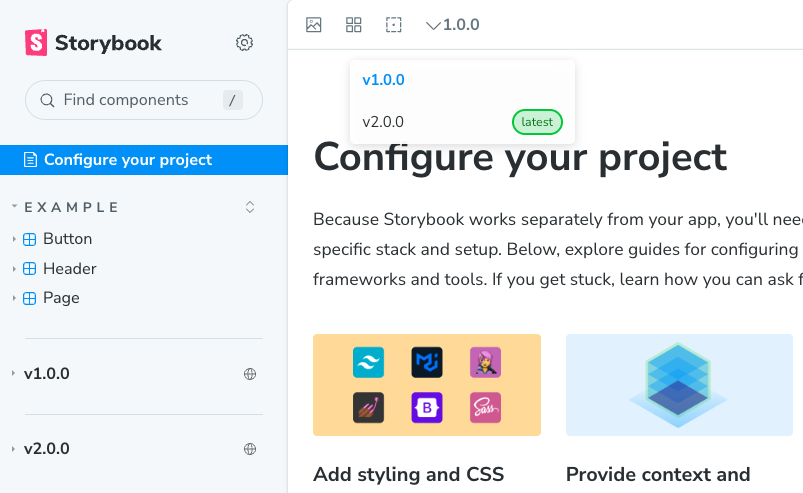
Features
- 📦 Multi-version management - Deploy and maintain multiple versions of your Storybook
- 🔄 Version switching - Toolbar dropdown to switch between component versions
- 📱 Persistent selection - Selected version is saved to localStorage
- 🏗️ Monorepo support - Discover and build Storybooks from NX monorepos automatically
- 🔗 Story path preservation - Navigate between versions while keeping the current story view
Compatibility
| Addon version | Storybook version | Node.js |
|---|---|---|
| 1.x | ^7.6.20 | ≥16 |
| 2.x | ^8.0.0 | ≥18 |
Note: This addon doesn't support Storybook's hot reloading. Static builds are required for proper version viewing.
Getting Started
Step 1: Install the addon
npm install storybook-addon-semantic-versionor with pnpm:
pnpm add storybook-addon-semantic-versionStep 2: Register the addon
Update your root .storybook/main.ts to include the addon and generated refs:
import { refs } from './refs.generated';

export default {
  refs,
  addons: ['@storybook/addon-essentials', 'storybook-addon-semantic-version'],
};
Note: The
refs.generated.tsfile is automatically created in step 3. If you encounter an error, you can create it manually.
Step 3: Build versioned Storybooks
Run the CLI command from your project root to discover all Storybook instances, build them, and generate the version management files:
npx storybook-addon-semantic-versionThis command will:
- Discover all Storybook instances in your monorepo
- Build each Storybook with its current version (from
package.json) - Generate
versions.jsonwith the list of all available versions - Generate
refs.generated.tswith the refs configuration - Output to
dist/storybooks/<version>/anddist/root/
Your dist/ folder structure will look like:
dist/
├── root/
│   ├── storybook/           # Root Storybook build (with version switcher)
│   └── versions.json        # List of all built versions
└── storybooks/
    ├── v1.0.0/              # Version 1 build
    ├── v1.1.0/              # Version 2 build
    └── v2.0.0/              # Version 3 build
Step 4: Serve locally
To test locally, serve the dist/ folder:
npx http-server dist --corsNote: Install http-server globally with
npm install -g http-serverif needed.
View your Storybook at http://localhost:3000/root/storybook
Step 5: Deploy
Deploy the entire dist/ folder to a hosting service (S3, GitHub Pages, Vercel, etc.) and configure your DNS to point to it.
Important Notes
⚠️ Persistent Storage: The dist/ folder must be preserved. Deleting it will lose all previously built versions. If accidentally deleted:
- Clear
refs.generated.tsfrom.storybook/ - Clear
versions.jsonfrom.storybook/ - Rebuild to start fresh
Contributing
Found a bug or want to suggest a feature? Check the issues tab to get started.
License
MIT