
storybook-chapters
v0.4.1
Published
Adds Substories/Hierarchy to React Storybook
Downloads
51

Maintainers
 usulpro
Readme
storybook-chapters


This addon for React Storybook adds unlimited levels of nesting for stories.
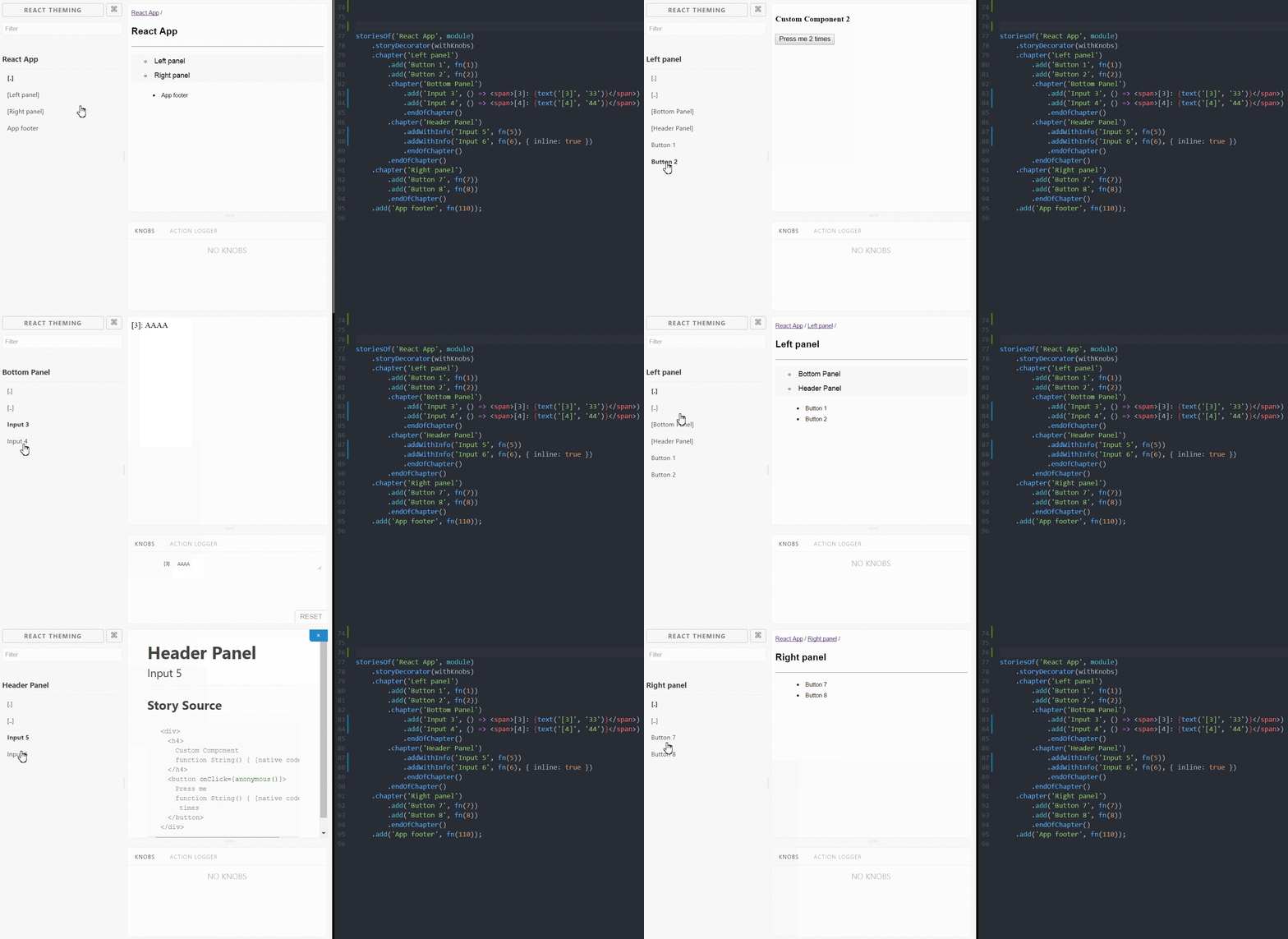
Usage
yarn add storybook-chapters --dev// .storybook/config.js:
import 'storybook-chapters';
//addons.js:

import 'storybook-chapters/register';
// stories.js:

storiesOf('React App', module)
    .addChapter('Atoms', chapter => chapter
        .add('Atom 1', render(1))
        .add('Atom 2', render(2))
        .addChapter('Molecules', chapter => chapter
            .addChapter('Organisms', chapter => chapter
                .add('Organism 1', render(7))
                .add('Organism 2', render(8)),
            )
            .add('Molecule 1', render(1))
            .add('Molecule 2', render(2)),
        )
        .add('Atom 3', render(3))
        .add('Atom 4', render(4)),
    )
    .add('new API docs', render(3))
    .add('prev API docs', render(4));
Features
- The hierarchical structure of Substories
- Hide/show your stories with
enable/disableand buid your own navigation - Compatible with
Knobs,addWithInfoand other addons - Use
storyDecoratorto wrap all chapters - Support query params of the address string to select (sub)chapter (same behavior as storybook holds current storyKind when you reload the page)
Examples
Basic
Lets add 'chapters' to Storybook Boilerplate:
git clone https://github.com/sm-react/storybook-chapters.git
cd storybook-chapters/example/basic
yarn
yarn start
Choose your side with Enable / Disable API
git clone https://github.com/sm-react/storybook-chapters.git
cd storybook-chapters/example/enable
yarn
yarn start
API
There are two possible API to add chapters. You can use one of them or make any combination of them. You can access chapters features as storiesOf('Kind Name', module).chapter('Chapter Name') or storiesOf('Kind Name', module).addChapter('Chapter Name', chapter => add(chapter))
Here're the list of available API:
.addChapter('ChapterName', chapter => chapter)addsChapterNamesubchapter to the root ofstoriesOfor to the current chapter and invokes function passed as second argument. This function provide same API asstoriesOf(including third-party addons) with the difference that everything you add here will be applyed to this current chapter. E.g.chapter => chapter.add()to add stories to this chapter andchapter => chapter.addChapter()to add subchapters.
example:
storiesOf('addChapter API', module)
    .addChapter('Atoms', chapter => chapter
        .add('Atom 1', render(1))
        .add('Atom 2', render(2))
        .addChapter('Molecules', chapter => chapter
            .addWithInfo('Molecule 1', render(1))
            .addWithInfo('Molecule 2', render(2)),
        )
    );
Note how we use .addWithInfo to add stories to .chapter('Molecules')
.chapter(ChapterName)addsChapterNamesubchapter to the root ofstoriesOfor to the current chapter. You can use any other API (going withstorybook-chapteror any other third-party addon) after this and it will apply to this current chapter. E.g..add()to add stories to this chapter and.chapter()to add subchapters. Use.endOfChapter()to shift back to the parent or root chapter.
example:
storiesOf('.chapter API', module)
    .chapter('Bottom Panel')
        .add('Input 3', () => <span>[3]: {text('[3]', '33')}</span>)
        .add('Input 4', () => <span>[4]: {text('[4]', '44')}</span>)
        .endOfChapter()
    .chapter('Header Panel')
        .addWithInfo('Input 5', render(5))
        .addWithInfo('Input 6', render(6), { inline: true })
        .endOfChapter()
Note how we use .addWithInfo to add stories to .chapter('Header Panel')
.add(name, story)add stories to current chapter.endOfChapter()jumps to the parent chapter..storyDecorator(decorator)adds decorators to wholestoriesOf(including subchapters). Enables "chapters". You can put it in any place of chapters tree, result will be the same.disable(enableFn => {})- temporarily hides currentstoriesOf.enableFn()- function to hide/show these stories:
enableFn(true)  // to show this stories
enableFn(false) // to hide this stories
It enables "chapters"
enable(enableFn => {})- don't hide currentstoriesOfbut provides functionenableFn()to control visibility of these stories. Enables "chapters"
You can use enable/disable to build custom navigation with your preferred logic.
For example, you can use enableFn() in another stories, decorators or addon panels
- mixing
.addChapterand.chapter. It's possible to use any combination of this API.
example:
storiesOf('Mixed API', module)
    .addChapter('Atoms new', chapter => chapter
        .add('Atom 1', fn(1))
        .add('Atom 2', fn(2))
        .addChapter('Molecules new', chapter => chapter
            .chapter('Cells old')
                .add('Cell 1', fn(1))
                .add('Cell 2', fn(2))
                .addChapter('Organisms new in old', chapter => chapter
                    .add('Organism 1', fn(1))
                    .add('Organism 2', fn(2)),
                )
                .endOfChapter()
            .add('Molecule 1', fn(1))
            .add('Molecule 2', fn(2)),
        )
        .add('Atom 3', fn(3))
        .add('Atom 4', fn(4)),
    )
    .add('new API docs', fn(3))
    .add('prev API docs', fn(4));
To enable chapters you need to apply one of privided API first:
// right:
storiesOf('React App', module).addChapter('Left panel', chapter => chapter.add('item1', render()));
storiesOf('React App', module).chapter('Left panel').add('item1', render());
storiesOf('React App', module).enable().add('item1', render());

// wrong:
storiesOf('React App', module).add('item1', render()).chapter('Left panel');
- Querry string. Storybook-Chapters use same querry params to set current storiKind/story. It means that you can reload page and don't lose current chapter. Or you can share the link of your chapter/story to point to exact place of your story. You need add one string in
addons.jsfile for that.
//addons.js:

import 'storybook-chapters/register';
Roadmap
Custom TOC
Bookmarks
Chapter decorators
Page spreads
Warning
Use carefully since it in early stages. It's fairly experimental approach of addon creating.
Credits
Big thanks to Norbert de Langen for the idea of .addChapter API
We'd be happy to receive feedback from this project. Any issue or PR will be appreciated!