
styled-hooks
v2.1.1
Published
Style your React components with Hooks

Maintainers
 colingourlay
Readme
Table of contents
- Getting started
- API
- Hooks
- Components
- Utilities
- About the project
Getting started
npm install styled-hooksimport React from 'react';
import ReactDOM from 'react-dom';
import { useStyle } from 'styled-hooks';
function Paragraph({ color, ...props }) {
const cn = useStyle`
padding: 1rem;
background-color: yellow;
color: ${color};
`;
return <p className={cn} {...props} />;
}
ReactDOM.render(
<div>
<Paragraph color="blue">I'm blue</Paragraph>
<Paragraph color="magenta">I'm magenta</Paragraph>
</div>,
document.getElementById('root')
);The rendered page will look like this:
<!-- In <head /> -->
<style>
  .kuyydJ {
    padding: 1rem;
    background-color: yellow;
    color: var(--kuyydJ-0);
  }
</style>
<style>
  .fzSSnP {
    --kuyydJ-0: blue;
  }
</style>
<style>
  .hXjsLE {
    --kuyydJ-0: magenta;
  }
</style>

<!-- In <div id="root" /> -->
<div>
  <p class="kuyydJ fzSSnP">I'm blue</p>
  <p class="kuyydJ hXjsLE">I'm magenta</p>
</div>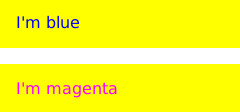
Don't worry! Styled Hooks will render the following in browsers that aren't up to scratch:
<!-- In <head /> -->
<style>
  .jODart {
    padding: 1rem;
    background-color: yellow;
    color: blue;
  }
</style>
<style>
  .iDgeTy {
    padding: 1rem;
    background-color: yellow;
    color: magenta;
  }
</style>

<!-- In <div id="root" /> -->
<div>
  <p class="jODart">I'm blue</p>
  <p class="iDgeTy">I'm magenta</p>
</div>
The amount of CSS generated is larger, but it acheives the same effect.
Note: You can still interpolate large portions of your CSS as strings—Custom Properties only come into effect when you attempt to interpolate CSS property values.
API
useStyle
The useStyle hook is a tagged template that expects CSS & dynamic values, and returns a className you can use in your component.
The hook will memoise the CSS of each unique style variant, and inject it into your document's <head>, taking advantage of CSS Custom Properties (if your browser suports them) to reduce style replication.
Style injection happens during the browser's layout phase, so your components will always be painted fully-styled.
Thanks to stylis, you can use some basic nesting and media queries:
import React from 'react';
import ReactDOM from 'react-dom';
import { useStyle } from 'styled-hooks';

function Button({ primary, ...props }) {
  const cn = useStyle`
    display: inline-block;
    padding: 0.5rem 0;
    width: 10rem;
    background-color: ${primary ? 'magenta' : 'yellow'};
    color: ${primary ? 'yellow' : 'magenta'};
    border: 0.125rem solid ${'magenta'};

    @media (min-width: 32rem) {
      padding: 0.75rem 0;
      width: 15rem;
      font-size: 1.5rem;
    }

    &:focus {
      color: #000;
      border-color: #000;
    }
  `;

  return <button className={cn} {...props} />;
}

ReactDOM.render(
  <div>
    <Button>Standard</Button>
    <Button primary>Primary</Button>
  </div>,
  document.getElementById('root')
);
Theming
In the example above, the dynamic styling is based on component properties, but what if we wanted to have a consistent theme throughout our app? Assuming your component is descendant of a ThemeProvider component, you're able to take advantage of a couple of the useStyle hook's additional features...
The first is an interpolation syntax familiar to anyone who's used SASS:
import React from 'react';
import ReactDOM from 'react-dom';
import { ThemeProvider, useStyle } from 'styled-hooks';

function Paragraph({ ...props }) {
  const cn = useStyle`
    padding: 1rem;
    background-color: #{bg};
    color: #{fg};
  `;

  return <p className={cn} {...props} />;
}

ReactDOM.render(
  <ThemeProvider theme={{ fg: 'magenta', bg: 'yellow' }}>
    <Paragraph>I'm magenta on yellow</Paragraph>
  </ThemeProvider>,
  document.getElementById('root')
);
To access a property of the theme you're providing, just place it between #{ and } braces. The usual template string interpolation still works, so you're still able to create styles based on your component props.
The interpolation syntax allows you to access nested properties too. Imagine your theme looked like this:
{
  colors: {
    fg: 'magenta',
    bg: 'yellow'
  },
  space: [
    '0', '0.25rem', '0.5rem', '1rem', '2rem', '4rem', '8rem', '16rem', '32rem'
  ]
}
You're able to access it like this:
function Paragraph({ ...props }) {
  const cn = useStyle`
    padding: #{space.3};
    background-color: #{colors.bg};
    color: #{colors.fg};

    @media (min-width: 480px) {
      padding: #{space.4};
    }
  `;

  return <p className={cn} {...props} />;
}
If you need to output different theme values based on your props, interpolate a function and it'll receive your theme as an argument:
function Paragraph({ isInverted, ...props }) {
  const cn = useStyle`
    padding: 1rem;
    background-color: ${({ fg, bg }) => (isInverted ? fg : bg)};
    color: ${({ fg, bg }) => (isInverted ? bg : fg)};
  `;

  return <p className={cn} {...props} />;
}
Going themeless
If you're styling components that don't require theming, you can opt to use an alternative hook: useThemelessStyle. It works the same way you'd expect useStyle to, only you can't interpolate functions (as there's no theme to pass in), or use the #{}-style theme prop interpolation.
import React from 'react';
import ReactDOM from 'react-dom';
import { useThemelessStyle } from 'styled-hooks';

function Title({ fontFamily, ...props }) {
  const cn = useThemelessStyle`
    font-family: ${fontFamily};
    font-weight: 200;
  `;

  return <h1 className={cn} {...props} />;
}

ReactDOM.render(
  <Title fontFamily="sans-serif">
    I'm a sans-serif level-1 heading with a thin font-weight
  </Title>,
  document.getElementById('root')
);
useTheme
The useTheme hook allows you to read theme context from the nearest <ThemeProvider /> ancestor, for use in places other than your styles:
import React from 'react';
import ReactDOM from 'react-dom';
import { ThemeProvider, useTheme } from 'styled-hooks';

function Colors() {
  const { fg, bg } = useTheme();

  return (
    <p>{`This app's foreground color is ${fg}; its background color is ${bg}`}</p>
  );
}

ReactDOM.render(
  <ThemeProvider theme={{ fg: 'magenta', bg: 'yellow' }}>
    <Colors />
  </ThemeProvider>,
  document.getElementById('root')
);
Combine this with React's useState hook, and you'll be able to modify the theme on the fly:
import React, { useState } from 'react';
import ReactDOM from 'react-dom';
import { ThemeProvider, useTheme } from 'styled-hooks';

function ColorSwapper({ ...props }) {
  const { fg, bg } = useTheme();

  return (
    <button {...props}>
      {`This app's foreground color is ${fg}; its background color is ${bg}`}
    </button>
  );
}

function App() {
  const [theme, setTheme] = useState({
    fg: 'magenta',
    bg: 'yellow'
  });

  return (
    <ThemeProvider theme={theme}>
      <ColorSwapper
        onClick={() =>
          setTheme({
            bg: theme.fg,
            fg: theme.bg
          })
        }
      />
    </ThemeProvider>
  );
}

ReactDOM.render(<App />, document.getElementById('root'));
ThemeProvider
This component allows you to provide theme context that can be accessed by useStyle and useTheme hooks anywhere in your app. Have a look at their respective examples above for basic usage.
ThemeProviders have a single property, theme which can be set to either an object or a merge function (explained further below).
import React from 'react';
import ReactDOM from 'react-dom';
import { ThemeProvider } from 'styled-hooks';
import App from './App';

const theme = {
  fg: 'magenta',
  bg: 'yellow'
};

ReactDOM.render(
  <ThemeProvider theme={theme}>
    <App />
  </ThemeProvider>,
  document.getElementById('root')
);
Nesting ThemeProvider components
When you nest ThemeProvider components, the child theme will be merged with its parent. You can either provide an object in order to add or replace theme properties, or a function to transform the parent theme entirely.
Here's the App.js component that is imported into the previous example:
import React from 'react';
import { ThemeProvider, useStyle } from 'styled-hooks';

function Paragraph({ ...props }) {
  const cn = useStyle`
    padding: 1rem;
    background-color: #{bg};
    color: #{fg};
  `;

  return <p className={cn} {...props} />;
}

export default function App() {
  return (
    <div>
      <Paragraph>I'm magenta on yellow</Paragraph>
      <ThemeProvider theme={{ fg: 'blue' }}>
        <Paragraph>I'm blue on yellow</Paragraph>
      </ThemeProvider>
      <ThemeProvider theme={theme => ({ ...theme, bg: 'cyan' })}>
        <Paragraph>I'm magenta on cyan</Paragraph>
      </ThemeProvider>
    </div>
  );
}
injectGlobal
This utility allows you to add arbitrary CSS to the document. It's useful for resets and other document-level styles.
import { injectGlobal } from 'styled-hooks';

injectGlobal`
  html {
    font-size: 18px;
  }

  body {
    margin: 0;
  }
`;
It can't be part of your app's component hierarchy, and therefore doesn't have access to theme context. You can use any interpolated values you want, but unlike hooks they won't ever become CSS Custom Properties.
About the project
- Styled Hooks is currently maintained by Colin Gourlay
- It is currently licensed under The Unlicense
- If you'd like to help out, please submit ideas & bugs to the project's issue tracker
- To contribute code and documentation, please see the contribution guide
- All contributions and project activity are subject to the project's code of conduct
Credits
Dependencies:
- stylis - The CSS parser providing auto-prefixing and SASS-like nesting
Inspiration:
Thanks:
- Glen Maddern, for giving this project a name