
sub-write
v0.0.1
Published
Subscribe to Redis channel and push messages to a Redis list


Readme
sub-write
A microservice to subscribe to a Redis pubsub channel, and print messages to the console.
The essence of the implementation is as follows:
async function startProduction() {
    sub.on('message', (channel, message) => {
        if (process.env.formatter === 'jsome') {
            jsome(JSON.parse(message), {});
        } else if (process.env.formatter === 'prettyjson') {
            console.log(prettyjson.render(JSON.parse(message)));
        } else if (process.env.jsonIndent > 0) {
            console.log(JSON.stringify(JSON.parse(message), null, parseInt(process.env.jsonIndent)));
        } else if (process.env.reverseFile) {
            state.messages.splice(0, 0, JSON.parse(message));
            state.messages = state.messages.slice(0, 10);
            fs.writeFile(process.env.reverseFile, JSON.stringify(state.messages, null, 2));
        } else {
            console.log(message);
        }
    });
    sub.subscribe(config.subscribeChannel);
}
where config is populated from environment variables as follows:
const config = ['subscribeChannel'].reduce((config, key) => {
    assert(process.env[key], key);
    config[key] = process.env[key];
    return config;
}, {});
For example the following command line runs this service to subscribe to channel logger:mylogger and log messages.
subscribeChannel=logger:mylogger formatter=prettyjson npm startwhere the prettyjson formatter is specified i.e. https://github.com/rafeca/prettyjson
Note the reverseFile option is useful to reverse the last 10 messages and view via your browser, presumeably with a JSON formatter extension, using a CLI HTTP server to serve the file e.g. https://www.npmjs.com/package/http-server
reverseFile=~/tmp/logger-phantomjs-redis.json subscribeChannel=logger:phantomjs-redis npm start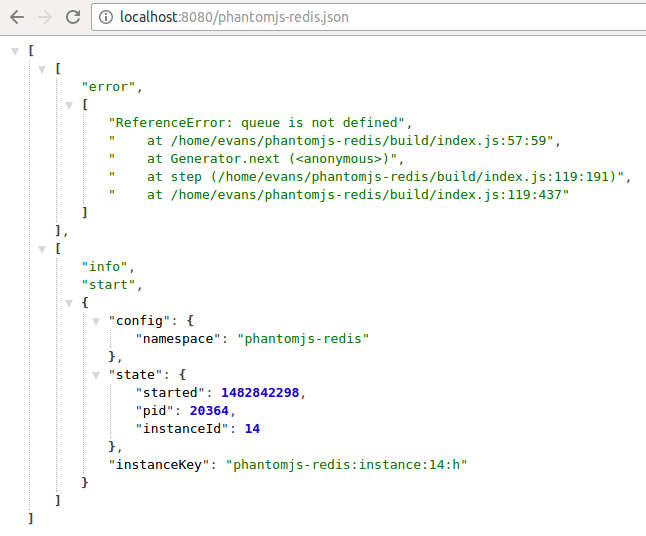
See https://github.com/evanx/sublog-http which is a variation of this service which will itself serve the last 10 reversed JSON messages via a built-in HTTP server.
Sample use case
This service is intended for a personal requirement to subscribe to logging messages published via Redis. These are arrays published via pubsub.
redis-cli publish 'logger:mylogger' '["info", {"name": "evanx"}]'where we might subscribe in the terminal as follows:
redis-cli psubscribe 'logger:*'where we see the messages in the console as follows:
Reading messages... (press Ctrl-C to quit)
1) "psubscribe"
2) "logger:*"
3) (integer) 1
1) "pmessage"
2) "logger:*"
3) "logger:mylogger"
4) "[\"info\", {\"name\": \"evanx\"}]"
However we want to pipe to a command-line JSON formatter to enjoy a more readable rendering:
[
  "info",
  {
    "name": "evanx"
  }
]
We found that redis-cli psubscribe didn't suit that use case, e.g. piping to jq or python -mjson.tool to format the JSON. See https://github.com/evanx/sub-push where we transfer messages to a list, brpop and then pipe to jq
Related code
Incidently, some sample Node code for a client logger that publishes via Redis:
const createRedisLogger = (client, loggerName) =>
['debug', 'info', 'warn', 'error'].reduce((logger, level) => {
    logger[level] = function() {
        if (!client || client.ended === true) { // Redis client ended
        } else if (level === 'debug' && process.env.NODE_ENV === 'production') {
        } else {
            const array = [].slice.call(arguments);
            const messageJson = JSON.stringify([
                level,
                ...array.map(item => {
                    if (lodash.isError(item)) {
                        return item.stack.split('\n').slice(0, 5);
                    } else {
                        return item;
                    }
                })
            ]);
            client.publish(['logger', loggerName].join(':'), messageJson);
        }
    };
    return logger;
}, {});
where the logger level is spliced as the head of the arguments array.
Note that logged errors are specially handled i.e. a slice of the stack is logged.