
svelte-wizard
v2.1.1
Published
A flexible and customizable stepper component for Svelte, perfect for building multi-step forms with progress indicators.

Maintainers
 sohnya
Readme
Svelte Wizard
⚠️ Minimum supported Svelte version: v5
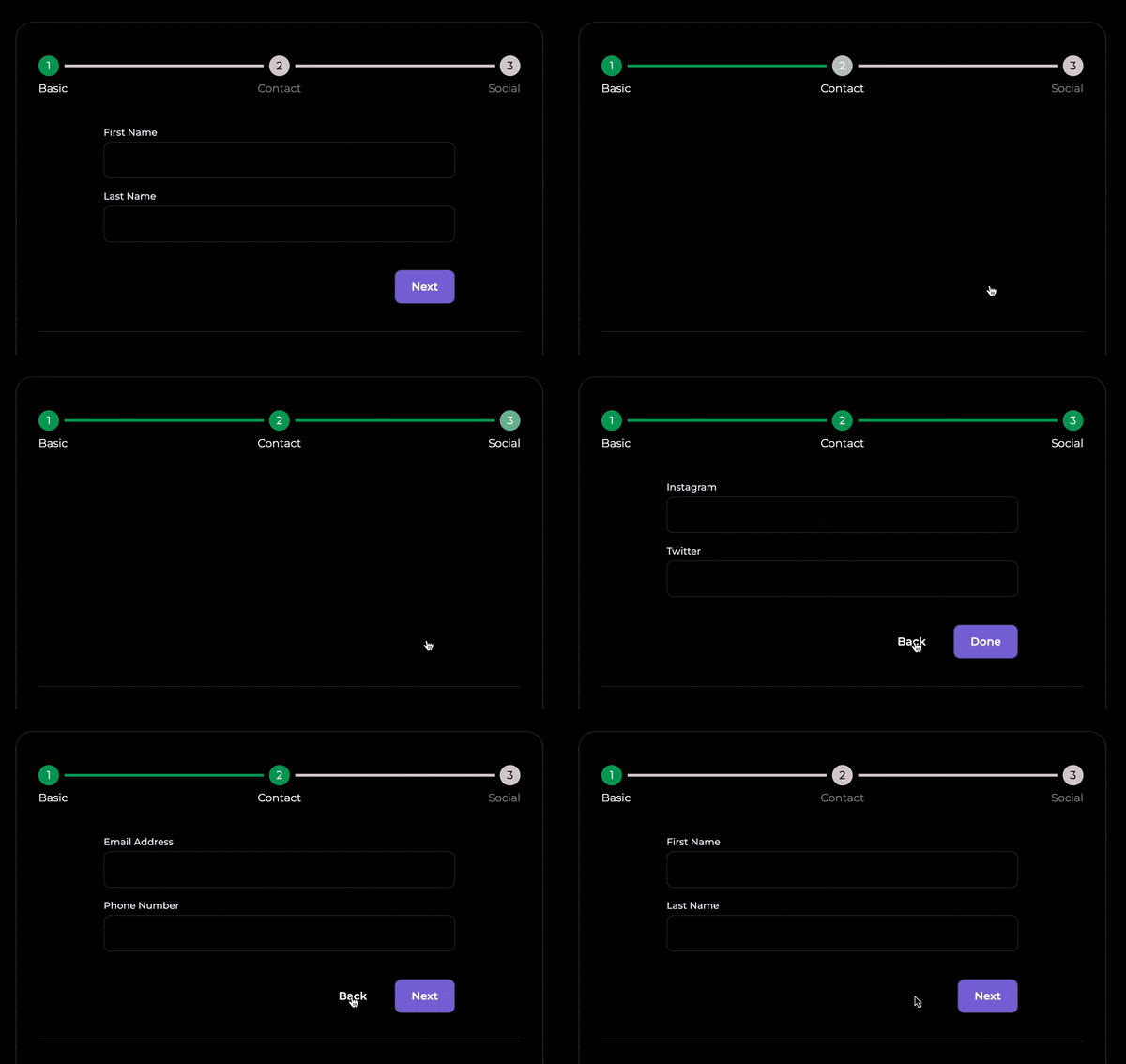
📺 Live Demo | 🧪 Playground
⚡ Features
- Custom styling for steps, titles, and progress
- Step navigation and state tracking
- Built-in progress bar
- Animated transitions
- Event dispatching
- Centralized form state
Installation
$ npm i svelte-wizard🧩 Basic Usage
<script>
  import { WizardComponent } from 'svelte-wizard';
  import StepOne from './StepOne.svelte';
  import StepTwo from './StepTwo.svelte';
  import StepThree from './StepThree.svelte';

  let stepsList = [
    { step: StepOne, title: 'Step One' },
    { step: StepTwo, title: 'Step Two' },
    { step: StepThree, title: 'Step Three' }
  ];
</script>

<WizardComponent {stepsList} />
⚙️ With Options
<script>
  import { WizardComponent } from 'svelte-wizard';

  let stepsList = [...];

  let options = $state({
    showTitles: true,
    showCheckIcon: false
  });
</script>

<WizardComponent {stepsList} {options} />
🎨 With Custom Class Names
<script>
  import { WizardComponent } from 'svelte-wizard';

  let stepsList = [...];

  let customClassnames = $state({
    activeTitleClass: 'activeTitleClass'
  });
</script>

<WizardComponent {stepsList} {customClassnames} />
🧪 Props Reference
Bindable
| Props | Type | Description |
| --------------- | -------- | ---------------------------------- |
| currentIndex | number | Index of the current step |
| wizardFormState | object | Shared form state across all steps |
stepsList
| Prop | Type | Description |
| ----- | ----------------- | ---------------------------- |
| step | SvelteComponent | The step component to render |
| title | string | Title of the step |
| icon | SvelteComponent | Optional icon for the step |
options
| Prop | Type | Default | Description |
| ------------------- | ------- | ------- | ----------------------------------------------------------------------------- |
| showTitles | boolean | true | Show titles for each step |
| showOneTitle | boolean | false | Show only the active step title (requires showTitles and showProgressBar) |
| showCheckIcon | boolean | false | Show check icon on completed steps |
| showStepCount | boolean | true | Show step numbers |
| clickableNavigation | boolean | false | Allow users to click step indicators to navigate |
| shouldAnimate | boolean | true | Animate transitions between steps |
| showProgressBar | boolean | true | Display progress bar |
| defaultStep | number | 0 | Index of the initial step |
customClassnames
| Prop | Type | Description | | ----------------------- | ------ | ---------------------------------------------- | | activeTitleClass | string | CSS class for active/completed step titles | | inactiveTitleClass | string | CSS class for inactive step titles | | activeBarItemClass | string | CSS class for active progress items (dot/line) | | inactiveBarItemClass | string | CSS class for inactive progress items | | activeStepNumberClass | string | CSS class for active/current step number | | inactiveStepNumberClass | string | CSS class for inactive step numbers |
📣 Events
Svelte wizard provides custom events to the parent and child components giving control over navigation and form state management.
Examples
Parent Component
<!-- FormContainer.svelte -->

<WizardComponent onStepChange={(e) => console.log(e)} />
Child Component
<!-- StepOne.svelte -->

<script>
	let { handleBack, handleSkipTo, handleNext, handleSkipToEnd,handleReset } = $props();
</script>

<button on:click={handleNext}> Next</button>
<button on:click={handleSkipToEnd}> Skip</button>
| Event/Prop | Triggered by | Description |
| --------------------- | ------------ | ----------------------------------------------- |
| onStepChange | Parent | Fires when current step changes |
| handleNext | Child | Goes to the next step |
| handleBack | Child | Goes to the previous step |
| handleSkipTo(index) | Child | Skips to a specific step |
| handleSkipToEnd | Child | Skips to the final step |
| handleSkipToStart | Child | Skips to the first step |
| handleReset | Child | Resets form state and returns to the first step |
| handleStateUpdate | Child | Updates shared wizardFormState |
🧠 State Management
Svelte Wizard provides a centralized wizardFormState shared across all steps. You can update it using handleStateUpdate
Accessing wizardFormState
<script>
	let { wizardFormState } = $props();
	let firstName = $state(wizardFormState?.firstName);
</script>
Using handleStateUpdate
<script>
  let { handleStateUpdate, wizardFormState } = $props();

  const submit = () => {
    handleStateUpdate('firstName', 'Jane'); // Set a single key
    handleStateUpdate({ lastName: 'Doe' }); // Merge object
    handleStateUpdate({ firstName: 'Jane', lastName: 'Doe' }, { replaceAll: true }); // Replace state
  };
</script>
handleStateUpdate Argument Types
| Argument | Type | Description |
| --------------- | ------------------------------- | ------------------------------------- |
| key + value | string, any | Updates a specific field in the state |
| object | object | Merges into wizardFormState |
| object + config | object, { replaceAll: boolean } | Optionally replaces the entire state |
defaultFormState
Svelte wizard also accepts the defaultFormState props used to define default data for wizardFormState
<WizardComponent defaultFormState={{ firstName: '' }} />🎨 Using Custom CSS Classes
To scope styles locally, use :global:
:global(.activeTitleClass) { /* styles */ }
:global(.inactiveTitleClass) { /* styles */ }
:global(.activeBarItemClass) { /* styles */ }
:global(.inactiveBarItemClass) { /* styles */ }
:global(.activeStepNumberClass) { /* styles */ }
:global(.inactiveStepNumberClass) { /* styles */ }
🤝 Contributing
Pull requests are welcome! If you'd like to add features or fix bugs, feel free to fork and submit a PR.
⚖️ Licence
MIT (c) Sonia Uduma