
svg-html
v1.0.4
Published
Interactive SVG viewer/editor - Generate beautiful, editable HTML visualizations from SVG files with live preview, validation, and export capabilities

Maintainers
 mohanchinnappan
Readme
🎨 svg-html
Interactive SVG Editor & Viewer - Generate beautiful, editable HTML visualizations from SVG files with live preview, validation, formatting, and export capabilities.

✨ Features
- 🎨 Monaco Editor Integration - Full-featured code editor with XML/SVG syntax highlighting
- 🔄 Live Preview - Auto-render with debouncing (500ms) as you type
- ✓ SVG Validation - Check syntax and structure in real-time
- 🎯 Auto-formatting - Pretty-print SVG/XML with proper indentation
- 📚 Sample Library - Pre-loaded examples (disk, home, rooster, tree)
- 💾 Multiple Export Formats - Download as SVG or PNG
- 🔍 Advanced Zoom Controls - Zoom in/out, reset, and fit-to-screen
- 🌓 Dark Theme - Beautiful dark UI with Tailwind CSS and grid background
- ⌨️ Keyboard Shortcuts - Fast workflow with hotkeys
- 📱 Responsive Design - Resizable split panes with draggable splitter
- 📊 Real-time Statistics - Element count, dimensions, and render time display
Screenshot
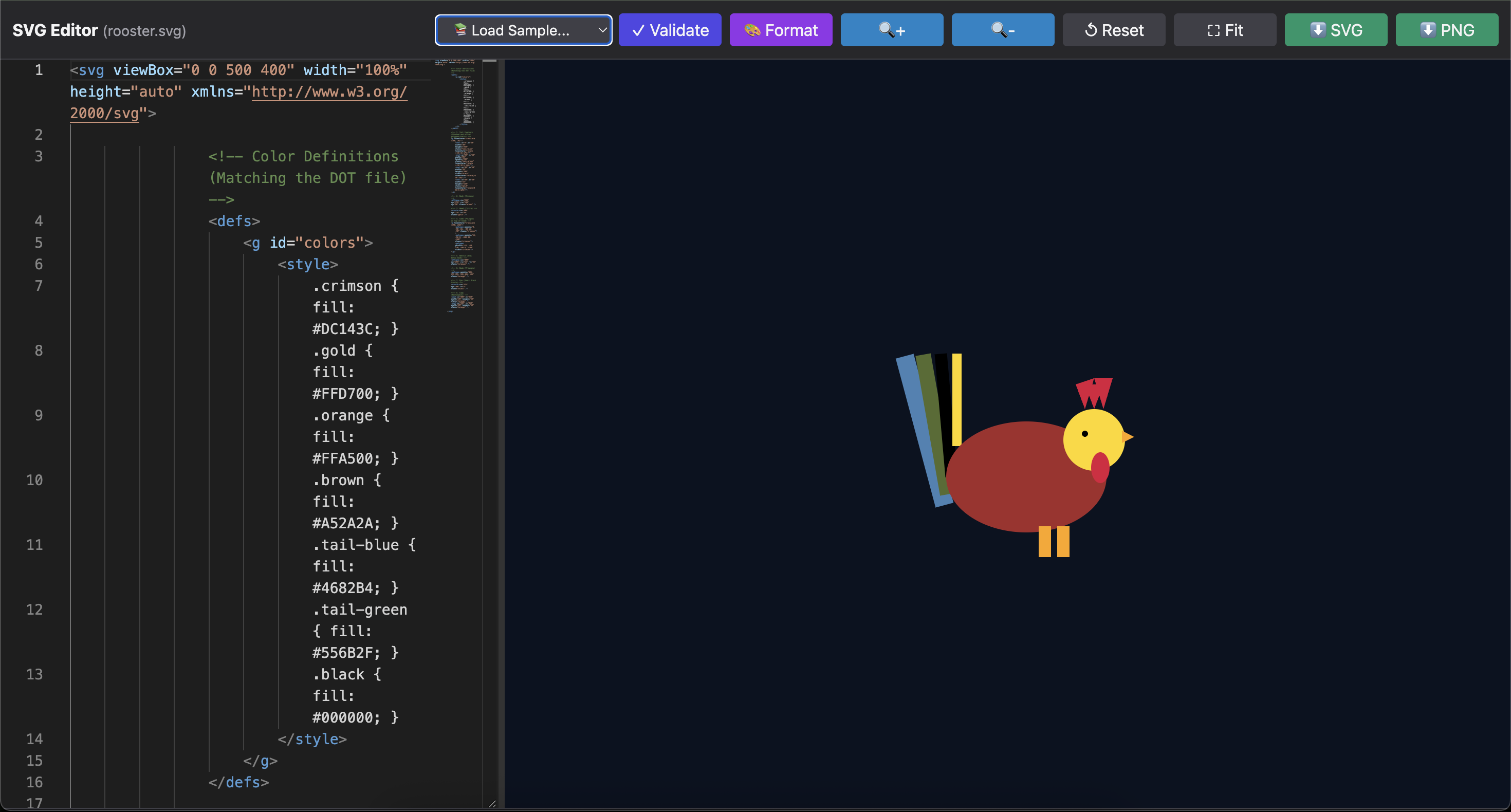
🚀 Installation
Global Installation
npm install -g svg-htmlUse with npx (No Installation)
npx svg-html -f image.svg📖 Usage
Basic Usage
svg-html -f image.svgThis generates svg-editor.html in the current directory.
Custom Output and Options
svg-html -f logo.svg -o logo-editor.html -t "Logo Editor" --openCommand Line Options
| Option | Description | Default |
|--------|-------------|---------|
| -f, --file <path> | SVG source file (.svg) | Required |
| -o, --out-html <path> | Output HTML file path | svg-editor.html |
| -t, --title <text> | HTML page title | SVG Editor |
| --open | Open generated HTML in browser | false |
📝 Examples
Example 1: Edit Icon
svg-html -f icon.svg -t "Icon Editor"icon.svg:
<svg xmlns="http://www.w3.org/2000/svg" width="100" height="100" viewBox="0 0 100 100">
  <circle cx="50" cy="50" r="40" fill="#3b82f6" />
  <path d="M 50 30 L 50 70 M 30 50 L 70 50" stroke="white" stroke-width="4" />
</svg>
Example 2: Complex Illustration
svg-html -f illustration.svg -o editor.html --openillustration.svg:
<svg xmlns="http://www.w3.org/2000/svg" viewBox="0 0 200 200">
  <defs>
    <linearGradient id="grad" x1="0%" y1="0%" x2="100%" y2="100%">
      <stop offset="0%" style="stop-color:#667eea;stop-opacity:1" />
      <stop offset="100%" style="stop-color:#764ba2;stop-opacity:1" />
    </linearGradient>
  </defs>
  <rect width="200" height="200" fill="url(#grad)" rx="20" />
  <text x="100" y="100" text-anchor="middle" fill="white" font-size="24">SVG</text>
</svg>
Example 3: Logo Design
svg-html -f company-logo.svg -t "Company Logo Editor" --open⌨️ Keyboard Shortcuts
Once the HTML is generated and opened:
| Shortcut | Action |
|----------|--------|
| Ctrl/Cmd + S | Download SVG source |
| Ctrl/Cmd + Shift + F | Format/prettify SVG code |
| Ctrl/Cmd + B | Toggle minimap |
🎨 UI Features
Editor Panel (Left)
- Syntax Highlighting - Full XML/SVG language support
- Auto-completion - Smart suggestions for tags and attributes
- Line Numbers - Easy navigation
- Minimap - Quick overview of entire file
- Word Wrap - Better readability
- Error Detection - Inline error markers
Viewer Panel (Right)
- Live Updates - See changes as you type (500ms debounce)
- Grid Background - Professional viewing backdrop
- Zoom Controls - Scale from 10% to 1000%
- Pan & Scroll - Navigate large SVGs
- Fit to Screen - Auto-scale to viewport
- Center Alignment - SVG always centered
Toolbar Features
- Sample Library - Load pre-made examples
- Validate Button - Check SVG syntax
- Format Button - Auto-indent and prettify
- Zoom In/Out - Precise scaling
- Reset/Fit Zoom - Quick view adjustments
- Export Options - SVG and PNG downloads
Status Bar
- Status Messages - Real-time operation feedback
- Statistics Display - Element counts, dimensions, render time
📊 Sample Library
Pre-loaded examples accessible from the dropdown:
| Sample | Description | Use Case | |--------|-------------|----------| | Disk | Hard drive icon | Storage, data visualization | | Home | House icon | Navigation, real estate | | Rooster | Bird illustration | Agriculture, nature | | Tree | Tree graphic | Environment, growth |
All samples are loaded from:
https://raw.githubusercontent.com/mchinnappan100/svg-samples/refs/heads/main/
🛠️ Technical Details
Browser Requirements
- Modern browsers with ES6+ support
- JavaScript enabled
- SVG and Canvas support (for PNG export)
- DOMParser API support
Node.js Requirements
- Node.js >= 16.0.0
- npm >= 7.0.0
📦 Output Structure
The generated HTML file is self-contained and includes:
- ✅ Embedded Monaco Editor
- ✅ Tailwind CSS styling
- ✅ Your original SVG source code
- ✅ All interactive features
- ✅ Sample library integration
- ✅ Export functionality
No external dependencies needed after generation! Share the HTML file with anyone.
🎯 Use Cases
- Icon Design - Create and edit SVG icons
- Logo Development - Design company logos
- Illustration - Draw vector graphics
- Data Visualization - Create charts and graphs
- UI Components - Design interface elements
- Animation - Prepare SVGs for animation
- Web Graphics - Optimize web images
- Print Design - Vector graphics for print
- Educational - Learn SVG syntax
- Prototyping - Quick mockups
💡 Pro Tips
Validation Best Practices
- Always validate after major changes
- Check for unclosed tags
- Verify attribute values
- Test in multiple browsers
Performance Optimization
- Minimize path complexity
- Use
<use>for repeated elements - Optimize viewBox dimensions
- Remove unnecessary attributes
Export Guidelines
- SVG Export - For web, further editing
- PNG Export - For presentations, documents
- Validate before exporting
- Use "Fit to Screen" for optimal PNG sizing
🐛 Troubleshooting
"Invalid SVG: Missing tag"
- Ensure your file starts with
<svgtag - Check for proper XML declaration
- Validate XML structure
"XML Parse Error"
- Check for unclosed tags (
<rect>needs/>) - Verify quotation marks around attributes
- Use the Validate button to find errors
PNG Export Issues
- Ensure SVG has width/height or viewBox
- Check browser console for errors
- Try exporting SVG first, then convert externally
Monaco Editor Not Loading
- Check internet connection (CDN required)
- Try refreshing the page
- Check browser console for errors
🔧 Advanced Usage
Integration with Build Tools
# Generate editor as part of build process
npm run build && svg-html -f dist/output.svg -o dist/editor.html
Batch Processing
# Generate editors for multiple SVGs
for file in *.svg; do
  svg-html -f "$file" -o "${file%.svg}-editor.html"
done
📚 SVG Resources
📄 License
MIT © Mohan Chinnappan
🗺️ Roadmap
- [ ] SVG animation preview
- [ ] Color picker integration
- [ ] Path editor with visual controls
- [ ] Layer management
- [ ] Undo/redo functionality
- [ ] Template library
- [ ] Cloud save/load
- [ ] Collaboration features
- [ ] SVG optimization tools
- [ ] Export to other formats (PDF, EPS)
Made with ❤️ for the SVG community